> This is part 1 of 2 of the full documentation (pages 1–100 of 101).
> The content is paginated: fetch every part to see all of it.
> Next part: https://docs.abracadabra.money/learn/llms-full.txt/1
> Page index: https://docs.abracadabra.money/learn/llms.txt

# Introduction

[**Abracadabra.money** ](/learn)is a Omnichain DeFi lending platform that works its magic by utilizing interest-bearing tokens as collateral to mint Magic Internet Money (MIM), a USD-Denominated stablecoin.

Abracadabra unlocks the capital of interest bearing assets, allowing users to take on USD-denominated loans while their collateral keeps earning yield. Abracadabra also offers staking strategies, which allows non-yielding assets to start earning yield in a very simple, secure and efficient way.

Abracadabra offers multiple services to its users, each section outlined on this document will explain how these product work.&#x20;

{% hint style="info" %}
If you still have any questions or issues, feel free to ask us anything on [**Discord**](https://discord.gg/mim) or [**telegram**](https://t.me/abracadabra_money)**.**
{% endhint %}

***

<table data-view="cards"><thead><tr><th></th><th></th><th></th><th data-hidden data-card-target data-type="content-ref"></th></tr></thead><tbody><tr><td></td><td><strong>Borrow MIM</strong></td><td></td><td><a href="/learn/intro/cauldrons/lending-markets">Borrow</a></td></tr><tr><td></td><td><strong>Leverage with MIM</strong></td><td></td><td><a href="/learn/intro/cauldrons/leveraged-positions">Leverage</a></td></tr><tr><td></td><td><strong>Stake - Yield</strong></td><td></td><td><a href="/learn/intro/stake">Stake</a></td></tr><tr><td></td><td><strong>Beam MIM - Bridging</strong> </td><td></td><td><a href="/learn/tokens/omnichain-mim#beaming-tutorial">Omnichain MIM</a></td></tr><tr><td></td><td><strong>Security</strong> </td><td></td><td><a href="https://dev.abracadabra.money/getting-started/security-and-vulnerability">Security &amp; Vulnerability</a></td></tr><tr><td></td><td><strong>Contract deployment addresses</strong></td><td></td><td><a href="https://dev.abracadabra.money/deployment-addresses/ethereum-mainnet">Deployment Addresses</a></td></tr></tbody></table>


# Cauldrons

Abracadabra's core product, the isolated lending market and leverage engine.

[**Abracadabra**](https://abracadabra.money/) provides isolated lending markets that allow you to borrow against various forms of collateral. Our isolated markets are based on [Kashi Technology](https://boringcrypto.medium.com/the-bentobox-lending-solution-1351606b9f5a).

To learn more about isolated lending markets and the technical aspects of the Cauldrons, please refer to the [Developper Documentation](https://dev.abracadabra.money/core-contracts/cauldrons).

## Core Lending Concepts

It's important for users to understand a few key concepts to better use Abracadabra (and lending protocols in general). These concepts will appear throughout your use of the Abracadabra products.

<details>

<summary>Lexicon - Terminology</summary>

* **Collateral:** The asset you deposit into the Cauldron to secures your MIM loan.
* **Borrow:** "Simple" borrowing implies borrowing MIM and getting it in your wallet for you to use it however you like.
* **Leverage:** Leveraging is a special type of borrow where the MIM isn't sent to your wallet but used to acquire more Collateral and depositing it back into the Cauldron.
* **LTV (Loan to Value):** The current ratio between collateral value and borrowed value. It is often expressed as a percentage. Supplying 100 USD of Collateral and borrowing 50MIM gives you a LTV of 50%.
* **MCR (Maximum Collateral Ratio):** The Maximum LTV allowed for this market before being liquidatable. If ETH has an MCR of 80%, you can borrow up to 80 MIM per 100 USD of ETH.\
  This figure is market-specific, each collateral has a different MCR.
* **Mint Fee** (or Borrow/Opening fee): This fee is charged once, when you open the position. It is a percentage of the total amount you borrowed and it is added to your debt.\
  *eg: if a Cauldron has an opening fee of 1%, when you borrow 1,000 MIM, your debt will initially be 1,010 MIM.*
* **Interest Fee:** This is the interest charged on the MIM you borrow, per year.\
  *eg: if a Cauldron has an Interest Fee of 5%, your debt will increase by 5% each year.*
* **Liquidation Fee:** Discount at which the liquidator will buy the Collateral in order to repay the debt of an insolvent position. *More detailed information in the* [*Liquidations section*](/learn/intro/cauldrons/liquidations)*.*

</details>

## Borrow vs Leverage

Cauldrons allow users to borrow or leverage their positions (and inversely, repay or deleverage). While both actions share a lot of common steps, it is very important to understand the difference between the two.&#x20;

When a user borrows MIM, **you receive MIM in your wallet** to use however you like.&#x20;

When a user utilizes leverage, the MIM that is borrowed in instantly exchanged for more collateral and is then instantly deposited back into the cauldron. **You do not receive MIM in your wallet**.

<table data-view="cards"><thead><tr><th></th><th></th><th></th><th data-hidden data-card-target data-type="content-ref"></th></tr></thead><tbody><tr><td></td><td><strong>Borrow Guide</strong></td><td></td><td><a href="/learn/intro/cauldrons/lending-markets">Borrow</a></td></tr><tr><td></td><td><strong>Leverage Guide</strong></td><td></td><td><a href="/learn/intro/cauldrons/leveraged-positions">Leverage</a></td></tr></tbody></table>


# Borrow

## Depositing Collateral and Borrowing MIM

{% hint style="info" %}
&#x20;Borrowing enables you to borrow MIM that you'll receive in your wallet by depositing (locking) collateral into a Cauldron.
{% endhint %}

To borrow MIM using our Abracadabra technology, go to [abracadabra.money](https://abracadabra.money) and launch the app. This will take you to our community and maintained interface pages.&#x20;

On this landing page, you can see all of the available cauldrons (markets). Users can search, filter and sort a cauldron of their choosing by chain, by MIM availability, by APR or TVL.

<figure><img src="https://2388475231-files.gitbook.io/~/files/v0/b/gitbook-x-prod.appspot.com/o/spaces%2F-Mc9U0yE30Tc9xb3mVGA-1703796690%2Fuploads%2FZA5hYuNKrsYYyS0vo6tZ%2FabraV3-homepage.png?alt=media&amp;token=42ce74cf-d332-4a81-a0ce-e4d958c47a1f" alt=""><figcaption><p>The Abracadabra homepage shows available cauldrons</p></figcaption></figure>

Once the cauldron(s) are selected, the cauldron's page will open, exhibiting market-specifc information and allowing you to borrow MIM.

{% tabs %}
{% tab title="Desktop Interface" %}

<figure><img src="https://2388475231-files.gitbook.io/~/files/v0/b/gitbook-x-prod.appspot.com/o/spaces%2F-Mc9U0yE30Tc9xb3mVGA-1703796690%2Fuploads%2FbvDqxetkJ2CASSuEv7En%2FabraV3%20-%20Cauldron%20Page.png?alt=media&amp;token=a0ff62cf-13e3-46a3-9f36-9ea0bf05f183" alt=""><figcaption><p>The Cauldron page. In this example, we're using wAVAX</p></figcaption></figure>
{% endtab %}

{% tab title="Mobile Interface" %}

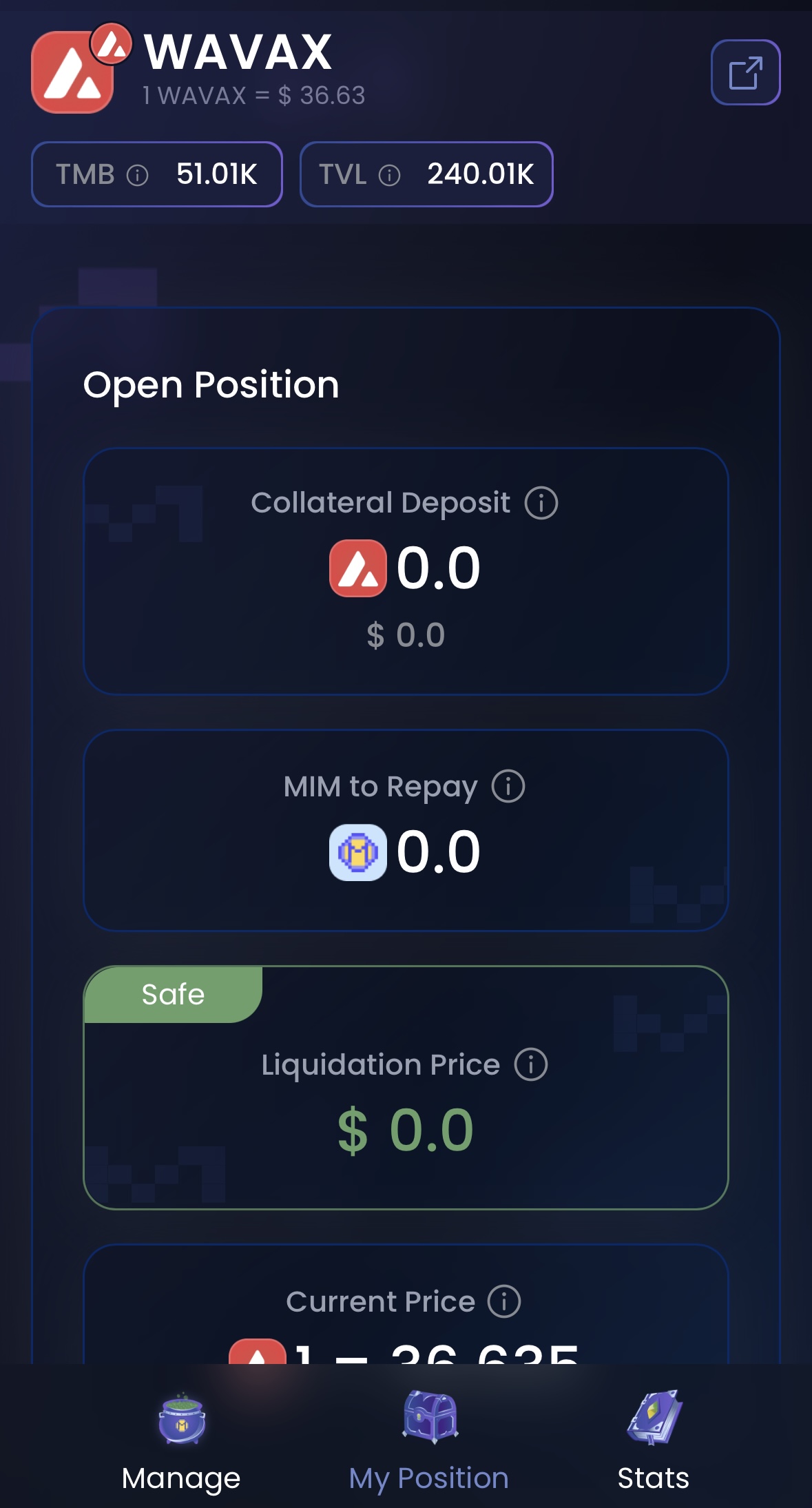
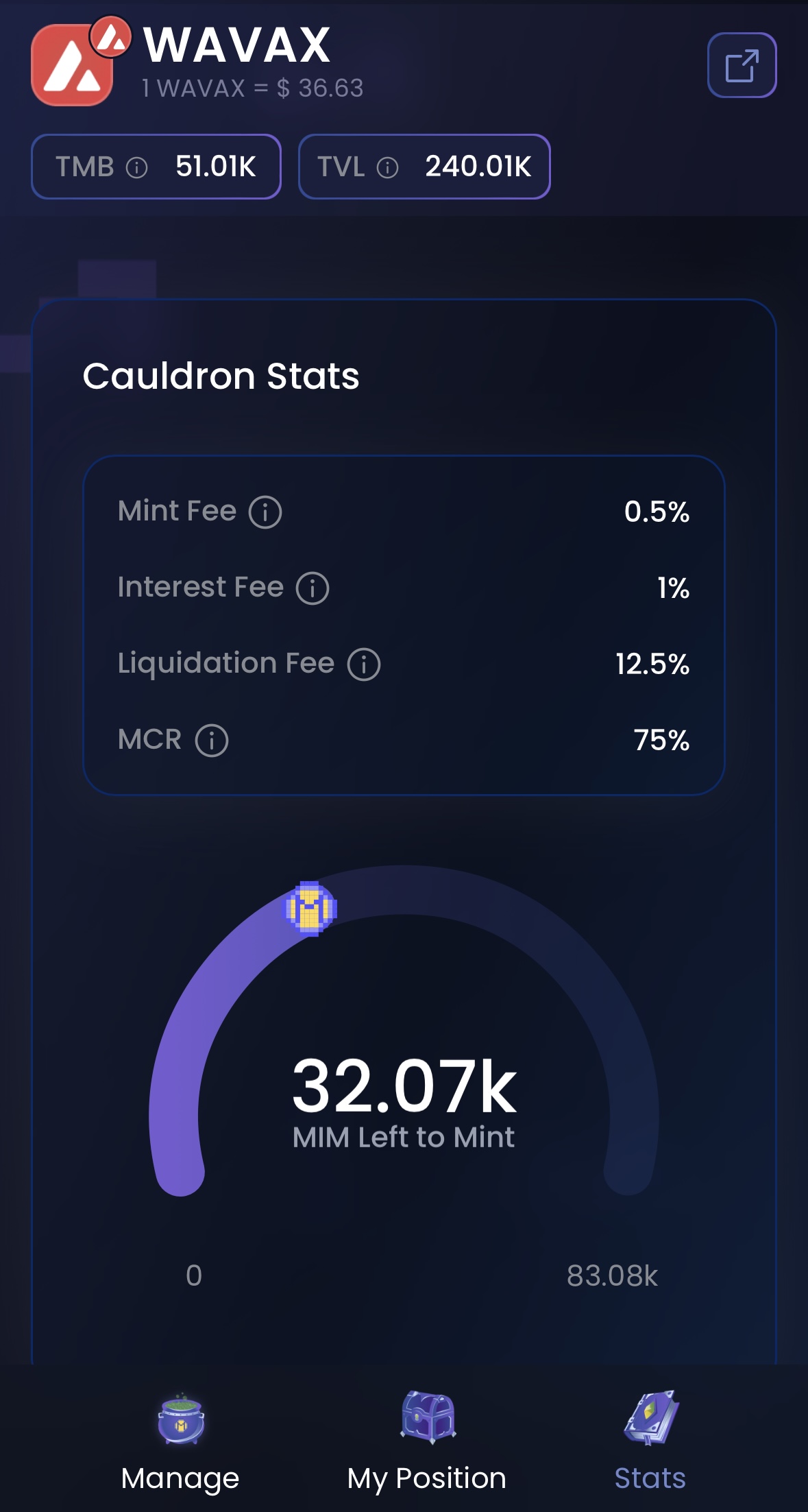
<div><figure><img src="https://2388475231-files.gitbook.io/~/files/v0/b/gitbook-x-prod.appspot.com/o/spaces%2F-Mc9U0yE30Tc9xb3mVGA-1703796690%2Fuploads%2FoEfx0n6qcotuEfDyk2Bg%2FabraV3%20-%20Mobile%20-%20Cauldron1.jpg?alt=media&amp;token=b9fe1a82-a0d6-44fe-be0a-8355640bceb0" alt=""><figcaption></figcaption></figure> <figure><img src="https://2388475231-files.gitbook.io/~/files/v0/b/gitbook-x-prod.appspot.com/o/spaces%2F-Mc9U0yE30Tc9xb3mVGA-1703796690%2Fuploads%2FzXz1orhQ54vmTvLruzgI%2FabraV3%20-%20Mobile%20-%20Cauldron2.jpg?alt=media&amp;token=29821e28-1969-4f57-8fd8-3da08fa6889d" alt=""><figcaption></figcaption></figure> <figure><img src="https://2388475231-files.gitbook.io/~/files/v0/b/gitbook-x-prod.appspot.com/o/spaces%2F-Mc9U0yE30Tc9xb3mVGA-1703796690%2Fuploads%2FFVfz8QEoXPxKMedznyzY%2FabraV3%20-%20Mobile%20-%20Cauldron3.jpg?alt=media&amp;token=47b5d819-9735-45cb-b07d-f8a9d5334cb8" alt=""><figcaption></figcaption></figure></div>

In the mobile version, the interface is split into 3 panes with icons in the bottom to navigate between them
{% endtab %}
{% endtabs %}

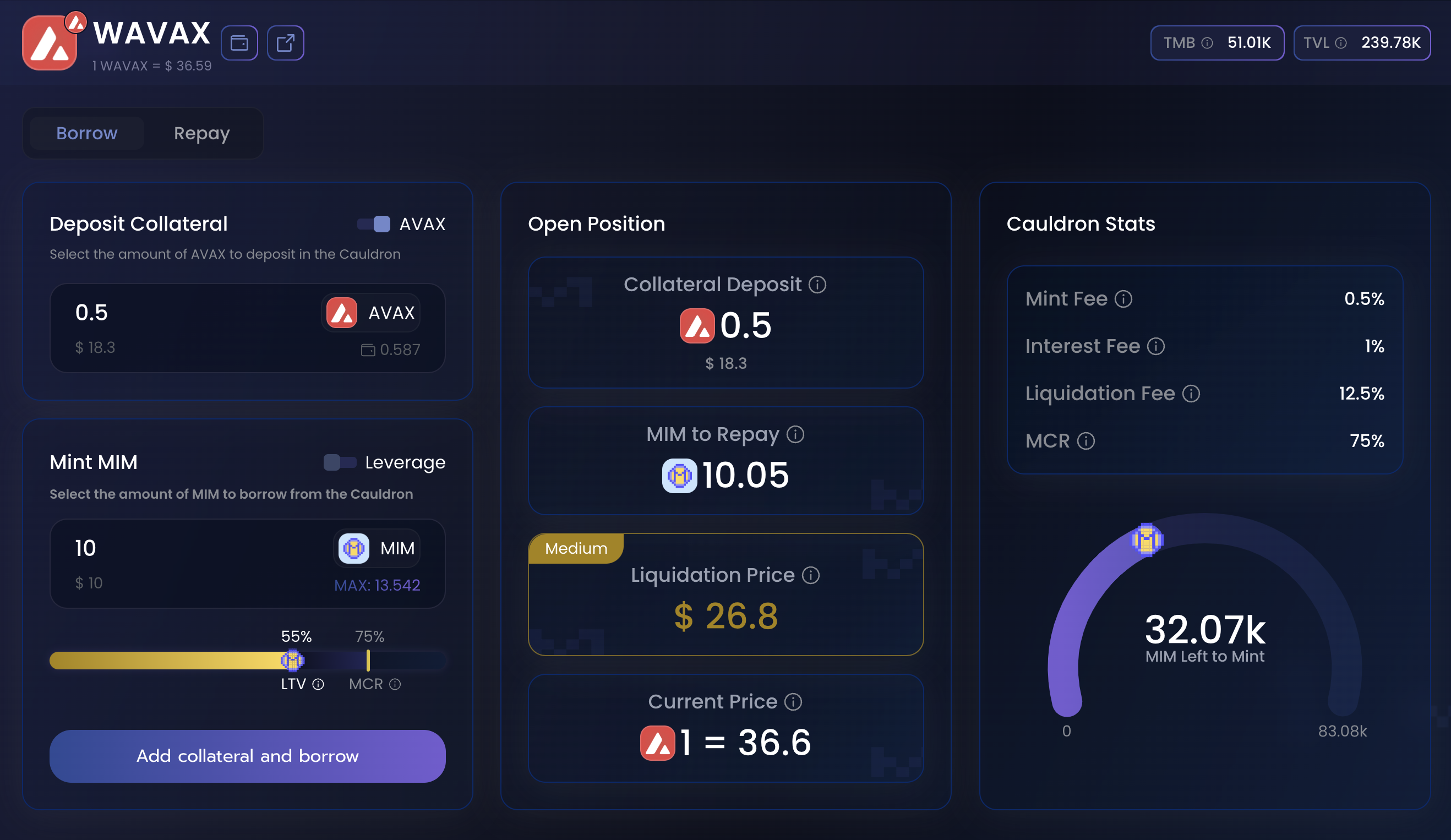
The Cauldron page contains several parts, with the top layer giving us information about the market we've selected (here it's wAVAX).

1. This enables the user to switch between Borrow mode and Repay mode.
2. This user can select how much collateral they want to deposit\
   *Some cauldrons can accept the collateral in their wrapped (wAVAX) or naked (AVAX) versions. A switch enables you to go between the 2.*
3. Users can select how much MIM you want to borrow. The selection bar shows you the LTV[^1] (Loan to Value)% you would have given the borrowed amount. It also shows the cauldron's MCR[^2] (Minimum Collaterized Ratio). As the borrowed amount becomes closer to the MCR, the position becomes riskier and there is a greater risk for liquidation.  \
   *In this example, we're not using leverage, so we leave this unchecked.* \
   [*Learn more about leverage*](/learn/intro/cauldrons/leveraged-positions)*.*
4. This pane shows how steps 2 and 3 will impact your position, showing the amount and value of the collateral deposited. It also shows the MIM that has to be repayed to fully exit the position and the [liquidation price](#user-content-fn-3)[^3].&#x20;
5. This pane gives information about the cauldron itself, including fees, risk parameters and MIM available. \
   *You can't borrow more MIM than what is available.*

<figure><img src="https://2388475231-files.gitbook.io/~/files/v0/b/gitbook-x-prod.appspot.com/o/spaces%2F-Mc9U0yE30Tc9xb3mVGA-1703796690%2Fuploads%2FHdA8FhnbTDHViiMATOjR%2Fabrav3%20-%20Cauldron%20Borrow.png?alt=media&amp;token=9cc191ca-9ed9-44d3-9184-6b3cdc9d9fc1" alt=""><figcaption></figcaption></figure>

Once you have selected your parameters, the middle pane will show you what your borrow position will look like, after the transaction is successfully completed.

* **Collateral Deposited:** Amount of collateral into the position and its USD value.
* **MIM to Repay:** Total amount of MIM that will be owed after the position is opened. (it includes the Mint Fee)
* **Liquidation Price:** Collateral price at which your borrow position will be liquidated.
* **Current Price:** Current value of one unit of Collateral.

## Liquidation Price <a href="#d332" id="d332"></a>

The liquidation price that is shown will always refer to the collateral that has been deposited to borrow MIM. A liquidation price of $26.8 means that if the price of AVAX drops to $26.8, your position is at risk of being liquidated. Please refer to the "[Liquidations](/learn/intro/cauldrons/liquidations)" section of the docs to learn more.

## Opening a position <a href="#id-38c9" id="id-38c9"></a>

When you are finally ready to open a position, simply click on the "Add collateral and borrow" button.

***Note that if this is your first time using Abracadabra, you may need to grant several approvals before you can open the position.***

The final transaction will deposit the collateral into the Cauldron, borrow MIM and deposit them into your wallet. If you can't see MIM in your wallet, you can clic on the MIM logo in the top right corner of the page or refer to your wallet's own documentation.

Once the transaction is confirmed, the page will refresh to show the updated values.

## Closing a position

In order to close your position, head over to the My Positions page, and click on the Manage button. This will bring you back to the Cauldron Page.

![](https://2388475231-files.gitbook.io/~/files/v0/b/gitbook-x-prod.appspot.com/o/spaces%2F-Mc9U0yE30Tc9xb3mVGA-1703796690%2Fuploads%2Feyjb5H68b6nXmeu0LO5s%2FAbraV3%20-%20Positions%20Page.png?alt=media\&token=2958b94e-9790-4fcc-9165-2ba0455b2bc6)

From there, clic on the Repay button to switch to repay mode.

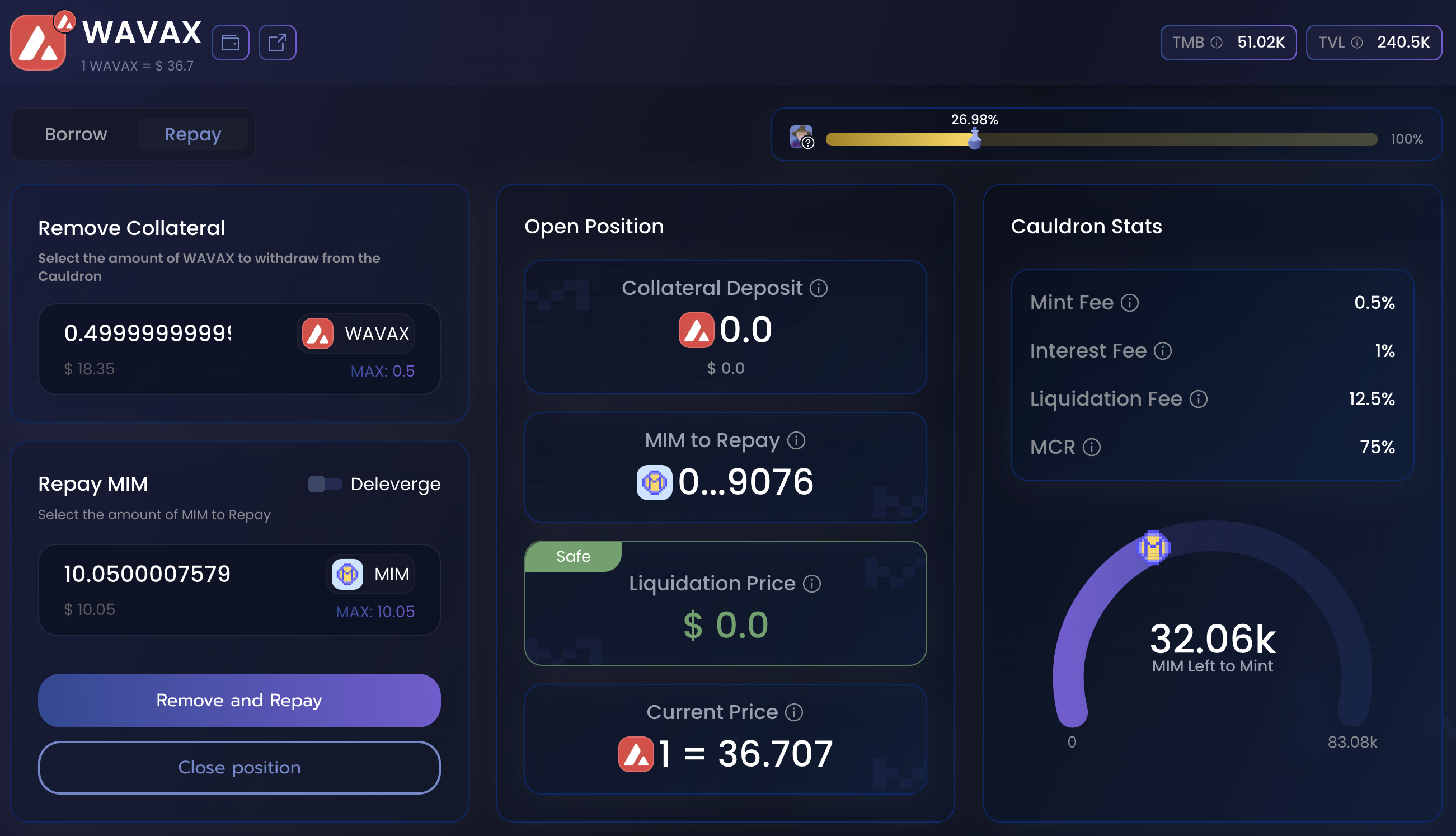
<figure><img src="https://2388475231-files.gitbook.io/~/files/v0/b/gitbook-x-prod.appspot.com/o/spaces%2F-Mc9U0yE30Tc9xb3mVGA-1703796690%2Fuploads%2FuPKzKCnskDELWzmTRarV%2FAbraV3%20-%20Cauldron%20-%20Repay.png?alt=media&amp;token=d7042869-4590-463c-a336-572d983d79cf" alt=""><figcaption></figcaption></figure>

The Repay interface enables the user to select how much MIM  to be repayed, how much collateral is removed, and the effect it would have on the health of the position.

In this example, we selected the maximum amount of MIM to repay the debt fully, and removed the maximum amount of wAVAX. It will take the MIM from your wallet and repay your debt, make sure to have enough MIM before starting this process.\
We did not use the "Deleverage" option in this scenario. To learn more about it, go to the [leverage section](/learn/intro/cauldrons/leveraged-positions).

If this is your first time using the platform, you'll need to approve the use of MIM by DegenBox before using the Remove and Repay button.

{% hint style="info" %}
While the interface allow you to repay and remove any custom amount, if you want to fully close your position (repay max and remove max) the "Close position" button is a shortcut to do so.
{% endhint %}

{% hint style="warning" %}
Because of the way cauldrons work, some dust may stay in the cauldron (which is why the interface is allowing me to remove 0.4999… instead of 0.5)
{% endhint %}

[^1]: Loan-to-Value: the ratio between the value of the collateral and the debt.

[^2]: Maximum Collateral Ratio: the Maximum percentage of your collateral value you're allowed to take on as debt.

[^3]: you will be liquidatable if the collateral's price drops bellow this value.


# Leverage

One of the key features of Abracadabra's cauldron technology is the ability for users to leverage their positions. Let's explain how it works before showing how to use the app yourself!

<details>

<summary>Leveraging on Abracadabra: How it works</summary>

Cauldrons allow withdrawing more MIMs than it should be possible, as long as the collateral required is supplied to the position eventually, within the same transaction.  \
To better explain this, let's use the example of a user that wants to leverage his yvUSDT position.

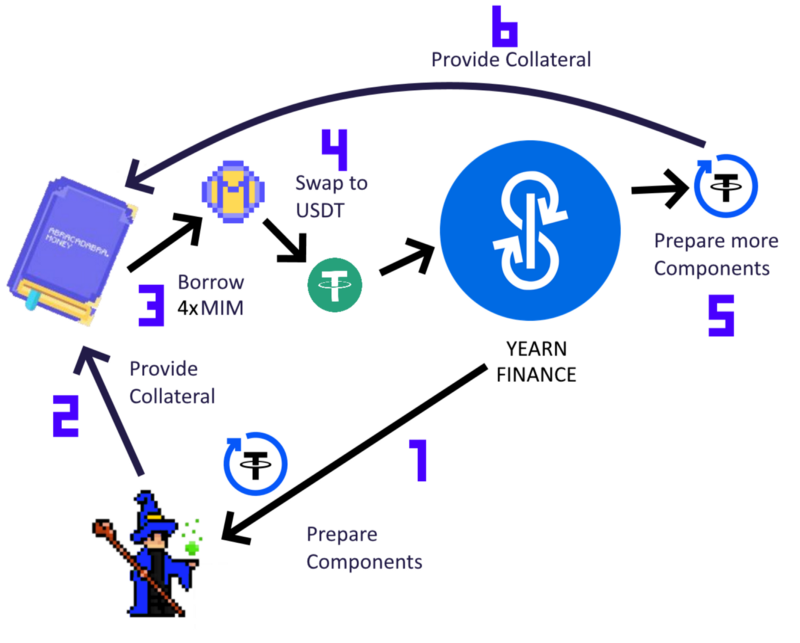
This process can be visualized using the following infographic:

<img src="https://2388475231-files.gitbook.io/~/files/v0/b/gitbook-legacy-files/o/assets%2Fabracadabra-money%2F-Mjo4KEVjDlk7m6yV2Tu%2F-Mjo4VZ8jVX7eSXCRa19%2F0.png?generation=1631887691385760&amp;alt=media" alt="" data-size="original">

* **Step 1 and 2** - The user selects the desired leverage, obtains the yvUSDT, and deposits them as collateral.
* **Step 3** - Given the selected leverage, the protocol borrows the respective amount of MIMs.
* **Step 4** - These MIMs are swapped into USDT (current price peg and slippage play an important role here).
* **Step 5** - These USDT are deposited into a Yearn Vault to receive yvUSDT.&#x20;
* **Step 6** - These yvUSDT tokens are deposited back into the Abracadababra to collateralize the user's position.

*Notice that all of these steps happen in one single transaction, and therefore only one gas fee will be required. **If one of these steps fails, the whole transaction fails.***\
\
***Note that if the token is not an Interest Bearing Token, STEP 4 and STEP 5 are substituted by a simple market buy of the token the user is leveraging.***&#x20;

</details>

## Depositing Collateral and Leveraging

{% hint style="info" %}
Leverage enables you to gained an oversized exposure to your collateral. **You will not receive MIM in your wallet.**
{% endhint %}

To leverage your position using Abracadabra, go to [abracadabra.money](https://abracadabra.money) and launch the app. This will take you to our community deployed and maintained interface.

From here, you can see all of the available cauldrons (markets), search for a specific one, filter and sort them however you like (by chain, by MIM availability, by APR, by TVL…)

<figure><img src="https://2388475231-files.gitbook.io/~/files/v0/b/gitbook-x-prod.appspot.com/o/spaces%2F-Mc9U0yE30Tc9xb3mVGA-1703796690%2Fuploads%2FZA5hYuNKrsYYyS0vo6tZ%2FabraV3-homepage.png?alt=media&amp;token=42ce74cf-d332-4a81-a0ce-e4d958c47a1f" alt=""><figcaption><p>The Abracadabra homepage shows available cauldrons</p></figcaption></figure>

Once you have selected the markets you were interested in, the cauldron's page will open, showing you market-specifc information and allowing you to borrow MIM.

{% tabs %}
{% tab title="Desktop Interface" %}

<figure><img src="https://2388475231-files.gitbook.io/~/files/v0/b/gitbook-x-prod.appspot.com/o/spaces%2F-Mc9U0yE30Tc9xb3mVGA-1703796690%2Fuploads%2FqLKkYmL9xYd9JBeg9gYI%2FAbraV3%20-%20Cauldron%20-%20Leverage.png?alt=media&amp;token=c7af1bca-8030-4bd3-a384-faab9998a714" alt=""><figcaption><p>The Cauldron page. In this example, we're using wAVAX</p></figcaption></figure>
{% endtab %}

{% tab title="Mobile Interface" %}

<div><figure><img src="https://2388475231-files.gitbook.io/~/files/v0/b/gitbook-x-prod.appspot.com/o/spaces%2F-Mc9U0yE30Tc9xb3mVGA-1703796690%2Fuploads%2FoEfx0n6qcotuEfDyk2Bg%2FabraV3%20-%20Mobile%20-%20Cauldron1.jpg?alt=media&amp;token=b9fe1a82-a0d6-44fe-be0a-8355640bceb0" alt=""><figcaption></figcaption></figure> <figure><img src="https://2388475231-files.gitbook.io/~/files/v0/b/gitbook-x-prod.appspot.com/o/spaces%2F-Mc9U0yE30Tc9xb3mVGA-1703796690%2Fuploads%2FzXz1orhQ54vmTvLruzgI%2FabraV3%20-%20Mobile%20-%20Cauldron2.jpg?alt=media&amp;token=29821e28-1969-4f57-8fd8-3da08fa6889d" alt=""><figcaption></figcaption></figure> <figure><img src="https://2388475231-files.gitbook.io/~/files/v0/b/gitbook-x-prod.appspot.com/o/spaces%2F-Mc9U0yE30Tc9xb3mVGA-1703796690%2Fuploads%2FFVfz8QEoXPxKMedznyzY%2FabraV3%20-%20Mobile%20-%20Cauldron3.jpg?alt=media&amp;token=47b5d819-9735-45cb-b07d-f8a9d5334cb8" alt=""><figcaption></figcaption></figure></div>

In the mobile version, the interface is split into 3 panes with icons in the bottom to navigate between them
{% endtab %}
{% endtabs %}

The Cauldron page contains several parts, with the top layer giving us information about the market we've selected (here it's wAVAX).

1. This enables you to switch between Borrow mode and Repay mode.
2. This is where you select how much collateral you want to deposit\
   *Some cauldrons can accept the collateral in their wrapped (wAVAX) or naked (AVAX) versions. A switch enables you to go between the 2.*
3. In this section, you'll first need to toggle on the Leverage button. Then, you will have access to this slider enabling you to chose the amount of leverage you want.\
   *The leverage is a multiplier of the amount of collateral you deposit. A 3x leverage on 1 AVAX of collateral means you'll borrow enough MIM buy 2 AVAX that will be added to the AVAX you deposited, resulting in a 3 AVAX position.*
4. This pane shows you how step 2 and 3 will impact your position, showing you the amount and value of the collateral deposited, which gets impacted by the leverage multiplier, the MIM you have to repay to exit fully your position and your [liquidation price](#user-content-fn-1)[^1].&#x20;
5. This pane gives information about the cauldron itself, including fees, risk parameters and MIM available. \
   *You can't borrow more MIM than what is available.*

<figure><img src="https://2388475231-files.gitbook.io/~/files/v0/b/gitbook-x-prod.appspot.com/o/spaces%2F-Mc9U0yE30Tc9xb3mVGA-1703796690%2Fuploads%2FVEiMzKXMujv7fWVpODoo%2FabraV3%20-%20Cauldorn%20Leverage.png?alt=media&amp;token=77183ec2-bed1-442d-9a8e-51a925b8253e" alt=""><figcaption></figcaption></figure>

Once you have selected your parameters, the middle pane will show you what the leverage position will look like, after the transaction is successfully completed.\
Using leverage mode, Abracadabra automatically determines how much MIM needs to be borrowed and swaps it for the collateral.&#x20;

{% hint style="info" %}
The price impact of the swap can be seen in the Dynamic Opening Fee section.
{% endhint %}

* **Collateral Deposited:** Amount of collateral into the position and its USD value.
* **MIM to Repay:** Total amount of MIM that will be owed after the position is opened. (it includes the Mint Fee)
* **Liquidation Price:** Collateral price at which your borrow position will be liquidated.
* **Current Price:** Current value of one unit of Collateral.

## Liquidation Price <a href="#d332" id="d332"></a>

The liquidation price that is shown will always refer to the collateral that has been deposited to borrow MIM. A liquidation price of $32.9 means that if the price of AVAX drops to $32.9, your position is at risk of being liquidated. Please refer to the "[Liquidations](/learn/intro/cauldrons/liquidations)" section of the docs to learn more.

{% hint style="danger" %}
Leveraged position are inherently more risky than simple borrows. Liquidations of levered positions leave no assets in the user's position.
{% endhint %}

## Opening a position <a href="#id-38c9" id="id-38c9"></a>

When you are finally ready to open a position, simply click on the "Leverage Up" button.

*Note that if this is your first time using Abracadabra, you may need to grant several approvals before you can open the position.*

The final transaction will deposit the collateral into the Cauldron, borrow MIM exchange it for more Collateral and deposit it back into your position.

{% hint style="info" %}
Sometimes, transaction may fail because of slippage. The interface will let you know. \
Use the gear (⚙) icon next to "Mint MIM" to adjust slippage accordingly.
{% endhint %}

Once the transaction is confirmed, the page will refresh to show the updated values.

## Closing a position

In order to close your position, head over to the My Positions page, and click on the Manage button. This will bring you back to the Cauldron Page.

![](https://2388475231-files.gitbook.io/~/files/v0/b/gitbook-x-prod.appspot.com/o/spaces%2F-Mc9U0yE30Tc9xb3mVGA-1703796690%2Fuploads%2FmJsKVUGAWtKF3Gr5iwm2%2FAbraV3%20-%20Positions%20-%20Leverage.png?alt=media\&token=b6dbae0e-c864-493d-8b11-e0b17cd8a70e)

From there, clic on the Repay button to switch to repay mode, and toggle the Deleverage button next to "Repay MIM".

<figure><img src="https://2388475231-files.gitbook.io/~/files/v0/b/gitbook-x-prod.appspot.com/o/spaces%2F-Mc9U0yE30Tc9xb3mVGA-1703796690%2Fuploads%2Fx6kyEyxpg83SEn4fpCn8%2FAbraV3%20-%20Cauldron%20-%20Partial%20Deleverage.png?alt=media&amp;token=d5dbc98b-b850-4bb6-aae6-3f2b8af46f24" alt=""><figcaption></figcaption></figure>

The Deleverage interface is the exact opposite of the Leverage interface. It enables you to select how much MIM you want to repay, how much collateral you want to remove, and the consequence it would have on your position.

In this example, I want to reduce my leverage to have a safer position, and chose not to remove any collateral. It will take some of my AVAX collateral, sell it for 17.2 MIM and use those MIM to partially repay my debt.\
Using Flash Repay will send the deleverage transaction.

If this is your first time, you'll need to approve the use of MIM by DegenBox before using the Remove and Repay button.

{% hint style="info" %}
While the interface allow you to deleverage and remove any custom amount, if you want to fully close your position (repay max and remove max) the "Close position" button is a shortcut to do so.
{% endhint %}

{% hint style="warning" %}
Sometimes after a deleverage, some MIM is left over after the swap. It is sent to the DegenBox, available at "My Position". From there you can simply withdraw it to your wallet.
{% endhint %}

[^1]: you will be liquidatable if the collateral's price drops bellow this value.


# GMX V2 Cauldrons

The Abracadabra GMX V2 Cauldrons operate slightly differently from other cauldrons. While the borrowing process remains the same, leveraging—though similar and straightforward—has some key distinctions that users should understand.

On GMX V2, entering or exiting a GM position is not instantaneous. Instead, users must first create a deposit or withdrawal order, which is then executed by GMX’s keepers. This means the process involves two transactions: order creation and order fulfillment.

This design choice by GMX helps prevent front-running and enhances user security. During the period between creating an order with borrowed MIM and its fulfillment, the USDC in the order serves as backing for the borrowed MIM. Once fulfilled, the GM tokens are added as collateral, and the backing functions as usual.\
*Note: The following documentation applies for all gm based cauldrons, no matter the underlying collateral. GM cauldrons have been added to Abracadabra's lineup following* [***SAIP #34.***](https://snapshot.org/#/abracadabrabymerlinthemagician.eth/proposal/0x0c2d5219988d844b23e2be8f152abe7bd09cc222c450e56bc5d5fdd25a4f0b8b)

## Leveraging using the GM V2 Cauldrons

When leveraging, you typically only need to complete two transactions, just as you normally would: approving the use of your GM tokens and executing the leverage transaction. However, additional steps take place in the background.

When you execute the leverage transaction, MIM is borrowed, swapped for USDC, and then used to create a deposit order to acquire GM tokens. Until the order is executed, both the USDC and the order remain under the user's ownership. The UI will display this process on the GM Leverage screen.\ <br>

1.

```
<div align="center"><figure><img src="/files/w0da7zGtJFNKzR39kx3w" alt="" width="563"><figcaption></figcaption></figure></div>
```

2. After some time ((usually a few seconds, but it rare occasions it could take up to 5h) the GMX keeper will execute the deposit, converting your USDC tokens to GM and sending them back to the cauldron to be added as collateral. **After this step, the leverage is complete.**

Sometimes, for unforeseen reasons, the second step can fail. This does not affect the security of your funds, as the USDC is stored in a contract you own. In this case, the Abracadabra frontend will ask you to retry, sending a transaction that will finalize the leverage.

## Deleveraging using the GMX V2 Cauldrons

Due to the non-atomic nature of GMX V2, deleveraging a position requires an additional transaction from the user. However, the way you interact with the interface remains unchanged.

You start by selecting your parameters, specifying how much debt you want to repay and how much collateral to withdraw—just as you normally would.

After signing the transaction in your wallet, it is sent, and the UI waits for the GMX keeper to complete the withdrawal from GMX. Once this is done, you will be prompted to send a second transaction to finalize the deleveraging process.

Once the second transaction is sent, the deleverage is complete. If you forget to submit the second transaction, the UI will remind you below the "Close Position" section.

Clicking "Deleverage" will complete the process.<br>

<figure><img src="https://2388475231-files.gitbook.io/~/files/v0/b/gitbook-x-prod.appspot.com/o/spaces%2F-Mc9U0yE30Tc9xb3mVGA-1703796690%2Fuploads%2FWJzOCQfkQBlGkJPBA2RT%2FCapture%20d%E2%80%99e%CC%81cran%202023-11-29%20a%CC%80%208.46.14%E2%80%AFPM.png?alt=media&amp;token=a875c2b6-bd31-4150-8116-a9280e644b21" alt="" width="375"><figcaption></figcaption></figure>

Note: GM cauldrons are audited by Guardian,  the audit can be found [**here**](https://github.com/GuardianAudits/Audits/blob/main/AbracadabraMoney/11-14-2023_Abracadabra_GMXV2.pdf).<br>


# Deprecated Markets

For some of our markets, certain parameters cannot be modified once deployed. As a result, we occasionally relaunch markets with updated parameters and deprecate older versions.

When a market is deprecated, users will no longer be able to borrow MIM from it. However, the cauldron remains fully operational, allowing users with open borrow positions to repay their debt at their convenience.

All markets, including deprecated ones, can be found in our **Markets** section.

{% hint style="warning" %}
Please note that positions are not automatically transferred to new versions of a market. Your collateral will continue to exist in the deprecated market and will *not* show up in the new market.
{% endhint %}


# Liquidations

This page will give readers a better understanding of liquidations at abracadabra.money

## LIQUIDATIONS

Abracadabra’s $MIM token is a non-algorithmic, collateral-backed stablecoin. This means that every $1 of $MIM should have more than $1 of collateral backing. The value of the collateral will fluctuate with changes in the market, so, like other DeFi lending protocols, Abracadabra uses liquidations to ensure that $MIM remains overcollateralized.

Liquidation is a process that occurs when a position’s collateral value does not properly cover the position’s borrowed amount. Each cauldron will have different liquidation thresholds as defined by the Maximum Collateral Ratio. Once a Collateralized Debt Position (CDP) reaches that liquidation threshold, it becomes eligible for liquidation and anyone can repay a position in exchange for a portion of the collateral.

It is important to note that Abracadabra is an isolated lending protocol, which means that each CDP is treated independently. If a user has multiple CDPs, then each will have separate liquidation eligibility parameters, separate liquidation processes, etc.

To read more about isolated lending markets and why they are different from traditional lending protocols, please refer[ here](https://docs.sushi.com/faq-1/kashi-bentobox-faq).

### Definitions

**Collateral Ratio:** Calculated as $MIM Borrowed / Value of Collateral. This is a representation of the current health of the loan. A low collateral ratio means that there is more collateral backing the $MIM borrowed.

**Maximum Collateral Ratio:** This is a parameter that is set on a per-cauldron basis. Once a CDP’s collateral ratio exceeds the maximum collateral ratio, the position becomes eligible for liquidation.

**Liquidation Fee:** This is the bonus amount of collateral that a liquidator gets to keep for liquidating a CDP. This fee is compensation for risks that the liquidator may be taking (e.g., slippage, high gas fees, etc.). This fee is deducted directly from the borrower’s collateral.

### Hypothetical Example

Merlin has 2000 of xToken and each xToken is currently worth $1. The xToken cauldron has a Maximum Collateral Ratio (MCR) of 50%, which means that if Merlin deposits $2000 of xToken collateral, he can borrow up to $1000 of $MIM. Merlin decides to borrow $500 $MIM which he uses to buy ink to write his magic spellbook.

![](https://lh4.googleusercontent.com/3h75Q63zY3Ju82msEzFBn-9GvkfznW2-NueFWfDjNAV1mIHJ3iGv7Msrs1j0yDb9SimBs3di-p26L_axsRXCdT6ugsvtw1eQ-j6dGJrRXQbXJ4poQaZEpCz3YUn4qggWDViOKV3SfP5k4oIaJ1EMMm9SAOrvl5SYstrB57Y8nOoM66Zff43Xr42R2YGq7Q)

Zoltac the Liquidator watches Merlin’s CDP and is ready to liquidate at a moment's notice.

As fate would have it, the price of xToken drops from $1 to $0.4995 and Merlin’s 2000 xToken is now only worth $999. Merlin’s new collateral ratio is $500/$999 = 50.1%, which is just above the maximum collateral ratio of 50%. As such, Merlin’s CDP becomes eligible for liquidation, and Zoltac can step in to repay the debt.

Zoltac swaps $500 of $USDT for $500 of $MIM on Curve. He then pays off Merlin’s CDP in exchange for a portion of Merlin’s collateral. Given that the liquidation fee is 5%, Zoltac gets to keep $500 of xToken (1000 xToken) plus a 5% bonus (50 xToken) for keeping the $MIM safe. Altogether, Zoltac earns 1050 xTokens, which, at a price of $0.4995, is equivalent to $525. After subtracting Zoltac’s original investment of $500, we see that Zoltac earned $25 of profit.<br>

When Merlin checks the Abracadabra UI, he will see that he no longer has 2000 xToken, but instead has 950 xToken left. Merlin gets to keep these 950 xToken and no longer needs to repay the original $500 of $MIM that he borrowed.

### Liquidation Fees for Staked SPELL Holders

Staked SPELL holders automatically benefit from liquidations that happen on the platform. Of the liquidation fee that Zoltan collects, 10% of this goes back to Abracadabra and is set aside for staked SPELL holders. This would mean that 10% of the $37.50 of xToken ($3.75) is kept by Abracadabra and distributed to stakers.


# My Positions

As shown below, there are several ways that allow users can interact and gather data about their positions on [**abracadabra.money.**](https://abracadabra.money/) It displays a complete view of the users positions, including Cauldrons, BentoBox and DegenBox balances, on all supported chains.

## The Cauldrons view

<figure><img src="https://2388475231-files.gitbook.io/~/files/v0/b/gitbook-x-prod.appspot.com/o/spaces%2F-Mc9U0yE30Tc9xb3mVGA-1703796690%2Fuploads%2FSOcRj6DvOJUdcaavWMQy%2FAbraV3%20-%20Positions%20-%20Cauldrons.png?alt=media&amp;token=29c7fc97-9eb5-43ad-83f7-9d95b33c6752" alt=""><figcaption></figcaption></figure>

The **Cauldrons** section under **My Positions** provides an overview of all your active positions in Abracadabra Cauldrons. You can sort and filter this view by **Health Factor, Collateral Deposited, MIM Borrowed, APR,** or **Chains**.

Clicking **Manage** on any position will take you to the corresponding Cauldron page, where you can make adjustments as needed.

## MIM Balance on Bentobox/Degenbox

This section displays the amount of MIM the user holds in **Bentobox** or **DegenBox** across all chains. MIM in these boxes typically comes from surplus obtained during deleveraging.

Users can easily withdraw their MIM back to their wallet with a single click.

![](https://2388475231-files.gitbook.io/~/files/v0/b/gitbook-x-prod.appspot.com/o/spaces%2F-Mc9U0yE30Tc9xb3mVGA-1703796690%2Fuploads%2FzFsjr9Un5jjJuRx92zjq%2FCapture%20d%E2%80%99e%CC%81cran%202024-02-24%20a%CC%80%2013.43.39.png?alt=media\&token=6f8812d4-c0be-4a6b-b99e-f07c172075a3)


# Stake

Staking is the act of depositing an asset into a smart contract in order to receive a reward, in the form of yield.\
When using Abracadabra, you will encounter 2 main forms of staking, each targeted to different use cases.

## Staking SPELL

The Abracadabra DAO shares its revenue with its token-holders. As a SPELL holder, in order to benefit from staking, you can hold two tokens, each earning the same amount of revenue:

* [sSPELL](/learn/intro/stake/sspell) - stake SPELL tokens and earn more SPELL
* [mSPELL](/learn/intro/stake/mspell) - stake SPELL tokens and earn stablecoin income through $MIM

On top giving you a share of the DAO's revenue, staking also gives you voting power in the Governance forum! Each SPELL Staked, regardless of the method used, gives you one vote.\
Find more about the [Abracadabra DAO's Governance](/learn/our-ecosystem/governance).

## Magic Tokens

**Magic Tokens** transform "naked" assets into yield-bearing assets! Abracadabra allows users to supercharge their tokens by adding yield to them, enhancing their earning potential.

Magic Tokens function like any other **ERC-20** tokens—they are stored in your wallet, can be transferred to other wallets, and in some cases, can even be used as collateral within Abracadabra.


# sSPELL

## sSPELL - Staked SPELL tokens

After navigating to the **SPELL Staking** page (**Stake → SPELL**), you will see the option to select **sSPELL** at the top.

Keep in mind that while **mSPELL** is available on multiple chains, staking **SPELL** for **sSPELL** is only possible on the **Ethereum Mainnet**.

![](https://2388475231-files.gitbook.io/~/files/v0/b/gitbook-x-prod.appspot.com/o/spaces%2F-Mc9U0yE30Tc9xb3mVGA-1703796690%2Fuploads%2F0xTGdmEdx4tZ5hSQwJoB%2FAbraV3%20-%20Staking%20-%20sSPELL.png?alt=media\&token=0af85d36-7fd2-4c8b-b63b-876ab2890e8b)

## Stake & Unstake:

Users can choose to either **Stake** or **Unstake**, as shown above. Clicking either button will open a popup window, allowing them to either add **SPELL** tokens to their position or withdraw them.

Please note that all **sSPELL** tokens are subject to a **24-hour lock-up period**. This means that whenever a user deposits **SPELL** tokens, they will not be able to unstake them for the next **24 hours**.

## Ratio Frame:

In the top right corner of the screen, users can view the **sSPELL-SPELL ratio**. As more fees accumulate, the value of **1 sSPELL** will increase, representing a growing amount of **SPELL** over time.

{% hint style="info" %}
Bear in mind that this is how rewards for staking SPELL are distributed: the increasing of the value of sSPELL tokens in terms of SPELL tokens!
{% endhint %}

## Staking APR:

The staking APR is variable and is determined by looking at the last 30 days of DAO revenue.&#x20;

Do not send tokens directly to the contract, they will be lost. For more information on the **SPELL** and **sSPELL** tokens visit [Tokenomics](/learn/tokens/tokenomics).


# mSPELL

mSPELL staking allows users to stake their SPELL tokens and earn stablecoin MIM income coming from the protocol revenue! mSPELL staking has been implemented after the passing of AIP#8 which can be found [**here**](https://forum.abracadabra.money/t/aip-8-an-update-on-abracadabra-fee-distribution-introducing-mspell-staking-pools/3218)!

#### How it Works:

Users can choose their preferred staking method. For **mSPELL**, the fees generated from the lending markets are held in **MIM** and shared across different staking pools proportionally. In other words, **MIM** will be distributed based on the amount of **SPELL** staked in the pool—similar to the process used in the **sSPELL** pool.

**mSPELL stakers** can claim their **MIM** at any time using the **Claim** button.

**mSPELL staking** is available on **Avalanche, Arbitrum, Ethereum**, and **Fantom Opera**.

#### How to Use mSPELL:

1. Head over to the **Staking** page under **Stake → SPELL**.
2. From there, you can select **mSPELL** and choose the chain you want to stake on.

{% hint style="info" %}
The chain you stake from has no impact on the APR you will get! Each chains receives the same APR.
{% endhint %}

![](https://2388475231-files.gitbook.io/~/files/v0/b/gitbook-x-prod.appspot.com/o/spaces%2F-Mc9U0yE30Tc9xb3mVGA-1703796690%2Fuploads%2FhlRK9fKxQJQ6topMQdfZ%2FAbraV3%20-%20Staking%20-%20mSPELL.png?alt=media\&token=4eefd5f2-3083-4344-84a2-7969efd8410a)

Please note that all **mSPELL** tokens are subject to a **24-hour lock-up period**. This means that whenever a user deposits **SPELL** tokens, they will not be able to unstake them for the next 24 hours.

Similarly, after depositing **SPELL**, users will not be able to claim rewards for the following 24 hours.

### Claiming MIM

To claim your pending **MIM** rewards, simply click the **CLAIM** button on the right side of the screen. Confirm the transaction in your wallet and wait for the network to confirm it. Once confirmed, your pending **MIM** rewards will be successfully harvested!

## Staking APR:

The staking APR is determined by looking at the last 30 days of revenue. It is variable and depends on the revenue generated by the DAO.

{% hint style="danger" %}
Do not send tokens directly to the contract, they will be lost.
{% endhint %}

Note that mSPELL is not a token, It is staking mechanism. You will not get back a token, but will have an opened position, exactly like when using our cauldrons.&#x20;

The mSPELL deployment addresses are:

* Ethereum: 0xbD2fBaf2dc95bD78Cf1cD3c5235B33D1165E6797
* Avalanche: 0xBd84472B31d947314fDFa2ea42460A2727F955Af
* Fantom: 0xa668762fb20bcd7148Db1bdb402ec06Eb6DAD569
* Arbitrum: 0x1DF188958A8674B5177f77667b8D173c3CdD9e51


# magicGLP

magicGLP:  Abracadabra’s Automated Compounder for GLP Token

Before using magicGLP (also known as mGLP), make sure to fully understand how GLP works [here](https://gmxio.gitbook.io/gmx/glp). \
\
*Note: magicGLP staking is available only on the Arbitrum and Avalanche network. Join magicGLP* [***here***](https://app.abracadabra.money/#/magicGLP)*.*

**magicGLP is Abracadabra’s auto-compounder for GLP tokens, in which ETH /AVAX yield is produced by GLP farming, which is therein automatically auto-compounded back into magicGLP.**

<figure><img src="https://2388475231-files.gitbook.io/~/files/v0/b/gitbook-x-prod.appspot.com/o/spaces%2F-Mc9U0yE30Tc9xb3mVGA-1703796690%2Fuploads%2Fj9h0iPJs1c1zXV7RQK2F%2FToken-mGLP.png?alt=media&amp;token=203f94ca-0032-4221-97a2-504db3c1313c" alt=""><figcaption></figcaption></figure>

With **magicGLP**, the **ETH/AVAX** yield generated from **GLP** farming is automatically reinvested into **magicGLP**, helping you maximize your returns. Like other vault tokens, the value of **magicGLP** will increase over time due to the auto-compounding, causing the **magicGLP:GLP** ratio to rise.

### Deposit GLP tokens into magicGLP

*The following example is set on Arbitrum, the same user experience can be found on Avalanche Mainnet!*

\
*In order to join the magicGLP auto compounder, you must first have GLP tokens in your wallet. You can purchase GLP tokens with various assets* [*here*](https://app.gmx.io/#/buy_glp)*.*

<figure><img src="https://2388475231-files.gitbook.io/~/files/v0/b/gitbook-x-prod.appspot.com/o/spaces%2F-Mc9U0yE30Tc9xb3mVGA-1703796690%2Fuploads%2FxmWI6lXy5rDcLi4PkUoP%2FStake%20GLP%3D.gif?alt=media&amp;token=62d0049f-94eb-4be9-9c97-d3ae0a7202bd" alt=""><figcaption></figcaption></figure>

Once in the wallet, you can deposit **GLP** tokens by entering the desired amount in the box at the top right of the screen. The first time you interact with the contract, you will need to approve **GLP** token spending before you can click **Stake**.

After approving the transaction in **MetaMask**, you will receive **magicGLP** tokens in your wallet, and rewards will begin compounding!

### Withdraw magicGLP tokens into GLP

<figure><img src="https://2388475231-files.gitbook.io/~/files/v0/b/gitbook-x-prod.appspot.com/o/spaces%2F-Mc9U0yE30Tc9xb3mVGA-1703796690%2Fuploads%2F1XT5iqiX5eZ50QvMPwpa%2FGMP_TW9yZUdIMDE%3D.gif?alt=media&amp;token=61bd22cb-77d7-4815-b990-609c5d4da621" alt=""><figcaption></figcaption></figure>

To **Unstake**, click on the two arrows on the left side of the screen (as shown above).

Once clicked, you can specify the amount of **magicGLP** tokens to unstake. The first time you interact with the contract, you will need to approve **magicGLP** token spending before you can click **Unstake**.

After approving the transaction in **MetaMask**, you will receive **GLP** tokens in your wallet and will resume earning the base **GLP** rewards!

**Note:** The exchange rate between **GLP** and **magicGLP** changes twice a day—each time a harvest is called and rewards are compounded!

### magicGLP Dashboard:

The **dashboard** features a graph showing the historical performance (APY) of **magicGLP** across various time frames. The **y-axis** represents the **APY**, while the **x-axis** represents the date.

In the top right corner of the screen, users can view the **magicGLP APY**, which includes the effects of auto-compounding. This calculation assumes two harvests per day and factors in the 1% management fee taken by the protocol.

In the middle right section, users will see the **magicGLP:GLP exchange rate**. As more fees are added, **1 magicGLP** will become worth more than **1 GLP**.

Finally, users can check the amount of **GLP** or **magicGLP** tokens available in their wallet, as well as the dollar value of those tokens. Below that, the total supply of **magicGLP** and the total rewards earned by **magicGLP** will also be displayed!

### APY Computation&#x20;

The APY displayed by magicGLP is computed using GLP's APR (taken from GMX) and computed using the following formula, using two compounding actions per day:

$$
Magic GLP APY = (1+GLPAPR/N)^N - 1)\*0.99
$$

\
*N= (Days in a Year) \* (Number of Compounding action per day) = 730*<br>

<br>

<br>


# magicAPE

magicAPE:  Abracadabra’s Automated Compounder for staked $APE Tokens

**magicAPE is Abracadabra’s auto-compounder for APE tokens, where APE yield produced by APE farming on** [**https://apestake.io/**](https://apestake.io/) **is automatically auto-compounded back into magicAPE.**

<figure><img src="https://2388475231-files.gitbook.io/~/files/v0/b/gitbook-x-prod.appspot.com/o/spaces%2F-Mc9U0yE30Tc9xb3mVGA-1703796690%2Fuploads%2FaciJrMgxgLpvdgQXDNTh%2Fape_01%201.png?alt=media&amp;token=28195084-360a-480f-afaf-527cd0ada974" alt=""><figcaption></figcaption></figure>

With magicAPE, the APE yield generated from APE staking is automatically reinvested into magicAPE, which helps you maximize your returns. **Like other vault tokens, over time, the value of magicAPE will increase, due to auto-compounding, causing the magicAPE:APE ratio to rise.**&#x20;

### Deposit APE tokens into magicAPE

*In order to join the magicAPE auto compounder, you must first hold APE tokens in your wallet. You can purchase APE tokens with various assets on the macha.xyz or 1Inch protocols.*

<figure><img src="https://2388475231-files.gitbook.io/~/files/v0/b/gitbook-x-prod.appspot.com/o/spaces%2F-Mc9U0yE30Tc9xb3mVGA-1703796690%2Fuploads%2FH6JYDqrE64xkLmqlEVmj%2FGMP_TW9yZUdNQVgwMQ%3D%3D.gif?alt=media&amp;token=b0adeb61-0633-4c0e-a00f-fd94b95885bc" alt=""><figcaption></figcaption></figure>

Once in the wallet, you can deposit **APE** tokens by entering the desired amount in the box at the top right of the screen. The first time you interact with the contract, you will need to approve **APE** token spending before you can click **Stake**.

After approving the transaction in **MetaMask**, you will receive **magicAPE** tokens in your wallet, and rewards will begin compounding!

### Withdraw magicAPE tokens into APE

In order to “Unstake”, please click on the two arrows on the left side of the screen.

<figure><img src="https://2388475231-files.gitbook.io/~/files/v0/b/gitbook-x-prod.appspot.com/o/spaces%2F-Mc9U0yE30Tc9xb3mVGA-1703796690%2Fuploads%2F8Jov7RZvlk8INfWG5j1S%2FGMP_TW9yZUdNQVgwMQ%3D%3D.gif?alt=media&amp;token=7baec624-377b-4cdd-b3ee-7ecd3584d574" alt=""><figcaption></figcaption></figure>

Once done, you can specify the amount of **magicAPE** tokens to unstake. The first time you interact with the contract, you will need to approve **magicAPE** token spending before you can click **Unstake**.

After approving the transaction in **MetaMask**, you will receive **APE** tokens in your wallet and will resume earning the base **APE** rewards!

**Note:** The exchange rate between **APE** and **magicAPE** changes twice per day, each time a harvest is called and rewards are compounded!

### magicAPE Dashboard:

The dashboard contains a graph of magicAPE’s historical performance (APY), TVL and Price across various time frames. The y-axis represents the statistics that is showed, and the x-axis represents the date.

<figure><img src="https://2388475231-files.gitbook.io/~/files/v0/b/gitbook-x-prod.appspot.com/o/spaces%2F-Mc9U0yE30Tc9xb3mVGA-1703796690%2Fuploads%2FhCp4KA6FmArVwvvyo6dk%2FGMP_TW9yZUdNQVgwMQ%3D%3D.gif?alt=media&amp;token=45a9e75c-7f66-48ec-abdd-8bac9a210969" alt=""><figcaption></figcaption></figure>

On the **Yield** page, you can compare the performance of **magicAPE** yield against that of plain **APE** staked!

In the top right corner of the screen, users will see the **magicAPE APY**, which factors in auto-compounding. This calculation assumes two harvests per day and includes the 1% management fee taken by the protocol.

In the middle right section of the screen, users can view the **magicAPE:APE exchange rate**. As more fees are added, **1 magicAPE** will become worth more than **1 APE**.

Finally, users can check how many **APE** or **magicAPE** tokens are available in their wallet, as well as the dollar value of those tokens. Below that, the total supply of **magicAPE** and the total rewards earned by **magicAPE** will be displayed!

### APY Computation&#x20;

The APY displayed by magicAPE is computed using APE's APR (taken from apestake.io backend) and computed using the following formula, using two compounding actions per day:

$$
Magic APE APY = (1+APEAPR/N)^N - 1)\*0.99
$$

\
*N= (Days in a Year) \* (Number of Compounding action per day) = 730*


# magicLVL

magicLVL:  Abracadabra’s Automated Compounder for staked Level Finance Tranches

Before using each of the magicLVL autocompounders , make sure to fully understand how the level finance tranches system works [**here**](https://docs.level.finance/tutorials/liquidity-tutorials/trading-pools-tranches). \
\
*Note: magicLVL staking is available only on the BNB Chain network so far. Join magicGLP* [***here***](https://app.abracadabra.money/#/magicLVL)*.*

<figure><img src="https://2388475231-files.gitbook.io/~/files/v0/b/gitbook-x-prod.appspot.com/o/spaces%2F-Mc9U0yE30Tc9xb3mVGA-1703796690%2Fuploads%2FOGSToeSDH05UBsj0Y2zX%2Ftranches-3.png?alt=media&amp;token=08acd886-0101-4f9f-82dc-8a2f205082dd" alt=""><figcaption></figcaption></figure>

**magicLVL** is Abracadabra’s auto-compounder for **Level Finance Tranches**, where the **LVL** yield generated by tranche farming is automatically reinvested into **magicLVL**.

**magicLVL** consists of three distinct auto-compounders:

* **MagicLVS** for **Senior Tranches**
* **MagicLVM** for **Mezzanine Tranches**
* **MagicLVJ** for **Junior Tranches**

Each of these assets contains different underlying tokens, with varying weights and risk profiles, which can be staked into different staking contracts.

### Deposit Level Tranches into magicLVL

*Please Note: The following tutorial is executed using Senior Tranches, but is similar for each of the autocompounders.*

<figure><img src="https://2388475231-files.gitbook.io/~/files/v0/b/gitbook-x-prod.appspot.com/o/spaces%2F-Mc9U0yE30Tc9xb3mVGA-1703796690%2Fuploads%2Ff9LVkmuMfyp7eQYcu0yF%2Fdepositnew.gif?alt=media&amp;token=b1104ecc-ea87-4698-b4f8-3f42f293b44d" alt=""><figcaption></figcaption></figure>

Once in the wallet, you can deposit Tranches  by inserting the desired amount in the upper box, on the right side of the screen. The first time you interact with the contract, you will need to approve Tranches token spending before you can click on “Stake”.&#x20;

*Note also that if you have tranches staked into the staking system directly on Level Finance, you will be asked to withdraw first, and then deposit into MagicLVL.*\
\
After having approved the transaction in Metamask, you will now have magicLVL tokens in your wallet and rewards will begin compounding!

### Withdraw magicLVL tokens into the underlying tranche.

In order to “Unstake”, please click on the two arrows on the left side of the screen.

<figure><img src="https://2388475231-files.gitbook.io/~/files/v0/b/gitbook-x-prod.appspot.com/o/spaces%2F-Mc9U0yE30Tc9xb3mVGA-1703796690%2Fuploads%2FLoR7aYYCOXSXRpBnlEu0%2FGMP_TW9yZUdNQVgwMQ%3D%3D.gif?alt=media&amp;token=1ee14b7b-4bdb-411b-83ca-5b93cef579af" alt=""><figcaption></figcaption></figure>

Once done, you can input how many magicLVL tokens are to be unstaked. The first time you interact with the contract, you will need to approve magicLVL token spending before you can click on “Unstake”. After approving the transaction in Metamask, you will now have the underlying tranche tokens in your wallet, and in order to resume earning LVL rewards, you will need to stake again on Level Finance!

Note: The exchange rate between the underlying tranche and magicLVL changes twice per day, each time a harvest is called and rewards are compounded!

### magicLVL Dashboard:

The **dashboard** features a graph displaying the historical performance (APY) of each **magicLVL** tranche across various time frames. The **y-axis** represents the **APY**, and the **x-axis** represents the date.

In the top right corner of the screen, users can view the **APY** of the selected **magicLVL** tranche, which factors in auto-compounding. This calculation assumes two harvests per day and includes the 1% management fee taken by the protocol.

In the middle right section of the screen, users will see the **magicLVL Tranches:Level Tranche exchange rate**. As more fees are added, **1 magicLVL** token will become worth more than **1 tranche** token.

Lastly, users can check how many **tranche** or **magicLVL** tokens are available in their wallet, along with the dollar value of those tokens. Below that, users can find the total supply of **magicLVL** and the total rewards earned by **magicLVL**!


# Tools

Tools are a series of pages that will be able to help our user, and are complementary to the experience offered by Abracadabra.


# Markets

The markets section of the website displays a variety of tokens that can be used as collateral on all chains in one simple window. It allows users to sort and filter them and display relevant informations.

![](https://2388475231-files.gitbook.io/~/files/v0/b/gitbook-x-prod.appspot.com/o/spaces%2F-Mc9U0yE30Tc9xb3mVGA-1703796690%2Fuploads%2FBpV2iVDhSVqawpxUX5ic%2FAbraV3%20-%20Markets.png?alt=media\&token=6e14ec45-3a4a-477c-b195-d196d423fb84)

For each market, you will find the following metrics:

* The Collateral's name
* The value of all the collateral deposited (TVL)
* The sum of all MIMs borrowed (TMB)
* The MIM available for borrowing (MIMS LB)
* The interest rate charged on the borrows
* The APR range of the collateral when using leverage

{% hint style="info" %}
You can chose to also display the deprecated markets by scrolling to the bottom of the list and clicking on the "Show Deprecated Markets" button.
{% endhint %}


# Farms

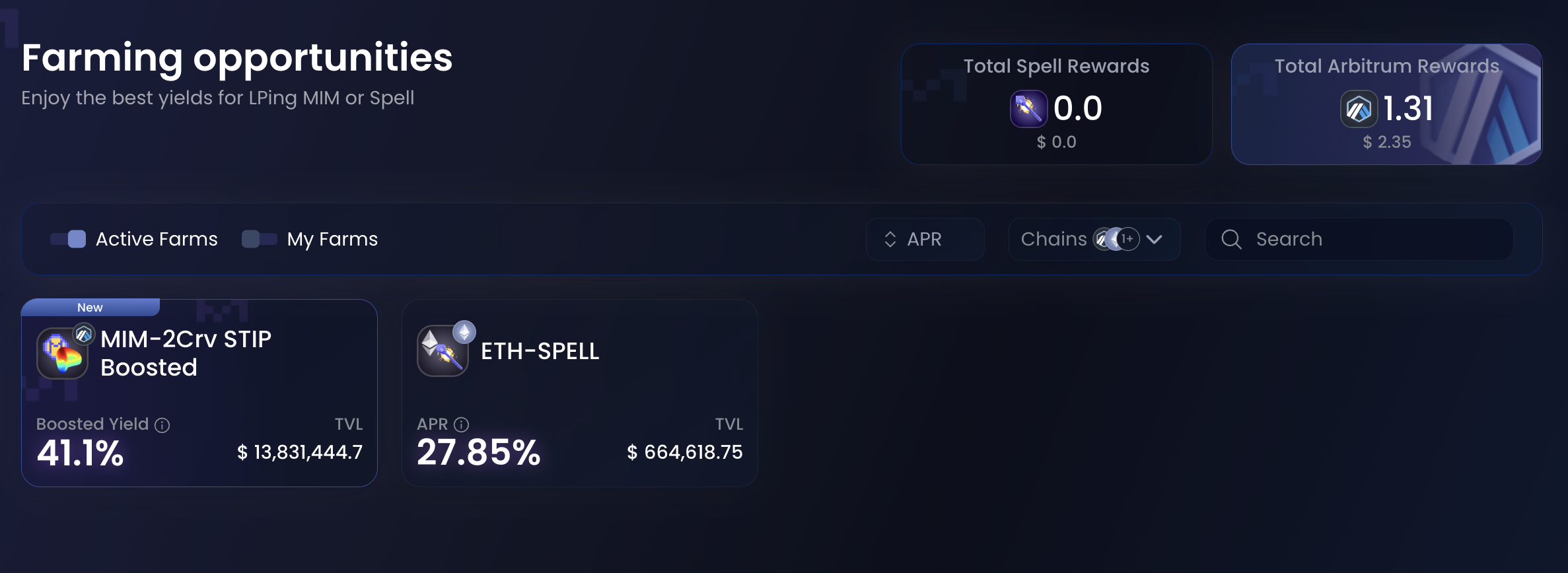
Farming is deploying liquidity in a specific pool in order to receive an incentive from the protocol. It enables the protocol to guide the liqudity into areas where it is most efficient.

Farming positions can be accessed by going to More → Farms from anywhere on the interface. From here, you can view all farms, and can filter to only see active ones.

<figure><img src="https://2388475231-files.gitbook.io/~/files/v0/b/gitbook-x-prod.appspot.com/o/spaces%2F-Mc9U0yE30Tc9xb3mVGA-1703796690%2Fuploads%2FcAAKlynTw1Ko6gD5CDlT%2FCapture%20d%E2%80%99e%CC%81cran%202024-02-24%20a%CC%80%2013.48.47.png?alt=media&amp;token=74284fa9-a348-42e1-8e79-5b7040d0e4fe" alt=""><figcaption></figcaption></figure>

After finding a farm you want to deposit to, access it by clicking on it. You are met with 2 modes: Stake and Unstake, used to deposit or withdraw from the farm.

<figure><img src="https://2388475231-files.gitbook.io/~/files/v0/b/gitbook-x-prod.appspot.com/o/spaces%2F-Mc9U0yE30Tc9xb3mVGA-1703796690%2Fuploads%2F8ZQbcr36XLRFan6aXmx5%2FCapture%20d%E2%80%99e%CC%81cran%202024-02-24%20a%CC%80%2013.51.30.png?alt=media&amp;token=4ca8ea3e-6478-4150-95b4-12e88bde58b0" alt=""><figcaption></figcaption></figure>

Most farms require you to stake some Liquidity Provisioning (LP) tokens. You'll find a button to acquire such LP tokens if you don't have them already.

Once you have them, farming is very easy, simply select how many you want to stake and hit the Stake button. \
Unstaking works in the exact same way, giving you back LP tokens.

{% hint style="info" %}
After unstaking, the farms gives you back LP Tokens. To redeem these tokens for the underlying asset, visit the website linked as "Get LPs". From there, find the withdraw button and follow the process.
{% endhint %}


# Swap

## Swapping MIM for other stablecoins

By clicking **SWAP**, we will open the [**curve.fi**](https://curve.fi/mim) website which allows users to swap their MIM stable coins for USDT, DAI, or USDC.

![In this example, we are swapping 1 MIM for 0.9935 DAI](https://2388475231-files.gitbook.io/~/files/v0/b/gitbook-legacy-files/o/assets%2F-Mc9U0yE30Tc9xb3mVGA%2F-MdMTTGS7RYTCpYh8VNG%2F-MdMZCuwriJqQnfBUgiX%2FScreenshot%202021-06-29%20at%2013.36.26.png?alt=media\&token=15f4ffdc-222a-4dcf-9a99-b52df780c2b2)

Enter the amount of MIM tokens you would like to swap, and select the stable coin you wish to swap into. Select your **Max Slippage** and **Gas Price.** Finally, click the green **“swap”** button and confirm your transaction. You have now succesfully swapped MIMs for another stablecoin!


# MIM Beaming

Here are the steps to beam your MIM tokens from one chain to another:

1. Navigate to [app.abracadabra.money](https://app.abracadabra.money)
2. Under the "More" section, find the "Beam" button.

<figure><img src="https://2388475231-files.gitbook.io/~/files/v0/b/gitbook-x-prod.appspot.com/o/spaces%2F-Mc9U0yE30Tc9xb3mVGA-1703796690%2Fuploads%2F6xddDLk8O6Z9PyxJo9jh%2FCapture%20d%E2%80%99e%CC%81cran%202024-02-24%20a%CC%80%2014.51.38.png?alt=media&amp;token=6acaaa82-fe11-4d38-8006-806f0485b46f" alt=""><figcaption></figcaption></figure>

2. In the beaming interface, select the origin and destination chains, and input the amount of MIM tokens you want to beam.

<figure><img src="https://2388475231-files.gitbook.io/~/files/v0/b/gitbook-x-prod.appspot.com/o/spaces%2F-Mc9U0yE30Tc9xb3mVGA-1703796690%2Fuploads%2FcXWabjNA5eYyXGtBccL1%2FAbraV3%20-%20Beam.png?alt=media&amp;token=22b3657b-6aa2-4448-8cf9-ee3ad4673a17" alt=""><figcaption></figcaption></figure>

3. If you're beaming from Ethereum mainnet, you'll need to approve MIM tokens for the transaction.
4. Click the "Beam" button. \
   This action will cost you some gas, like every transaction, but will also cost you some native tokens (e.g., FTM for Fantom, ETH for Ethereum mainnet…) to pay for the transaction on the other chain.\
   This cost is highlighted under "Estimated gas cost" and depends on the chains you're coming from as well as as the chain you're beaming to.
5. (Optional) Receive gas on the destination chain:\
   If you want some gas on the destination chain (because you've never used it for example), you can clic on the gear icon and beam some gas in the same transaction! It will automatically convert some gas on the chain you're on and send it on the destination chain<br>

   <figure><img src="https://2388475231-files.gitbook.io/~/files/v0/b/gitbook-x-prod.appspot.com/o/spaces%2F-Mc9U0yE30Tc9xb3mVGA-1703796690%2Fuploads%2FPBvRsHtKw9qibLXN0Gp5%2FCapture%20d%E2%80%99e%CC%81cran%202024-02-24%20a%CC%80%2014.55.08.png?alt=media&amp;token=338dff8d-90cd-4008-bef4-3a3992304000" alt=""><figcaption><p>In this example, I'll receive 0.001 ETH on optimism on top of the MIM I'm beaming.</p></figcaption></figure>
6. (Optional) Set a custom recipient:\
   If you want to beam MIM to another chain and have it land in another wallet of your choice, click the wallet icon next to the settings button.\
   It'll add a custom recipient field allowing you to chose who receives the MIM on the other side!<br>
7. The user interface will display beaming information and automatically update when the beaming has been successfully completed.<br>

   <figure><img src="https://2388475231-files.gitbook.io/~/files/v0/b/gitbook-x-prod.appspot.com/o/spaces%2F-Mc9U0yE30Tc9xb3mVGA-1703796690%2Fuploads%2FyCKyGA5JVPVVryWNvjWk%2FCapture%20d%E2%80%99e%CC%81cran%202024-02-24%20a%CC%80%2014.56.21.png?alt=media&amp;token=16c17ef1-ec3a-4b84-aae0-07f0dbf69080" alt=""><figcaption></figcaption></figure>

That's it! In no time you'll magically receive your MIM on the destination chain.


# MIMSwap

MIMSwap is an in house stableswap AMM for the Abracadabra ecosystem

[**Abracadabra**](https://abracadabra.money/) launched an Automated Market Maker DEX (AMM DEX) called MIMSwap with its own liquidity needs as the first use case. MIMSwap specializes is the exchange of tightly pegged assets (like stablecoins).

To learn more about MIMSwap and the technical aspects of it, please refer to the **Developer Documentation (coming soon).**

## Core Concepts

It's important for users to understand a few key concepts to better use MIMSwap and more broadly DEXes. These concepts will appear throughout your use of MIMSwap.

<details>

<summary>Lexicon - Terminology</summary>

* **DEX:** a Decentralized EXchange (or DEX) is a suite of smart contracts that enable users to exchange assets without intermediaries.
* **Capital Efficiency:** in DEXes, capital efficiency refers to the ability of a DEX to serve a high exchange volume with limited liquidity while limiting price movemrnts. The more volume can be served with limited liquidity, the more capital efficient.
* **Price Impact:** Price impact refers to a shift in the expected price of a trade due to the size of it. The bigger the trade is, the higher the price impact.
* **Slippage:** unlike price impact, slippage isn't caused by your trade, but by external factors happening between the time of submission and of execution of the trade. Slippage can be negative, resulting in a worse than expected price or positive.\
  You can set your slippage tolerance to only allow a trade to happen if the negative slippage is less than a desired percentage.
* **Liquidity Provisioning:** Providing liquidity is the action of supplying to the liquidity pool assets that will be used to execute the swaps of users. When doing this, you usually get an exposure to all the assets in the pool and earn trading fees and other incentives if applicable.
* **LP Tokens:** after providing liquidity, most DEXes give you back LP Tokens. They are an IOU on the share of the pool. You can use them to redeem your share of the assets in the pool, but they can also be used as any other ERC20 tokens in DeFi.
* **Farming:** While farming can take many forms, in the context of Liquidity Provisioning, farming is the action of locking up your LP tokens in a farm to receive further rewards. Some farms ask you to lock your tokens for a set durations to better align incentives.
* **Stable Pool:** a stable pool is the type of liquidity pool used by MIMSwap. It specializes in the exchange of pegged assets, maximizing capital efficiency while minimizing price impact.

</details>

{% hint style="info" %}
**A note on liquidity provisioning:**\
\
When providing liquidity to a DEX, you provide it at the current ratio of the pool (of the pool has 40% MIM and 60% USDT, you will provide 40 MIM and 60 USDT if you provide 100$). You will get back LP tokens corresponding to your share of the entire pool (assuming the pool has 1000$, you will receive 10%)\
\
When you withdraw from the pool, assuming the total liquidity hasn't change, you will receive 10% of the pool at the current rate of the pool, which may differ from the rate you provided at. This is the normal and expected behavior of a DEX. When LPing, you are exposed to every asset in the pool and to the ratio of said pool to evolve with market conditions.
{% endhint %}

Let's now explore the 2 main ways users will interact with MIMSwap.

<table data-view="cards"><thead><tr><th></th><th></th><th></th><th data-hidden data-card-target data-type="content-ref"></th></tr></thead><tbody><tr><td></td><td><strong>Swapping assets using MIMSwap</strong></td><td></td><td><a href="/learn/intro/mimswap/swapping-assets">Swapping assets</a></td></tr><tr><td></td><td><strong>Providing Liquidity on MIMSwap</strong></td><td></td><td><a href="/learn/intro/mimswap/providing-liquidity">Providing Liquidity</a></td></tr><tr><td></td><td></td><td></td><td></td></tr></tbody></table>


# Swapping assets

How to exchange a token A for a token B using MIMSwap

To Swap using MIMSwap, go to [abracadabra.money](https://abracadabra.money) and launch the app. This will take you to our community deployed and maintained interface.

From here, hit the MIMSwap button, available at the top of the page on desktop or in the side panel on mobile.

<div align="left"><figure><img src="https://2388475231-files.gitbook.io/~/files/v0/b/gitbook-x-prod.appspot.com/o/spaces%2F-Mc9U0yE30Tc9xb3mVGA-1703796690%2Fuploads%2FIwvfiDzVkWlvI9rwcnYl%2FAbracadabra%20-%20MIMSwap%20-%20Swap.png?alt=media&amp;token=63fde245-5f7f-4877-9fb6-abc5921a8b82" alt="" width="375"><figcaption></figcaption></figure></div>

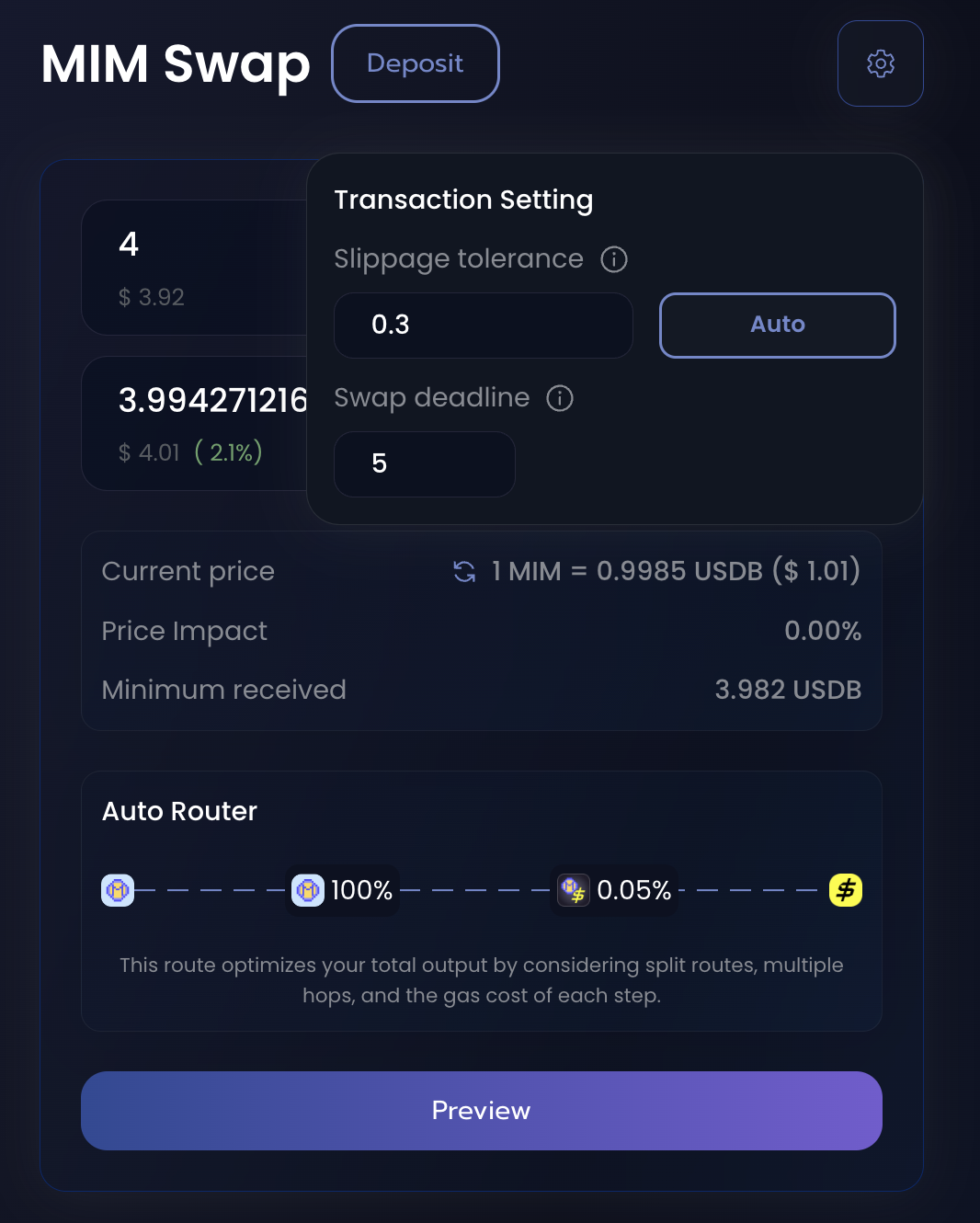
This is the MIM Swap landing page, from here you can select which assets you want to go from and to. In this example, we're swapping MIM for USDB on Blast.\
The interface will show you the expected amount of USDB you would receive, the price, the price impact as well as the minimum you could ever receive (any swap that would result in less USDB than this would not execute). The minimum received value can be configured to your liking using the gear icon on the top left corner.\
It also shows you the route used by the DEX to go from asset A to asset B. The 0.05% shown here refers to the fee charged by the pool for this swap. The fee is used to pay the Liquidity providers that facilitated the trade.

<div align="left"><figure><img src="https://2388475231-files.gitbook.io/~/files/v0/b/gitbook-x-prod.appspot.com/o/spaces%2F-Mc9U0yE30Tc9xb3mVGA-1703796690%2Fuploads%2FWzyPBBtvzTyEVf7WLJgf%2FAbracadabra%20-%20MIMSwap%20-%20Swap%20Settings.png?alt=media&amp;token=25c419f5-02bf-4262-ab5b-5e8807079735" alt="" width="375"><figcaption></figcaption></figure></div>

Here you can select your slippage tolerance, in percents, as well as a swap deadline. The deadline settings will prevent the swap from executing if it happens after 5 minutes in this example.

Once you're ready to swap, you can hit preview, which will show you a recap of your transaction, and then confirm it.

<div align="left"><figure><img src="https://2388475231-files.gitbook.io/~/files/v0/b/gitbook-x-prod.appspot.com/o/spaces%2F-Mc9U0yE30Tc9xb3mVGA-1703796690%2Fuploads%2FH4nDwKRjcug7naE1WhIE%2FAbracadabra%20-%20MIMSwap%20-%20Swap%20Preview.png?alt=media&amp;token=ea90864a-b321-4309-8ae9-c9ad0ec63fa6" alt="" width="375"><figcaption></figcaption></figure></div>

{% hint style="info" %}
When swapping an ERC20 token for the first time, you will need to approve it to be used by MIMSwap.&#x20;
{% endhint %}


# Providing Liquidity

How to provide liquidity on MIMSwap and earn trading fees

### Depsiting into MIMSwap

To provide liquidity on MIMSwap, go to [abracadabra.money](https://abracadabra.money) and launch the app. This will take you to our community deployed and maintained interface.

From here, hit the MIMSwap button, available at the top of the page on desktop or in the side panel on mobile, then hit the **Deposit** button on the top of the page.

<div align="left"><figure><img src="https://2388475231-files.gitbook.io/~/files/v0/b/gitbook-x-prod.appspot.com/o/spaces%2F-Mc9U0yE30Tc9xb3mVGA-1703796690%2Fuploads%2FhB8n4GcNYx1ddKN2umQU%2FAbracadabra%20-%20MIMSwap%20-%20LP.png?alt=media&amp;token=3e3f25db-6a61-4b20-8506-4c5c86266974" alt="" width="375"><figcaption></figcaption></figure></div>

This is the main section of the Liquidity Provisioning positioning page. It shows the following information:

* The mode (Deposit | Remove)
* The deposit type (Deposit | Stake)
* The two tokens of the pair
* The pool ratio between the 2 assets
* The current liquidity provided (TVL)

To supply liquidity, you need to provide the assets in the current Ratio (in this example, you'll provide 76% of MIM and 24% of USDB). You can learn more about this ratio in the [MIMSwap page](/learn/intro/mimswap)\
Inputing an amount of any of the 2 tokens will automatically fill out the other asset's amount according to this ratio. If you only have one of the 2 assets, you can use the swap function to get to the good ratio. Follow the [Swap Guide](/learn/intro/mimswap/swapping-assets) to know how to.

Once you've inputed the amounts you want to provide, you'll be able to go ahead and provide liquidity.

{% hint style="info" %}
You might be required to approve the 2 assets on MIMSwap before providing liquidity, the UI will guide you through the process.
{% endhint %}

<div align="left"><figure><img src="https://2388475231-files.gitbook.io/~/files/v0/b/gitbook-x-prod.appspot.com/o/spaces%2F-Mc9U0yE30Tc9xb3mVGA-1703796690%2Fuploads%2FviKzQym5GrvX5nuY5NSS%2FAbracadabra%20-%20MIMSwap%20-%20LP%20confirmation%20wizard.png?alt=media&amp;token=8e9b8b64-9e6c-4301-9378-330c370c4b9e" alt="" width="375"><figcaption></figcaption></figure></div>

Once all tokens are approved and you're happy with the amounts you're providing, you can click deposit to start providing liquidity.

MIMSwap will transfer your tokens into the pool and give you MagicLP tokens, an IOU token representing your share of the pool. These tokens can be used in DeFi, be staked for further rewards, and finally used to get back your share of the pool.

### Staking your MagicLP tokens

To gain further rewards, you can stake your liquidity in MIMSwap. You'll need MagicLP tokens for this part, so go ahead and deposit some liquidity if you haven't done so already.\
To do so, you'll stake your MagicLP tokens. Click on the stake button to access the staking menu.

&#x20;![](https://2388475231-files.gitbook.io/~/files/v0/b/gitbook-x-prod.appspot.com/o/spaces%2F-Mc9U0yE30Tc9xb3mVGA-1703796690%2Fuploads%2F4Jx5huKlaymSmYYwka2u%2FAbracadabra%20-%20MIMSwap%20-%20LP%20staking.png?alt=media\&token=e928e953-dcdd-4272-8a78-058329383f2a)

Here, you'll be able to stake your tokens for further rewards and even lock them to increase those rewards.

{% hint style="info" %}
On Blast, you'll get the Founder Boost for locking your LP tokens, this is only available for a short amount of time and might not be possible at the time of reading.
{% endhint %}

Use the lock switch to toggle it on if you want to lock your tokens for 3 months, or leave it off if you're not interested in those extra rewards.\
Then, simply approve and stake and you're done!

### Unstaking MagicLP tokens

If you want to exit the farm, or exit your liquidity provisioning position entirely, you'll need to get your LP tokens back. If you're not locked, or if the lock is over, access the Unstake section within the remove portion of the interface.

<div align="left"><figure><img src="https://2388475231-files.gitbook.io/~/files/v0/b/gitbook-x-prod.appspot.com/o/spaces%2F-Mc9U0yE30Tc9xb3mVGA-1703796690%2Fuploads%2FijUKzd8u3vwjUgamekM6%2FAbracadabra%20-%20MIMSwap%20-%20LP%20unstaking.png?alt=media&amp;token=5302b97b-8f54-47c9-91b5-df96429e6d02" alt="" width="375"><figcaption></figcaption></figure></div>

From here, you'll be able to select how much you want to unstake and then confirm. This will send the MagicLP tokens back to your account from the farm; and you'll be able to redeem them for your share of the pool.

### Withdrawing Liquidity from MIMSwap

To remove liquidity, access the remove section of the Remove menu.

<div align="left"><figure><img src="https://2388475231-files.gitbook.io/~/files/v0/b/gitbook-x-prod.appspot.com/o/spaces%2F-Mc9U0yE30Tc9xb3mVGA-1703796690%2Fuploads%2F3ZtJXTO7gn2AFrTetego%2FAbracadabra%20-%20MIMSwap%20-%20LP%20remove.png?alt=media&amp;token=d49c499a-bd86-4133-a9d6-016b83ec844e" alt="" width="375"><figcaption></figcaption></figure></div>

From this menu, you'll be able to see you MagicLP tokens, and what they correspond to in term of underlying tokens.\
Select how much you want to remove and hit the Remove button to withdraw your liquidity. You may need to approve the spend of your magicLP tokens first.

{% hint style="info" %}
When withdrawing liquidity, you're removing your share of the liquidity and getting back the 2 tokens at the current rate of the pool. This rate may be different from the time you provided liquidity as the markets shift towards one or the other asset.
{% endhint %}


# Tokenomics

Abracadabra has 3 main tokens.

* **SPELL**: the protocol's token which is used for incentivization.
* **sSPELL**: obtained by staking SPELL tokens and used for fee-sharing and governance!
* **MIM**: a USD pegged stable coin

## The SPELL Token <a href="#d5a7" id="d5a7"></a>

![](https://2388475231-files.gitbook.io/~/files/v0/b/gitbook-legacy-files/o/assets%2F-Mc9U0yE30Tc9xb3mVGA%2F-McCt9d5o7LmBMkCgvbX%2F-McCvWpdUYyT0YmyPfxl%2Fimage.png?alt=media\&token=28cdaf6d-d567-43a6-a565-22dcd1469247)

**Token Symbol**: SPELL

**Total Supply**: 210,000,000,000 SPELL (initial burn halved the supply)

**Native Deployements**&#x20;

<table><thead><tr><th width="196">Chain</th><th width="92">ID</th><th>Contract Address</th></tr></thead><tbody><tr><td>Ethereum</td><td>1</td><td><a href="https://etherscan.io/token/0x090185f2135308bad17527004364ebcc2d37e5f6">0x090185f2135308BaD17527004364eBcC2D37e5F6</a></td></tr></tbody></table>

**Bridged as Multichain Wrapped assets**

<table><thead><tr><th width="196">Chain</th><th width="92">ID</th><th>Contract Address</th></tr></thead><tbody><tr><td>Optimism</td><td>10</td><td><a href="https://optimistic.etherscan.io/token/0xe3ab61371ecc88534c522922a026f2296116c109">0xe3ab61371ecc88534c522922a026f2296116c109</a></td></tr><tr><td>BSC</td><td>56</td><td><a href="https://bscscan.com/token/0x9fe28d11ce29e340b7124c493f59607cbab9ce48">0x9Fe28D11ce29E340B7124C493F59607cbAB9ce48</a></td></tr><tr><td>Fantom Opera</td><td>250</td><td><a href="https://ftmscan.com/token/0x468003b688943977e6130f4f68f23aad939a1040">0x468003b688943977e6130f4f68f23aad939a1040</a></td></tr><tr><td>Avalanche C-Chain</td><td>43114</td><td><a href="https://snowtrace.io/token/0xce1bffbd5374dac86a2893119683f4911a2f7814">0xCE1bFFBD5374Dac86a2893119683F4911a2F7814</a></td></tr></tbody></table>

**Bridged through** **Arbitrum** **Official** **Bridge**

<table><thead><tr><th width="196">Chain</th><th width="92">ID</th><th>Contract Address</th></tr></thead><tbody><tr><td>Arbitrum One</td><td>42161</td><td><a href="https://arbiscan.io/token/0x3e6648c5a70a150a88bce65f4ad4d506fe15d2af">0x3e6648c5a70a150a88bce65f4ad4d506fe15d2af</a></td></tr></tbody></table>

### Token Burn:

The total Supply of SPELL has been reduced from 420B SPELL to 210B SPELL by performing a unique token burn event. 210B SPELL was minted to the SPELL contract itself. The contract has no way of accessing these tokens which ultimately turns the Token Smart Contract into a Burn Address. This burn event has been publicly [**announced**](https://twitter.com/0xM3rlin/status/1399019741839335426) on Twitter by our main dev 0xm3rlin.

Token Burn Tx Hash: [**0x01bdb6c4b22b9c8b82c9074772e95818e4680e4c8a71df5b0151e321f8048417**](https://etherscan.io/tx/0x01bdb6c4b22b9c8b82c9074772e95818e4680e4c8a71df5b0151e321f8048417)

### SPELL Token Distribution:

* 63% (132.3B SPELL): Global Farming Incentives
* 30% (63.0B SPELL): Team allocation (4 Year Vesting Schedule)&#x20;
* 7% (14.7B SPELL): Initial DEX Offering

![](https://2388475231-files.gitbook.io/~/files/v0/b/gitbook-legacy-files/o/assets%2F-Mc9U0yE30Tc9xb3mVGA%2F-MlVGO-O-0eCUTb-XK1Y%2F-MlVLeXA6fo0aFM-qo5T%2FScreenshot%202021-10-08%20at%2015.41.53.png?alt=media\&token=58577811-2734-45d2-8bed-187fcf72da2c)

\
\
**SPELL tokens are distributed as follows:**

* **63%** of the total supply will be used to incentivise particular LP pairs or other liquidity mining programs. Read more about the weekly allocation of SPELL incentives in the following section!
* **7%** of the total supply has been distributed via an IDO, half on Uniswap v3 and half on Sushiswap.
* **30%** of the total supply is allocated to the team members.

## SPELL Token Farming Emissions <a href="#d33e" id="d33e"></a>

The SPELL token is used to incentivize users, in order to keep deep liquidity on our markets!\
\
The current emissions per week are:

* ETH-SPELL SLP on Ethereum Mainnet: **4,688,305 SPELL**
* Bribes System: **35,000,000 SPELL**
* MIM + 2Crv Curve LP on Arbitru&#x6D;**: 40,000,000 SPELL**
* Votium (Ethereum): **55,000,000 SPELL**\ <br>

  <figure><img src="https://2388475231-files.gitbook.io/~/files/v0/b/gitbook-x-prod.appspot.com/o/spaces%2F-Mc9U0yE30Tc9xb3mVGA-1703796690%2Fuploads%2FDvDyqqFQByIyogFNK2VO%2FScreenshot%202023-10-26%20at%2012.32.56.png?alt=media&amp;token=bbb251fe-3ce2-4b9f-8974-cd9017deed14" alt=""><figcaption></figcaption></figure>

**The new weekly benchmark is 911,501,384 SPELL tokens following the passing of this proposal** [**here**](https://forum.abracadabra.money/t/aip-2-burn-proposal-of-the-unallocated-spell-per-week/926)**.**

A Total of **134,688,305 SPELL** per week are currently emitted!

*Please note this graph will be updated weekly!*

## The sSPELL Token <a href="#d33e" id="d33e"></a>

You can stake and lock your SPELL to get sSPELL using the [**Wizard Dashboard**](https://abracadabra.money/dashboard)! Staking SPELL has a 24 hour time lock (Every time a user stakes SPELL token, he will not be able to withdraw for the next 24 hours).

![](https://2388475231-files.gitbook.io/~/files/v0/b/gitbook-legacy-files/o/assets%2F-Mc9U0yE30Tc9xb3mVGA%2F-McCrELlwZljArG_OYUO%2F-McCsu82nj4Ndr2v_nmP%2Fimage.png?alt=media\&token=63c5bc04-bc5b-4ba5-970f-b57634d4f07a)

The token address for **sSPELL** are as follows:

<table><thead><tr><th width="197">Chain</th><th width="79.33333333333331">ID</th><th>Contract Address</th></tr></thead><tbody><tr><td>Ethereum</td><td>1</td><td><a href="https://etherscan.io/token/0x26fa3fffb6efe8c1e69103acb4044c26b9a106a9">0x26fa3fffb6efe8c1e69103acb4044c26b9a106a9</a></td></tr><tr><td>Fantom Opera</td><td>250</td><td><a href="https://ftmscan.com/token/0xbB29D2A58d880Af8AA5859e30470134dEAf84F2B">0xbB29D2A58d880Af8AA5859e30470134dEAf84F2B</a></td></tr><tr><td>Arbitrum One</td><td>42161</td><td><a href="https://arbiscan.io/address/0xf7428ffcb2581a2804998efbb036a43255c8a8d3">0xf7428ffcb2581a2804998efbb036a43255c8a8d3</a></td></tr><tr><td>Avalanche C-Chain</td><td>43114</td><td><a href="https://snowtrace.io/token/0x3Ee97d514BBef95a2f110e6B9b73824719030f7a">0x3Ee97d514BBef95a2f110e6B9b73824719030f7a</a></td></tr></tbody></table>

*Attention: sSPELL and SPELL contracts on all networks but Arbitrum are affected by the Multichain hack. Do not buy these tokns are the funds are locked on Ethereum.*

Firstly fees (interest, borrow fee and 10% of the liquidation fee for certain markets) are deposited in the SPELL fee pool in the form of SPELL tokens. When users single-side stake their SPELL tokens they receive sSPELL tokens. **sSPELL** tokens represent your share of the SPELL fee pool with a mechanism similar to the SUSHI/xSUSHI one.\
\
10% of all liquidation fees are also hardcoded to be taken out and used to purchase SPELL tokens in certain markets. These SPELL tokens are also added to the SPELL fee pool.

Your **sSPELL** tokens are continuously compounding! When you unstake, you will receive all the originally deposited SPELL tokens plus any additional SPELL earned from the **fees**.&#x20;

As for [**AIP #10**](https://forum.abracadabra.money/t/aip-10-bad-debt-repayment-plan/3940), 50% of the protocol revenue will be used to buyback SPELL tokens or distributed through mSPELL staking contracts, while 50% will be used to build up a treasury.

**sSPELL** will also allow wizards to take part in governance as soon as the governance portal will be live.

## The MIM Token

The Magic Internet Money token is a USD pegged stable coin that is backed by interest bearing tokens!

![](https://2388475231-files.gitbook.io/~/files/v0/b/gitbook-legacy-files/o/assets%2F-Mc9U0yE30Tc9xb3mVGA%2F-McCt9d5o7LmBMkCgvbX%2F-McCuMEZojRVKKTEsXYd%2FMIM.png?alt=media\&token=edb0d439-eed2-4b3c-8768-a423e6f397af)

Abracadabra always considers the MIM token to be worth 1USD. The officially-supported MIM contracts are as follows:

<table><thead><tr><th width="212">Chain</th><th width="81">ID</th><th>Contract Address</th></tr></thead><tbody><tr><td>Ethereum</td><td>1</td><td><a href="https://etherscan.io/token/0x99D8a9C45b2ecA8864373A26D1459e3Dff1e17F3">0x99D8a9C45b2ecA8864373A26D1459e3Dff1e17F3</a></td></tr><tr><td>Optimism</td><td>10</td><td><a href="https://optimistic.etherscan.io/token/0xb153fb3d196a8eb25522705560ac152eeec57901">0xB153FB3d196A8eB25522705560ac152eeEc57901</a></td></tr><tr><td>BSC</td><td>56</td><td><a href="https://bscscan.com/token/0xfe19f0b51438fd612f6fd59c1dbb3ea319f433ba">0xfE19F0B51438fd612f6FD59C1dbB3eA319f433Ba</a></td></tr><tr><td>Polygon Mainnet</td><td>137</td><td><a href="https://polygonscan.com/token/0x49a0400587a7f65072c87c4910449fdcc5c47242">0x49a0400587A7F65072c87c4910449fDcC5c47242</a></td></tr><tr><td>Fantom Opera</td><td>250</td><td><a href="https://ftmscan.com/token/0x82f0b8b456c1a451378467398982d4834b6829c1">0x82f0B8B456c1A451378467398982d4834b6829c1</a></td></tr><tr><td>Moonriver</td><td>1285</td><td><a href="https://moonriver.moonscan.io/token/0x0cae51e1032e8461f4806e26332c030e34de3adb?a=0x8d2876ad4d2a994c529f19d846ca541015dc3f05">0x0cae51e1032e8461f4806e26332c030e34de3adb</a></td></tr><tr><td>Arbitrum One</td><td>42161</td><td><a href="https://arbiscan.io/token/0xfea7a6a0b346362bf88a9e4a88416b77a57d6c2a">0xFEa7a6a0B346362BF88A9e4A88416B77a57D6c2A</a></td></tr><tr><td>Avalanche C-Chain</td><td>43114</td><td><a href="https://snowtrace.io/token/0x130966628846bfd36ff31a822705796e8cb8c18d">0x130966628846BFd36ff31a822705796e8cb8C18D</a></td></tr><tr><td>Kava Chain</td><td>2222‍</td><td><a href="https://explorer.kava.io/address/0x471EE749bA270eb4c1165B5AD95E614947f6fCeb/transactions">0x471EE749bA270eb4c1165B5AD95E614947f6fCeb</a></td></tr><tr><td>Linea</td><td>59144</td><td><a href="https://lineascan.build/token/0xdd3b8084af79b9bae3d1b668c0de08ccc2c9429a">0xdd3b8084af79b9bae3d1b668c0de08ccc2c9429a</a></td></tr><tr><td>Base</td><td>8453</td><td><a href="https://basescan.org/token/0x4A3A6Dd60A34bB2Aba60D73B4C88315E9CeB6A3D">0x4A3A6Dd60A34bB2Aba60D73B4C88315E9CeB6A3D</a></td></tr><tr><td>Blast</td><td>81457</td><td>0x76DA31D7C9CbEAE102aff34D3398bC450c8374c1</td></tr><tr><td>Nibiru</td><td>6900</td><td>0xfCfc58685101e2914cBCf7551B432500db84eAa8</td></tr></tbody></table>

### The MIM Price Peg

Since MIM is a USD pegged stable coin, it needs to remain pegged to the USD. The mechanics used rely on arbitrage, keeping it simple. This can happen in several ways.

* Users that hold debt, in MIM, might notice that MIM is trading on some market **below 1 USD** and decide to buy some MIM at this discount to repay some of their debt. This purchase of MIM will have a price rising effect relative to their volume.
* Users that hold components (valid collateral), might notice that MIM is trading on some market **above 1 USD** and decide to open a position and sell the MIM borrowed to put to use elsewhere. This transaction will have a price lowering effect relative to their volume.
* Users that hold other cryptocurrencies, (stablecoins or not) might see MIM trading differently on two of the above mentioned markets and decide to buy MIM on one market where the price is below 1USD and sell on another where the price is either at 1USD or above. This can also happen in reverse.&#x20;

In most cases, a lot of the Market to Market arbitrage is done by automated bots that constantly monitor pools for opportunities to capitalize on these price differences. This has the benefit of having price pegs being corrected quite rapidly.&#x20;

MIM tokens are minted by a [**Multisign**](https://twitter.com/MIM_Spell/status/1401478828116123648), deposited in the Kashi Markets smart contracts, and then injected into circulation only after the user deposits the collaterals!

The 5/10 multisign is composed of:

* [**Poolpi**](https://twitter.com/poolpitako) (Yearn Finance)
* [**Leo Cheng**](https://twitter.com/leokcheng) (Iron Bank)
* [**Michael**](https://twitter.com/newmichwill) (Curve Finance)
* [**Squirrel**](https://twitter.com/squirrelcrypto) (Arrakis Finance)&#x20;
* [**Wicked**](https://twitter.com/0xWicked) (Abracadabra Money Contributor)
* [**0xMerlin**](https://twitter.com/0xM3rlin) (Abracadabra Money Contributor) &#x20;
* [**Julien**](https://twitter.com/bneiluj) (Stakedao)
* [**Georgiyxo**](https://twitter.com/GeorgiyXo) (Popsicle Finance, Abracadabra Money Contributor)
* [**Sarang**](https://twitter.com/sarangparikh22) (Sushiswap)
* [**Romy**](https://twitter.com/LickMyRomy) (Abracadabra Money Contributor)

The multisigns can be found at the following addresses:

<table><thead><tr><th width="206">Chain Name</th><th width="85.33333333333331">ID</th><th>Contract Address</th></tr></thead><tbody><tr><td>Ethereum</td><td>1</td><td><a href="https://gnosis-safe.io/app/eth:0x5f0DeE98360d8200b20812e174d139A1a633EDd2/home">0x5f0DeE98360d8200b20812e174d139A1a633EDd2</a></td></tr><tr><td>Optimism</td><td>10</td><td><a href="https://gnosis-safe.io/app/oeth:0x4217AA01360846A849d2A89809d450D10248B513/home">0x4217AA01360846A849d2A89809d450D10248B513</a></td></tr><tr><td>BSC</td><td>56</td><td><a href="https://gnosis-safe.io/app/bnb:0x9d9bC38bF4A128530EA45A7d27D0Ccb9C2EbFaf6/home">0x9d9bC38bF4A128530EA45A7d27D0Ccb9C2EbFaf6</a></td></tr><tr><td>Polygon Mainnet</td><td>137</td><td><a href="https://app.safe.global/home?safe=matic:0x7d847c4A0151FC6e79C6042D8f5B811753f4F66e">0x7d847c4A0151FC6e79C6042D8f5B811753f4F66e</a></td></tr><tr><td>Fantom Opera</td><td>250</td><td><a href="https://safe.fantom.network/ftm:0xb4ad8B57Bd6963912c80FCbb6Baea99988543c1c/home">0xb4ad8B57Bd6963912c80FCbb6Baea99988543c1c</a></td></tr><tr><td>Arbitrum One</td><td>42161</td><td><a href="https://gnosis-safe.io/app/arb1:0xf46BB6dDA9709C49EfB918201D97F6474EAc5Aea/home">0xf46BB6dDA9709C49EfB918201D97F6474EAc5Aea</a></td></tr><tr><td>Avalanche C-Chain</td><td>43114</td><td><a href="https://gnosis-safe.io/app/avax:0xae64A325027C3C14Cf6abC7818aA3B9c07F5C799/home">0xae64A325027C3C14Cf6abC7818aA3B9c07F5C799</a></td></tr></tbody></table>


# Omnichain MIM

How to beam MIM across chains

## Overview

Welcome to the world of Magic Internet Money (MIM) Beaming! Beaming is an innovative way to transfer your MIM tokens from one chain to another swiftly and securely. Powered by LayerZero's Omnichain Fungible Token (OFT) standard, beaming not only promises speed, reliability, and security, but it also unlocks the potential for future cross-chain interactions, such as borrowing on one chain from a position on another, cross-chain liquidations, and more.

Beaming transcends the boundaries of individual blockchains, creating bridges for MIM tokens to move seamlessly across them. It amplifies the power of decentralization by allowing MIM tokens to exist and operate on multiple chains simultaneously, providing resilience and freedom. This interoperability also expands the utility of MIM, allowing you to tap into the unique advantages that each chain offers, ensuring that MIM is able to move freely between chain to better integrate with what every chain has to offer.

Following [AIP #26 - Implement a 1$ flat beaming fee on all networks](https://forum.abracadabra.money/t/aip-26-implement-a-1-flat-beaming-fee-on-all-networks), Abracadabra charges a 1 USD flat beaming fee for the service, regardless of the beamed amount. This fee is taken in the gas currency (ETH on mainnet, FTM on Fantom…), which allows the UX to stay the same and the beamed amount to be consistant. \
The generated revenue is treated like treasury revenue, to further increase the DAO profitability and runway.\
\
MIM contract addresses across the different network the Omnistable is live on can be found [**here**](/learn/tokens/tokenomics#the-mim-token).

Find out more about how to beam MIM bellow!

{% content-ref url="/pages/FSM32Vvj0mZjvi6ZuT4G" %}
[MIM Beaming](/learn/intro/tools/mim-beaming)
{% endcontent-ref %}


# Bug Bounties

## Securtity Disclosures

If you've found a vulnerability in our codebase, please contact the security address immediately in order for our team to take action as quickly as possible.

Please do not disclose the vulnerability while the team is taking action to prevent damage.

The security team can be reached at: <security@abracadabra.money>


# Governance

Abracadabra's governance ecosystem!

Since day one, abracadabra strives towards decentralization! Find here all the details regarding the governance system of our platform! For a general overview, please refer to this forum post [**here**](https://forum.abracadabra.money/t/abracadabra-governance-process/504).&#x20;

If you have any suggestions, please reach out to our team members on Discord!

### Snapshot page

The governance of [**abracadabra.money**](https://abracadabra.money/) happens through a snapshot page that can be found [**here**](https://snapshot.org/#/abracadabrabymerlinthemagician.eth).

Once a proposal is passed, the team will implement it executing SPELL holders vote!

Voting power is given by holding **sSPELL** **tokens** (either in your wallet, as collateral in our sSPELL lending market or in any other contracts recognised by Abracadabra) or **SPELL/ETH** Sushiswap LP tokens(deposited in our farm)!

### Discord and Forum

Feel free to use our [**discord**](https://discord.gg/vJpPDCZcVe) channel **│🏛│›-governance-discussion** to dive into the proposal and discuss with the fellows' community members!

If you want a more in depth discussion, or explore the single proposals, we highly recommend joining our Forum [**here**](https://forum.abracadabra.money/).&#x20;


# Our Contracts

## **Our Deployed Contracts**

For up-to-date data regarding our deployed contracts, please refer to our [Developers Documentation](https://dev.abracadabra.money/deployment-addresses/ethereum-mainnet).&#x20;

We try our best to keep the list up to date, if you see something missing, please let us know on [discord](https://discord.gg/mim)!

## **Treasuries**

**Abracadabra** main treasury can be found on **Ethereum at the** [following address](https://app.safe.global/home?safe=eth:0xDF2C270f610Dc35d8fFDA5B453E74db5471E126B)**.**

The protocol also has operational treasury multisigs on side chains and L2 to manage operational duties, they can be found here:&#x20;

* [**Arbitrum**](https://app.safe.global/home?safe=arb1:0xA71A021EF66B03E45E0d85590432DFCfa1b7174C)
* [**Optimism**](https://app.safe.global/home?safe=oeth:0xCbb86ffF0F8094C370cdDb76C7F270C832a8C7C0)
* [**Avalanche**](https://app.safe.global/home?safe=avax:0xAE4D3a42E46399827bd094B4426e2f79Cca543CA)
* [**Fantom**](https://safe.fantom.network/ftm:0xf68b78CB64C49967719214aa029a29712ddd567f/settings/owners)
* [**Base**](https://app.safe.global/home?safe=base:0xF657dE126f9D7666b5FFE4756CcD9EB393d86a92)
* [**BNB Chain**](https://app.safe.global/home?safe=bnb:0x5a1DE6c40EF68A3F00ADe998E9e0D687E4419450)
* [**KAVA**](https://kavascan.com/address/0x3A2761F421b7E3Fd18C1aD50c461b2DE2F77c367)
* [**Linea**](https://safe.linea.build/home?safe=linea:0x1c063276CF810957cf0665903FAd20d008f4b404)

**A Zapper Bundle with all treasury addresses can be found** [**here**](https://zapper.xyz/bundle/0xdf2c270f610dc35d8ffda5b453e74db5471e126b,0xa71a021ef66b03e45e0d85590432dfcfa1b7174c,0xf68b78cb64c49967719214aa029a29712ddd567f,0xae4d3a42e46399827bd094b4426e2f79cca543ca,0x1c063276cf810957cf0665903fad20d008f4b404,0x3a2761f421b7e3fd18c1ad50c461b2de2f77c367,0x5a1de6c40ef68a3f00ade998e9e0d687e4419450,0xf657de126f9d7666b5ffe4756ccd9eb393d86a92,0xcbb86fff0f8094c370cddb76c7f270c832a8c7c0?label=Abracadabra%20Treasuries\&id=0x627fc02775cacfbdf0af7f3880f08954fcbbd718\&tab=apps)**.**<br>


# Useful Links

<table data-view="cards"><thead><tr><th></th><th></th><th></th><th data-hidden data-card-cover data-type="files"></th><th data-hidden data-card-target data-type="content-ref"></th></tr></thead><tbody><tr><td></td><td>Abracadabra UI</td><td></td><td><a href="https://2388475231-files.gitbook.io/~/files/v0/b/gitbook-x-prod.appspot.com/o/spaces%2F-Mc9U0yE30Tc9xb3mVGA-1703796690%2Fuploads%2F50THXlTJwuv70SCQCJqX%2FCapture%20d%E2%80%99e%CC%81cran%202024-02-24%20a%CC%80%2015.04.51.png?alt=media&amp;token=cb171088-e0c5-4313-9dc5-53e7d95fb43c">Capture d’écran 2024-02-24 à 15.04.51.png</a></td><td><a href="https://abracadabra.money/">https://abracadabra.money/</a></td></tr><tr><td></td><td>Twitter</td><td></td><td><a href="https://2388475231-files.gitbook.io/~/files/v0/b/gitbook-x-prod.appspot.com/o/spaces%2F-Mc9U0yE30Tc9xb3mVGA-1703796690%2Fuploads%2FqnMT6RdkpaNwQpnhVfAo%2FX%20Logo.jpg?alt=media&amp;token=454d431f-dd1f-490c-b9ac-d57478567711">X Logo.jpg</a></td><td><a href="https://twitter.com/MIM_Spell">https://twitter.com/MIM_Spell</a></td></tr><tr><td></td><td>Blog</td><td></td><td><a href="https://2388475231-files.gitbook.io/~/files/v0/b/gitbook-x-prod.appspot.com/o/spaces%2F-Mc9U0yE30Tc9xb3mVGA-1703796690%2Fuploads%2FdPBHtnwy1IrrF7550d8Q%2FfB3kzXkesQJbPVhKlTc86.png?alt=media&amp;token=ca3becde-9480-45f3-aa5d-67a7d652ef97">fB3kzXkesQJbPVhKlTc86.png</a></td><td><a href="https://mirror.xyz/0x5744b051845B62D6f5B6Db095cc428bCbBBAc6F9">https://mirror.xyz/0x5744b051845B62D6f5B6Db095cc428bCbBBAc6F9</a></td></tr><tr><td></td><td>Discord</td><td></td><td><a href="https://2388475231-files.gitbook.io/~/files/v0/b/gitbook-x-prod.appspot.com/o/spaces%2F-Mc9U0yE30Tc9xb3mVGA-1703796690%2Fuploads%2FyOp9efTlr8Z95pyIm0aS%2Fdiscord-logo-icon-editorial-free-vector.jpg?alt=media&amp;token=3e4c070a-d431-4719-9798-6bc64ecd6961">discord-logo-icon-editorial-free-vector.jpg</a></td><td><a href="https://discord.gg/mim">https://discord.gg/mim</a></td></tr><tr><td></td><td>GitHub</td><td></td><td><a href="https://2388475231-files.gitbook.io/~/files/v0/b/gitbook-x-prod.appspot.com/o/spaces%2F-Mc9U0yE30Tc9xb3mVGA-1703796690%2Fuploads%2FLspmZGSlZW3on2W2TK47%2FGitHub-Mark-ea2971cee799.png?alt=media&amp;token=af6ebcd2-7060-4c32-b29b-1046251c2e8f">GitHub-Mark-ea2971cee799.png</a></td><td><a href="https://github.com/Abracadabra-money">https://github.com/Abracadabra-money</a></td></tr><tr><td></td><td>Snapshot</td><td></td><td><a href="https://2388475231-files.gitbook.io/~/files/v0/b/gitbook-x-prod.appspot.com/o/spaces%2F-Mc9U0yE30Tc9xb3mVGA-1703796690%2Fuploads%2FlOXeA8cKMs9Iy9Czl7GD%2FTvz6UU5R_400x400.jpg?alt=media&amp;token=d6a2b5da-d045-49cf-a948-ac404411fabc">Tvz6UU5R_400x400.jpg</a></td><td><a href="https://snapshot.org/#/abracadabrabymerlinthemagician.eth">https://snapshot.org/#/abracadabrabymerlinthemagician.eth</a></td></tr><tr><td></td><td>Forum</td><td></td><td><a href="https://2388475231-files.gitbook.io/~/files/v0/b/gitbook-x-prod.appspot.com/o/spaces%2F-Mc9U0yE30Tc9xb3mVGA-1703796690%2Fuploads%2FpVvq99HTOf40vC3Ho4Bd%2Fbook.6e4348a7.png?alt=media&amp;token=2f66f96b-57ec-4234-bd80-b850a39e0ee3">book.6e4348a7.png</a></td><td><a href="https://forum.abracadabra.money/">https://forum.abracadabra.money/</a></td></tr></tbody></table>


# Marketing Material

In order to allow our community to grow as fast as possible, we have decided to give access to our branding material to everyone. These are the only official Abracadabra Logos, feel free to use them for any press material!

## Abracadabra DAO Logo

<figure><img src="https://2388475231-files.gitbook.io/~/files/v0/b/gitbook-x-prod.appspot.com/o/spaces%2F-Mc9U0yE30Tc9xb3mVGA-1703796690%2Fuploads%2FHVB5OSAskm1foR8PmocZ%2FAbracadabra%20Logo%20Color.svg?alt=media&amp;token=fd0eb29e-f7df-40d7-ab8b-8acbf18033b9" alt=""><figcaption></figcaption></figure>

{% file src="/files/CUk61BrlpLN1br6pqKCR" %}

{% file src="/files/0eXn7QlPjP7YTDE5y4Z5" %}

## MIM Token Logo:

![Magic Internet Money](https://2388475231-files.gitbook.io/~/files/v0/b/gitbook-legacy-files/o/assets%2F-Mc9U0yE30Tc9xb3mVGA%2F-McF-MUtKQnjF8iBPrv5%2F-McF8_XaAL4kyHrICXUw%2FMIM%20Logo%20PNG.png?alt=media\&token=12b05d37-765f-494d-809b-4deab52bd212)

{% file src="/files/-McF8eL4L24OyQh4NfOi" %}
MIM Token PNG
{% endfile %}

{% file src="/files/ti6h6MYQpVikI9AhETK8" %}

## Logo GIF

<figure><img src="https://2388475231-files.gitbook.io/~/files/v0/b/gitbook-x-prod.appspot.com/o/spaces%2F-Mc9U0yE30Tc9xb3mVGA-1703796690%2Fuploads%2Fg0bVSz5PpmC7gdaMOmuI%2FLogo%20transform.gif?alt=media&amp;token=e5078848-b33f-4c50-a322-f3232593d673" alt="" width="375"><figcaption></figcaption></figure>

{% file src="/files/pHebf9OnEld7S74DxC4U" %}

## SPELL Token Logo:

![With and Without Background ](https://2388475231-files.gitbook.io/~/files/v0/b/gitbook-legacy-files/o/assets%2F-Mc9U0yE30Tc9xb3mVGA%2F-McCt9d5o7LmBMkCgvbX%2F-McCvWpdUYyT0YmyPfxl%2Fimage.png?alt=media\&token=28cdaf6d-d567-43a6-a565-22dcd1469247)

{% file src="/files/-McF58obe9ErYpaClAOJ" %}
SPELL Background Large PNG
{% endfile %}

{% file src="/files/-McF5PvUK6vcJSCyRn5M" %}
SPELL Background Small PNG
{% endfile %}

{% file src="/files/-McF5oi3aMOXmqmHDc7P" %}
SPELL No Background PNG
{% endfile %}

{% file src="/files/-Mefkmzu48l7yRFaF9nl" %}
SPELL 200 x 200
{% endfile %}

{% file src="/files/pCKjufZkKzcarX5My8qj" %}

## sSPELL Token Logo:

![With and Without Background ](https://2388475231-files.gitbook.io/~/files/v0/b/gitbook-legacy-files/o/assets%2F-Mc9U0yE30Tc9xb3mVGA%2F-McF-MUtKQnjF8iBPrv5%2F-McF6Zg-nBCOjmT-mk2k%2Fsspell-new%201.png?alt=media\&token=ac4c1b77-b10f-48db-9596-1a665f2d6863)

{% file src="/files/-McF7172asHWTZI3Ehyq" %}
sSPELL Background PNG
{% endfile %}

{% file src="/files/-McF7aBVdthQaaQOYrfK" %}
sSPELL No Background Large PNG
{% endfile %}

{% file src="/files/-McF7hzBxrVQjMRZKRbv" %}
sSPELL No Background Small PNG
{% endfile %}

## mSPELL Staking Logo

![](https://2388475231-files.gitbook.io/~/files/v0/b/gitbook-x-prod.appspot.com/o/spaces%2F-Mc9U0yE30Tc9xb3mVGA-1703796690%2Fuploads%2FQQfatmVYnHqOQLCn6FST%2FmSpell-png%20copy.png?alt=media\&token=0657ac49-2621-4350-bf77-26d3faef6aa7)

{% file src="/files/GQGHgRjgkyioUoEZFGNh" %}

{% file src="/files/BA5qZWSIHk55LFNqAfgb" %}

## Other Elements (v2):

![3D elements](https://2388475231-files.gitbook.io/~/files/v0/b/gitbook-x-prod.appspot.com/o/spaces%2F-Mc9U0yE30Tc9xb3mVGA-1703796690%2Fuploads%2FFkYQsslZ6Sbdni9X8XEW%2Fbunch%20of%20coins.png?alt=media\&token=023be872-33f4-4783-86bb-1a1e0d106efa)

{% file src="/files/cmiuiwh4cdXXH7AtLxFS" %}

{% file src="/files/bkLHLph779tZBm9ujGLy" %}

{% file src="/files/BL5uwOARoR7ZOovrtJ3x" %}

{% file src="/files/QIXWiZzQ0KiY3V64V94H" %}

{% file src="/files/ufshQVffjwnj3DDOZmQ5" %}

{% file src="/files/NO5JUUlw6Po8oD5X1LWw" %}

{% file src="/files/ro0dvR6OnMThFiHx3Aiv" %}

## Other Elements (v1):

![Twitter's Magic Wizard](https://2388475231-files.gitbook.io/~/files/v0/b/gitbook-legacy-files/o/assets%2F-Mc9U0yE30Tc9xb3mVGA%2F-McF-MUtKQnjF8iBPrv5%2F-McFA92Ls8dK--WFDuWQ%2Fwizard.webp?alt=media\&token=db262589-9fdd-40de-ad20-5409f1353e47)

{% file src="/files/-McFAMlbxxyQbbIN-TH1" %}
Wizard PNG
{% endfile %}

![](https://2388475231-files.gitbook.io/~/files/v0/b/gitbook-legacy-files/o/assets%2F-Mc9U0yE30Tc9xb3mVGA%2F-McJRjixxAaHDH7zjT8D%2F-McJSg9gvS77Ir0ODV-5%2FLiquidator%20Dargon.png?alt=media\&token=0cbb0f6d-6eb7-4d19-a0e0-975c0ba40736)

{% file src="/files/-McJSg9gvS77Ir0ODV-5" %}
Liquidator Dragon PNG
{% endfile %}

![](https://2388475231-files.gitbook.io/~/files/v0/b/gitbook-legacy-files/o/assets%2F-Mc9U0yE30Tc9xb3mVGA%2F-McF-MUtKQnjF8iBPrv5%2F-McF8vyXH_f86FerCNbj%2FSpellbook%20PNG.png?alt=media\&token=6357d1b6-ffc9-4c06-b10f-ec8603985ba8)

{% file src="/files/-McF8sKTh7X1NG5wlkFe" %}
Spellbook PNG
{% endfile %}

![](https://2388475231-files.gitbook.io/~/files/v0/b/gitbook-legacy-files/o/assets%2F-Mc9U0yE30Tc9xb3mVGA%2F-McF-MUtKQnjF8iBPrv5%2F-McF9HmldJZ1BkqhSAo5%2FElixir%2016.png?alt=media\&token=1beb4adc-d4fa-4887-a327-8359842931d5)

{% file src="/files/-McF9juJWA\_cZv95BAMM" %}
Potion PNG
{% endfile %}

![](https://2388475231-files.gitbook.io/~/files/v0/b/gitbook-legacy-files/o/assets%2F-Mc9U0yE30Tc9xb3mVGA%2F-McF-MUtKQnjF8iBPrv5%2F-McF9_d70TQCcYINCjVp%2FCoin%2020.png?alt=media\&token=ebceb68e-1908-47b4-9172-13b0b3815ffe)

{% file src="/files/-McF9s3W0ECfzea4sNau" %}
Coin PNG
{% endfile %}

![](https://2388475231-files.gitbook.io/~/files/v0/b/gitbook-legacy-files/o/assets%2F-Mc9U0yE30Tc9xb3mVGA%2F-McJRjixxAaHDH7zjT8D%2F-McJTMn1w37MoFIXbfTs%2FDark%20Skull.png?alt=media\&token=2932cf9e-618b-4344-84b9-9dcbc82c6fb1)

{% file src="/files/-McJTSsDHqZ8PVVaS01b" %}
Dark Skull PNG
{% endfile %}

{% file src="/files/-McJTSsDHqZ8PVVaS01b" %}
Light Skull PNG
{% endfile %}

<figure><img src="https://2388475231-files.gitbook.io/~/files/v0/b/gitbook-x-prod.appspot.com/o/spaces%2F-Mc9U0yE30Tc9xb3mVGA-1703796690%2Fuploads%2Fuy9MrKHL8DaZYQjVSf1C%2FDiscord%20invite%20background%201920-1080.png?alt=media&amp;token=c5fd4328-3e56-41fd-a6fd-9217c4cd0aeb" alt=""><figcaption></figcaption></figure>

{% file src="/files/atXbeR38iF2PGablZ5rf" %}

{% file src="/files/Niy2ZLCY6aml4ZSVQsam" %}


# Introducción

[**Abracadabra.money**](/learn/abracadabra-spanish) es una plataforma de préstamos que utiliza monedas digitales con interés (ibTKNs) como colateral/aval para pedir prestado un USD vinculadas a la moneda estable (Dinero Mágico del Internet - MIM), que se puede utilizar como cualquier otra moneda estable tradicional.

Actualmente, muchos activos, como cajas fuertes de VY de Yean Finance, tienen un capital que no se puede utilizar más. **Abracadabra** ofrece la oportunidad de usarlo.&#x20;

*Thanks to the Community member Spaniard for this translation! Always refer to the English Version for the latest news!*<br>


# Borrow

Esta página le dará una descripción de la página de BORROW

[**Abracadabra**](https://abracadabra.money/) utiliza la tecnología préstamos de “Kashi” (de SUSHI)  para proporcionar mercados de crédito aislados, el cual permiten a los usuarios ajustar su tolerancia al riesgo en función de la colateral/aval que se proponga utilizar. Para averiguar más sobre cómo funcionan los mercados de préstamos aislados de estilo Kashi, y por qué son diferentes en comparación con protocolos de préstamos tradicionales, consulte este enlace[ **aquí**](https://docs.sushi.com/faq-1/kashi-bentobox-faq)**.**

## **Depósito de colateral/avales y préstamos MIM**

Diríjase a[ **abracadabra.money**](https://abracadabra.money/) y haga clic en BORROW.

![](https://2046659130-files.gitbook.io/~/files/v0/b/gitbook-legacy-files/o/assets%2F-Mc9U0yE30Tc9xb3mVGA%2F-McCaPMXj6Wy1FtLuGsj%2F-McCbRqCMmJAuJDZxYtY%2Fimage.png?alt=media\&token=9ae57aab-3e6d-46a9-8a11-6b52678b2d5c)

La sección de préstamos de la pagina web muestra una variedad de “ibTKNS” que se pueden utilizar como colateral/aval. A continuación, se muestran algunos ejemplos:

![](https://2046659130-files.gitbook.io/~/files/v0/b/gitbook-legacy-files/o/assets%2F-Mc9U0yE30Tc9xb3mVGA%2F-Mc_TgUG3v65S9ilMwxL%2F-Mc_Twj8s0u-KpCtyEa9%2FScreenshot%202021-06-19%20at%2019.15.01.png?alt=media\&token=b2582a3c-032b-4934-b11c-9345b3104ba0)

En la parte superior, verá:

* **COMPONENT:** estos son los componentes que puede usar como colateral/aval para pedir prestados MIM.
* **Total Value Locked (TVL):** muestra el valor total de los componentes que son depositados en cada mercado por todos los usuario&#x73;**.**
* **LEFT TO BORROW:** esto muestra cuánto MIM está todavía disponible para tomar prestado utilizando ese componente.
* **INTEREST:** Este es el porcentaje anualizado del cual su deuda crecerá cada año.
* **LIQUIDATION FEE -**&#x45;ste es el descuento que obtendrá un liquidador al liquidar una posición que ha sido marcada para liquidación.

*Para tomar prestados algunos MIM, simplemente haga clic en cualquier parte del marco del componente que desea utilizar como colateral/aval. Usaremos yvUSDT como ejemplo.*<br>

![](https://miro.medium.com/max/876/0*WGeM1bxDHGIepuiC)

Una vez que haya seleccionado su componente, aparecerán dos seccione&#x73;**, PRESTADO / REEMBOLSO**.

![](https://2046659130-files.gitbook.io/~/files/v0/b/gitbook-legacy-files/o/assets%2F-Mc9U0yE30Tc9xb3mVGA%2F-McCQ0Aqm8os1SpzNVt-%2F-McC_FmwhnFoU96AQ1cy%2Fimage.png?alt=media\&token=600ae928-c90b-4947-9579-39249b8a51ed)

Vamos a empezar con la primera ventana y los dos botones de arriba.![](https://miro.medium.com/max/548/0*9jQidm607uPTELlZ)

Estos dos botones simplemente alternan el marco de abajo para pedir prestado o reembolsar MIM.

![](https://miro.medium.com/max/549/1*ETjt9R6W-IoCzHAv5d5lmw.jpeg)

Primero, decida cuánto yvUSDT se utilizará como colateral/aval. Luego, decida cuánto MIM se tomará prestado escribiendo los números o usando los botones de porcentaje a continuación.

El de azul celeste de “SAFE” ayudará a advertirnos si hemos establecido configuraciones que son demasiado arriesgadas. El “LIQUIDATION PRICE” mostrará el precio del componente al que se nos puede marcar para liquidaciones.

## &#x20;**Precio de Liquidación (Liquidation Price)** <a href="#d332" id="d332"></a>

![](https://2046659130-files.gitbook.io/~/files/v0/b/gitbook-legacy-files/o/assets%2F-Mc9U0yE30Tc9xb3mVGA%2F-Mc_Gz4aYkBy_Z_uMprV%2F-Mc_MmK9gvVrieLQytBV%2F1_0_GIF_2.gif?alt=media\&token=90758c2e-2e23-4486-bf9c-86e9d20e469c)

Un precio de liquidación de $ 0,71 significa que si su moneda digital con interés cae a $ 0,71 o menos, su posición corre el riesgo de ser liquidada. El precio de liquidación que se muestra siempre está vinculado a la moneda digital con interés que se utiliza para pedir prestado MIM. Puede leer más sobre liquidaciones en la sección dedicada de este Wiki. Si ya tiene una posición abierta, asegúrese de verificar el precio de liquidación total actualizado de esa posición en **MY OPEN POSITION**.

## &#x20;**Actualización de Precios** <a href="#id-38c9" id="id-38c9"></a>

![](https://miro.medium.com/max/167/0*1HHOuTPw9itxjRsX)

Esta casilla de verificación permite a los usuarios pagar una pequeña cantidad de gwei para que Abracadabra obtenga el precio del oráculo más reciente para la moneda que están utilizando para pedir MIM. El oráculo de auto-actualiza cada 3 horas ya, pero algunos usuarios podrían querer asegurarse de que sus monedas digitales sean citadas con en el precio más reciente.

![](https://miro.medium.com/max/267/0*hHY9BF5EdqVTTGgF)

Cuando estamos listos, podemos darle al botón de **ADD COLLATERAL AND BORROW**. Esto eliminará nuestros “ibTKN” y los colocará en el contrato, y colocará los tokens MIM respectivos en nuestra billetera digital.

## &#x20;**Gestión de posiciones**

Las posiciones abiertas pueden ser gestionadas en la misma ventana que se utiliza para abrir posiciones iniciales. Aquí podemos:

* Agregar colateral
* Pedir prestado más MIM (asumiendo que no se ha alcanzado el máximo)
* Devolver MIM prestado
* Quitar colateral (asumiendo que el MIM máximo aún no se ha tomado prestado)

### **Mi posición abierta**

A la derecha, verá un marco llamado MY OPEN POSITION que contiene información dinámica pertinente a esta posición específica. Si abre una posición con un componente diferente, estos números se ajustarán a ese mercado aislado. Si ajusta su posición, estos números se ajustarán en consecuencia. Tenga en cuenta que cada vez que cambie su posición (agregue más colateral/avales o pida prestado más MIM), estos números se ajustarán en consecuencia. **El precio de liquidación que se indica aquí es el que decidirá cuándo su posición total será liquidada (o no).**

![](https://2046659130-files.gitbook.io/~/files/v0/b/gitbook-legacy-files/o/assets%2F-Mc9U0yE30Tc9xb3mVGA%2F-McCHpW-h8Pfr7vBDldq%2F-McCL3akbwzzAPiFFyiO%2Fimage.png?alt=media\&token=c2df355f-6e4b-4660-a88a-354ea4decdb2)

**A continuación se describen los detalles de cada parámetro.**

* **Collateral deposited :** esta es la cantidad de moneda digital que se ha vinculado a esta posición.
* **Collateral value :** este es el valor total en USD de todas las monedas digitales suministradas a esta posición.
* **MIM borrowed :** Este es el valor total y la cantidad de MIM que ha sido prestado. El protocolo siempre considera que 1MIM es igual a 1 USD.
* **Liquidation price :** este es el precio de la moneda digital el cual marcará que su posición sea liquidada.
* **MIM left to borrow :** este es el número de MIM que aún puede pedir prestado antes de que hayan alcanzado su asignación máxima. Para ajustar esta asignación, puede reembolsar o agregar más moneda del mismo tipo.
* **1MIM = 1USD :** este número estático le recuerda al usuario que el protocolo siempre considera que 1MIM es igual a 1USD.
* **1yvUSDT = 1.0097MIM :** este es el precio actual de nuestra moneda (en este caso, yvUSDT). Si este número es igual al precio de liquidación, se le marcará para liquidació&#x6E;**.**

## &#x20;**La barra MANA**

![](https://2046659130-files.gitbook.io/~/files/v0/b/gitbook-legacy-files/o/assets%2F-Mc9U0yE30Tc9xb3mVGA%2F-McCHpW-h8Pfr7vBDldq%2F-McCOGsJ07bhqh1YHGBO%2Fimage.png?alt=media\&token=f94f5ab5-455c-4094-90fd-e729370e9383)

This bar gives the users a visual representation of the status of their current positions. Again, this bar is isolated and specific to the current component page opened.&#x20;

Here are a few factors:

* A full bar means it is very safe, and an empty bar means this position is flagged for liquidation.
* If you supply collateral but don't borrow any MIMs your bar will be full.

***NOTE: For collaterals that have stable coins as the underlying asset, the bar has been magnified by 10 to make for a better visual representation of the risk level.***&#x20;

<div align="center"><img src="https://2046659130-files.gitbook.io/~/files/v0/b/gitbook-legacy-files/o/assets%2F-Mc9U0yE30Tc9xb3mVGA%2F-McCQ0Aqm8os1SpzNVt-%2F-McCWIYTQdPXyekkV1YE%2Fimage.png?alt=media&amp;token=9ddacc6d-096e-4545-bb92-2ee0b8714dec" alt=""></div>

**Este número le muestra cuánto debe bajar el precio de su colateral/aval para que lo marquen para la liquidación.**

## &#x20;**Otros marcos**

![](https://2046659130-files.gitbook.io/~/files/v0/b/gitbook-legacy-files/o/assets%2F-Mc9U0yE30Tc9xb3mVGA%2F-McCQ0Aqm8os1SpzNVt-%2F-McCXEgFNoD2TZGVZeZ8%2Fimage.png?alt=media\&token=61cbd0b8-b485-48be-acc2-0df9780e1370)

**Esta ventana simplemente muestra los saldos de estos tokens en su billetera digital conectada actualmente.**

![](https://2046659130-files.gitbook.io/~/files/v0/b/gitbook-legacy-files/o/assets%2F-Mc9U0yE30Tc9xb3mVGA%2F-McCQ0Aqm8os1SpzNVt-%2F-McCX_ugrflZ9lunug_L%2Fimage.png?alt=media\&token=69a037bd-4ee3-4988-8d76-7647dd64f05e)

Esta ventana muestra los parámetros estáticos de este tipo de colateral/aval. Estos números permanecerán constantes a menos que el DAO elija modificarlos.

* **Maximum collateral ratio:** el porcentaje colateral/aval máximo representa la cantidad máxima de deuda que un usuario puede pedir prestado con una moneda de colateral/aval seleccionada.
* **Liquidation fee :** esta es la ganancia que obtiene un liquidador al comprar una colateral/aval marcado para liquidación.
* **Borrow fee:** esta tasa se agrega a su deuda cada vez que solicita un préstamo de MIM. Por ejemplo, si pide prestados 1000 MIM, su deuda aumentará a 1000,5 MIM, pero en realidad recibirá 1000 MIM. Estos 0.5 MIM se distribuirán a los titulares de sSPELL.
* **Interest:** este es el porcentaje anualizado que aumentará su deuda cada año. La tasa de interés se distribuye posteriormente a los titulares de sSPELL.


# Farms

Granjas

[**Abracadabra**](https://abracadabra.money/) ofrece diferentes oportunidades de cultivo donde los usuarios pueden apostar sus tokens LP para cultivar tokens SPELL. Este mecanismo se utiliza para mantener una liquidez profunda en pares particulares. La agricultura está actualmente disponible en Ethereum para tokens LP ETH-SPELL y MIM-3CRV. Los futuros programas de incentivo para parejas de LP se pueden votar a través del proceso de gobernanza cuando el portal de gobernanza entre en funcionamiento.

## **Uso de tokens LP para cultivar en Abracadabra**

![](https://2046659130-files.gitbook.io/~/files/v0/b/gitbook-legacy-files/o/assets%2F-Mc9U0yE30Tc9xb3mVGA%2F-McCaPMXj6Wy1FtLuGsj%2F-McCbIjBpcsid7DZLPsi%2Fimage.png?alt=media\&token=f20fda60-0a20-4b55-9f62-5f8eb824849f)

La FARM páginadel sitio web permite al usuario agregar tokens de reserva de liquidez y cultivar HECHIZO.

![](https://2046659130-files.gitbook.io/~/files/v0/b/gitbook-legacy-files/o/assets%2F-Mc9U0yE30Tc9xb3mVGA%2F-MhNHX7MmSuO8G81IBFv%2F-MhNJG6xE396rzZifZ4L%2F1_0_GIF_2.GIF?alt=media\&token=a62aa52b-34f5-4fcd-976a-7eb99d4d52c4)

Podemos usar  **ETH**-**SPELL** tokens LPcomo ejemplo, pero el proceso será el mismo para todos los activos.\
\
Tendremos que desplazarnos hacia abajo hasta **ETH-SPELL** POOL.

![](https://miro.medium.com/max/170/0*0jEl9-jHTOq-qXGY)

Primero, necesitamos APROBAR el gasto de nuestros  **ETH-SPELL LP** tokens.&#x20;

![](https://miro.medium.com/max/113/0*E6iPEAQvWf9qnESL)

Después de completar esto, simplemente presionamos **STAKE** para depositar nuestros  ETH-SPELL tokens en la granja para comenzar a ganar **HECHIZO**.

Podemos confirmar que nuestro depósito se realizó correctamente en la ETH-SPELL LP DEPOSITED ventana. También podemos ver las monedas digitales de **HECHIZO** que ganamos en la GANADA de ventana arriba a medida que avanza el tiempo y continuamos lanzando este hechizo ritual.

![](https://2046659130-files.gitbook.io/~/files/v0/b/gitbook-legacy-files/o/assets%2F-Mc9U0yE30Tc9xb3mVGA%2F-MhNHX7MmSuO8G81IBFv%2F-MhNIB0Qkj_LI2WYMgLi%2FScreenshot%202021-08-18%20at%2010.07.03.png?alt=media\&token=e4808d87-2080-4acd-b1a1-341222f31bb9)

Ahora podemos usar la **COSECHA** y retirar los botones, para cosechar las recompensas, respectivamente única o retirar las dos monedas digitales y recompensas estacadas.


# Stake

Estaca se escribe monedas digitales para sSPELL y participar en el mecanismo de reparto de las comisiones de Abracadabra!

## s**SPELL - monedas digitales de SPELL apostadas.**

Al hacer clic en el botón APLICAR en la parte superior de la pantalla, los usuarios podrán acceder a la página. Esta página está dividida en tres marcos.

![](https://2046659130-files.gitbook.io/~/files/v0/b/gitbook-legacy-files/o/assets%2F-Mc9U0yE30Tc9xb3mVGA%2F-MgMOAsqv1bRWXvyYhzv%2F-MgMRGmr9SJftsQh7VfK%2FScreenshot%202021-08-05%20at%2019.51.30.png?alt=media\&token=fc45851e-8d8f-4a3e-8cc9-187bdc4ced1e)

## **Marco de STAKE/UNSTAKE:**

Los usuarios podrán optar por **estaca** o “**UNSTAKE**” como se muestra arriba. Cuando un usuario hace clic en estos dos botones, se encontrará con una ventana emergente que le permitirá agregar tokens SPELL a su posición o retirar tokens SPELL de su posición. Para cambiar entre estos dos marcos, simplemente haga clic en las dos flechas en el medio.<br>

![Staking Frame](https://2046659130-files.gitbook.io/~/files/v0/b/gitbook-legacy-files/o/assets%2F-Mc9U0yE30Tc9xb3mVGA%2F-MgMOAsqv1bRWXvyYhzv%2F-MgMOPeH8Wofem-KIjw4%2FScreenshot%202021-08-05%20at%2019.38.38.png?alt=media\&token=c556023e-e861-4abf-9b53-e521ab77b5ff)

Tenga en cuenta que todos los tokens sSPELL están sujetos a un período de bloqueo de 24 horas. En otras palabras, cada vez que un usuario deposita tokens SPELL, no podrá deshacerlos durante las siguientes 24 horas.

![Unstaking Frame](https://2046659130-files.gitbook.io/~/files/v0/b/gitbook-legacy-files/o/assets%2F-Mc9U0yE30Tc9xb3mVGA%2F-MgMOAsqv1bRWXvyYhzv%2F-MgMPQd7PN5Gc9Y7xti8%2FScreenshot%202021-08-05%20at%2019.40.11.png?alt=media\&token=7db613b8-05b1-400a-a3a3-8813432d7f54)

## Ratio Frame:

![](https://2046659130-files.gitbook.io/~/files/v0/b/gitbook-legacy-files/o/assets%2F-Mc9U0yE30Tc9xb3mVGA%2F-MgMOAsqv1bRWXvyYhzv%2F-MgMPfbNGhTo82C2JtU-%2FScreenshot%202021-08-05%20at%2019.44.04.png?alt=media\&token=0c961476-738a-4f7f-8c2d-2858d2e4c59c)

**En la esquina superior derecha de la pantalla, los usuarios podrán ver la relación SPELL - SPELL.** \
**A medida que se agregan más y más tasas, 1 token de SPELL valdrá más y más SPELL**

## **Marco de parámetros de replanteo**:

![](https://2046659130-files.gitbook.io/~/files/v0/b/gitbook-legacy-files/o/assets%2F-Mc9U0yE30Tc9xb3mVGA%2F-MgMOAsqv1bRWXvyYhzv%2F-MgMQHk9lcEt1xQCK7-b%2FScreenshot%202021-08-05%20at%2019.46.46.png?alt=media\&token=a2bdc28e-7e87-4333-86dd-838b26674291)

aquí los usuarios podrán verificar cuántos tokens SPELL o sSPELL están disponibles en su billetera, así como el valor en dólares de esos tokens. Debajo, los usuarios podrán encontrar la APR de participación aproximada dada, que se calcula mediante los ingresos anualizados del protocolo del último mes.

**Para obtener más información sobre el hechizo y sSPELL la visita monedas digitales**[ **Tokenomics**](https://docs.abracadabra.money/spell-token/tokenomics)**.**


# MIM3POOL

Proporcionar liquidez al MIM-3POOL

![](https://2046659130-files.gitbook.io/~/files/v0/b/gitbook-legacy-files/o/assets%2F-Mc9U0yE30Tc9xb3mVGA%2F-McCaPMXj6Wy1FtLuGsj%2F-McCbYRhjLzRc3lis0y7%2Fimage.png?alt=media\&token=c8077bfe-45dc-4a43-b396-782a02aabe36)

[Al clicar en MIM3POOL se abrirá el](https://docs.abracadabra.money/intro/mim3pool)[ curve.fi](https://curve.fi/mim/deposit) sitio web que le permite producir MIM-3LP3CRV tokens de grupo de liquidez. Cómo MIM ahora figura en Curve, el proceso de depósito será similar a cualquier otra moneda estable Metapool disponible en el intercambio!

![En el ejemplo anterior, estamos depositando 10,65 MIM, 62,32 DAI, 1,25 USDC y 0 USDT](https://2046659130-files.gitbook.io/~/files/v0/b/gitbook-legacy-files/o/assets%2F-Mc9U0yE30Tc9xb3mVGA%2F-MdMTTGS7RYTCpYh8VNG%2F-MdMVtoP1gAypFBJ0cm-%2FScreenshot%202021-06-29%20at%2013.20.51.png?alt=media\&token=3686e325-3e6c-4ade-9450-ff11954daca5)

Lo primero es lo primero, seleccione la cantidad de monedas estables que desea depositar en el grupo usando el cuadro que se muestra arriba. ¡Puede optar por depositar la cantidad y combinación de monedas estables que desee, siempre que las tenga en su billetera!&#x20;

En segundo lugar, seleccione las tasas de GWEI que desea utilizar. Tenga en cuenta que la opción "Fast”.

Después de haber ajustado los valores a nuestro deseo, podemos volver a verificar y luego presionar el botón de DEPÓSITO verde.

¡El cuadro de abajo dará más detalles sobre las reservas actuales del Metapool MIM-3Crv!<br>

![](https://2046659130-files.gitbook.io/~/files/v0/b/gitbook-legacy-files/o/assets%2F-Mc9U0yE30Tc9xb3mVGA%2F-MdMTTGS7RYTCpYh8VNG%2F-MdMXZygO8jyrnxQcCa3%2FScreenshot%202021-06-29%20at%2013.31.29.png?alt=media\&token=eaa0c115-56fb-4a4c-b661-922dbb3e2c5d)

Después de haber realizado todas las transacciones, deberíamos tener tokens de MIM-3LP3CRV en nuestra billetera. Para verlos, simplemente agréguelos a Metamask usando esta dirección 0x5a6a4d54456819380173272a5e8e9b9904bdf41b.

### **Farming on Curve**

El 17 de agosto de 2021, las ganancias de [MIM-3 CR V](https://curve.fi/mim/deposit) han sido mudadas de nuestra página de Abracadabra.money a la página de [Curve.fi](https://curve.fi/mim/deposit). Apueste sus tokens directamente en Gauge para ganar CRV y SPELL al mismo tiempo


# Swap

## **Intercambio MIM para otros moneda estables**

![](https://2046659130-files.gitbook.io/~/files/v0/b/gitbook-legacy-files/o/assets%2F-Mc9U0yE30Tc9xb3mVGA%2F-McCaPMXj6Wy1FtLuGsj%2F-McCbhAVRV4mhMqmbjo_%2Fimage.png?alt=media\&token=c2a1178c-7127-4de4-a131-856b51211e33)

Al pulsar SWAP, vamos a abrir el curve.fi sitio web que permite a los usuarios intercambiar sus monedas estables MIM por USDT, DAI o USDC.

![En este ejemplo, estamos intercambiando 1 MIM por 0.9935 DAI.](https://2046659130-files.gitbook.io/~/files/v0/b/gitbook-legacy-files/o/assets%2F-Mc9U0yE30Tc9xb3mVGA%2F-MdMTTGS7RYTCpYh8VNG%2F-MdMZCuwriJqQnfBUgiX%2FScreenshot%202021-06-29%20at%2013.36.26.png?alt=media\&token=15f4ffdc-222a-4dcf-9a99-b52df780c2b2)

Ingrese la cantidad de tokens MIM que desea intercambiar y seleccione la moneda estable por la que desea intercambiar. Seleccione su Max Slippage y Gas Price. Finalmente, haga clic en el botón verde de  "swap" y confirme su transacción. ¡Ahora ha cambiado con éxito los MIM por otra moneda estable!


# The Dashboard

## **Usando el tablero de instrumentos**

![](https://2046659130-files.gitbook.io/~/files/v0/b/gitbook-legacy-files/o/assets%2F-Mc9U0yE30Tc9xb3mVGA%2F-McCaPMXj6Wy1FtLuGsj%2F-McCc-aib-_isFnEXEug%2Fimage.png?alt=media\&token=bad302cb-ebb5-47c8-94e9-a6b5b9e9759a)

Para acceder al panel de control deben mover el cursor sobre la dirección de la cartera anterior, y se van a cambiar el panel de visualización. Haga clic aquí para ingresar a la página del Panel de Control.

![](https://2046659130-files.gitbook.io/~/files/v0/b/gitbook-legacy-files/o/assets%2F-Mc9U0yE30Tc9xb3mVGA%2F-MfCbnEdQwClycUooLvf%2F-MfCcashSS2ERGW2PPi7%2FScreenshot%202021-07-22%20at%2011.50.20.png?alt=media\&token=b86fc29b-225d-4624-9e99-527392f3b22d)

Esta página tiene varios marcos que permiten a los usuarios interactuar y recopilar datos sobre varios aspectos de sus posiciones en[ **abracadabra.money.**](https://abracadabra.money/)<br>

## **MIM Saldo a la Bentobox**&#x20;

Este marco describe la cantidad de MIM que el usuario tiene en Bentobox. Mantén eso en mente. ya que Abracadabra está usando la tecnología Kashi. interactúa con Bentobox. Leer más sobre lo que es Bentobox[ **aquí**](https://docs.sushi.com/products/bentobox)**.**

![](https://lh4.googleusercontent.com/7Gu3mDp4w8I_Y9OBIZUyrq9eLL64F-6wTUhVGPFnlDG6zaq1SNtmI_d8NmfV-AA3Y-pbWrjolhGb7C_J9QtHdTwEjTpuG4Pah3cwkY4vIKTXGstUjWX8M9SvPJHEdWEi74nLkWFm)

Después de haber eliminado su posición, considere verificar su saldo aquí, algunos MIM pueden enviarse a su saldo de Bentobox y podrá retirarse haciendo clic en el botón de RETIRAR.<br>

## **El Resumen (The Summary)**

Este cuadro le brinda al usuario un resumen rápido de los totales de su posición actual.

![](https://2046659130-files.gitbook.io/~/files/v0/b/gitbook-legacy-files/o/assets%2F-Mc9U0yE30Tc9xb3mVGA%2F-McCfCQun6cXD2oUdv0h%2F-McCpjC5gNctPUiL9vzH%2Fimage.png?alt=media\&token=96804177-0d2a-4d35-aadc-d3942d5ddadd)

* **TOTAL PRESTADO (TOTAL BORROWED) :** muestra la cantidad total de tokens MIM prestados.
* **TOTAL COLATERALIZADO (TOTAL COLLALTERALISED) :** muestra el valor en USD de todos los ibTKN suministrados a todas las posiciones.
* **OFERTAS ABIERTAS (OPEN DEALS) :** muestra qué tipos de ibTKNS se utilizan actualmente como colateral/aval.

## **Posiciones Abiertas**

La parte inferior de la página mostrará un resumen de todas las posiciones del usuario y lo saludable que son actualmente.


# Posiciones Apalancadas

Una de las características de la utilización de Kashi como nuestro motor de préstamos es que permite a los usuarios aprovechar su posiciones de tokens que devengan intereses. Aquí en Abracadabra, hemos desarrollado una interfaz de usuario con un solo clic que le permite hacerlo automáticamente. ¡Vamos a sumergirnos en esto!

## **Cómo funciona el proceso:**

Para abrir una posición apalancada, los usuarios deben depositar una moneda digital con interés que desean aprovechar. Kashi permite retirar más MIM de los que debería ser posible, siempre que la colateral/aval requerido se suministre eventualmente a la posición, dentro de la misma transacción. &#x20;

Para explicar mejor esto, usemos el ejemplo de un usuario que quiere aprovechar su posición yvUSDT:

* **Paso 1 y 2 :** el usuario selecciona el apalancamiento deseado, obtiene el yvUSDT y lo deposita como colateral/aval.
* **Paso 3 :** dado el apalancamiento seleccionado, el protocolo toma prestada la cantidad respectiva de MIM.
* **Paso 4 :** estos MIM se cambian a USDT (la vinculación del precio actual y el deslizamiento juegan un papel importante aquí).
* **Paso 5 :** estos USDT se depositan en un Yearn Vault para recibir yvUSDT.
* **Paso 6 :** estos tokens yvUSDT se depositan nuevamente en Abracadabra para garantizar la posición del usuario.

**Este proceso se puede visualizar utilizando la siguiente infografía:**

![](https://cdn-images-1.medium.com/max/800/0*YCtmiCBW2pcCyzwz)

**Tenga en cuenta que todos estos pasos ocurren en una sola transacción y, por lo tanto, solo se requerirá una tasa de GWEI. Si uno de estos pasos falla, toda la transacción falla.**

## **Aprovechamiento de una posición en Abracadabra**

Primero diríjase a la **PRESTADO página,** luego haga clic en el colateral/aval que desea utilizar para apalancar

![](https://cdn-images-1.medium.com/max/800/0*loLOleaVC1aREbpV)

Cambie la"CAMBIAR APALANCAMIENTO casilla de verificación".

![](https://2046659130-files.gitbook.io/~/files/v0/b/gitbook-legacy-files/o/assets%2F-Mc9U0yE30Tc9xb3mVGA%2F-MdhGosz_3exCU5_0UwT%2F-MdhMb6-XWNBK20vq0DQ%2F1_0_GIF_2.GIF?alt=media\&token=043cbc53-610e-4a86-ac19-3d709e588ea6)

Aquí los usuarios podrán seleccionar la cantidad de bucles deseados (hasta 10x), así como la tolerancia de intercambio para toda la transacción. Recuerde que un 10x seleccionado en la escala anterior significa 10 bucles de su capital inicial dada la tolerancia de intercambio seleccionada y el LTV. ¡Asegúrese de verificar la cantidad de MIM prestada en el cuadro de abajo, así como su apalancamiento real!

Para ser claros, 10x NO significa que esté aumentando su capital inicial en 10 veces. Más bien, la interfaz de usuario calcula la cantidad total que pediría prestado en MIM si tuviera que pedir prestado MIM 10x en su LTV seleccionado, creando una nueva colateral/aval cada vez. Luego, toma prestada esa cantidad de MIM a través de un préstamo flash y hace un colateral/aval en una transacción.

Por ejemplo, si elige un LTV del 90% y selecciona bucles de 10x, en realidad estará pidiendo prestado 6.7x su valor de colateral/aval inicial.

Tenga en cuenta que se cobrará una tasa del 0,05% sobre la cantidad de MIM apalancada que el usuario esté pidiendo prestado.

La tolerancia de intercambio es la cantidad de cambio en el valor con el que un usuario se siente cómodo. Los factores que afectan el cambio en el valor cuando se intercambian MIM por otros tokens son, la diferencia de paridad de precio inicial en el mercado y el deslizamiento del comercio debido a los cambios de precio durante la ejecución.

Si la tolerancia de intercambio no es lo suficientemente alta, la transacción fallará y aparecerá un error.

Debajo de esto, los usuarios verán los siguientes datos dinámicos:

![](https://2046659130-files.gitbook.io/~/files/v0/b/gitbook-legacy-files/o/assets%2F-Mc9U0yE30Tc9xb3mVGA%2F-MdhGosz_3exCU5_0UwT%2F-MdhMr4Yuy9nJcBEhnZ8%2FScreenshot%202021-07-03%20at%2019.16.41.png?alt=media\&token=9b23e6fe-2fc7-490d-aae1-7ad5f8bdf3f7)

* **Cantidad de MIM esperada:** este número le indicará al asistente aproximadamente cuántos MIM se tomarán prestados y se usarán para crear componentes apalancados.
* **APY esperado:**  este número estima el “ROI” (vuelta de inversión) de su colateral/aval inicial.
* **Apalancamiento esperado:** el apalancamiento real que tiene en su inversión dado el LTV y el número de bucles.
* **Precio de liquidación esperado:** precio de el colateral/aval al que puede esperar que se liquide esta posición apalancada. Esto dependerá del porcentaje de colateral/aval que seleccione el usuario y del apalancamiento elegido.

Tenga en cuenta que cada posición que abra en Abracadabra con el mismo colateral/aval se combinará en una sola posición, sin importar si está apalancada o no. Por lo tanto, asegúrese de verificar sus parámetros de liquidación combinados después de cada ajuste utilizando los datos en el Mis posiciones abiertas cuadro, ya que es probable que sean diferentes de los anteriores.

Una vez establecidos todos los parámetros, haga clic en AÑADIR COLATERAL Y PRESTADO y abra su posición de apalancamiento.

**Nota: El usuario no terminará con ningún MIM en su billetera digital digital a partir de esta transacción, y cultivará el rendimiento con el apalancamiento que haya seleccionado.**

### **⚠Esto es extremadamente importante⚠**&#x20;

**A diferencia de lo que sucede en las posiciones no apalancadas, si la posición apalancada se liquida, los usuarios no tendrán ningún activo en su poder.**

### **Transacciones**

Debe tenerse en cuenta que los usuarios nuevos se encontrarán con varias transacciones en el siguiente orden.

1. Los usuarios deberán aprobar el gasto de su token de colateral/aval en Bentobox.
2. Luego, los usuarios deberán aprobar el gasto de su token de colateral/aval para el contrato específico para la posición en la que están ingresando.
3. A continuación, deberán aprobar el gasto del MIM que están tomando prestado para el contrato específico del puesto al que están ingresando.
4. Finalmente, deberán enviar la transacción completa para abrir la posición.

Es importante tener en cuenta esto, ya que cada transacción tendrá un costo de GWEI individual.<br>

## **Posiciones de desapalancamiento**

Tenga en cuenta que, dado que Abracadabra no puede distinguir entre posiciones apalancadas y no apalancadas, esta función se puede utilizar para pagar cualquier tipo de deuda, pero costará más con gas que una transacción de pago habitual. Utilice esta función en consecuencia.

Tenga en cuenta que las posiciones apalancadas se pueden cerrar simplemente devolviendo la cantidad de MIM adeudado al protocolo, no es obligatorio utilizar esta función. Esta función permite a los usuarios cerrar su posición incluso si no tienen los MIM requeridos en sus billeteras.

### **Cómo funciona el proceso:**

***Kashi permite retirar colateral/aval incluso sin reembolsar los MIM, siempre que los MIM requeridos se entreguen eventualmente al puesto, dentro de la misma transacción.*** &#x20;

El proceso funciona exactamente al revés que la "Transacción de rendimiento de apalancamiento".

Para explicar mejor esto, usemos el ejemplo de un usuario que quiere cerrar su posición apalancada yvUSDT. Este usuario no tiene suficientes MIM en su billetera digital digital para pagar su deuda, por lo tanto, necesita usar la función "Desaprovechamiento".

* **Paso 1 :** el usuario selecciona la cantidad deseada de colateral/aval que desea retirar y la cantidad de MIM que desea reembolsar.
* **Paso 2 :** el protocolo libera el colateral/aval del usuario, en este caso, yvUSDT.
* **Paso 3 :** estos tokens yvUSDT se retiran de la bóveda de anhelo y se convierten en USD&#x54;**.**
* **Paso 4 :** estos USDT se intercambian por MIM. (La fijación de precios actual y el deslizamiento juegan un papel importante aquí).
* **Paso 5 :** estos tokens MIM se depositan nuevamente en Abracadabra para reembolsar las colateral/aval liberadas por el usuario.
* **Paso 6 -** El usuario recibe el colateral/aval que queda después de estas transacciones, en este caso, el valor será igual a la ganancia que ha producido la posición apalancad&#x61;**.**

Este proceso se puede visualizar utilizando la siguiente infografía:<br>

![](https://2046659130-files.gitbook.io/~/files/v0/b/gitbook-legacy-files/o/assets%2F-Mc9U0yE30Tc9xb3mVGA%2F-MdY6ha39XvqClMNQTwU%2F-MdYAcf8HpmKmMkl6r2e%2Fimage.png?alt=media\&token=39ba12f7-f9c2-4f1e-8dee-951ba6a9ad36)

*Tenga en cuenta que todos estos pasos ocurren en una sola transacción y, por lo tanto, solo se requerirá una tasa de GWEI. Si uno de estos pasos falla, toda la transacción falla.*

## **Posiciones de desapalancamiento en Abracadabra.**

Primero, haz clic en el botón de “REPAY”. En segundo lugar, cambiar el tic de "Deleverage" de  en la parte inferior de la pantalla. Se abrirá una ventana emergente de advertencia. Una vez cerrado, los usuarios podrán ver la siguiente página.

![](https://2046659130-files.gitbook.io/~/files/v0/b/gitbook-legacy-files/o/assets%2F-Mc9U0yE30Tc9xb3mVGA%2F-MdbRJx1-uN9mHDRSdYK%2F-MdbRXwcmONY6GiEHkr1%2FScreenshot%202021-07-02%20at%2015.37.48.png?alt=media\&token=5b2fddec-4daf-430f-a370-1dd258b39292)

&#x20;Aquí los usuarios podrán seleccionar la cantidad de MIM que desean reembolsar, así como la cantidad de colateral/aval que desean eliminar. Tenga en cuenta que la cantidad de colateral/aval que un usuario desea eliminar cambia dinámicamente con la tolerancia de intercambio y la cantidad de MIM que el usuario desea reembolsar, y se restablecerá cada vez que cambie uno de estos dos parámetros.

Los usuarios también podrán seleccionar la tolerancia de intercambio que están dispuestos a aceptar. Si la tolerancia de intercambio no es lo suficientemente alta, la transacción fallará y aparecerá un error.

Después de que todos los parámetros estén configurados según el deseo del usuario, pueden hacer clic en REPAY e iniciar la transacción. Tenga en cuenta que las tasas del GWEI suelen ser más altas que la acción de reembolso habitual, por lo que recomendamos utilizar esta función sólo si el usuario está dispuesto a aceptar el costo.&#x20;

**¡Atención!**

**Tenga en cuenta que, a partir de ahora, después del proceso de desenrollado completo, todavía queda algo de polvo (tanto en MIM como en Colateral) en la posición. ¡Este pequeño problema se solucionará pronto! Mientras tanto, si desea limpiar el polvo restante, procese una transacción normal adicional. ¡Manténganse al tanto!**


# Liquidaciones

This page will give readers a better understanding of liquidations at abracadabra.money

## LIQUIDATIONS

En[ abracadabra.money](https://abracadabra.money/), cada MIM está respaldado por un determinado token de interés (ibTKN). A diferencia de la mayoría de los protocolos donde todas el colateral/aval del usuario están en riesgo de un evento de liquidación, aquí en Abracadabra, cada Posición de Deuda Colateralizada (CDP) está aislada y solo en riesgo de su propia liquidación individual.

Para aclarar, si un usuario abre dos CDP con diferentes ibTKN, puede pedir prestados MIM frente a esos ibTKN individualmente y establecer su tolerancia al riesgo en consecuencia. Entonces, si creen que cierto ibTKN tiene una mayor probabilidad de disminuir su valor, pueden optar por pedir prestado menos MIM en comparación con ese.

Para leer más sobre cómo funcionan los mercados de préstamos aislados y Kashi, y por qué son diferentes de los protocolos de préstamos tradicionales, consulte[ aquí](https://docs.sushi.com/faq-1/kashi-bentobox-faq).

Dicho esto, todavía hay momentos en los que el valor de ibTKN de un usuario disminuirá y se marcará para su liquidación. En este caso, los jugadores de terceros (generalmente bots) pueden optar por pagar toda la deuda de MIM a cambio de el colateral/aval ibTKN utilizada para ese CDP específico.

### **Un ejemplo (con números inventados)**

Merlín el mago tiene algo de yvWETH (un ibTKN). El precio actual por token de este colateral/aval es de $2000,00. Merlín es un mago loco y decide pedir prestada la cantidad máxima de tokens MIM que usa para comprar tinta para su libro de hechizos mágicos. Se le cotiza un precio de liquidación de $1696,69

Zoltac the Dark, tiene un golem configurado para ver este CDP y está listo para liquidar en cualquier momento.

Como el destino lo quiso, el precio de yvWETH cae a $1696,69, y el colateral/aval de Merlín ya no vale lo suficiente para cubrir su deuda. Entonces, el golem de Zoltac puede trabajar en este CDP y liquidarlo. Zoltac paga el MIM adeudado y toma esas monedas digitales mágicas yvWETH en su poder. Sin embargo, Merlín no está terriblemente decepcionado, ya que todavía tiene esos tokens MIM, bueno, los que no gastó en tinta mágica, y ya no tiene que pagar su deuda.

### **La Tasa de Liquidación**

Cada mercado tiene su propia tasa de liquidación, pero en general los ibTKNS con monedas estables subyacentes tendrán una tasa de liquidación del 3% y los ibTKNS con acción del precio tendrán una tasa de liquidación del 12.5%.

*tasa de liquidación compartida* **:** esta tasa es el incentivo otorgado. a las partes que realizan liquidaciones. Además, el 10% de estas tasas cobradas están codificadas de forma para reservarse para las recompensas semanales de sSPELL en grupos particulares.

Desde la perspectiva del usuario, esta tasa ya se considera en los cálculos al cotizar un precio de liquidación para los respectivos ibTKN. Cuando se alcanza el precio de liquidación de los usuarios, se liquidan.

### **El precio de Liquidación**&#x20;

El precio de liquidación es el precio de su colateral/aval al que se le liquidará. Si el valor de su colateral/aval disminuye hasta un punto en el que el precio de liquidación coincide con el precio del token que se utiliza como colateral/aval, su posición se marcará para liquidación. El contrato no permitirá a los liquidadores realizar una liquidación por encima del precio de liquidación, lo que significa que la colateral/aval del usuario está segura hasta el precio total de liquidación establecido.

### **Características especiales**

Hay algunos puntos importantes a tener en cuenta con respecto a las liquidaciones que deben destacarse muy claramente. Estos puntos distinguen a Abracadabra y pueden determinar si los usuarios serán liquidados.

**ELLOS SON:**

* Abracadabra usa ibTKN que aumentan de valor por sí mismos independientemente de la acción del precio.
* MIM tiene interés, por lo que si una colateral/aval, por alguna razón u otra, no aumenta de valor, pueden ocurrir liquidaciones. Para reducir este riesgo, el equipo ha seleccionado ibTKN que tienen un historial de aumento de valor a una tasa que supera con creces la tasa de interés de la deuda MIM.
* La acción del precio de los tokens subyacentes en algunos de los ibTKN puede ser bastante volátil. Para reducir este riesgo, el equipo ha establecido tokens que tienen acción del precio para tener una Relación Colateral Máxima (MCR) del 75%
* Abracadabra permite el uso de ibTKN con monedas estables subyacentes como colateral/aval con un MCR del 90%. Aunque puede ser poco probable que estos ibTKN disminuyan en valor en USD, no es imposible, ya que los tokens subyacentes pueden perder sus precios fijos por eventos imprevisibles.
* Aunque cualquier persona puede realizar una liquidación, se ha convertido en estándar que estas funciones sean realizadas por bots. Debido a esto, no hay necesidad de una interfaz de usuario en el sitio principal para esta función-.


# Funcionalidad Multi-Cadena

Abracadabra está disponible en varias cadenas:

Haz clic en el botón púrpura en el lado izquierdo del "Dashboard", los usuarios podrán seleccionar la red en la que quieren utilizar Abracadabra.

![](https://2046659130-files.gitbook.io/~/files/v0/b/gitbook-legacy-files/o/assets%2F-Mc9U0yE30Tc9xb3mVGA%2F-MeC7S6Lm80vPZcjx6hb%2F-MeC8_C1fCT6NMam8F0m%2FScreenshot%202021-07-09%20at%2023.19.53.png?alt=media\&token=68ebb2b0-f24e-43a7-9053-76b2305d775f)

### **Redes compatibles**

Actualmente, los préstamos de Abracadabra solo están disponibles en Ethereum Mainnet y Fantom Opera. Para comprobar qué colateral/aval están disponibles en cada cadena, simplemente haga clic en "BORROW" y consulte la lista.

*Tenga en cuenta que Abracadabra también llegará a otras cadenas, ¡intentaremos mantener esta lista lo más actualizada posible!*

Encuentre las funciones multichain actualizadas [**aqui**](https://docs.abracadabra.money/intro/multichain-functionality)!


# Tokenomics (Economía De Moneda)

Abracadabra.Money tiene 3 monedas digitales principales.

* **SPELL:** el token del protocolo que se utiliza para incentivar.
* **sSPELL:** se obtiene apostando tokens SPELL y se usa para compartir tasas y gobernar.
* **MIM:** una moneda estable vinculada al USD

## The SPELL Token <a href="#d5a7" id="d5a7"></a>

![](https://2046659130-files.gitbook.io/~/files/v0/b/gitbook-legacy-files/o/assets%2F-Mc9U0yE30Tc9xb3mVGA%2F-McCt9d5o7LmBMkCgvbX%2F-McCvWpdUYyT0YmyPfxl%2Fimage.png?alt=media\&token=28cdaf6d-d567-43a6-a565-22dcd1469247)

**Token Symbol**: SPELL \
**Token Address:** [**0x090185f2135308BaD17527004364eBcC2D37e5F6**](https://etherscan.io/token/0x090185f2135308bad17527004364ebcc2d37e5f6) \
**Total Supply**: 210,000,000,000 SPELL (**la quema inicial redujo a la mitad el suministro)**\
)

### **Quema de monedas digitales:**

El suministro total de HECHIZO se ha reducido de 420B HECHIZO a 210B HECHIZO mediante la realización de un evento de quema de monedas digitales único. 210B SPELL se acuñó en el propio contrato SPELL. El contrato no tiene forma de acceder a estos tokens, lo que finalmente convierte el Token Smart Contract en una Burn Address. Este evento de quemadura ha sido públicamente[ anunciado](https://twitter.com/0xM3rlin/status/1399019741839335426) [en Twitter por nuestro desarrollador principal 0xm3rlin.](https://docs.abracadabra.money/spell-token/tokenomics)<br>

Token Burn Tx Hash: [**0x01bdb6c4b22b9c8b82c9074772e95818e4680e4c8a71df5b0151e321f8048417**](https://etherscan.io/tx/0x01bdb6c4b22b9c8b82c9074772e95818e4680e4c8a71df5b0151e321f8048417)

### SPELL Token Distribution:

SPELL Token de distribución:

* 45% (SPELL 94.5B): MIM-3LP3CRV liquidez Incentivos
* 30% (63.0B SPELL): asignación del equipo (4 Año calendario de devengo)
* 18% (37.8B SPELL): ETH-SPELL Sushiswap liquidez Incentivos
* 7 % (14.7B SPELL): De SPELL de oferta DEX inicial

**Distribución de Spell:**&#x20;

* **El 30% del suministro total se asigna a los miembros del equipo.**
* **45% del suministro total se distribuye a los participantes de MIM-3LP3CRV, para mantener una liquidez profunda en el grupo y asegurarse de que Wizards siempre será capaz de intercambiar sus MIM por USDT, DAI o USDC.**
* **Se seguirá un modelo de reducción a la mitad de 10 años, que reducirá a la mitad las recompensas distribuidas cada año.**
* **El 18% del suministro total se distribuye entre los apostadores de tokens LPETH-SPELL Sushiswap. El 75% de esta cantidad se distribuirá en el primer año, el resto en el segundo año.**
* **El 7% del suministro total se ha distribuido a través de un IDO, la mitad en Uniswap v3 y la otra mitad en Sushiswap.**

### El token de SPELL

Puede apostar y bloquear su SPELL para obtener SPELL usando el Panel de control del asistente! Staking SPELL tiene un bloqueo de tiempo de 24 horas (cada vez que un usuario apuesta un token de SPELL, no podrá retirarse durante las próximas 24 horas).

![](https://2046659130-files.gitbook.io/~/files/v0/b/gitbook-legacy-files/o/assets%2F-Mc9U0yE30Tc9xb3mVGA%2F-McCrELlwZljArG_OYUO%2F-McCsu82nj4Ndr2v_nmP%2Fimage.png?alt=media\&token=63c5bc04-bc5b-4ba5-970f-b57634d4f07a)

[**La address del token para sSPELL es**](https://docs.abracadabra.money/spell-token/tokenomics)[ **0x26fa3fffb6efe8c1e69103acb4044c26b9a106a9**](https://etherscan.io/address/0x26fa3fffb6efe8c1e69103acb4044c26b9a106a9)**.**

En primer lugar, las tasas (intereses y tasa de préstamo) se depositan en el grupo de tasas SPELL en forma de tokens SPELL. Cuando los usuarios apuestan por un solo lado sus tokens SPELL, reciben tokens sSPELL. sSPELL tokens representa su parte del grupo de tasas de SPELL con un mecanismo similar al de SUSHI / xSUSHI.<br>

El 10% de todas las tasas de liquidación también están codificadas para ser retiradas y utilizadas para comprar tokens SPELL en el mercado. Estos tokens de HECHIZO también se agregan al grupo de tasas de HECHIZO.

¡Tus tokens de sSPELL son acumulados continuamente! Cuando abandone la apuesta, recibirá todos los tokens SPELL depositados originalmente más cualquier SPELL adicional obtenido de las tasas.

sSPELL también permitirá a los asistentes participar en la gobernanza tan pronto como el portal de gobernanza esté activo.

Tenga en cuenta que durante las primeras semanas, el 100% de las tasas recaudadas por el protocolo se enviará a los titulares de sSPELL.<br>

## The MIM Token

Magic Internet Money es una moneda estable vinculada al USD que está respaldada por tokens que devengan intereses con la siguiente dirección de contrato: [**0x99D8a9C45b2ecA8864373A26D1459e3Dff1e17F3**](https://etherscan.io/address/0x99D8a9C45b2ecA8864373A26D1459e3Dff1e17F3)

![](https://2046659130-files.gitbook.io/~/files/v0/b/gitbook-legacy-files/o/assets%2F-Mc9U0yE30Tc9xb3mVGA%2F-McCt9d5o7LmBMkCgvbX%2F-McCuMEZojRVKKTEsXYd%2FMIM.png?alt=media\&token=edb0d439-eed2-4b3c-8768-a423e6f397af)

Abracadabra siempre considera esta muestra en un valor de 1 USD. El token MIM también se puede negociar en los siguientes mercados.\
**En Ethereum Mainnet**

* **Curve Finance** - [**Here**](https://curve.fi/mim/)
* **SushiSwap - ETH-MIM -** [**Here**](https://app.sushi.com/add/ETH/0x99D8a9C45b2ecA8864373A26D1459e3Dff1e17F3)
* **Uniswap V2 - ETH-MIM -** [**Here**](https://app.uniswap.org/#/swap?inputCurrency=0x5b25737e8c976111e3e9ff3d7d4c095c34d36d16\&outputCurrency=ETH)
* **Uniswap V3 - MIM-USDC -** [**Here**](https://app.uniswap.org/#/swap?inputCurrency=0x99d8a9c45b2eca8864373a26d1459e3dff1e17f3\&outputCurrency=0xa0b86991c6218b36c1d19d4a2e9eb0ce3606eb48)

**En Fantom Opera**

* **SpiritSwap - FTM-MIM -** [**Here**](https://swap.spiritswap.finance/#/swap?inputCurrency=0x82f0b8b456c1a451378467398982d4834b6829c1)
* **SpookySwap - FTM-MIM -** [**Here**](https://spookyswap.finance/swap?inputCurrency=FTM\&outputCurrency=0x82f0b8b456c1a451378467398982d4834b6829c1)

### El Precio de MIM&#x20;

MIM es un USD vinculado a la moneda estable, tiene que permanecer vinculado al USD. La mecánica utilizada se basa en el arbitraje, manteniéndolo simple. Esto puede suceder de varias formas.

* Los usuarios que tienen deuda en MIM, pueden notar que MIM se cotiza en algún mercado por debajo de 1 USD y deciden comprar algo de MIM con este descuento para pagar parte de su deuda. Esta compra de MIM tendrá un efecto de aumento de precio en relación con su volumen.
* Los usuarios que tienen componentes (colateral/aval válido), pueden notar que MIM está operando en algún mercado por encima de 1 USD y decidir abrir una posición y vender el MIM prestado para usar en otro lugar. Esta transacción tendrá un efecto de reducción de precios en relación con su volumen.
* Los usuarios que tienen otras criptomonedas (monedas estables o no) pueden ver a MIM operando de manera diferente en dos de los mercados mencionados anteriormente y decidir comprar MIM en un mercado donde el precio es inferior a 1 USD y vender en otro donde el precio es de 1 USD o superior. . Esto también puede suceder a la inversa.

En la mayoría de los casos, gran parte del arbitraje de mercado a mercado se realiza mediante bots automatizados que monitorean constantemente los grupos en busca de oportunidades para capitalizar estas diferencias de precios. Esto tiene la ventaja de que los precios fijos se corrigen con bastante rapidez.<br>

Los tokens MIM son acuñados por un [**Multifirma**](https://twitter.com/MIM_Spell/status/1401478828116123648), depositado en los contratos inteligentes de Kashi Markets, y luego inyectado en circulación solo después de que el usuario deposita la colateral/aval.<br>


# Useful Links

### Abracadabra.money Website: <https://abracadabra.money/>

### Abracadabra Twitter: <https://twitter.com/MIM_Spell>

### 0xMerlin Twitter: <https://twitter.com/0xM3rlin>

### Abracadabra Medium: <https://abracadabramoney.medium.com/>

### Community Run Telegram Group: <https://t.me/MIM_Spell>

### Community Run Discord Server: <https://discord.gg/wcsUNxYrFM>

### GitHub: [https://github.com/Abracadabra-money](https://github.com/Abracadabra-money/magic-internet-money)


# Marketing Material

Para permitir que nuestra comunidad crezca lo más rápido posible, hemos decidido dar acceso a nuestro material de marca a todos. Estos son los únicos logotipos oficiales de Abracadabra, ¡no dude en utilizarlos para cualquier material de prensa!

## SPELL Token Logo:

![With and Without Background ](https://2046659130-files.gitbook.io/~/files/v0/b/gitbook-legacy-files/o/assets%2F-Mc9U0yE30Tc9xb3mVGA%2F-McCt9d5o7LmBMkCgvbX%2F-McCvWpdUYyT0YmyPfxl%2Fimage.png?alt=media\&token=28cdaf6d-d567-43a6-a565-22dcd1469247)

{% file src="/files/-McF58obe9ErYpaClAOJ" %}
SPELL Background Large PNG
{% endfile %}

{% file src="/files/-McF5PvUK6vcJSCyRn5M" %}
SPELL Background Small PNG
{% endfile %}

{% file src="/files/-McF5oi3aMOXmqmHDc7P" %}
SPELL No Background PNG
{% endfile %}

{% file src="/files/-Mefkmzu48l7yRFaF9nl" %}
SPELL 200 x 200
{% endfile %}

## sSPELL Token Logo:

![With and Without Background ](https://2046659130-files.gitbook.io/~/files/v0/b/gitbook-legacy-files/o/assets%2F-Mc9U0yE30Tc9xb3mVGA%2F-McF-MUtKQnjF8iBPrv5%2F-McF6Zg-nBCOjmT-mk2k%2Fsspell-new%201.png?alt=media\&token=ac4c1b77-b10f-48db-9596-1a665f2d6863)

{% file src="/files/-McF7172asHWTZI3Ehyq" %}
sSPELL Background PNG
{% endfile %}

{% file src="/files/-McF7aBVdthQaaQOYrfK" %}
sSPELL No Background Large PNG
{% endfile %}

{% file src="/files/-McF7hzBxrVQjMRZKRbv" %}
sSPELL No Background Small PNG
{% endfile %}

## MIM Token Logo:

![Magic Internet Money](https://2046659130-files.gitbook.io/~/files/v0/b/gitbook-legacy-files/o/assets%2F-Mc9U0yE30Tc9xb3mVGA%2F-McF-MUtKQnjF8iBPrv5%2F-McF8_XaAL4kyHrICXUw%2FMIM%20Logo%20PNG.png?alt=media\&token=12b05d37-765f-494d-809b-4deab52bd212)

{% file src="/files/-McF8eL4L24OyQh4NfOi" %}
MIM Token PNG
{% endfile %}

## Other Elements:

![Twitter's Magic Wizard](https://2046659130-files.gitbook.io/~/files/v0/b/gitbook-legacy-files/o/assets%2F-Mc9U0yE30Tc9xb3mVGA%2F-McF-MUtKQnjF8iBPrv5%2F-McFA92Ls8dK--WFDuWQ%2Fwizard.webp?alt=media\&token=db262589-9fdd-40de-ad20-5409f1353e47)

{% file src="/files/-McFAMlbxxyQbbIN-TH1" %}
Wizard PNG
{% endfile %}

![](https://2046659130-files.gitbook.io/~/files/v0/b/gitbook-legacy-files/o/assets%2F-Mc9U0yE30Tc9xb3mVGA%2F-McJRjixxAaHDH7zjT8D%2F-McJSg9gvS77Ir0ODV-5%2FLiquidator%20Dargon.png?alt=media\&token=0cbb0f6d-6eb7-4d19-a0e0-975c0ba40736)

{% file src="/files/-McJSg9gvS77Ir0ODV-5" %}
Liquidator Dragon PNG
{% endfile %}

![](https://2046659130-files.gitbook.io/~/files/v0/b/gitbook-legacy-files/o/assets%2F-Mc9U0yE30Tc9xb3mVGA%2F-McF-MUtKQnjF8iBPrv5%2F-McF8vyXH_f86FerCNbj%2FSpellbook%20PNG.png?alt=media\&token=6357d1b6-ffc9-4c06-b10f-ec8603985ba8)

{% file src="/files/-McF8sKTh7X1NG5wlkFe" %}
Spellbook PNG
{% endfile %}

![](https://2046659130-files.gitbook.io/~/files/v0/b/gitbook-legacy-files/o/assets%2F-Mc9U0yE30Tc9xb3mVGA%2F-McF-MUtKQnjF8iBPrv5%2F-McF9HmldJZ1BkqhSAo5%2FElixir%2016.png?alt=media\&token=1beb4adc-d4fa-4887-a327-8359842931d5)

{% file src="/files/-McF9juJWA\_cZv95BAMM" %}
Potion PNG
{% endfile %}

![](https://2046659130-files.gitbook.io/~/files/v0/b/gitbook-legacy-files/o/assets%2F-Mc9U0yE30Tc9xb3mVGA%2F-McF-MUtKQnjF8iBPrv5%2F-McF9_d70TQCcYINCjVp%2FCoin%2020.png?alt=media\&token=ebceb68e-1908-47b4-9172-13b0b3815ffe)

{% file src="/files/-McF9s3W0ECfzea4sNau" %}
Coin PNG
{% endfile %}

![](https://2046659130-files.gitbook.io/~/files/v0/b/gitbook-legacy-files/o/assets%2F-Mc9U0yE30Tc9xb3mVGA%2F-McJRjixxAaHDH7zjT8D%2F-McJTMn1w37MoFIXbfTs%2FDark%20Skull.png?alt=media\&token=2932cf9e-618b-4344-84b9-9dcbc82c6fb1)

{% file src="/files/-McJTSsDHqZ8PVVaS01b" %}
Dark Skull PNG
{% endfile %}

{% file src="/files/-McJTSsDHqZ8PVVaS01b" %}
Light Skull PNG
{% endfile %}


# Giriş

[Abracadabra,](https://docs.abracadabra.money/) herhangi bir stabil para ile Magic Internet Money - MIM ödünç almak için teminat olarak faiz getiren tokenları (ibTKN’ler) kullanan bir borç verme platformudur.

Şu anda yVault gibi birçok varlık daha fazla kullanılamayacak şekilde sermaye sağlanarak kilitlenmiş ve potansiyeline ulaşmış durumda. Abracadabra bu varlıkları kullanmak için bir fırsat sunuyor.

*Thanks to the community member armog 🐝#3687 for this translation!*


# Ödünç Alma

Bu sayfa Ödünç alma sayfasına dair detaylar içerir.

[abracadabra](https://abracadabra.money/), kullanıcıların risk toleranslarını kullanmaya karar verdikleri teminata göre ayarlamalarına olanak tanıyan izole borç verme piyasaları sağlamak için Kashi Borç Verme Teknolojisini kullanır. İzole borç verme piyasaları ve Kashi’nin nasıl çalıştığı ve bunların geleneksel borç verme protokollerinden nasıl farklı olduğu hakkında daha fazla bilgi için lütfen [buraya](https://docs.sushi.com/faq-1/kashi-bentobox-faq) tıklayın.

## Teminat Yatırma ve MIM Borç Almak <a href="#teminat-yatirma-ve-mim-borc-almak" id="teminat-yatirma-ve-mim-borc-almak"></a>

Bu işlem için [Abrakadabra](https://abracadabra.money/)’ya gidin ve Ödünç Al’a tıklayın.

![](https://i.imgur.com/kTQh5Ac.png)

Web sitesinin ödünç alma bölümü, teminat olarak kullanılabilecek çeşitli ibTKNS’leri gösterir. İşte bazı örnekler:

![](https://i.imgur.com/2TmO1wA.png)

Üst kısımda şunları göreceksiniz:

* **BİLEŞEN** -MIM ödünç almak için teminat olarak kullanabileceğiniz bileşenlerdir.
* **Toplam Değer Kilitli (TVL)** -TVL kullanıcılar tarafından her bir piyasada yatırılan bileşenlerin toplam değerini gösterir.
* **KALAN BORÇLANMA** -Bu kısım kaç MIM’in olduğunu gösterir. hala bu bileşen kullanılarak ödünç alınabilir. Bu sayı 0’a düştüğünde kaldıraç pozisyonu veya yeni kredi açılamaz. Daha fazla MIM kullanıcısının borç alabilmesi için söz konusu piyasanın yenilenmesini beklemesi gerekir!
* **FAİZ** -Faiz borcunuzun her yıl artacağı yıllık yüzdedir.
* LİKİDASYON ÜCRETİ -Likidasyon ücreti bir likidasyon memurunun bir pozisyonu likide ederken alacağı indirimdir.

MIM’leri ödünç almak için teminat olarak kullanmak istediğiniz bileşen çerçevesinde herhangi bir yere tıklamanız yeterlidir. Örnek olarak yvUSDT kullanacağız.

![](https://i.imgur.com/4NwXey8.png)

Bileşeniniz seçildikten sonra, BORÇ/GERİ ÖDEME bölümü görünecektir.

![](https://i.imgur.com/Cualqlm.png)

Birinci pencere ve yukarıdaki iki buton ile başlayalım.

![](https://i.imgur.com/IoHKH1A.png)

Bu iki buton, MIM’leri ödünç almak veya geri ödemek için aşağıdaki çerçeveyi değiştirir.

![](https://i.imgur.com/UgQYAsd.png)

İlk olarak, ne kadar yvUSDT’nin teminat olarak kullanılacağına karar verin. Ardından, sayıları girerek veya aşağıdaki yüzde düğmelerini kullanarak ne kadar MIM ödünç alınacağına karar verin.

Açık mavi **SAFE** göstergesi, aşırı riskli ayarlar oluşturduğumzda bizi uyarmaya yardımcı olacaktır. **LİKİDASYON FİYATI**, likidasyon için işaretlenebileceğimiz bileşen fiyatını gösterecektir.

## Likidasyon Fiyatı <a href="#likidasyon-fiyati" id="likidasyon-fiyati"></a>

![](https://i.imgur.com/Jz6UspR.png)

0.71 dolarlık likidasyon fiyatı faiz getiren tokenınızın 0,71$'a veya altına düşmesi durumunda pozisyonunuzun likidasyon riski altında olduğu anlamına gelir. Gösterilen likidasyon fiyatı her zaman MIM’i ödünç almak için kullanılan faiz getiren token ile bağlantılıdır. Wiki’nin özel bölümünde likidasyon hakkında daha fazla bilgi edinebilirsiniz. Halihazırda açık bir pozisyonunuz varsa, **AÇIK POZİSYONUM** kutusunda o pozisyonun güncellenmiş Toplam Likidasyon fiyatını kontrol ettiğinizden emin olun.

## Fiyatı Güncelle <a href="#fiyati-guencelle" id="fiyati-guencelle"></a>

![](https://i.imgur.com/45BDDRY.png)

Geçiş için onay kutusu, kullanıcıların MIM’i ödünç almak için kullandıkları bileşendir ve Abracadabra’nın en son oracle fiyatını alması amacıyla küçük bir gaz ücreti ödemesine olanak tanır. Bu kutu işaretliyken pazarlarımızdan biriyle her etkileşime girdiğinde, fiyatın Oracle’dan en güncel olanı alınarak ve her kullanıcı için kullanıcı arayüzünde görüntülenerek güncelleneceğini unutmayın.

Şu anda bu süreci otomatikleştirmeye çalışıyoruz, bizi izlemeye devam edin!\
![](https://i.imgur.com/icFCVRA.png)

Hazır olduğumuzda TEMİNAT VE Ödünç EKLE butonuna basabiliriz. Bu onay ibTKN’lerimizi kaldıracak ve onları sözleşmeye yerleştirecek ve ilgili MIM tokenlarını cüzdanımıza ekleyecektir.

## Pozisyonları Yönetme <a href="#pozisyonlari-yoenetme" id="pozisyonlari-yoenetme"></a>

Açık pozisyonlar, başlangıçta bir pozisyon açmak için kullanılan pencerede yönetilebilir. Burada şunları yapabiliriz:

* Teminat ekle
* Daha fazla MIM ödünç alın (maksimum sınırın karşılanmadığını varsayarak)
* Ödünç alınan MIM’i geri ödeyin
* Teminatı kaldırın (kullanıcının mevcut borç düzeyi/teminat oranına göre)

**Açık Pozisyonum**

Sağ tarafta, belirli pozisyonla ilgili dinamik bilgileri içeren AÇIK POZİSYONUM adlı bir çerçeve göreceksiniz. Farklı bir bileşen kullanarak bir pozisyon açarsanız, bu rakamlar o izole piyasaya göre ayarlanacaktır. Konumunuzu ayarlarsanız sayılar buna göre ayarlanacaktır. Lütfen pozisyonunuzu her düzenlediğinizde (daha fazla teminat ekleyin veya daha fazla MIM ödünç alın) bu sayıların buna göre ayarlanacağını unutmayın. Burada belirtilen likidasyon fiyatı, toplam pozisyonunuzun ne zaman tasfiye edilip edilmeyeceğine karar verecek olan fiyattır.

![](https://i.imgur.com/LFEukFC.png)

Aşağıdakiler, her bir parametrenin ayrıntılarını açıklayacaktır.

* \*\*Yatırılan teminat \*\*- Bu pozisyona sağladığınız bileşen tokennlarının miktarıdır.
* **Teminat değeri** - MIM ödünç aldığınız bu pozisyona sağladığınız tüm bileşenlerin USD cinsinden toplam değeridir
* **MIM Borç Alma** - Sahip olduğunuz MIM’in toplam değeri ve ödünç alınan miktarıdır. Protokol her zaman 1MIM’i 1USDT olarak değerlendirir.
* **Likidasyon Ücreti** - Pozisyonunuzun likidasyon için işaretleneceği bileşenin fiyatıdır.
* **Ödünç alınabilecek kalan MIM** - Maksimum ödeneğinize ulaşmadan önce ödünç alabileceğiniz MIM sayısıdır. Bu ödeneği ayarlamak için geri ödeyebilir veya teminat ekleyebilirsiniz.
* **1MIM = 1USD** - Bu statik sayı, kullanıcıya protokolün 1MIM’i her zaman 1USD’ye eşit kabul ettiğini hatırlatır.
* \*\* 1yvUSDT = 1.0097MIM\*\* - Bileşenimizin mevcut fiyatıdır, (bu durumda yvUSDT ). Bu sayı likidasyon fiyatına eşitse, likidasyon için işaretlenirsiniz.

## MANA Çubuğu <a href="#mana-cubugu" id="mana-cubugu"></a>

![](https://i.imgur.com/yhiwhYu.png)

Bu çubuk, kullanıcılara mevcut konumlarının durumunun görsel bir temsilini verir. Pozisyon izole edilmiştir ve açılan mevcut bileşen sayfasına özeldir.

İşte birkaç not:

* Dolu bir çubuk, çok güvenli olduğu anlamına gelir ve boş bir çubuk, bu pozisyonun likidasyon için işaretlendiği anlamına gelir.
* Teminat sağlarsanız ancak herhangi bir MIM ödünç almazsanız, çubuğunuz dolar.

*NOT: Dayanak varlık olarak sabit tokenlara sahip teminatlar için, risk seviyesinin daha iyi bir görsel temsilini sağlamak amacıyla çubuk 10 kat büyütülmüştür.*

![](https://i.imgur.com/rpsgDhR.png)

Bu sayı, likidasyon için işaretlenmeniz için teminat fiyatınızın ne kadar düşmesi gerektiğini gösterir.

## Diğer Pencereler <a href="#diger-pencereler" id="diger-pencereler"></a>

![](https://i.imgur.com/SwPu6zu.png)

Bu pencere, şu anda bağlı olan cüzdanınızdaki tokenların bakiyelerini gösterir.

![](https://i.imgur.com/cVKWMYq.png)

Bu pencere, bu teminat türünün statik parametrelerini görüntüler. Yönetim onları değiştirmeyi seçmedikçe bu sayılar sabit kalacaktır.

* **Maksimum teminat oranı** - Maksimum teminat oranı, bir kullanıcının seçilen bir teminat belirteci ile ödünç alabileceği maksimum borç miktarını temsil eder.
* **Likidasyon ücreti** - Bir likidasyon memurunun likidasyon için işaretlenmiş teminat satın alırken aldığı indirimdir.
* **Ödünç alma ücreti** - Bu ücret MIM’i her ödünç aldığınızda. borcunuza eklenir Örnek olarak, 1000 MIM ödünç alırsanız borcunuz 1000,5 MIM’e yükseltilir. Aslında 1000 MIM alırsınız. 0,5 MIM, sSPELL sahiplerine dağıtılacaktır.
* **Faiz** - Borcunuzun her yıl artacağı yıllık yüzdedir. Faiz ücreti daha sonra sSPELL sahiplerine dağıtılır.


# Kullanımdan Kaldırılan Piyasalar

Kazanlardaki parametreler bir kez konuşlandırıldıktan sonra değiştirilemez, bu nedenle bunları değiştirmek için, güncellenmiş parametrelerle yeni pazarlar eklenecek ve öncekiler kullanımdan kaldırılacaktır.

Kullanımdan kaldırılan tüm pazarları bulmak için “BORROW” sayfasının en altına gidin!

![](https://i.imgur.com/f99Vvny.png)

Bir kazan kullanımdan kaldırıldığında, bu yalnızca artık MIM yenilemelerinin olmayacağı anlamına gelir. Kazanın kendisi hala tamamen çalışır durumda ve bir kullanıcının açık pozisyonu varsa, yine de kendi hızında ve zamanında geri ödenebilir!

Kullanımdan kaldırılmış bir piyasada açık pozisyonunuz varsa, teminatınızın yeni piyasada görünmeyeceğini unutmayın.


# Çiftlikler

[abracadabra](https://abracadabra.money/) kullanıcıların LP tokenlarını SPELL toplamak için stake edebilecekleri farklı çiftçilik fırsatları sunar. Bu mekanizma, belirli çiftlerde derin likidite tutmak için kullanılır. Farming şu anda ETH-SPELL ve MIM-3CRV LP tokenları için Ethereum’da mevcuttur. LP çiftleri için gelecekteki teşvik programları, yönetişim portalı yayına girdiğinde yönetişim süreci aracılığıyla oylanabilir.

**Abracadabra’da Farm yapmak için LP tokenlarını kullanma**

![](https://i.imgur.com/qZkodBs.png)

Web sitesinin FARM sayfası, kullanıcının likidite havuzu tokenları ve SPELL eklemesine izin verir.

![](https://i.imgur.com/g800Yiy.png)

Örnek olarak **ETH-SPELL LP tokenlerını** kullanabiliriz. Süreç her varlık için aynı olacaktır.

**ETH-SPELL POOL**’a kaydırmamız gerekecek.

![](https://i.imgur.com/WeMXqCo.png)

İlk olarak, ETH-SPELL LP tokenlarımızın harcamasını **ONAYLA**malıyız.

![](https://i.imgur.com/jxdcBgk.png)

Bu tamamlandıktan sonra, SPELL kazanmaya başlamak için ETH-SPELL LP tokenlarımızı çiftliğe yatırmak için STAKE’e basıyoruz.\
\*\*\
ETH-SPELL DEPOSITED\*\* penceresinde yukarıdaki para yatırma işlemimizin başarılı olduğunu onaylayabiliriz. Yukarıdaki \*\*KAZANILDI \*\*penceresinde de kazandığımız SPELL tokenlarını zaman ilerledikçe görebiliriz ve bu ritüel büyü yapmaya devam ederiz.

![](https://i.imgur.com/GeF4xRQ.png)

Artık, sırasıyla yalnızca ödülleri toplamak veya hem stake edilen tokenları hem de ödülleri çekmek için HASAT ve ÇEKİM butonlarını kullanabiliriz.


# Stake

SPELL tokenlarınızı sSPELL kazanmak için stake edin ve Abracadabra’nın Ücret paylaşım mekanizmasına katılın!

**sSPELL - Stake SPELL tokenları**

Kullanıcılar ekranın üst kısmındaki STAKE butonuna tıklayarak SPELL Staking sayfasına erişebilecekler. Bu Sayfa üç pencereye bölünmüştür.

![](https://i.imgur.com/9jYOlSt.png)

STAKE/UNSTAKE Penceresi:\
Kullanıcılar yukarıda gösterildiği gibi STAKE veya UNSTAKE arasında seçim yapabilecektir. Bir kullanıcı bu iki butona tıkladığında ya pozisyonlarına SPELL tokenleri eklemelerine ya da SPELL tokenlarını pozisyonlarından çekmelerine izin verecek bir açılır pencere ile karşılaşacaklar. Bu iki kare arasında geçiş yapmak için ortadaki iki oka tıklamanız yeterlidir.

![](https://i.imgur.com/IeTyg1K.png)

**Stake Penceresi**

Lütfen tüm sSPELL tokenlarınızın 24 Saat kilitlenme süresine tabi olduğunu unutmayın. Başka bir deyişle, bir kullanıcı SPELL jetonlarını her yatırdığında, sonraki 24 Saat boyunca onları geri alamaz.

![](https://i.imgur.com/bwR7t4A.png)

**Oran Penceresi**

![](https://i.imgur.com/yQRP1oa.png)

Kullanıcılar ekranın sağ üst köşesinde sSPELL - SPELL oranını görebilecekler. Giderek daha fazla ücret eklendikçe, 1 sSPELL giderek daha fazla SPELL değerinde olacaktır.

SPELL’i stake etmenin ödüllerinin bu şekilde dağıtıldığını unutmayın: SPELLcinsinden sSPELL belirteçlerinin değerinin artması anlamına gelir!

**Stake Parametreleri Penceresi:**

![](https://i.imgur.com/sHMDnOh.png)

Burada kullanıcılar, cüzdanlarında kaç tane SPELL veya sSPELL bulunduğunu ve bu tokenların dolar değerini kontrol edebilecekler. Bunun altında, kullanıcılar, geçen ayın protokolün yıllık gelirine göre hesaplanan, verilen Yaklaşık Staking APR’sini bulabilecekler.

Jetonları doğrudan sözleşmeye göndermeyin, kaybolabilirler!

**SPELL** ve **sSPELL** hakkında daha fazla bilgi için [Tokenomik](https://docs.abracadabra.money/tokens/tokenomics) sayfasını ziyaret edin.


# MIM3POOL

MIM-3LP3CRV havuzuna likidite sağlayın!

**MIM-3POOL’a Likidite Sağlama**

![](https://i.imgur.com/i3IZ5wd.png)

MIM3POOL’a tıklayarak, MIM-3LP3CRV Likidite havuzu tokenları üretmenize izin veren web sitesine gidebilirsiniz. MIM artık Curve’de listelendiğinden, para yatırma işlemi borsada bulunan diğer herhangi bir stabilcoin Metapool’a benzer olacak!

![](https://i.imgur.com/L7DaveR.png)

*Yukarıdaki örnekte 10.65 MIM, 62.32 DAI, 1.25 USDC ve 0 USDT yatırıyoruz.*

İlk önce, yukarıda gösterilen sekmeyi kullanarak havuza yatırmak istediğiniz miktarını seçin. Cüzdanınızda olduğu sürece, istediğiniz stablecoin miktarını ve kombinasyonunu yatırmayı seçebilirsiniz!

İkinci olarak, kullanmak istediğiniz gas ücretlerini seçin. Lütfen “Hızlı” seçeneğinin önerildiğini unutmayın.

Değerleri istediğimiz gibi ayarladıktan sonra tekrar kontrol edip yeşil YATIR butonuna basabiliriz.

Aşağıdaki kutu, MIM-3Crv Metapool’un mevcut rezervleri hakkında biraz daha ayrıntı verecektir!

![](https://i.imgur.com/6yNGEEG.png)

Tüm işlemleri yaptıktan sonra cüzdanımızda MIM-3LP3CRV tokenları olmalıdır. Bunları görmek için 0x5a6a4d54456819380173272a5e8e9b9904bdf41b adresini kullanarak Metamask’a eklemeniz yeterlidir.

**Curve’de Farming**

17 Ağustos 2021’de çiftçilik ödüllerimiz, FARMS sayfamızdan web sitesine taşındı. Aynı anda hem CRV hem de SPELL kazanmak için tokenlarınızı doğrudan Gauge’a yatırın!


# Takas

## MIM’i diğer stablecoinler ile değiştime<br>

![](https://i.imgur.com/aq4An1X.png)

SWAP’a tıklayarak kullanıcıların MIM’i USDT, DAI veya USDC ile değiştirmelerine olanak tanıyan web sitesini ve özelliklerini detaylandıracağız.

![](https://i.imgur.com/PVO35us.png)

*Bu örnekte, 0,9935 DAI için 1 MIM’i değiştiriyoruz*

Takas etmek istediğiniz MIM miktarını girin ve takas etmek istediğiniz sabit tokenı seçin. Maksimum Fiyat Değişimi ve Gas Fiyatınızı seçin. Son olarak yeşil “swap” butonuna tıklayın ve işleminizi onaylayın. Artık MIM’leri başka bir stabilcoin ile başarıyla takasladınız.


# Kontrol Paneli

**Paneli Kullanma Metotları**\
![](https://i.imgur.com/DxBgfzy.png)

Kontrol Paneli sayfasına girmek için buna tıklayın.\
![](https://i.imgur.com/x67vtP2.png)

Bu sayfa kullanıcıların [abracadabra.money](https://abracadabra.money/) etkileşim kurmasına ve aşağıdaki pozisyonların çeşitli yönleri hakkında veri toplamasına olanak tanıyan birkaç pencereye sahiptir.

## Bentobox’ta MIM Bakiyesi <a href="#bentoboxta-mim-bakiyesi" id="bentoboxta-mim-bakiyesi"></a>

Bu pencere, kullanıcının Bentobox’ta sahip olduğu MIM miktarını tanımlar. Bunu aklınızda bulundurun. Abracadabra Kashi Teknolojisini kullanıyor ve Bentobox ile etkileşime girer. Bentobox’ın ne olduğu hakkında daha fazla bilgiye [buradan](https://docs.sushi.com/products/bentobox) erişebilirsiniz.

![](https://i.imgur.com/cYwDUej.png)

Konumunuzu kaldırdıktan sonra, lütfen burada bakiyenizi kontrol edin. Bentobox bakiyenize bazı MIM’ler gönderilebilir ve ÇEKİM düğmesine tıklayarak para çekebilirsiniz.

## Özet <a href="#oezet" id="oezet"></a>

Bu pencere, bir kullanıcıya mevcut pozisyonunun hızlı bir özetini verir.

![](https://i.imgur.com/0je9Dm5.png)

* **TOPLAM Ödünç Alınan** - Ödünç alınan MIM tokenlarının toplam miktarını görüntüler.
* **TOPLAM Teminatlandırılmış**- Tüm pozisyonlara sağlanan tüm ibTKN’lerin USD değerini görüntüler.
* **Açık Anlaşmalar** - Teminat olarak şu anda hangi ibTKNS türlerinin kullanıldığını gösterir.

**Açık pozisyonlar**\
Sayfanın alt kısmında, tüm kullanıcının konumlarının bir özeti ve şu anda ne kadar sağlıklı oldukları gösterilir.


# Leveraged Yielding Positions

Kashi’yi ödünç verme aracımız olarak kullanmanın özelliklerinden biri, kullanıcıların faiz getiren token pozisyonlarından yararlanmalarına izin vermesidir. Abracadabra’da, bu işlemi otomatik olarak yapmanızı sağlayan tek tıklamalı bir kullanıcı arayüzü geliştirdik. Şimdi detayları inceleyelim!

## Süreç nasıl işler: <a href="#suerec-nasil-isler" id="suerec-nasil-isler"></a>

Kaldıraçlı bir pozisyon açmak için kullanıcıların, kullanmak istedikleri faiz getiren tokenı yatırmaları gerekir. Kashi, aynı işlem içinde gerekli teminatın sonunda pozisyona sağlandığı sürece, mümkün olandan daha fazla MIM çekilmesine izin verir.\
Bunu daha iyi açıklamak için, yvUSDT pozisyonundan yararlanmak isteyen bir kullanıcı örneğini kullanalım:

* Adım 1 ve 2 - Kullanıcı istediği kaldıracı seçer, yvUSDT’yi alır ve teminat olarak yatırır.
* Adım 3 - Seçilen kaldıraç göz önüne alındığında, protokol ilgili MIM miktarını ödünç alır.
* Adım 4 - Bu MIM’ler USDT’ye değiştirilir (mevcut fiyat sabitlenmesi ve slipaj burada önemli bir rol oynar).
* Adım 5 - Bu USDT, yvUSDT’yi almak için bir Yearn Kasasına yatırılır.
* Adım 6 - Bu yvUSDT tokenları, kullanıcının pozisyonunu teminat altına almak için Abracadababra’ya geri yatırılır.

Bu süreç aşağıdaki infografik kullanılarak görselleştirilebilir:

![](https://i.imgur.com/cWCPdJG.png)

Tüm bu adımların tek bir işlemde gerçekleştiğine ve yalnızca tek bir gas ücretinin gerekli olacağına dikkat edin. ***Bu adımlardan biri başarısız olursa, tüm işlem başarısız olur.***

***Token Faiz Getiren özelliği yoksa, ADIM 4 ve ADIM 5’in, kullanıcının kaldıraç olarak kullandığı tokenın basit bir piyasa alımıyla değiştirildiğini unutmayın.***

## Abracadabra’da Bir Pozisyondan Yararlanmak <a href="#abracadabrada-bir-pozisyondan-yararlanmak" id="abracadabrada-bir-pozisyondan-yararlanmak"></a>

Önce BORÇ AL (Borrow) sayfasına gidin, ardından yararlanmak için kullanmak istediğiniz teminata tıklayın.

![](https://i.imgur.com/apvaBDk.png)

“**KALDIRAÇ DEĞİŞTİR**” (Change Leverage) onay butonuna tıklayın.

![](https://i.imgur.com/Pa4dOvz.png)

Kullanıcı arayüzümüz, kaldıraçlı pozisyonlarınız için optimum LTV’yi ve döngü sayısını otomatik olarak hesaplar. Kaydırıcıyı sağa kaydırmak bu parametreleri artıracak, pozisyonunuzu daha riskli hale getirecek ve dolayısıyla likidasyon fiyatını yükseltecektir.

Alttaki kutuda kullanılan MIM miktarını ve gerçek kaldıraç miktarınızı kontrol ettiğinizden emin olun.

Likidasyon Fiyatı slaytlarınızla dinamik olarak değişir, kaldıraçlı pozisyonu açmadan önce her zaman iki kez kontrol ettiğinizden emin olun.

Likidasyon Fiyatının altında kullanıcılar, kendilerini likidasyon için işaretleyecek olan teminatın cari değerindeki yüzde düşüşünü görebilecekler.

*Kullanıcının ödünç aldığı kaldıraçlı MIM tutarı üzerinden %0,05 Ücret alınacağını unutmayın.*

**Takas Toleransı**, bir kullanıcının uygun olduğu değerdeki değişiklik miktarıdır. MIM’in diğer tokenler ile takas edildiğinde değer değişimini etkileyen faktörler, piyasadaki ilk fiyat sabitlenmesi farkı ve işlem sırasındaki fiyat değişikliklerinden ticaretin kaymasıdır.

Takas toleransı yeterince yüksek değilse, işlem başarısız olur ve bir hata açılır.\
Profesyonel bir ipucu olarak, kullanıcılar “Kaldıraç” onay kutusu seçiliyken yukarıdaki kutuda ödünç alınan MIM’lerin sayısını değiştirerek LTV oranlarını manuel olarak değiştirebilirler! Varsayılan %75’e ayarlanmıştır, bu yüzden güvenli oynamak istiyorsanız düzenlediğinizden emin olun!

Bunun altında, kullanıcılar aşağıdaki dinamik verileri göreceklerdir:

Takas toleransı yeterince yüksek değilse, işlem başarısız olur ve bir hata açılır.\
Bunun altında, kullanıcılar aşağıdaki dinamik verileri göreceklerdir:

![](https://i.imgur.com/coAYV1C.png)

* **Beklenen MIM miktarı**: Bu sayı, sihirbaza yaklaşık olarak ne kadar MIM ödünç alınacağını ve kaldıraçlı bileşenler oluşturmak için kullanılacağını söyleyecektir.
* **Beklenen APY**: Bu sayı, ilk teminatlarının yatırım getirisini tahmin eder.
* **Beklenen Kaldıraç**: LTV ve Döngü Sayısı verilen yatırımınız üzerinde sahip olduğunuz gerçek kaldıraç.
* **Beklenen Likidasyon fiyatı**: Bu kaldıraçlı pozisyonun likide edilmesini bekleyebileceğiniz teminat fiyatıdır. Fiyat kullanıcının seçtiği teminat yüzdesine ve seçilen kaldıraca bağlı olacaktır.
*

Aynı teminatı kullanarak Abracadabra’da açtığınız her pozisyonun, kaldıraçlı olsun ya da olmasın tek bir pozisyonda birleştirileceğini lütfen unutmayın.

Yukarıdakilerden farklı olmaları muhtemel olduğundan, Açık Pozisyonlarım kutusundaki verileri kullanarak her ayarlamadan sonra birleşik likidasyon parametrelerinizi kontrol ettiğinizden emin olun.

Tüm parametreler ayarlandıktan sonra, TEMİNAT VE BORÇ EKLE’ye tıklayın ve kaldıraç pozisyonunuzu açın!

Not: Kullanıcı, bu işlemden sonra cüzdanında herhangi bir MIM göremeyecek ve seçtikleri kaldıraçta verim çiftçiliği yapacaktır.

**⚠Bu çok önemli ⚠**\
Kaldıraçsız pozisyonlarda olandan farklı olarak, kaldıraçlı pozisyon tasfiye edilirse, kullanıcıların elinde herhangi bir varlık olmayacaktır.

**işlemler**\
Unutulmamalıdır ki 1. kez kullananlar aşağıdaki sıraya göre birkaç işlemle karşılanacaktır.

1. Kullanıcılar, teminat tokenlarının Bentobox’a harcanmasını onaylamak zorunda kalacaklar.
2. Ardından, kullanıcıların teminat tokenlarını girdikleri pozisyona özel sözleşmeye harcamalarını onaylamaları gerekecektir.
3. Daha sonra, borçlandıkları MIM’in, girdikleri pozisyona özel sözleşmeye harcamalarını onaylamaları gerekecek.
4. Son olarak, pozisyonu açmak için tüm işlemi göndermeleri gerekecek.\
   Her işlemin ayrı bir gas maliyeti olacağı için not edilmesi önemlidir.

## Kaldıraç Pozisyonları <a href="#kaldirac-pozisyonlari" id="kaldirac-pozisyonlari"></a>

Abracadabra kaldıraçlı ve kaldıraçsız pozisyonları ayırt edemediğinden, bu işlevin her türlü borcu geri ödemek için kullanılabileceğini, normal bir geri ödeme işleminden daha pahalıya mal olacağını lütfen unutmayın. Bu işlevi uygun şekilde kullanın.

Kaldıraçlı pozisyonların, protokole borçlu olunan MIM tutarının geri ödenmesiyle kapatılabileceğini unutmayın. Bu işlevin kullanılması zorunlu değildir. Bu işlev, kullanıcıların cüzdanlarında gerekli MIM’ler olmasa bile konumlarını kapatmalarına olanak tanır.

**Süreç nasıl işler:**

Kashi, gerekli MIM’ler aynı işlem içinde nihai olarak pozisyona sağlandığı sürece MIM’leri geri ödemeden bile teminatların çekilmesine izin verir.

Süreç, "Kaldıraç Getirisi İşlemi"nin tam tersi şekilde çalışır.

Bunu daha iyi açıklamak için, yvUSDT kaldıraçlı pozisyonunu kapatmak isteyen bir kullanıcı örneğini kullanalım. Bu kullanıcının cüzdanında borcunu ödemek için yeterli MIM yok ve bu nedenle “Kaldıraç” işlevini kullanması gerekiyor.

* Adım 1 - Kullanıcı çekmek istediği teminat miktarını ve geri ödemek istediği MIM miktarını seçer.
* Adım 2 - Protokol, kullanıcının teminatını, bu durumda yvUSDT’yi serbest bırakır.
* Adım 3 - Bu yvUSDT tokenları daha sonra yearn kasasından çıkarılır ve USDT’ye dönüştürülür.
* Adım 4 - USDT, MIM’lerle değiştirilir. (mevcut fiyat sabitlenmesi ve fiyat kayması burada önemli bir rol oynamaktadır).
* Adım 5 - MIM tokenları, kullanıcının serbest bırakılan teminatlarını geri ödemek için Abracadabra’ya geri yatırılır.
* Adım 6 - Kullanıcı, bu işlemlerden sonra kalan teminatları alır, bu durumda değer, kaldıraçlı pozisyonun ürettiği kâra eşit olacaktır.\
  Bu süreç aşağıdaki infografik kullanılarak görselleştirilebilir:

![](https://i.imgur.com/QRYS4Px.png)

Tüm bu adımların tek bir işlemde gerçekleştiğine ve bu nedenle yalnızca tek bir gas ücretinin gerekli olacağına dikkat edin. ***Bu adımlardan biri başarısız olursa, tüm işlem başarısız olur.***

**Abracadabra’da Pozisyon Kaldırma**

İlk önce REPAY butonuna tıklayın. İkinci olarak, ekranın altındaki “Kaldıraç” onay kutusunu değiştirin. Bir uyarı açılır penceresi açılacaktır. Kapatıldıktan sonra kullanıcılar aşağıdaki sayfayı görebilecektir.

![](https://i.imgur.com/O6SH2cV.png)

Kullanıcılar geri ödemek istedikleri MIM sayısını ve kaldırmak istedikleri teminat miktarını seçebilecekler. Bir kullanıcının takas toleransı ile dinamik olarak değişiklikleri kaldırmak istediği teminat miktarının ve kullanıcının geri ödemek istediği MIM miktarının bu iki parametreden biri değiştiğinde sıfırlanacağını lütfen unutmayın.

Kullanıcılar ayrıca kabul etmek istedikleri Takas Toleransını da seçebilecekler. Takas toleransı yeterince yüksek değilse, işlem başarısız olur ve bir hata oluşur.

Tüm parametreler kullanıcının isteğine göre ayarlandıktan sonra REPAY’e tıklayıp işlemi başlatabilir. Lütfen gas ücretlerinin genellikle normal geri ödeme işleminden daha yüksek olduğunu unutmayın. Bu işlevi yalnızca kullanıcının maliyeti kabul etmeye istekli olması durumunda kullanmanızı öneririz.

***Dikkat!***\
***Şu andan itibaren, tam çözme işleminden sonra, bir miktar ufak miktar (hem MIM’de hem de/veya Teminatta) hala yerinde kaldığını unutmayın. Bu küçük sorun yakında çözülecek! Bu arada, kalan ufaklıkları satabilirsiniz. Bizi izlemeye devam edin!***


# Likidasyonlar

Bu içerik okuyuculara abracadabra.money’deki likidasyon faaliyetini daha iyi anlamalarını sağlaması amacıyla yazılmıştır.

LİKİDASYONLAR

<https://abracadabra.money/> içinde her MIM belirli bir faiz getiren TOKEN (ibTKN) tarafından desteklenir. Tüm kullanıcının teminatının bir likidasyon olayı riski altında olduğu çoğu protokolün aksine, burada Abracadabra’da her Teminatlı Borç Pozisyonu (CDP) izole edilir ve yalnızca kendi bireysel pozisyonu likidasyon riski altındadır.

Açıklığa kavuşturmak gerekirse, bir kullanıcı farklı ibTKN’lere sahip iki CDP açarsa, bu ibTKN’lere karşı MIM’leri ayrı ayrı ödünç alabilir ve risk toleranslarını buna göre ayarlayabilir. Dolayısıyla, belirli bir ibTKN’nin değer kaybetme şansının daha yüksek olduğuna inanırlarsa, buna karşı daha az MIM ödünç almayı seçebilirler.

Yalıtılmış borç verme Piyasaları ve Kashi’nin nasıl çalıştığı ve bunların geleneksel borç verme protokollerinden neden farklı olduğu hakkında daha fazla bilgi için lütfen [buradan](https://docs.sushi.com/faq-1/kashi-bentobox-faq) detayları inceleyiniz.

Bununla birlikte, bir kullanıcının ibTKN değerinin düşeceği ve likidasyon için işaretleneceği zamanlar hala vardır. Bu durumda, 3. taraf oyuncular (genellikle botlar), söz konusu belirli CDP için kullanılan ibTKN teminatı karşılığında tüm MIM borcunu geri ödemeyi seçebilir.

Bir Örnek (uyumlu sayılarla tabi ki)

Merlin sihirbazda biraz yvWETH (bir ibTKN) var. Bu teminatın token başına mevcut fiyatı 2000,00′dır.MerlinçılgınbirsihirbazdırvesihirlibüyükitabıiçinmürekkepsatınalmakiçinkullandığımaksimumMIMtokenödeneğiniödünçalmayakararverir.1696.69′dır.MerlinçılgınbirsihirbazdırvesihirlibüyükitabıiçinmürekkepsatınalmakiçinkullandığımaksimumMIMtokenödeneğiniödünçalmayakararverir.1696.69’lık bir likidasyon fiyatı teklif edildi.

Zoltac the Dark, bu CDP’yi izlemek için bir golemine sahip ve her an likidasyona hazır.\
Kaderin sahip olacağı gibi, yvWETH’in fiyatı 1696,69 dolara düşer ve Merlin’in teminatı artık borcunu karşılayacak kadar değerli değildir. Böylece, Zoltac’ın golemi bu CDP üzerinde çalışmaya gidebilir ve onu likit edebilir. Zoltac, borçlu olunan MIM’i öder ve bu büyülü yvWETH tokenlarını tekrar mülkiyetine alır. Ancak Merlin, sihirli mürekkebe harcamadığı MIM tokenlarına sahip olduğu ve artık borcunu ödemek zorunda olmadığı için büyük bir hayal kırıklığına uğramıyor.

## Likidasyon Ücreti <a href="#likidasyon-uecreti" id="likidasyon-uecreti"></a>

Her piyasanın kendi likidasyon ücreti vardır. Genel olarak, altında stabil coin bulunan ibTKNS’nin likidasyon ücreti %3 ve fiyat hareketi olan ibTKNS’nin tasfiye ücreti %12,5 olacaktır.

*Likidasyon Ücreti Paylaşımı* - Bu ücret, likidasyonu yapan taraflara verilen teşviktir. Ayrıca, toplanan bu ücretlerin %10’u belirli havuzlardaki haftalık sSPELL ödülleri için ayrılmak üzere kodlanmıştır.

Kullanıcı açısından bakıldığında, ilgili ibTKN’ler için bir likidasyon fiyatı teklif edilirken bu ücret hesaplamalarda zaten dikkate alınmaktadır. Kullanıcıların likidasyon fiyatına ulaşıldığında tasfiye edilirler.

## **Likidasyon Fiyatı** <a href="#likidasyon-fiyati" id="likidasyon-fiyati"></a>

Likidasyon fiyatı, likide olacağınız teminatınızın fiyatıdır. Teminat değeriniz, likidasyon fiyatının teminat olarak kullanılan tokenın fiyatıyla eşleştiği bir noktaya düşerse, pozisyonunuz likidasyon için işaretlenecektir. Sözleşme, likidasyon memurlarının likidasyon fiyatının üzerinde işlem yapmasına izin vermeyecektir. Bu durumda kullanıcının teminatının belirtilen toplam likidasyon fiyatına kadar güvende olduğu anlamına gelir.

## Ek Özellikler <a href="#ek-oezellikler" id="ek-oezellikler"></a>

Likidasyonlarla ilgili olarak çok net bir şekilde vurgulanması gereken birkaç önemli nokta vardır. Bu noktalar Abracadabra’yı diğerlerinden ayırır ve kullanıcıların likidasyona maruz kalıp kalmayacağını belirleyebilir.

DİĞERLERİ;

* Abracadabra, fiyat hareketinden bağımsız olarak kendi başına değeri artan ibTKN’yi kullanır.
* MIM’in faizi vardır ve herhangi bir nedenle bir teminatın değeri artmazsa, likidasyonlar olabilir. Bu riski azaltmak için ekip, MIM borcunun faiz oranını çok aşan bir oranda değer artışı konusunda geçmişe sahip ibTKN’leri seçti.
* Bazı ibTKN’lerde temel alınan tokenların Fiyat eylemi oldukça değişken olabilir. Bu riski azaltmak için ekip, fiyat eylemi olan tokenları Maksimum Teminat Oranına (MCR) %75 olacak şekilde ayarladı.
* Abracadabra, ibTKN’nin, %90 MCR ile teminat olarak altta yatan stabil tokenlar kullanılmasına izin verir. Bu ibTKN’lerin USD değerinde düşme olasılığı düşük olsa da, temeldeki tokenler öngörülemeyen olaylardan dolayı fiyat sabitlerini kaybedebileceğinden bu imkansız değildir.
* Herhangi bir kişi likidasyon işlemi gerçekleştirebilse de bu işlevlerin botlar tarafından yapılması standart hale geldi. Bu nedenle, bu işlev için ana sitede bir kullanıcı arayüzüne gerek yoktur.


# Köprü/Çok Zincirli İşlevsellik

Abracadabra Magic’i farklı zincirlerde kullanın!

**MIM Köprüsü**\
MIM’leri doğrudan <https://abracadabra.money/> Arayüzü üzerinde [Anyswap Bridge ](https://stable.anyswap.exchange/#/swap)ile köprüleyin!

![](https://i.imgur.com/EMHafaz.png)

MIM’inizin köprülenmesini istediğiniz zinciri soldan ve varış zincirinizi sağdan seçin.\
İstediğiniz MIM miktarını girin ve “KÖPRÜ” düğmesine basın!

*Tüm köprü işlemlerinin Anyswap tarafından yönetildiğini unutmayın. Büyük meblağlarda gecikmeler olabilir, ancak işlemler her zaman gerçekleşir! Sabrınız için teşekkürler*!

## KÖPRÜ PARAMETRELERİ <a href="#koeprue-parametreleri" id="koeprue-parametreleri"></a>

Bu parametrelerin her biri ağa özeldir ve varış zincirine göre değişiklik gösterecektir!

![](https://i.imgur.com/fR2Qvi5.png)

* Maksimum Bağlanabilir Tutar - Tek bir işlemde gönderilebilecek maksimum tutar.
* Minimum Bağlanabilir Tutar - Tokenları köprülemek için gereken Minimum Tutar.
* Köprüleme Ücreti - Tokenlarınızı köprülemek için gereken ücret.
* Minimum Köprüleme Ücreti - Tokenları köprülemek için gereken Minimum Ücret.

## Ağı Değiştir <a href="#agi-degistir" id="agi-degistir"></a>

Kullanıcılar "DASHBOARD"un sol tarafında bulunan Mor düğmeye tıklayarak Abracadabra’yı kullanmak istedikleri ağı seçebilecekler.

![](https://i.imgur.com/8KAfCjM.png)

## Desteklenen Ağlar <a href="#desteklenen-aglar" id="desteklenen-aglar"></a>

Şu anda Abracadabra kredi piyasaları yalnızca Ethereum Mainnet, Fantom Opera, Binance Smart Chain ve Avalanche’da mevcuttur. Köprümüz ayrıca MIM’in Arbitrum L2’ye gönderilmesine de izin veriyor! Her bir zincirde hangi teminatların mevcut olduğunu kontrol etmek için “BORROW” butonuna tıklayın ve listeyi kontrol edin.

*Abracadabra’nın diğer zincirlere de geldiğini unutmayın (şu andan itibaren Matic’i hedefliyoruz), ancak bu listeyi mümkün olduğunca güncel tutacağız!*

## MIM Adresleri <a href="#mim-adresleri" id="mim-adresleri"></a>

Ethereum Mainnet’te MIM sözleşme adresi: [0x99D8a9C45b2ecA8864373A26D1459e3Dff1e17F3](https://etherscan.io/address/0x99D8a9C45b2ecA8864373A26D1459e3Dff1e17F3)\
Binance Smart Chain’de MIM sözleşme adresi:[0xfe19f0b51438fd612f6fd59c1dbb3ea319f433ba](https://bscscan.com/address/0xfe19f0b51438fd612f6fd59c1dbb3ea319f433ba)\
Fantom Opera Ağı’nda MIM sözleşme adresi: [0x82f0b8b456c1a451378467398982d4834b6829c1](https://ftmscan.com/token/0x82f0b8b456c1a451378467398982d4834b6829c1)\
Avalanche Network’te MIM sözleşme adresi:[0x130966628846bfd36ff31a822705796e8cb8c18d](https://snowtrace.io/token/0x130966628846bfd36ff31a822705796e8cb8c18d)\
Arbitrum’da, MIM sözleşme adresi (anyswap kullanarak arbitrum’a köprü MIM): [0xfea7a6a0b346362bf88a9e4a88416b77a57d6c2a](https://arbiscan.io/token/0xfea7a6a0b346362bf88a9e4a88416b77a57d6c2a)

*Lütfen Arbitrum için köprüleme sistemimizin diğer zincirlerin köprüleriyle tamamen aynı şekilde çalıştığını unutmayın: MIM’ler, ETH tarafında bir Akıllı Sözleşmede kilitlenir ve Arbitrum’da basılır. Arbitrum’dan geri dönerken, MIM’ler L2’de yakılır ve Ethereum Mainnet’teki akıllı sözleşmeden çıkarılır!*

SPELL Adresleri\
Ethereum Mainnet’te, SPELL sözleşme adresi:\
[0x090185f2135308bad17527004364ebcc2d37e5f6](https://etherscan.io/token/0x090185f2135308bad17527004364ebcc2d37e5f6)\
Fantom Opera’da, SPELL sözleşme adresi: [0x468003b688943977e6130f4f68f23aad939a1040](https://ftmscan.com/token/0x468003b688943977e6130f4f68f23aad939a1040)\
Avalanche Network’te SPELL sözleşmesi şu şekildedir: [0x3e6648c5a70a150a88bce65f4ad4d506fe15d2af](https://arbiscan.io/token/0x3e6648c5a70a150a88bce65f4ad4d506fe15d2af)

## &#x20;<a href="#tip1" id="tip1"></a>

## Köprüler <a href="#koeprueler" id="koeprueler"></a>

Köprüler, kullanıcıların tokenlarını farklı zincirler arasında taşımasına izin veren akıllı sözleşmelerdir! Platformumuzun tokenlar için köprülerin nasıl çalıştığına bakalım!

Tokenlarımız **Ethereum Mainnet**’te basılıyor ve daha sonra diğer zincirlere köprüleniyor. Belirteçleri köprülemek için, kullanıcıların bunları bir zincirde göndermesi ve aynı belirtecin başka bir zincirde (veya L2 çözümünde) sarılmış bir sürümünü alması gerekir. Bunu yapmak için, köprü adı verilen belirli altyapıları kullanabiliriz. Farklı köprü türleri ve markaları vardır, ancak yalnızca bir istisna dışında hem MIM hem de SPELL belirteçlerini köprülemek için [Anyswap Ağı’nı](https://anyswap.exchange/dashboard#/router) kullanırız: Arbitrum’da SPELL.

**Şimdi bu sürece dalalım ve örnek olarak bir MIM köprüleme ETH --> FTM kullanalım:**

Kullanıcılar, tokenları kilitleyen ETH üzerindeki köprü sözleşmesine ETH MIM’ler gönderir. Anyswap köprüsü, aynı tokenın paketlenmiş bir versiyonunu FTM’de basar ve yayınlar ve bunu FTM’deki kullanıcı cüzdanına gönderir. Bu iki tokenın farklı adresleri olabileceğini unutmayın! Dolaşımdaki her FTM MIM için köprüde kilitli bir ETH MIM var! Bu, her farklı zincirdeki tüm tokenların yerel zincirde kilitli 1 token (bizim durumumuzda Ethereum) olduğundan, dolaşımdaki arzı kolayca izlememizi sağlar!

Geri köprüleme yapılırken FTM MIM’ler köprüye gönderilir, yakılır, ETH MIM’ler Mainnet’te geri bırakılır ve ETH üzerindeki kullanıcı cüzdanına gönderilir!

**Abritrum**\
Arbitrum’da iki farklı köprümüz var: Anyswap Network ve Arbitrum resmi köprüsü.\
Bu köprüleri kullanarak MIM’i köprülersek, Arbitrum’da iki farklı adresle farklı MIM alacağız. Arbitrum’daki tek resmi $MIM tokenları Anyswap! Arbitrum köprüsü üzerinden köprü kurarsanız, L2MIM alacaksınız ve MIM almak için tekrar Ethereum’a köprü kurmanız gerekecek.\
SPELL için Abritrum köprüsünü kullanıyoruz. Anyswap aracılığıyla köprülenmeyen tek token budur!


# Tokenomics

## **Tokenomik** <a href="#tokenomik" id="tokenomik"></a>

Abracadabra’nın 3 ana tokenı vardır.\
**SPELL:** Teşvik için kullanılan protokolün simgesidir.\
**sSPELL** :SPELL stake ederek elde edilir ve ücret paylaşımı ve yönetişim için kullanılır!\
**MIM**: USD ile sabitlenmiş bir sabit para

## SPELL Tokenı <a href="#spell-tokeni" id="spell-tokeni"></a>

![](https://i.imgur.com/VkvSjCW.png)

Token Sembolü: SPELL

Token Adresi Ethereum: [0x090185f2135308bad17527004364ebcc2d37e5f6](https://etherscan.io/token/0x090185f2135308bad17527004364ebcc2d37e5f6)\
Fantom Opera’daki Token Adresi: [0x468003b688943977e6130f4f68f23aad939a1040](https://ftmscan.com/token/0x468003b688943977e6130f4f68f23aad939a1040)\
Avalanche Network’teki Token Adresi: [0xce1bffbd5374dac86a2893119683f4911a2f7814](https://snowtrace.io/token/0xce1bffbd5374dac86a2893119683f4911a2f7814)\
Arbitrum’daki Token Adresi: [0x3e6648c5a70a150a88bce65f4ad4d506fe15d2af](https://arbiscan.io/token/0x3e6648c5a70a150a88bce65f4ad4d506fe15d2af)\
**Toplam Arz**: 210.000.000,000 SPELL (ilk yanma arzı yarıya indirdi)

**Token Yakma:**

Benzersiz bir jeton yakma olayı gerçekleştirilerek toplam SPELL Arzı 420B SPELL’den 210B SPELL’ye düşürüldü. 210B SPELL, SPELL sözleşmesinin kendisine basıldı. Bu yakma olayı, ana geliştiricimiz 0xm3rlin tarafından Twitter’da herkese açık olarak [yayınlandı](https://twitter.com/0xM3rlin/status/1399019741839335426).\
Token Burn Tx Hash: [0x01bdb6c4b22b9c8b82c9074772e95818e4680e4c8a71df5b0151e321f8048417](https://etherscan.io/tx/0x01bdb6c4b22b9c8b82c9074772e95818e4680e4c8a71df5b0151e321f8048417)

## SPELL Token Dağıtımı: <a href="#spell-token-dagitimi" id="spell-token-dagitimi"></a>

* %63 (132.3B SPELL): Küresel Çiftçilik Teşvikleri\
  %30 (63.0B SPELL): Takım tahsisi (4 Yıllık Hak Kazanma Programı)\
  %7 (14.7B SPELL): İlk DEX Teklifi

![](https://i.imgur.com/jnk7CH8.png)

SPELL aşağıdaki gibi dağıtılır:

* Toplam arzın %63’ü belirli LP çiftlerini veya diğer likidite madenciliği programlarını teşvik etmek için kullanılacaktır. Aşağıdaki bölümde SPELL teşviklerinin haftalık tahsisi hakkında daha fazlasını okuyun!
* Her yıl dağıtılan ödülleri yarıya indirecek 10 Yıllık bir halving modeli izlenecek.
* Toplam arzın %7’si, yarısı Uniswap v3’te ve yarısı Sushiswap’ta olmak üzere bir IDO aracılığıyla dağıtıldı.
* Toplam arzın %30.

## sSPELL <a href="#sspell" id="sspell"></a>

<https://abracadabra.money/dashboard> kullanarak sSPELL almak için SPELL’inizi stake edebilir ve kilitleyebilirsiniz! Staking SPELL’in 24 saatlik bir zaman kilidi vardır (Bir kullanıcı SPELL stake ettiğinde, sonraki 24 saat boyunca para çekemez).

![](https://i.imgur.com/4Y5dgmA.png)

sSPELL için belirteç adresi:\
ETH’de: [0x26fa3fffb6efe8c1e69103acb4044c26b9a106a9](https://etherscan.io/address/0x26fa3fffb6efe8c1e69103acb4044c26b9a106a9)\
AVAX’ta: [0x3Ee97d514BBef95a2f110e6B9b73824719030f7a](https://snowtrace.io/token/0x3Ee97d514BBef95a2f110e6B9b73824719030f7a)\
FTM’de: [0xbB29D2A58d880Af8AA5859e30470134dEAf84F2B](https://ftmscan.com/token/0xbB29D2A58d880Af8AA5859e30470134dEAf84F2B)\
Arbitrum’da: [0xf7428ffcb2581a2804998efbb036a43255c8a8d3](https://arbiscan.io/address/0xf7428ffcb2581a2804998efbb036a43255c8a8d3)

Bu tokenların tüm köprüleme işlemleri Anyswap Ağı üzerinden yapılacaktır!

İlk olarak ücretler (faiz, borçlanma ücreti ve belirli piyasalar için likidasyon ücretinin %10’u) SPELL olarak SPELL ücret havuzuna yatırılır. Kullanıcılar SPELL tokenlarını tek taraflı stake ettiklerinde, sSPELL alırlar. sSPELL, SUSHI/xSUSHI’ye benzer bir mekanizma ile SPELL ücret havuzundaki payınızı temsil eder.

Tüm likidasyon ücretlerinin %10’u ayrıca belirli pazarlarda SPELL satın almak ve satın almak için kodlanmıştır. Bu SPELL ayrıca SPELL ücret havuzuna eklenir.\
sSPELL sürekli olarak birleşiyor! Yatırımı kaldırdığınızda, orijinal olarak yatırılan tüm SPELL ve ücretlerden kazanılan herhangi bir ek SPELL’i alacaksınız.\
sSPELL ayrıca, yönetişim portalı yayına girer girmez sihirbazların yönetimde yer almasına da izin verecektir.

**MIM Tokenı**

Magic Internet Money, faiz getiren tokenlarla desteklenen, USD’ye sabitlenmiş stabil paradır.

![](https://i.imgur.com/0hIo327.png)

Abracadabra bu tokenin her zaman 1 USD değerinde olduğunu düşünür. MIM çok zincirli bir tokendır. Diğer zincirlerdeki MIM adresini burada bulabilirsiniz:\
MIM’i farklı ağlar arasında köprülemek için [Anyswap](https://stable.anyswap.exchange/#/swap) kullanın!\
Ethereum Mainnet’te MIM sözleşme adresi: [0x99D8a9C45b2ecA8864373A26D1459e3Dff1e17F3](https://etherscan.io/address/0x99D8a9C45b2ecA8864373A26D1459e3Dff1e17F3)\
Binance Smart Chain’de MIM sözleşme adresi: [0xfe19f0b51438fd612f6fd59c1dbb3ea319f433ba](https://bscscan.com/address/0xfe19f0b51438fd612f6fd59c1dbb3ea319f433ba)

Fantom Opera Ağı’nda MIM sözleşme adresi: [0x82f0b8b456c1a451378467398982d4834b6829c1](https://ftmscan.com/token/0x82f0b8b456c1a451378467398982d4834b6829c1)\
Avalanche Network’te MIM sözleşme adresi: [0x130966628846bfd36ff31a822705796e8cb8c18d](https://snowtrace.io/token/0x130966628846bfd36ff31a822705796e8cb8c18d)\
Arbitrum’da, MIM sözleşme adresi (anyswap kullanarak arbitrum’a köprü MIM): [0xfea7a6a0b346362bf88a9e4a88416b77a57d6c2a](https://arbiscan.io/token/0xfea7a6a0b346362bf88a9e4a88416b77a57d6c2a)

## MIM Fiyat Peg’i <a href="#mim-fiyat-pegi" id="mim-fiyat-pegi"></a>

MIM, USD’ye sabitlenmiş bir stablecoin olduğundan, USD’ye sabitlenmesi gerekir. Kullanılan mekanikler arbitraja dayanır ve bunu basit tutar. Bu birkaç şekilde olabilir;

* MIM’de borcu olan kullanıcılar, MIM’in bazı piyasalarda 1 USD’nin altında işlem gördüğünü fark edebilir ve borçlarının bir kısmını geri ödemek için bu indirimden bir miktar MIM almaya karar verebilir. Bu MIM alımı, hacimlerine göre fiyat artış etkisine sahip olacaktır.
* Bileşik varlıklara (geçerli teminat) sahip olan kullanıcılar, MIM’in 1 USD’nin üzerinde bir pazarda işlem gördüğünü fark edebilir ve bir pozisyon açmaya ve başka bir yerde kullanmak üzere ödünç alınan MIM’i satmaya karar verebilir. Bu işlemin hacmine göre fiyat düşürücü bir etkisi olacaktır.
* Diğer kripto para birimlerine (sabit paralar olsun ya da olmasın) sahip olan kullanıcılar, yukarıda bahsedilen pazarlardan ikisinde MIM ticaretini farklı görebilir ve fiyatın 1 USD’nin altında olduğu bir piyasada MIM satın almaya ve fiyatın 1 USD veya üzerinde olduğu başka bir piyasada satış yapmaya karar verebilir. . Bu durum tersine de gerçekleşebilir.

Çoğu durumda, Pazardan Pazara arbitrajının çoğu, bu fiyat farklılıklarından yararlanmak için havuzları sürekli olarak izleyen otomatik botlar tarafından yapılır. Bu, fiyat sabitlerinin oldukça hızlı bir şekilde düzeltilmesi avantajına sahiptir.\
MIM tokenları bir [multisig](https://twitter.com/MIM_Spell/status/1401478828116123648) ile Kashi Markets akıllı sözleşmelerine yatırılır ve daha sonra yalnızca kullanıcı teminatları yatırdıktan sonra dolaşıma enjekte edilir!

5/10 multisig erişimi aşağıdaki kişilerden oluşur:

* [**Poolpi**](https://twitter.com/poolpitako) (Yearn Finance)
* [**Leo Cheng**](https://twitter.com/leokcheng) (Iron Bank)
* [**Michael**](https://twitter.com/newmichwill) (Curve Finance)
* [**Squirrel**](https://twitter.com/squirrelcrypto) (Arrakis)&#x20;
* [**Danielesesta**](https://twitter.com/danielesesta) (Popsicle Finance, Abracadabra Money)&#x20;
* [**0xMerlin**](https://twitter.com/0xM3rlin) (Abracadabra Money) &#x20;
* [**Julien**](https://twitter.com/bneiluj) (Stakedao)
* [**Georgiy**](https://twitter.com/GeorgiyXo) (Popsicle Finance, Abracadabra Money)
* [**Sarang**](https://twitter.com/sarangparikh22) (Sushiswap)
* [**Romy**](https://twitter.com/LickMyRomy) (Abracadabra Money, Popsicle Finance)


# Yönetişim

Abracadabra’nın yönetim ekosistemini inceliyoruz!

Abrakadabra, ilk günden beri ademi merkeziyetçilik için çabalıyor! Platformumuzun yönetişim sistemi ile ilgili tüm detayları burada inceleyebilirsiniz.

**Anlık görüntü sayfası**

<https://abracadabra.money/'de> yönetişim araçlarından biri anlık görüntü sayfasıdır ve katılımcıların oyları ile gerçekleşir. Sayfayı [buradan](https://snapshot.org/#/abracadabrabymerlinthemagician.eth) inceleyebilirsiniz.

Bir teklif kabul edildiğinde, ekip bunu değerlendirecek ve uygulayacaktır!

Oylama gücü, sSPELL tokenlarını (ya cüzdanınızda, sSPELL borç verme piyasamızda veya Abracadabra tarafından tanınan diğer herhangi bir sözleşmede teminat olarak) veya SPELL/ETH Sushiswap LP tokenlarını (çiftliğimizde yatırılan) tutarak verilir!

Discord Forum

Öneriyi incelemek ve topluluk üyeleriyle tartışmak için [Discord](https://discord.gg/vJpPDCZcVe) hesabımızda │**🏛│›-yönetim-tartışma** kanalımızı kullanmaktan çekinmeyin!


# Sözleşmelerimiz

**Caudron Sözleşmelerimiz**\
Her Borç Verme Piyasasının özel bir akıllı kontratı vardır. Bu akıllı kontratlara Caudron denir ve kullanıcıların kredi açmasına, MIM ödünç almasına, kaldıraç kullanmasına ve geri ödemesine olanak tanır. Kashi ve Cauldrons sözleşmelerimiz arasındaki fark denetleyicisini [burada](https://www.diffchecker.com/JVs0rrxi) bulabilirsiniz.

Caudron’lar ya [BentoBox](https://docs.sushi.com/products/bentobox)’ın üzerine ya da Degenbox’ın üzerine inşa edilir. Certora’nın Bentobox denetimlerini [burada](https://www.certora.com/pubs/SushiBentoboxFeb2021.pdf)bulabilirsiniz.

Her zincirin tüm Caudron’larını aşağıdaki listede bulabilirsiniz!

## Degenbox Sözleşmelerimiz

Degenbox, bir [BentoBox](https://docs.sushi.com/products/bentobox) forkudur (Abracadabra bunun için lisansı satın aldığından). Hem BentoBox hem de Degenbox’ın üzerine inşa edilen Cauldron’lar, kullanıcıların işlem ücretlerini düşürmelerine ve ayrıca içeride tutulan varlıklar için birden fazla starteji oluşturulmasına izin veriyor.

Lütfen doğrudan BentoBox veya Degenbox’a para göndermeyin! Bunun yerine “Para Yatırma” işlevini kullanın!

Degenbox, birden çok zincirde mevcuttur. Aşağıdaki listede farklı adresleri bulabilirsiniz.

Ethereum: **0xd96f48665a1410C0cd669A88898ecA36B9Fc2cce**\
Fantom Opera: **0x74A0BcA2eeEdf8883cb91E37e9ff49430f20a616**\
Avalanche: **0x1fC83f75499b7620d53757f0b01E2ae626aAE530**


# Olympus Pro Programı

Abracadabra ve Olympus DAO arasındaki ortaklığın detayları derledik.

**Program artık tamamen hazır!**\
Kullanıcılarımıza ETH-SPELL SLP tokenlarını kullanarak SPELL satın alma imkanı sağlamak için Olympus DAO ile ortaklık kurduk!

**Olympus Pro nedir?**

[Olympus Pro](https://pro.olympusdao.finance/), kendi likiditemizi oluşturmaya başlamak için Abracadabra hazinesine yönlendirilecek olan ETH-SPELL LP tokenları karşılığında indirimli SPELL satın almalarına olanak tanır. Bu, [bonding](https://docs.olympusdao.finance/pro/olympus-pro-users/what-are-bonds) adı verilen bir süreç aracılığıyla gerçekleşir.\
Olympus Pro hakkında daha fazla bilgiye [buradan](https://docs.olympusdao.finance/pro/) ulaşabilirsiniz.

## Program Nasıl Çalışıyor? <a href="#program-nasil-calisiyor" id="program-nasil-calisiyor"></a>

Olympus Pro ile [bonding](https://pro.olympusdao.finance/#/bond/spell_eth_sushi) çalışmalarımız 29 Eylül 2021’de başladı. Protokolümüzün SPELL emisyonlarını kullanarak kullanıcılardan satın alarak likidite elde etmesini sağlayacak!

Bağlamanın nasıl çalıştığına aşina değilseniz, [Olympus Pro dökümanlarını](https://docs.olympusdao.finance/pro/) inceleyebilirsiniz.

Bir bono satın alarak indirimli SPELL almak istiyorsanız, öncelikle cüzdanda ETH-SPELL SLP tokenlarına sahip olmanız ve ardından Olympus Pro sayfasına gitmeniz gerekir. [Burada](https://pro.olympusdao.finance/), Olympus’un kendi OHM tahvili için sahip olduğu kullanıcı arayüzünü kullanarak bir tahvil satın alabileceksiniz. Eğer aşina değilseniz, işte [rehberiniz burada](https://docs.olympusdao.finance/pro/olympus-pro-users/purchasing-bonds/how-to-bond)! Hak kazanma süresinden sonra, bu [rehberi](https://docs.olympusdao.finance/pro/olympus-pro-users/purchasing-bonds/claim-rewards) izleyerek SPELL ödüllerinizi talep edebileceksiniz.

Bu ürün için emisyonu haftada 50m SPELL olarak belirledik!

**Platformumuza Faydası:**

Her tahvil satın alındığında, kullanıcıların SLP tokenları ekip tarafından yönetilen bir hazineye gönderilir. Bu likiditeye POL (Protokol Sahibi Likidite) denir! Bu SLP tokenları üzerinde kontrol sahibi olmak, likidite oluşturmamızı sağlarken, zamanla çiftlik teşviklerini azaltarak daha az seyreltme ve daha sürdürülebilir bir sistem sağlar!

Bir kullanıcı olarak bu size birçok avantaj sağlar! Her şeyden önce, piyasa fiyatına kıyasla indirimli bir oranda SPELL satın alabileceksiniz. İkinci olarak, Geçici Kayba maruz kalmayacaksınız ve üçüncü olarak, ETH-SPELL çifti için bir miktar likiditenin her zaman olacağından emin olabilirsiniz. SPELL tokenlarınızı ucuza takas etmenize izin vererek hazır olun! Bu konuda detaylara [buradan](https://docs.olympusdao.finance/pro/#benefits-of-olympus-pro-for-the-community) erişebilirsiniz!


# Useful Links

### Abracadabra.money Website: <https://abracadabra.money/>

### Abracadabra Twitter: <https://twitter.com/MIM_Spell>

### 0xMerlin Twitter: <https://twitter.com/0xM3rlin>

### Abracadabra Medium: <https://abracadabramoney.medium.com/>

### Community Run Telegram Group (inactive): <https://t.me/MIM_Spell>

### Announcement Telegram Channel: <https://t.me/abracadabramoney>

### Official Discord Server: <https://discord.gg/wcsUNxYrFM>

### GitHub: [https://github.com/Abracadabra-money](https://github.com/Abracadabra-money/magic-internet-money)

### Snapshot: <https://snapshot.org/#/abracadabrabymerlinthemagician.eth>

### Official Forum: <https://forum.abracadabra.money/>


# Pazarlama Dökümanları

Topluluğumuzun olabildiğince hızlı büyümesini sağlamak için, herkesin marka bilinci oluşturma materyallerine erişmesine izin vermeye karar verdik. Bunlar tek resmi Abracadabra logolarıdır, bunları herhangi bir basın materyali için kullanmaktan çekinmeyin!SPELL Token Logo:

![With and Without Background ](https://4269429507-files.gitbook.io/~/files/v0/b/gitbook-legacy-files/o/assets%2F-Mc9U0yE30Tc9xb3mVGA%2F-McCt9d5o7LmBMkCgvbX%2F-McCvWpdUYyT0YmyPfxl%2Fimage.png?alt=media\&token=28cdaf6d-d567-43a6-a565-22dcd1469247)

{% file src="/files/-McF58obe9ErYpaClAOJ" %}
SPELL Background Large PNG
{% endfile %}

{% file src="/files/-McF5PvUK6vcJSCyRn5M" %}
SPELL Background Small PNG
{% endfile %}

{% file src="/files/-McF5oi3aMOXmqmHDc7P" %}
SPELL No Background PNG
{% endfile %}

{% file src="/files/-Mefkmzu48l7yRFaF9nl" %}
SPELL 200 x 200
{% endfile %}

## sSPELL Token Logo:

![With and Without Background ](https://4269429507-files.gitbook.io/~/files/v0/b/gitbook-legacy-files/o/assets%2F-Mc9U0yE30Tc9xb3mVGA%2F-McF-MUtKQnjF8iBPrv5%2F-McF6Zg-nBCOjmT-mk2k%2Fsspell-new%201.png?alt=media\&token=ac4c1b77-b10f-48db-9596-1a665f2d6863)

{% file src="/files/-McF7172asHWTZI3Ehyq" %}
sSPELL Background PNG
{% endfile %}

{% file src="/files/-McF7aBVdthQaaQOYrfK" %}
sSPELL No Background Large PNG
{% endfile %}

{% file src="/files/-McF7hzBxrVQjMRZKRbv" %}
sSPELL No Background Small PNG
{% endfile %}

## MIM Token Logo:

![Magic Internet Money](https://4269429507-files.gitbook.io/~/files/v0/b/gitbook-legacy-files/o/assets%2F-Mc9U0yE30Tc9xb3mVGA%2F-McF-MUtKQnjF8iBPrv5%2F-McF8_XaAL4kyHrICXUw%2FMIM%20Logo%20PNG.png?alt=media\&token=12b05d37-765f-494d-809b-4deab52bd212)

{% file src="/files/-McF8eL4L24OyQh4NfOi" %}
MIM Token PNG
{% endfile %}

## Other Elements:

![Twitter's Magic Wizard](https://4269429507-files.gitbook.io/~/files/v0/b/gitbook-legacy-files/o/assets%2F-Mc9U0yE30Tc9xb3mVGA%2F-McF-MUtKQnjF8iBPrv5%2F-McFA92Ls8dK--WFDuWQ%2Fwizard.webp?alt=media\&token=db262589-9fdd-40de-ad20-5409f1353e47)

{% file src="/files/-McFAMlbxxyQbbIN-TH1" %}
Wizard PNG
{% endfile %}

![](https://4269429507-files.gitbook.io/~/files/v0/b/gitbook-legacy-files/o/assets%2F-Mc9U0yE30Tc9xb3mVGA%2F-McJRjixxAaHDH7zjT8D%2F-McJSg9gvS77Ir0ODV-5%2FLiquidator%20Dargon.png?alt=media\&token=0cbb0f6d-6eb7-4d19-a0e0-975c0ba40736)

{% file src="/files/-McJSg9gvS77Ir0ODV-5" %}
Liquidator Dragon PNG
{% endfile %}

![](https://4269429507-files.gitbook.io/~/files/v0/b/gitbook-legacy-files/o/assets%2F-Mc9U0yE30Tc9xb3mVGA%2F-McF-MUtKQnjF8iBPrv5%2F-McF8vyXH_f86FerCNbj%2FSpellbook%20PNG.png?alt=media\&token=6357d1b6-ffc9-4c06-b10f-ec8603985ba8)

{% file src="/files/-McF8sKTh7X1NG5wlkFe" %}
Spellbook PNG
{% endfile %}

![](https://4269429507-files.gitbook.io/~/files/v0/b/gitbook-legacy-files/o/assets%2F-Mc9U0yE30Tc9xb3mVGA%2F-McF-MUtKQnjF8iBPrv5%2F-McF9HmldJZ1BkqhSAo5%2FElixir%2016.png?alt=media\&token=1beb4adc-d4fa-4887-a327-8359842931d5)

{% file src="/files/-McF9juJWA\_cZv95BAMM" %}
Potion PNG
{% endfile %}

![](https://4269429507-files.gitbook.io/~/files/v0/b/gitbook-legacy-files/o/assets%2F-Mc9U0yE30Tc9xb3mVGA%2F-McF-MUtKQnjF8iBPrv5%2F-McF9_d70TQCcYINCjVp%2FCoin%2020.png?alt=media\&token=ebceb68e-1908-47b4-9172-13b0b3815ffe)

{% file src="/files/-McF9s3W0ECfzea4sNau" %}
Coin PNG
{% endfile %}

![](https://4269429507-files.gitbook.io/~/files/v0/b/gitbook-legacy-files/o/assets%2F-Mc9U0yE30Tc9xb3mVGA%2F-McJRjixxAaHDH7zjT8D%2F-McJTMn1w37MoFIXbfTs%2FDark%20Skull.png?alt=media\&token=2932cf9e-618b-4344-84b9-9dcbc82c6fb1)

{% file src="/files/-McJTSsDHqZ8PVVaS01b" %}
Dark Skull PNG
{% endfile %}

{% file src="/files/-McJTSsDHqZ8PVVaS01b" %}
Light Skull PNG
{% endfile %}


# Introdução

[**Abracadabra.money** ](/learn/abracadabra-portuguese)é uma plataforma de empréstimo que usa tokens recebedores de juros (ibTKNs) como garantia para emprestar uma stablecoin indexada em USD (Magic Internet Money - MIM), que pode ser usada como qualquer outra stablecoin tradicional.

Atualmente, muitos ativos, como yVaults, têm capital bloqueado que não pode ser usado em outro local. Abracadabra oferece uma oportunidade de utilizá-lo.&#x20;

*Thanks to jameskbh#1322 for this translation!*


# Tomar emprestado

Esta página fornecerá uma descrição da página BORROW

[**Abracadabra**](https://abracadabra.money/) usa a Tecnologia de Empréstimo Kashi para fornecer mercados de empréstimo isolados, que permitem aos usuários ajustar sua tolerância ao risco de acordo com a garantia que decidam usar. Para ler mais sobre como os mercados de empréstimos isolados e Kashi funcionam e por que são diferentes dos protocolos de empréstimos tradicionais, consulte [**aqui**](https://docs.sushi.com/faq-1/kashi-bentobox-faq).

### **Depositando Garantia e Tomando Emprestado MIM**

Acesse [**abracadabra.money**](https://abracadabra.money/) e clique em **BORROW**.

![](https://138355516-files.gitbook.io/~/files/v0/b/gitbook-legacy-files/o/assets%2Fabracadabra-money%2F-Mjo2DEMyPBmAiEWq2jc%2F-Mjo2vFAeVS8PirQD1ET%2F0.png?generation=1631887276401627\&alt=media)

A seção de empréstimo do site exibe uma variedade de ibTKNS que podem ser usados como garantia. Aqui estão alguns exemplos:

![](https://138355516-files.gitbook.io/~/files/v0/b/gitbook-legacy-files/o/assets%2Fabracadabra-money%2F-Mjo2DEMyPBmAiEWq2jc%2F-Mjo2vFB3J02VxbCenAq%2F1.png?generation=1631887276433223\&alt=media)

Na parte superior, você verá:

**COMPONENT -** Estes são os componentes que você pode usar como garantia para emprestar MIMs.

**Valor Total Bloqueado (TVL)** - Mostra o valor total dos componentes que são depositados em cada mercado, por todos os usuários.

**LEFT TO BORROW** - Mostra quantos MIMs ainda estão disponíveis para serem emprestados usando aquele componente. Quando este número chegar a 0, nenhuma posição de alavancagem ou novos empréstimos podem ser realizados. Para pedir mais empréstimos, os usuários do MIM precisam aguardar a reposição desse mercado específico!

**JUROS** - É a porcentagem anualizada pela qual sua dívida aumentará a cada ano.

**TAXA DE LIQUIDAÇÃO** -Este é o desconto que um liquidante obterá ao liquidar uma posição que foi sinalizada para liquidação.

Para tomar emprestado alguns MIMs, basta clicar em qualquer lugar no quadro do componente que deseja usar como garantia. Vamos usar o yvUSDT como exemplo.

![](https://138355516-files.gitbook.io/~/files/v0/b/gitbook-legacy-files/o/assets%2Fabracadabra-money%2F-Mjo2DEMyPBmAiEWq2jc%2F-Mjo2vFCM-3t5fe6sn5H%2F2.png?generation=1631887276392512\&alt=media)

Assim que seu componente for selecionado, a seção **BORROW/REPAY** aparecerá.

![](https://138355516-files.gitbook.io/~/files/v0/b/gitbook-legacy-files/o/assets%2Fabracadabra-money%2F-Mjo2DEMyPBmAiEWq2jc%2F-Mjo2vFDwWI5OsCv6Q5C%2F3.png?generation=1631887276558885\&alt=media)

Vamos começar com a primeira janela e os dois botões acima.![A picture containing icon  Description automatically generated](https://138355516-files.gitbook.io/~/files/v0/b/gitbook-legacy-files/o/assets%2Fabracadabra-money%2F-Mjo2DEMyPBmAiEWq2jc%2F-Mjo2vFEOR1OzKZrm6Um%2F4.png?generation=1631887276393076\&alt=media)

Esses dois botões simplesmente alternam o quadro abaixo para tomar emprestado ou pagar o empréstimo de MIMs.

![](https://138355516-files.gitbook.io/~/files/v0/b/gitbook-legacy-files/o/assets%2Fabracadabra-money%2F-Mjo2DEMyPBmAiEWq2jc%2F-Mjo2vFFIgYFZlA1BqQF%2F5.jpeg?generation=1631887276373343\&alt=media)

Primeiro, decida quanto yvUSDT será usado como garantia. Em seguida, decida quanto MIM será tomado emprestado digitando os números ou usando os botões de porcentagem abaixo.

O indicador **SAFE** azul claro nos ajudará a avisar se colocamos configurações muito arriscadas. O **PREÇO DE LIQUIDAÇÃO** exibirá o preço do componente pelo qual podemos ser indicados como passíveis de liquidação.

### Preço de Liquidação

![](https://138355516-files.gitbook.io/~/files/v0/b/gitbook-legacy-files/o/assets%2Fabracadabra-money%2F-Mjo2DEMyPBmAiEWq2jc%2F-Mjo2vFGSkeRjv1fOVhe%2F6.gif?generation=1631887276436057\&alt=media)

Um preço de liquidação de $0,71 significa que se o seu token que rende juros cair para ou abaixo de $0,71, sua posição corre o risco de ser liquidada. O preço de liquidação mostrado está sempre vinculado ao token que rende juros que é usado para emprestar o MIM. Você pode ler mais sobre liquidações na seção dedicada deste Wiki. Se você já tem uma posição aberta, certifique-se de verificar o preço de liquidação total atualizado dessa posição na caixa **MY OPEN POSITION .**

### Atualizar Preço

​![](https://138355516-files.gitbook.io/~/files/v0/b/gitbook-legacy-files/o/assets%2Fabracadabra-money%2F-Mjo2DEMyPBmAiEWq2jc%2F-Mjo2vFHwz4z3kcumBIN%2F7.png?generation=1631887276486898\&alt=media)​

Esta caixa de seleção permite que os usuários paguem uma pequena taxa de gás para que a Abracadabra recupere o preço mais atual do oráculo para o componente que estão usando para emprestar o MIM. Lembre-se que toda vez que alguém interagir com um de nossos mercados com esta caixa marcada, o preço será atualizado recuperando o mais atualizado do oráculo e exibindo-o na IU para cada usuário.

No momento, estamos procurando automatizar esse processo, fique atento!

​![A picture containing text  Description automatically generated](https://138355516-files.gitbook.io/~/files/v0/b/gitbook-legacy-files/o/assets%2Fabracadabra-money%2F-Mjo2DEMyPBmAiEWq2jc%2F-Mjo2vFIj-D6hcpPqUhK%2F8.png?generation=1631887276486663\&alt=media)​

Quando estivermos prontos, podemos pressionar o botão **ADD COLLATERAL AND BORROW** . Isso removerá nossos ibTKNs e os colocará no contrato e colocará os respectivos tokens MIM em nossa carteira.

### Gerenciamento de posições

As posições abertas podem ser gerenciadas na mesma janela usada para abrir uma posição inicialmente. Aqui podemos:

Adicionar garantia

Tomar emprestado mais MIM (assumindo que o máximo não foi atingido)

Pagar o empréstimo do MIM

Remover a garantia (com base no nível de dívida atual do usuário/índice de garantia)

Minha posição aberta

À direita, você verá um quadro chamado **MY OPEN POSITION** que contém informações dinâmicas pertinentes a esta posição específica. Se você abrir uma posição usando um componente diferente, esses números se ajustarão a esse mercado isolado. Se você ajustar sua posição, esses números se ajustarão de acordo. Observe que cada vez que você editar sua posição (adicionar mais garantias ou tomar emprestado mais MIMs), esses números se ajustarão de acordo. **O preço de liquidação declarado aqui é o que decidirá quando sua posição total será liquidada ou não.**

![Graphical user interface, application  Description automatically generated](https://138355516-files.gitbook.io/~/files/v0/b/gitbook-legacy-files/o/assets%2Fabracadabra-money%2F-Mjo2DEMyPBmAiEWq2jc%2F-Mjo2vFJxMnSa0b2G0rI%2F9.png?generation=1631887276387379\&alt=media)

A texto seguir irá descrever os detalhes de cada parâmetro.

**Garantia depositada** - Esta é a quantidade de tokens de componente que você forneceu para esta posição.

**Valor da garantia** - este é o valor total em dólares americanos de todos os componentes que você forneceu para esta posição

**MIM emprestado** - Este é o valor total e a quantidade de MIM que você tomou emprestado. O protocolo sempre considera 1MIM igual a 1USD

**Preço de liquidação** - este é o preço do componente no qual sua posição será sinalizada para liquidação.

**MIM disponíveis para empréstimo** - São quantos MIMs você ainda pode pedir emprestado antes de atingir seu limite máximo. Para ajustar este valor, você pode pagar seu empréstimo ou adicionar novas garantias.

**1MIM = 1USD** - Este número estático lembra o usuário que o protocolo sempre considera 1MIM igual a 1USD.

**1yvUSDT = 1.0097MIM** - Este é o preço atual de nosso componente, (neste caso, yvUSDT). Se esse número for igual ao preço de liquidação, você será sinalizado para liquidação.

### A Barra de MANA

![Graphical user interface, website  Description automatically generated](https://138355516-files.gitbook.io/~/files/v0/b/gitbook-legacy-files/o/assets%2Fabracadabra-money%2F-Mjo2DEMyPBmAiEWq2jc%2F-Mjo2vFKDZ3qJA5ThyIv%2F10.png?generation=1631887276365652\&alt=media)

Esta barra oferece aos usuários uma representação visual do status de suas posições atuais. Novamente, essa barra é isolada e específica para a página do componente atual.

Aqui estão alguns fatores:

Uma barra cheia significa que é muito seguro e uma barra vazia significa que esta posição está marcada para liquidação.

Se você fornecer garantia, mas não pedir emprestado nenhum MIM, sua barra estará cheia.

**NOTA: Para garantias que têm stablecoins como ativo subjacente, a barra foi ampliada em 10 para fazer uma melhor representação visual do nível de risco.**

![](https://138355516-files.gitbook.io/~/files/v0/b/gitbook-legacy-files/o/assets%2Fabracadabra-money%2F-Mjo2DEMyPBmAiEWq2jc%2F-Mjo2vFLT8ZBQoHAcFCA%2F11.png?generation=1631887276363433\&alt=media)

Este número mostra quanto o preço da garantia precisa cair para que você seja sinalizado para liquidação

### Outras molduras

![](https://138355516-files.gitbook.io/~/files/v0/b/gitbook-legacy-files/o/assets%2Fabracadabra-money%2F-Mjo2DEMyPBmAiEWq2jc%2F-Mjo2vFMWixLMpP9697c%2F12.png?generation=1631887276404510\&alt=media)

Esta janela simplesmente exibe os saldos desses tokens em sua carteira conectada no momento.

![](https://138355516-files.gitbook.io/~/files/v0/b/gitbook-legacy-files/o/assets%2Fabracadabra-money%2F-Mjo2DEMyPBmAiEWq2jc%2F-Mjo2vFNi1Uxzx10ZC5c%2F13.png?generation=1631887276372649\&alt=media)

Esta janela exibe os parâmetros estáticos deste tipo de garantia. Esses números permanecerão constantes, a menos que a governança decida modificá-los.

**Índice máximo de garantia** - O índice de garantia máximo representa o valor máximo de dívida que um usuário pode tomar emprestado para o token de garantia selecionado.

**Taxa de liquidação** - é o desconto que um liquidante obtém ao comprar uma garantia marcada para liquidação.

**Taxa de empréstimo** - Essa taxa é adicionada à sua dívida toda vez que você toma um empréstimo do MIM. Por exemplo, se você emprestar 1000 MIMs, sua dívida aumentará para 1000,5 MIMs, mas na verdade você receberá 1000 MIMs. Esses 0,5 MIMs serão distribuídos aos detentores de sSPELL.

**Juros-** Esta é a porcentagem anualizada de que sua dívida aumentará a cada ano. A taxa de juros é posteriormente distribuída aos detentores de sSPELL.


# Mercados Aposentados

Parâmetros nos caldeirões não podem ser mudados depois de lançados e, por isso, para os mudar, novos precisam ser lançados com os parâmetros atualizados, e os anteriores são aposentados.

Vá até o final da página “BORROW” para ver a lista de mercados aposentados!

![](https://138355516-files.gitbook.io/~/files/v0/b/gitbook-x-prod.appspot.com/o/spaces%2Fi1lxamygm2lWXtEZ8uIn%2Fuploads%2FxrBiUbViOedYuiKRJO0a%2Fimage.png?alt=media\&token=41f80c1a-2908-475a-bba0-5725e789ae5d)

Quando um caldeirão é aposentado, isso só significa que não haverá mais acréscimo de MIMs nele. O caldeirão em si permanece plenamente operacional e, se um usuário tem uma posição aberta nele, ela pode ser paga no tempo e ritmo que o usuário desejar!

{% hint style="danger" %}
Tenha em mente que se você tinha uma posição aberta em um mercado aposentado, o seu colateral não vai aparecer no novo mercado.
{% endhint %}


# Farms

[**Abracadabra**](https://abracadabra.money/) oferece diferentes oportunidades de farms onde os usuários podem fazer stake de seus tokens LP para farm de tokens SPELL. Este mecanismo é usado para manter uma liquidez profunda em pares específicos. O farm está atualmente disponível na rede Ethereum para os tokens ETH-SPELL e MIM-3CRV LP. Futuros programas de incentivo para pares LP podem ser votados por meio do processo de governança quando o portal de governança entrar no ar.

## **Usando tokens LP para fazer Farm em Abracadabra**

![](https://138355516-files.gitbook.io/~/files/v0/b/gitbook-legacy-files/o/assets%2Fabracadabra-money%2F-Mjo2DEMyPBmAiEWq2jc%2F-Mjo2fD8KRTfM-Gnohiu%2F0.png?generation=1631887210071590\&alt=media)

A página **FARM** do site permite ao usuário adicionar tokens de pool de liquidez e fazer farm de SPELL.

![](https://138355516-files.gitbook.io/~/files/v0/b/gitbook-legacy-files/o/assets%2Fabracadabra-money%2F-Mjo2DEMyPBmAiEWq2jc%2F-Mjo2fD9h8EekQ20saTb%2F1.gif?generation=1631887210392816\&alt=media)

Podemos usar tokens **ETH-SPELL** LP como exemplo, mas o processo será o mesmo para todos os ativos. Precisamos rolar para baixo até o pool **ETH-SPELL** .

![](https://138355516-files.gitbook.io/~/files/v0/b/gitbook-legacy-files/o/assets%2Fabracadabra-money%2F-Mjo2DEMyPBmAiEWq2jc%2F-Mjo2fDAya1bN3Oij1C2%2F2.png?generation=1631887210072393\&alt=media)

Primeiro, precisamos **APROVAR** a utilização de nossos **tokens ETH-SPELL LP** .

![](https://138355516-files.gitbook.io/~/files/v0/b/gitbook-legacy-files/o/assets%2Fabracadabra-money%2F-Mjo2DEMyPBmAiEWq2jc%2F-Mjo2fDBYSPtRrlWubpt%2F3.png?generation=1631887210043902\&alt=media)

Depois de concluído, simplesmente pressionamos **STAKE** para depositar nossos tokens **ETH-SPELL LP** no farm para começar a ganhar SPELL.

Podemos confirmar que nosso depósito foi bem-sucedido acima na janela **ETH-SPELL DEPOSITED**. Também podemos ver os tokens SPELL que ganhamos na janela **EARNED** acima, conforme o tempo passa e continuamos a lançar este feitiço.

![](https://138355516-files.gitbook.io/~/files/v0/b/gitbook-legacy-files/o/assets%2Fabracadabra-money%2F-Mjo2DEMyPBmAiEWq2jc%2F-Mjo2fDCgrmCeu-t6t8n%2F4.png?generation=1631887210067293\&alt=media)

Agora podemos usar os botões **HARVEST** e **WITHDRAW** para, respectivamente, coletar apenas as recompensas ou retirar tanto os tokens em stake e as recompensas.


# Stake

Faça stake de seus tokens SPELL para receber sSPELL e participe do mecanismo de compartilhamento de taxas da Abracadabra!

## sSPELL - tokens SPELL em stake

Ao clicar no botão STAKE na parte superior da tela, o usuário poderá acessar a página SPELL Staking. Esta página está dividida em três molduras.

![](https://138355516-files.gitbook.io/~/files/v0/b/gitbook-legacy-files/o/assets%2Fabracadabra-money%2F-Mjo1qBkVDkp3NsjWWRH%2F-Mjo21gPhKJYuLQfAo2k%2F0.png?generation=1631887044013915\&alt=media)

## Caixa STAKE/UNSTAKE:

Os usuários poderão escolher entre **STAKE** ou **UNSTAKE** conforme mostrado acima. Quando um usuário clica nesses dois botões, ele será recebido com uma janela pop-up que permitirá que ele adicione tokens SPELL à sua posição ou retire tokens SPELL de sua posição. Para alternar entre esses dois quadros, basta clicar nas duas setas do meio.

![](https://138355516-files.gitbook.io/~/files/v0/b/gitbook-legacy-files/o/assets%2Fabracadabra-money%2F-Mjo1qBkVDkp3NsjWWRH%2F-Mjo21gQiG-FIQ3uVOH6%2F1.png?generation=1631887044018288\&alt=media)

Caixa de Staking

Observe que todos os tokens sSPELL estão sujeitos a um período de bloqueio de 24 horas. Em outras palavras, toda vez que um usuário depositar tokens SPELL, ele não poderá retirá-los nas próximas 24 horas.

![Caixa de Unstaking](https://138355516-files.gitbook.io/~/files/v0/b/gitbook-legacy-files/o/assets%2Fabracadabra-money%2F-Mjo1qBkVDkp3NsjWWRH%2F-Mjo21gR2k9pQGRO82zu%2F2.png?generation=1631887044023040\&alt=media)

## Quadro de proporção:

![](https://138355516-files.gitbook.io/~/files/v0/b/gitbook-legacy-files/o/assets%2Fabracadabra-money%2F-Mjo1qBkVDkp3NsjWWRH%2F-Mjo21gSvncVTF0r0Cha%2F3.png?generation=1631887044003054\&alt=media)

No canto superior direito da tela, os usuários poderão ver a proporção sSPELL - SPELL. **À medida que mais e mais taxas forem adicionadas, 1 token sSPELL terá cada vez um valor maior de SPELLs.&#x20;*****Lembre-se de que é assim que as recompensas por fazer staking de SPELL são distribuídas: o aumento do valor dos tokens sSPELL em termos de tokens SPELL!***

## Caixa de parâmetros de stake:

![](https://138355516-files.gitbook.io/~/files/v0/b/gitbook-legacy-files/o/assets%2Fabracadabra-money%2F-Mjo1qBkVDkp3NsjWWRH%2F-Mjo21gTY7JrQHHuRseW%2F4.png?generation=1631887044064529\&alt=media)

Aqui, os usuários poderão verificar quantos tokens SPELL ou sSPELL estão disponíveis em sua carteira, bem como o valor em dólares desses tokens. Abaixo dele, os usuários poderão encontrar a **APR de staking aproximada,** que é calculada pela receita anualizada do protocolo, com base na do mês passado.

Para obter mais informações sobre os tokens **SPELL** e **sSPELL**, visite [Tokenomics](https://docs.abracadabra.money/tokens/tokenomics).


# MIM3POOL

Forneça liquidez para o pool MIM-3LP3CRV!

## Fornecendo Liquidez para o MIM-3POOL

![](https://138355516-files.gitbook.io/~/files/v0/b/gitbook-legacy-files/o/assets%2Fabracadabra-money%2F-Mjo1qBkVDkp3NsjWWRH%2F-Mjo28owMLAimRRDYRV6%2F0.png?generation=1631887073305464\&alt=media)

Clicar em**MIM3POOL** abrirá o site [**curve.fi**](https://curve.fi/mim/deposit%22%20/t%20%22_blank) , que permite produzir tokens **MIM-3LP3CRV** de pool de liquidez. Como o MIM agora está listado no Curve, o processo de depósito será semelhante a qualquer outro Stablecoin Metapool disponível na exchange!

![](https://138355516-files.gitbook.io/~/files/v0/b/gitbook-legacy-files/o/assets%2Fabracadabra-money%2F-Mjo1qBkVDkp3NsjWWRH%2F-Mjo28oxA00hRHQXBrWT%2F1.png?generation=1631887073297340\&alt=media)

No exemplo acima, estamos depositando 10,65 MIM, 62,32 DAI, 1,25 USDC e 0 USDT.

Em primeiro lugar, selecione a quantidade de stablecoins que deseja depositar no pool usando a caixa exibida acima. Você pode optar por depositar qualquer quantidade e combinação de stablecoins que desejar, desde que as tenha em sua carteira! Em segundo lugar, selecione as taxas de gás que deseja usar. Observe que a opção "**Fast**" é recomendada.

Depois de ajustar os valores de acordo com o nosso desejo, podemos verificar novamente e pressionar o botão verde **DEPOSIT** .

A caixa abaixo dará mais alguns detalhes sobre as reservas atuais do MIM-3Crv Metapool!

![](https://138355516-files.gitbook.io/~/files/v0/b/gitbook-legacy-files/o/assets%2Fabracadabra-money%2F-Mjo1qBkVDkp3NsjWWRH%2F-Mjo28oyjYy4pCAKl7t1%2F2.png?generation=1631887073263127\&alt=media)

Depois de passarmos por todas as transações, devemos ter tokens **MIM-3LP3CRV** em nossa carteira. Para vê-los, basta adicioná-los ao Metamask usando este endereço **0x5a6a4d54456819380173272a5e8e9b9904bdf41b.**

### **Farming em Curve**

No dia 17 de agosto de 2021, nossas recompensas de farming [**MIM-3CRV**](https://curve.fi/mim/deposit) foram migradas de nossa página FARMS para o site [**Curve.fi**](https://curve.fi/mim/deposit). Faça stake de seus tokens diretamente no gauge para ganhar CRV e SPELL ao mesmo tempo!


# Troca (Swap)

## Troca de MIM por outras stablecoins

![](https://138355516-files.gitbook.io/~/files/v0/b/gitbook-legacy-files/o/assets%2Fabracadabra-money%2F-Mjo3i8OXjnggoqcSC6j%2F-Mjo3upXgdDuMRjMim_s%2F0.png?generation=1631887535981842\&alt=media)

Ao clicar em **SWAP**, abriremos o site [**curve.fi**](https://curve.fi/mim), que permite aos usuários trocar sua stablecoin MIM por USDT, DAI ou USDC.

![Neste exemplo, estamos trocando 1 MIM por 0,9935 DAI](https://138355516-files.gitbook.io/~/files/v0/b/gitbook-legacy-files/o/assets%2Fabracadabra-money%2F-Mjo3i8OXjnggoqcSC6j%2F-Mjo3upYRmvKEspCJJ2w%2F1.png?generation=1631887535964726\&alt=media)

Insira a quantidade de tokens MIM que você gostaria de trocar e selecione a stablecoin para a qual deseja trocar. Selecione sua **slippage máxima** e **preço do gás.** Por fim, clique no botão verde **“swapr”** e confirme sua transação. Agora você trocou com êxito os MIMs por outra stablecoin!


# O Painel de Controle

Usando o painel

![](https://138355516-files.gitbook.io/~/files/v0/b/gitbook-legacy-files/o/assets%2Fabracadabra-money%2F-Mjo4-JSK8ZKWG7Bw3vx%2F-Mjo48rTcZ5s3d1boMvh%2F0.png?generation=1631887597665204\&alt=media)

Para acessar o **PAINEL** , você deve mover o cursor sobre o endereço da carteira, no canto direito superior, e ele mudará para exibir o **DASHBOARD**. Clique aqui para entrar na página Dashboard.

![](https://138355516-files.gitbook.io/~/files/v0/b/gitbook-legacy-files/o/assets%2Fabracadabra-money%2F-Mjo4-JSK8ZKWG7Bw3vx%2F-Mjo48rUo19zuRn38_7w%2F1.png?generation=1631887597660836\&alt=media)

Esta página possui várias caixas que permitem aos usuários interagir e coletar dados sobre vários aspectos de suas posições no [**abracadabra.money.**](https://abracadabra.money/)

Saldo MIM no Bentobox

Este quadro descreve a quantidade de MIM que o usuário possui no Bentobox. Tenha em mente que, já que a Abracadabra está usando a Tecnologia Kashi, ela interage com o Bentobox. Leia mais sobre o que é o Bentobox [**aqui**](https://docs.sushi.com/products/bentobox).

![](https://138355516-files.gitbook.io/~/files/v0/b/gitbook-legacy-files/o/assets%2Fabracadabra-money%2F-Mjo4-JSK8ZKWG7Bw3vx%2F-Mjo48rVA0avMjGO9IY5%2F2.png?generation=1631887597759330\&alt=media)

Depois de ter desalavancado sua posição, por favor, considere verificar seu saldo aqui, alguns MIMs podem ser enviados para seu saldo da Bentobox e você poderá sacar clicando no botão **WITHDRAW** .

### Resumo

Este quadro fornece ao usuário um resumo rápido de seus totais de posição atual.

![](https://138355516-files.gitbook.io/~/files/v0/b/gitbook-legacy-files/o/assets%2Fabracadabra-money%2F-Mjo4-JSK8ZKWG7Bw3vx%2F-Mjo48rWN1ZgkeulPyMD%2F3.png?generation=1631887597655541\&alt=media)

* **TOTAL BORROWED** - Exibe a quantidade total de tokens MIM tomados emprestados.
* **TOTAL COLLALTERALISED** - Exibe o valor em USD de todos os ibTKNs fornecidos para todas as posições.
* **OPEN DEALS** - Mostra quais tipos de ibTKNS são usados atualmente como garantia.

### Posições abertas

A parte inferior da página mostrará um resumo de todas as posições do usuário e quão saudáveis elas estão atualmente.


# Posições de rendimento alavancadas

Um dos recursos de usar o Kashi como nosso mecanismo de empréstimo é que ele permite aos usuários alavancar suas posições de tokens que rendem juros. Aqui na Abracadabra, desenvolvemos uma IU de um clique que permite que você faça isso automaticamente. Vamos mergulhar nisso!

### Como funciona o processo:

Para abrir uma posição alavancada, os usuários precisam depositar o token que rende juros que desejam alavancar. Kashi permite a retirada de mais MIMs do que deveria ser possível, desde que a garantia exigida seja fornecida para a posição eventualmente, dentro da mesma transação. Para explicar isso melhor, vamos usar o exemplo de um usuário que deseja alavancar sua posição yvUSDT:

* **Passo 1 e 2** - O usuário seleciona a alavancagem desejada, obtém o yvUSDT e os deposita como garantia.
* **Passo 3** - Dada a alavancagem selecionada, o protocolo toma emprestado a respectiva quantidade de MIMs.
* **Etapa 4** - Esses MIMs são trocados por USDT (a indexação do preço atual e a slippage desempenham um papel importante aqui).
* **Etapa 5** - Esses USDT são depositados em um Yearn Vault para receber yvUSDT.
* **Etapa 6** - Esses tokens yvUSDT são depositados de volta no Abracadababra para garantir a posição do usuário.

Esse processo pode ser visualizado por meio do seguinte infográfico:

![](https://138355516-files.gitbook.io/~/files/v0/b/gitbook-legacy-files/o/assets%2Fabracadabra-money%2F-Mjo4KEVjDlk7m6yV2Tu%2F-Mjo4VZ8jVX7eSXCRa19%2F0.png?generation=1631887691385760\&alt=media)

Observe que todas essas etapas acontecem em uma única transação e, portanto, apenas uma taxa de gás será exigida. **Se uma dessas etapas falhar, toda a transação falhará. Observe que, se o token não for um Token de recebimento de rendimento, os PASSOS 4 e 5 são substituídos por uma simples compra no mercado do token que o usuário está alavancando.**

## Alavancando uma posição no Abracadabra

Primeiro vá para a página **BORROW** e, em seguida, clique na garantia que deseja usar para alavancar.

![](https://138355516-files.gitbook.io/~/files/v0/b/gitbook-legacy-files/o/assets%2Fabracadabra-money%2F-Mjo4KEVjDlk7m6yV2Tu%2F-Mjo4VZ9UhPZPWAqngKy%2F1.png?generation=1631887691449368\&alt=media)

Alterne a caixa de seleção “**ALTERAR ALAVANCAGEM**”.

![](https://138355516-files.gitbook.io/~/files/v0/b/gitbook-legacy-files/o/assets%2Fabracadabra-money%2F-Mjo4KEVjDlk7m6yV2Tu%2F-Mjo4VZA1vj91KjkvDY_%2F2.gif?generation=1631887691448984\&alt=media)

Aqui os usuários poderão selecionar o número de loops desejados (até 10x), bem como a tolerância de troca para toda a transação. Lembre-se de que 10x selecionado na escala acima significa 10 loops de seu capital inicial, dada a tolerância de swap e LTV selecionados. Certifique-se de verificar a quantidade de MIM a ser tomado emprestado na caixa abaixo, bem como sua alavancagem real!

Para ser claro, 10x NÃO significa que você está aumentando seu capital inicial em 10 vezes. Em vez disso, a interface do usuário calcula quanto total você tomaria emprestado em MIM se tomasse emprestado o MIM 10x no LTV selecionado, criando novas garantias a cada vez. Em seguida, ele toma emprestado esse montante de MIM por meio de um empréstimo antecipado e dá a garantia em uma transação.

Por exemplo, se você escolher um LTV de 90% e selecionar loops 10x, na verdade estará emprestando 6,7x o valor inicial da garantia. Observe que uma taxa de 0,05% será cobrada sobre o valor do MIM alavancado que o usuário está tomando emprestado.

**Tolerância de swap** é a variação no valor do ativo com a qual o usuário se sente confortável. Os fatores que afetam a mudança no valor quando o MIM é trocado por outros tokens são a diferença de preço inicial no mercado e a slippage da negociação devido às mudanças de preço durante a execução.

Se a tolerância de swap não for alta o suficiente, a transação falhará e um erro aparecerá.

Abaixo disso, os usuários verão os seguintes dados dinâmicos:

![A picture containing text  Description automatically generated](https://138355516-files.gitbook.io/~/files/v0/b/gitbook-legacy-files/o/assets%2Fabracadabra-money%2F-Mjo4KEVjDlk7m6yV2Tu%2F-Mjo4VZB9DNMnRYAJUT7%2F3.png?generation=1631887691348994\&alt=media)

* **Quantidade MIM esperada:** Este número dirá aproximadamente quantos MIM serão tomado emprestados e usados para criar componentes alavancados.
* **APY esperado:** este número estima o ROI de sua garantia inicial.
* **Alavancagem esperada:** A alavancagem real que você tem sobre seu investimento, dados o LTV e o número de loops.
* **Preço de liquidação esperado:** Preço da garantia em que essa posição alavancada será liquidada. Isso dependerá da porcentagem de garantias que o usuário seleciona, bem como da alavancagem escolhida.

Observe que cada posição que você abrir no Abracadabra usando a mesma garantia será combinada em uma única posição, não importa se está alavancada ou não. Portanto, certifique-se de verificar seus parâmetros de liquidação combinados após cada ajuste usando os dados na caixa **My Open Positions** , pois eles provavelmente serão diferentes dos acima.

Depois que todos os parâmetros forem configurados, clique em **ADD COLLATERAL AND BORROW** e abra sua posição com alavancagem!

**Nota: O usuário não ficará com nenhum MIM em sua carteira a partir desta transação e estará fazendo farm do rendimento com a alavancagem que selecionou.**

**⚠Isto é extremamente⚠**

Ao contrário do que acontece nas posições desalavancadas, se a posição alavancada for liquidada, os usuários não terão nenhum ativo em sua posse.

### Transações

Deve-se observar que os usuários, quando da primeira vez, realizarão várias transações, na ordem a seguir.

1. Os usuários terão que aprovar a utlização de seu token de garantia para a Bentobox.
2. Em seguida, os usuários precisarão aprovar a utilização de seu token de garantia para o contrato específico da posição que estão entrando.
3. Em seguida, eles terão que aprovar a utilização do MIM que estão tomando emprestado do contrato específico para a posição que estão entrando.
4. Finalmente, eles precisarão enviar toda a transação para abrir a posição.

É importante observar isso, pois cada transação virá com um custo de gás individual.

## Desalavancagem de Posições

Observe que, como a Abracadabra não consegue distinguir entre posições alavancadas e não alavancadas, esta função pode ser usada para pagar qualquer tipo de dívida, mas custará mais gás do que uma operação de pagamento normal. Use esta função de acordo.

Lembramos que as posições alavancadas podem ser fechadas simplesmente reembolsando o valor do MIM devido ao protocolo, não é obrigatório o uso desta função. Esta função permite que os usuários fechem suas posições mesmo que não tenham os MIMs necessários em suas carteiras.

### Como funciona o processo:

Kashi permite a retirada de garantias mesmo sem o pagamento dos MIMs, desde que os MIMs necessários sejam fornecidos para a posição eventualmente, dentro da mesma transação. O processo funciona exatamente o oposto da "Transação de Alavancagem de Rendimento".

Para explicar isso melhor, vamos usar o exemplo de um usuário que deseja fechar sua posição yvUSDT alavancada: Este usuário não possui MIMs suficientes em sua carteira para pagar sua dívida, portanto, ele precisa usar a função "**Deleverage**".

* **Passo 1** - O usuário seleciona a quantidade desejada de garantias que deseja retirar e a quantidade de MIMs que deseja pagar.
* **Etapa 2** - O protocolo libera a garantia do usuário, neste caso, yvUSDT.
* **Etapa 3** - Esses tokens yvUSDT são então retirados do vault Yearn e se transformam em USDT.
* **Etapa 4** - Esse USDT é trocado por MIM (a indexação do preço atual e a slippage desempenham um papel importante aqui).
* **Etapa 5** - Esses tokens MIMs são depositados de volta no Abracadababra para reembolsar as garantias liberadas do usuário.
* **Passo 6 -** O usuário recebe as garantias que sobraram após essas transações, neste caso, o valor será igual ao lucro que a posição alavancada gerou.

Esse processo pode ser visualizado por meio do seguinte infográfico:

![](https://138355516-files.gitbook.io/~/files/v0/b/gitbook-legacy-files/o/assets%2Fabracadabra-money%2F-Mjo4KEVjDlk7m6yV2Tu%2F-Mjo4VZCLtwrRbHj6l-U%2F4.png?generation=1631887691512096\&alt=media)

Observe que todas essas etapas acontecem em uma única transação e, portanto, apenas uma taxa de gás será exigida. **Se uma dessas etapas falhar, toda a transação falhará.**

## **Desalavancagem de posições na Abracadabra.**

Primeiro, clique no botão **REPAY**. Em segundo lugar, selecione a caixa "**Deleverage**" na parte inferior da tela. Um pop-up de aviso será aberto. Depois de fechado, os usuários poderão ver a página a seguir.

![](https://138355516-files.gitbook.io/~/files/v0/b/gitbook-legacy-files/o/assets%2Fabracadabra-money%2F-Mjo4KEVjDlk7m6yV2Tu%2F-Mjo4VZDhdG3wE7KY5VB%2F5.png?generation=1631887691483971\&alt=media)

Aqui, os usuários poderão selecionar o número de MIMs que desejam pagar, bem como a quantidade de garantias que desejam remover. Observe que a quantidade de garantias que um usuário deseja remover muda dinamicamente com a tolerância de swap e a quantidade de MIMs que o usuário deseja reembolsar, e será redefinida toda vez que um desses dois parâmetros mudar. Os usuários também poderão selecionar a **Swap Tolerance** (tolerância de Swap) que desejam aceitar. Se a tolerância de swap não for alta o suficiente, a transação falhará e um erro aparecerá.

Após todos os parâmetros serem configurados de acordo com o desejo do usuário, ele pode clicar em ***REPAY*** e iniciar a transação. Observe que as taxas de gás são geralmente mais altas do que a ação de reembolso normal, portanto, recomendamos usar esta função apenas se o usuário estiver disposto a aceitar o custo. **Atenção! Observe que, a partir de agora, após o processo de desfazer a alavancagem estar completo, um pouco de tokens (tanto MIM e/ou da Garantia) ainda permanece na posição. Este pequeno problema será resolvido em breve! Nesse ínterim, se desejar retirar os tokens que sobraram, processe uma transação normal adicional. Fique ligado(a)!**


# Liquidações

Esta página dará aos leitores uma melhor compreensão das liquidações em abracadabra.money

## LIQUIDAÇÕES

Em [**abracadabra.money**](https://abracadabra.money/), cada MIM é tem como garantia um certo token que rende juros (ibTKN). Ao contrário da maioria dos protocolos em que todas as garantias do usuário estão em risco de um evento de liquidação, aqui na Abracadabra, cada Posição de Dívida Garantida (CDP) está isolada e apenas sob o risco de sua própria liquidação individual.

Para esclarecer, se um usuário abrir dois CDPs com ibTKNs diferentes, ele poderá emprestar MIMs contra os ibTKNs individualmente e definir sua tolerância ao risco de acordo. Portanto, se eles acreditarem que um determinado ibTKN tem uma chance maior de diminuir de valor, eles podem optar por pegar menos MIM nesta posição.

Para ler mais sobre como os mercados de empréstimos isolados e Kashi funcionam e por que são diferentes dos protocolos de empréstimos tradicionais, consulte [**aqui**](https://docs.sushi.com/faq-1/kashi-bentobox-faq).

Dito isso, ainda há momentos em que o valor ibTKN de um usuário diminuirá e será sinalizado para liquidação. Nesse caso, os terceiros (geralmente bots) podem escolher pagar toda a dívida do MIM em troca da garantia ibTKN usada para aquele CDP específico.

### Um exemplo (com números inventados)

Merlin, o mago, tem algum yvWETH (um ibTKN). O preço atual por token desta garantia é de **$2.000,00.** Merlin é um mago louco e decide pedir emprestado o máximo de tokens MIM, que usa para comprar tinta para seu livro de feitiços. Ele recebeu um preço de liquidação d&#x65;**$ 1.696,69**

Zoltac, o Escuro, tem um golem preparado para acompanhar este CDP e está pronto para liquidá-lo a qualquer momento.

Como o destino quis, o preço de yvWETH cai para $1.696,69, e a garantia de Merlin não vale mais o suficiente para cobrir sua dívida. Então, o golem de Zoltac pode interagir com este CDP e liquidá-lo. Zoltac paga o MIM devido e leva aqueles tokens mágicos yvWETH para sua carteira. No entanto, Merlin não está terrivelmente desapontado, pois ele ainda tem aqueles tokens MIM, bem, aqueles que ele não gastou com tinta mágica, e ele não precisa mais pagar sua dívida.

### A Taxa de Liquidação

Cada mercado tem sua própria taxa de liquidação, mas em geral o ibTKNS com moedas estáveis subjacentes terá uma taxa de liquidação de **3%** e o ibTKNS com oscilação de preço terá uma taxa de liquidação de **12,5%**

Compartilhamento da Taxa de Liquidação - Esta taxa é o incentivo dado às partes que realizam as liquidações. Além disso, **10%** dessas taxas coletadas foram programadas para serem enviadas como recompensas semanais do **SPELL**sSPELL em pools específicos.

Do ponto de vista do usuário, esta taxa já é considerada nos cálculos ao cotar um preço de liquidação para os respectivos ibTKNs. Quando o preço de liquidação dos usuários é atingido, eles são liquidados.

### **Preço de Liquidação**

O preço de liquidação é o preço em que sua garantia será liquidada. Se o valor da sua garantia diminuir ao ponto em que o preço de liquidação corresponda ao preço do token usado como garantia, sua posição será sinalizada para liquidação. O contrato não permitirá que os liquidantes realizem liquidações acima do preço de liquidação, o que significa que a garantia do usuário está segura até o preço total de liquidação declarado.

### Recursos Especiais

Existem alguns pontos importantes a serem observados em relação às liquidações que devem ser destacados de forma muito clara. Esses pontos diferenciam a Abracadabra e podem determinar se os usuários serão liquidados.

#### Eles são:

* A Abracadabra usa ibTKNs, que sobe em valor por conta própria, independentemente da oscilação do preço.
* Há juros a ser pagos sobre o MIM tomado emprestado e então, se uma garantia, por algum motivo ou outro, não aumentar de valor, podem ocorrer liquidações. Para reduzir esse risco, a equipe selecionou ibTKNs que têm um histórico de aumento de valor a uma taxa que excede em muito a taxa de juros da dívida do MIM.
* A oscilação do preço dos tokens subjacentes em alguns dos ibTKNs pode ser bastante volátil. Para reduzir esse risco, a equipe definiu tokens que têm oscilação de preço para ter uma Taxa de garantia máxima (MCR) de 75%
* Abracadabra permite o uso de ibTKN com stablecoins subjacentes como garantia com um MCR de 90%. Embora seja improvável que esses ibTKNs diminuam no valor em dólares, não é uma impossibilidade, pois os tokens subjacentes podem ter oscilações em seus preços, por alguns eventos imprevisíveis.
* Embora qualquer pessoa possa realizar uma liquidação, tornou-se padrão que essas funções sejam executadas por bots. Por causa disso, não há necessidade de uma IU no site principal para esta função.


# Funcionalidade de Bridge/Multichain

Use Abracadabra Magic em diferentes redes!

## Bridge MIM

Faça a transferência de Tokens MIM de uma rede para outra diretamente na Interface [**Abracadabra**](https://abracadabra.money/%22%20/t%20%22_blank) graças [**à Rede Anyswap**](https://stable.anyswap.exchange/%22%20/l%20%22/swap%22%20/t%20%22_blank)!

![](https://138355516-files.gitbook.io/~/files/v0/b/gitbook-legacy-files/o/assets%2Fabracadabra-money%2F-Mjo4eHefc5Jt0kPVXcy%2F-Mjo4zmEEz4s-R00tfgg%2F0.png?generation=1631887818583702\&alt=media)

Selecione a redea de onde deseja que seu MIM seja enviado à **esquerda**e sua rede de chegada à **direita**.

Insira a quantidade de MIM desejada e aperte o botão"**BRIDGE**"!

Lembre-se de que todas as transações de bridge são gerenciadas pela Rede Anyswap. Podem ocorrer atrasos no casod e grandes valores, mas as transações sempre acontecem! Thanks for your patience!

## PARÂMETROS DE BRIDGE

Cada um desses parâmetros é específico da rede e irá variar dependendo da rede de chegada!

![](https://138355516-files.gitbook.io/~/files/v0/b/gitbook-legacy-files/o/assets%2Fabracadabra-money%2F-Mjo4eHefc5Jt0kPVXcy%2F-Mjo4zmFuugc3DOQL7cW%2F1.png?generation=1631887818694435\&alt=media)

* **Valor máximo passível de transação** - valor máximo que pode ser enviado em uma única transação.
* **Valor mínimo passível de transferência** - Valor mínimo necessário para fazer a bridge dos tokens.
* **Taxa de transação**- Taxa cobrada para fazer a transferência de seus tokens.
* **Taxa mínima de transação** - Taxa mínima exigida para transferência dos tokens.

## Mudar rede

Ao clicar no Botão Roxo à esquerda do "**DASHBOARD**", o usuário poderá selecionar a rede na qual deseja utilizar o Abracadabra.

![](https://138355516-files.gitbook.io/~/files/v0/b/gitbook-legacy-files/o/assets%2Fabracadabra-money%2F-Mjo4eHefc5Jt0kPVXcy%2F-Mjo4zmGKPAxRVNxgqc0%2F2.png?generation=1631887818585815\&alt=media)

### Redes Suportadas

Atualmente, os mercados de empréstimos da **Abracadabra** estão disponíveis apenas no Ethereum Mainnet, Fantom Opera, Binance Smart Chain e Avalanche. Nossa ponte também permite o envio de MIM para o Arbitrum L2! Para verificar quais garantias estão disponíveis em cada rede, basta clicar em "**BORROW**" e verificar a lista.

Observe que Abracadabra está chegando a outras redes também (estamos visando Matic a partir de agora), mas vamos manter esta lista o mais atualizada possível!

### Endereços MIM

Na Binance Smart Chain, o endereço do contrato MIM é: [**0xfE19F0B51438fd612f6FD59C1dbB3eA319f433Ba**](https://bscscan.com/address/0xfe19f0b51438fd612f6fd59c1dbb3ea319f433ba%22%20/t%20%22_blank) Na Fantom Opera Network, o endereço do contrato MIM é [**0x82f0b8b456c1a451378467398982d4834b6829c1**](https://ftmscan.com/token/0x82f0b8b456c1a451378467398982d4834b6829c1%22%20/t%20%22_blank)

Na Avalanche Network, o endereço do contrato MIM é: [**0x130966628846BFd36ff31a822705796e8cb8C18D**](https://cchain.explorer.avax.network/address/0x130966628846BFd36ff31a822705796e8cb8C18D/transactions%22%20/t%20%22_blank)

No Arbitrum, o endereço do contrato MIM é: [**0xfea7a6a0b346362bf88a9e4a88416b77a57d6c2a**](https://arbiscan.io/token/0xfea7a6a0b346362bf88a9e4a88416b77a57d6c2a%22%20/t%20%22_blank) Observe que nosso sistema de bridge para Arbitrum funciona exatamente da mesma forma que as bridges para outras cadeias: os tokens MIM são bloqueados em um Contrato Inteligente no lado ETH e emitidos no Arbitrum. Ao fazer a ponte de volta do Arbitrum, os MIMs são excluídos no L2 e liberados do contrato inteligente na Ethereum Mainnet!

### **Endereços SPELL**

No Fantom Opera, o endereço do contrato SPELL é: [**0x468003b688943977e6130f4f68f23aad939a1040**](https://ftmscan.com/token/0x468003b688943977e6130f4f68f23aad939a1040%22%20/t%20%22_blank)

Na Avalanche Network, o contrato SPELL é: [**0xCE1bFFBD5374Dac86a2893119683F4911a2F7814**](https://cchain.explorer.avax.network/tokens/0xCE1bFFBD5374Dac86a2893119683F4911a2F7814/token-transfers)


# Tokenomics (Modelo econômico do token)

Abracadabra.Money tem 3 tokens principais.

* **SPELL**: o token do protocolo que é usado para incentivo.
* **sSPELL**: obtido através do stake de tokens SPELL e usado para compartilhamento de taxas e governança!
* **MIM**: uma stablecoin estável atrelada ao USD

## O token SPELL

![](https://138355516-files.gitbook.io/~/files/v0/b/gitbook-legacy-files/o/assets%2Fabracadabra-money%2F-Mjo5DI-1-xPj5WN_AUg%2F-Mjo5H3FVzGO-X5D7aSc%2F0.png?generation=1631887893842506\&alt=media)

**Símbolo do token**: SPELL **Endereço do token:** [**0x090185f2135308BaD17527004364eBcC2D37e5F6**](https://etherscan.io/token/0x090185f2135308bad17527004364ebcc2d37e5f6) **Emissão total**: 210.000.000.000 SPELL (queima inicial reduziu a quantidade de tokens emitidos pela metade)

### Token Burn:

A emissão total de SPELL foi reduzida de 420B SPELL para 210B SPELL com a realização de um evento único de queima de tokens. 210B SPELL foi emitido para o próprio contrato SPELL. O contrato não tem como acessar esses tokens, o que, em última análise, transforma o contrato inteligente em um endereço de queima de tokens. Este evento de queima foi [**anunciado**](https://twitter.com/0xM3rlin/status/1399019741839335426) publicamente no Twitter por nosso principal dev 0xm3rlin.

Hash da transação de queima dos tokens:[**0x01bdb6c4b22b9c8b82c9074772e95818e4680e4c8a71df5b0151e321f8048417**](https://etherscan.io/tx/0x01bdb6c4b22b9c8b82c9074772e95818e4680e4c8a71df5b0151e321f8048417)

### Distribuição de Token SPELL:

* 45% (94.5B SPELL): Incentivo de Liquidez do pool MIM-3LP3CRV
* 30% (63,0B SPELL): Alocação da equipe (cronograma de bloqueio de 4 anos)
* 18% (37.8B SPELL): Incentivo de Liquidez do pool ETH-SPELL na Sushiswap
* 7% (14.7B SPELL): **tokens SPELL do IDO (Oferta Inicial na Exchange Decentralizada) são distribuídos da seguinte forma:**

![](https://138355516-files.gitbook.io/~/files/v0/b/gitbook-legacy-files/o/assets%2Fabracadabra-money%2F-Mjo5DI-1-xPj5WN_AUg%2F-Mjo5H3GJwPsy6-TB-b_%2F1.png?generation=1631887893962575\&alt=media)

* **45%** do fornecimento total é distribuído para os participantes do **pool MIM-3LP3CRV,** a fim de manter uma grande liquidez no pool e garantir que os Wizards sempre possam trocar seus MIMs por USDT, DAI ou USDC. Um modelo de 10 anos de redução pela metade será seguido, o que reduzirá pela metade as recompensas distribuídas a cada ano.
* **18%** do fornecimento total é distribuído entre os stakers de **tokens ETH-SPELL Sushiswap LP.** 75% desse valor será distribuído no primeiro ano, o restante no segundo ano.
* **7%** do fornecimento total foi distribuído por meio de um IDO, metade no Uniswap v3 e metade no Sushiswap.
* **30%** do fornecimento total é alocado aos membros da equipe.

## O token sSPELL

Você pode fazer stake e bloquear seu SPELL para obter sSPELL usando o [**Wizard Dashboard**](https://abracadabra.money/dashboard)! O stake do SPELL tem um bloqueio de 24 horas (toda vez que um usuário fizer stake do token SPELL, ele não o poderá sacar nas próximas 24 horas).

![](https://138355516-files.gitbook.io/~/files/v0/b/gitbook-legacy-files/o/assets%2Fabracadabra-money%2F-Mjo5DI-1-xPj5WN_AUg%2F-Mjo5H3ItpmTbGgS1BeT%2F3.png?generation=1631887893920763\&alt=media)

O endereço do token **sSPELL** é [**0x26fa3fffb6efe8c1e69103acb4044c26b9a106a9**](https://etherscan.io/address/0x26fa3fffb6efe8c1e69103acb4044c26b9a106a9)**.**

As taxas cobradas (juros, taxa de empréstimo e 10% da taxa de liquidação para determinados mercados) são depositadas no pool de taxas SPELL na forma de tokens SPELL. Quando os usuários fazem single stake de seus tokens SPELL, eles recebem tokens sSPELL. Os tokens **sSPELL** representam sua parcela do pool de taxas SPELL com um mecanismo semelhante ao SUSHI/xSUSHI. 10% de todas as taxas de liquidação também foram programadas no contrato para serem separadas e usadas para comprar tokens SPELL no mercado. Esses tokens SPELL também são adicionados ao pool de taxas SPELL.

Então, seus tokens **sSPELL** estão continuamente recebendo juros compostos (na forma de mais tokens SPELL)! Quando você desfaz o stake, receberá todos os tokens SPELL depositados originalmente, além de qualquer SPELL adicional obtido com as **taxas**.

## O token MIM

O token Magic Internet Money é uma stablecoin indexada ao USD, que é lastreada por tokens que rendem juros, com o seguinte endereço de contrato: [**0x01bdb6c4b22b9c8b82c9074772e95818e4680e4c8a71df5b0151e321f804841**](https://etherscan.io/address/0x99D8a9C45b2ecA8864373A26D1459e3Dff1e17F3)

![](https://138355516-files.gitbook.io/~/files/v0/b/gitbook-legacy-files/o/assets%2Fabracadabra-money%2F-Mjo5DI-1-xPj5WN_AUg%2F-Mjo5H3JE-rSNKN-0__N%2F4.png?generation=1631887893812792\&alt=media)

A Abracadabra sempre considera este token como valendo 1USD. MIM é um token multichain, encontre o endereço MIM nas outras cadeias aqui: Na Binance Smart Chain, o endereço do contrato MIM é: [**0xfE19F0B51438fd612f6FD59C1dbB3eA319f433Ba**](https://bscscan.com/address/0xfe19f0b51438fd612f6fd59c1dbb3ea319f433ba) Na Rede Fantom Opera, o endereço do contrato MIM é: [**0x82f0b8b456c1a451378467398982d4834b6829c1**](https://ftmscan.com/token/0x82f0b8b456c1a451378467398982d4834b6829c1)

Na Avalanche Network, o endereço do contrato MIM é: [**0x130966628846BFd36ff31a822705796e8cb8C18D**](https://cchain.explorer.avax.network/address/0x130966628846BFd36ff31a822705796e8cb8C18D/transactions)

**Use** [**o Anyswap**](https://stable.anyswap.exchange/#/swap) **para conectar o MIM em redes diferentes!** **Na mainet Ethereum**

* **Curve Finance** - [**Aqui**](https://curve.fi/mim/)
* **SushiSwap - ETH-MIM -** [**Aqui**](https://app.sushi.com/add/ETH/0x99D8a9C45b2ecA8864373A26D1459e3Dff1e17F3)
* **Uniswap V2 - ETH-MIM -** [**Aqui**](https://app.uniswap.org/#/swap?inputCurrency=0x5b25737e8c976111e3e9ff3d7d4c095c34d36d16\&outputCurrency=ETH)
* **Uniswap V3 - MIM-USDC -** [**Aqui**](https://app.uniswap.org/#/swap?inputCurrency=0x99d8a9c45b2eca8864373a26d1459e3dff1e17f3\&outputCurrency=0xa0b86991c6218b36c1d19d4a2e9eb0ce3606eb48)

**No Fantom Opera**

* **SpiritSwap - FTM-MIM -** [**Aqui**](https://swap.spiritswap.finance/#/swap?inputCurrency=0x82f0b8b456c1a451378467398982d4834b6829c1)
* **SpookySwap - FTM-MIM -** [**Aqui**](https://spookyswap.finance/swap?inputCurrency=FTM\&outputCurrency=0x82f0b8b456c1a451378467398982d4834b6829c1)

### O pareamento de preço MIM

Como o MIM é uma stablecoin atrelada ao dólar, precisa permanecer pareada ao dólar. A mecânica utilizada baseia-se na arbitragem, mantendo-a simples. Isso pode acontecer de várias maneiras.

* Os usuários que possuem dívidas, em MIM, podem perceber que o MIM está sendo negociado em algum mercado **abaixo de 1 USD** e decidir comprar algum MIM com esse desconto para pagar parte de sua dívida. Esta compra de MIM terá um efeito de aumento de preço em relação ao seu volume.
* Os usuários que detêm componentes (garantia válida) podem notar que o MIM está negociando em algum mercado **acima de 1 USD** e decidir abrir uma posição e vender o MIM tomado emprestado para colocar em uso em outro lugar. Esta transação terá um efeito de redução de preço em relação ao seu volume.
* Os usuários que possuem outras criptomoedas (stablecoins ou não) podem ver o MIM negociando de forma diferente em dois dos mercados mencionados acima e decidir comprar o MIM em um mercado onde o preço está abaixo de 1USD e vender em outro onde o preço é de 1USD ou superior . Isso também pode acontecer ao contrário.

Na maioria dos casos, grande parte da arbitragem entre diferentes mercados é feita por bots automatizados que monitoram constantemente os pools em busca de oportunidades para capitalizar sobre essas diferenças de preço. Isso tem a vantagem de ter os pareamentos de preços sendo corrigidos muito rapidamente.

Os tokens MIM são emitidos por um [**Multisign**](https://twitter.com/MIM_Spell/status/1401478828116123648), depositados nos contratos inteligentes do Kashi Markets e, em seguida, injetados em circulação somente após o usuário depositar as garantias!


# Os Contratos de Nossos Caldeirões

Cada Mercado de Empréstimo tem um contrato inteligente dedicado. Estes contratos inteligentes são chamados de caldeirões e permitem que os usuários abram empréstimos, tomem emprestado MIMs, usem alavancagem e paguem sua dívida. **Você pode encontrar cada um dos caldeirões de cada rede na lista abaixo!** Para alista completa de caldeirões acesse [**aqui**](https://docs.abracadabra.money/our-ecosystem/our-contracts)**!**

Ethereum Mainnet **Markets**:&#x20;

Active Markets:\
ALC&#x58;**: 0x7b7473a76D6ae86CE19f7352A1E89F6C9dc39020**\
Cvx3poo&#x6C;**: 0x806e16ec797c69afa8590A55723CE4CC1b54050E**\
FT&#x4D;**: 0x05500e2Ee779329698DF35760bEdcAAC046e7C27**\
wsOH&#x4D;**: 0x003d5A75d284824Af736df51933be522DE9Eed0f**\
xSUSH&#x49;**: 0x98a84EfF6e008c5ed0289655CcdCa899bcb6B99F**\
yvcrvI&#x42;**: 0xEBfDe87310dc22404d918058FAa4D56DC4E93f0A**\
yvstET&#x48;**: 0x0BCa8ebcB26502b013493Bf8fE53aA2B1ED401C1**\
yvUSDC v&#x32;**: 0x6cbAFEE1FaB76cA5B5e144c43B3B50d42b7C8c8f**\
yvUSDT v&#x32;**: 0x551a7CfF4de931F32893c928bBc3D25bF1Fc5147**\
yvWETH v&#x32;**: 0x920D9BD936Da4eAFb5E25c6bDC9f6CB528953F9f**\
yvYF&#x49;**: 0xFFbF4892822e0d552CFF317F65e1eE7b5D3d9aE6**\
\
Discontinued Markets:\
yvWET&#x48;**: 0x6Ff9061bB8f97d948942cEF376d98b51fA38B91f**\
xSUSH&#x49;**: 0xbb02A884621FB8F5BFd263A67F58B65df5b090f3**

### **Fantom Opera Markets:**

wFTM (3.5% interest)**: 0x8E45Af6743422e488aFAcDad842cE75A09eaEd34**\
wFTM (1.8% interest)**: 0xd4357d43545F793101b592bACaB89943DC89d11b**

### **AVAX Chain Markets:**

AVA&#x58;**: 0x3CFEd0439aB822530b1fFBd19536d897EF30D2a2**

### **Abritrum L2 Markets:**

ET&#x48;**: 0xC89958B03A55B5de2221aCB25B58B89A000215E6**

## **Nossos Contratos Degenbox**

Degenbox  é um fork autorizado do [**BentoBox**](https://docs.sushi.com/products/bentobox) (pois Abracadabra comprou uma licença de uso). Os Caldeirões são construídos tanto com o BentoBox e o Degenbox, o que permite que os usuários reduzam as taxas de transações, assim como a criação de múltiplas estratégias para os ativos mantidos dentro deles.

Favor não depositar os fundos diretamente, seja para o BentoBox ou Degenbox, pois eles se perderão! Use sempre a função “Depósito”!

Degenbox está implantado em várias redes. Você pode encontrar os diferentes endereços na lista baixo.

Ethereum: **0xd96f48665a1410C0cd669A88898ecA36B9Fc2cce**

Fantom Opera: **0x74A0BcA2eeEdf8883cb91E37e9ff49430f20a616**

Avalanche: **0x1fC83f75499b7620d53757f0b01E2ae626aAE530**


# Governança

Governança do ecossistema Abracadabra!

Desde o primeiro dia, abracadabra se movimenta para a descentralização! Descubra aqui todos os detalhes sobre o sistema de governança de nossa plataforma!

### Página Snapshot

A governança de [**abracadabra.money**](https://abracadabra.money/) acontece através de uma página snapshot que pode ser encontrada [**aqui**](https://snapshot.org/#/abracadabrabymerlinthemagician.eth).

Quando uma proposta é aprovada, a equipe a irá considerar e implementar!

O poder de voto é dado aos detentores power de **sSPELL** **tokens** (Seja em sua carteira, como garantia em nosso mercado de empréstimo sSPELL ou em qualquer outro contrato reconhecido por Abracadabra) ou por tokens LP **SPELL/ETH**  Sushiswap (depositados em nosso farm)!

### Fórum Discord

Sinta-se à vontade para usar nosso canal do [**discord**](https://discord.gg/vJpPDCZcVe) **│🏛│›-governance-discussion** para se aprofundar na proposta e discutir com outros membros da comunidade!


# Links úteis

## Site da Abracadabra.money: <https://abracadabra.money/>

## Twitter da Abracadabra: <https://twitter.com/MIM_Spell>

## 0xMerlin Twitter: <https://twitter.com/0xM3rlin>

## Medium Abracadabra: <https://abracadabramoney.medium.com/>

## Grupo de Telegram Gerido pela Comunidade: <https://t.me/MIM_Spell>

## Servidor Discord Gerido pela Comunidade: <https://discord.gg/wcsUNxYrFM>

## GitHub: [https://github.com/Abracadabra-money](https://github.com/Abracadabra-money/magic-internet-money)


# Material de marketing

Para permitir que nossa comunidade cresça o mais rápido possível, decidimos dar acesso ao nosso material de branding a todos. Estes são os únicos logotipos oficiais do Abracadabra, fique à vontade para usá-los em qualquer material de imprensa!SPELL Token Logo:

![With and Without Background ](https://138355516-files.gitbook.io/~/files/v0/b/gitbook-legacy-files/o/assets%2F-Mc9U0yE30Tc9xb3mVGA%2F-McCt9d5o7LmBMkCgvbX%2F-McCvWpdUYyT0YmyPfxl%2Fimage.png?alt=media\&token=28cdaf6d-d567-43a6-a565-22dcd1469247)

{% file src="/files/-McF58obe9ErYpaClAOJ" %}
SPELL Background Large PNG
{% endfile %}

{% file src="/files/-McF5PvUK6vcJSCyRn5M" %}
SPELL Background Small PNG
{% endfile %}

{% file src="/files/-McF5oi3aMOXmqmHDc7P" %}
SPELL No Background PNG
{% endfile %}

{% file src="/files/-Mefkmzu48l7yRFaF9nl" %}
SPELL 200 x 200
{% endfile %}

## sSPELL Token Logo:

![With and Without Background ](https://138355516-files.gitbook.io/~/files/v0/b/gitbook-legacy-files/o/assets%2F-Mc9U0yE30Tc9xb3mVGA%2F-McF-MUtKQnjF8iBPrv5%2F-McF6Zg-nBCOjmT-mk2k%2Fsspell-new%201.png?alt=media\&token=ac4c1b77-b10f-48db-9596-1a665f2d6863)

{% file src="/files/-McF7172asHWTZI3Ehyq" %}
sSPELL Background PNG
{% endfile %}

{% file src="/files/-McF7aBVdthQaaQOYrfK" %}
sSPELL No Background Large PNG
{% endfile %}

{% file src="/files/-McF7hzBxrVQjMRZKRbv" %}
sSPELL No Background Small PNG
{% endfile %}

## MIM Token Logo:

![Magic Internet Money](https://138355516-files.gitbook.io/~/files/v0/b/gitbook-legacy-files/o/assets%2F-Mc9U0yE30Tc9xb3mVGA%2F-McF-MUtKQnjF8iBPrv5%2F-McF8_XaAL4kyHrICXUw%2FMIM%20Logo%20PNG.png?alt=media\&token=12b05d37-765f-494d-809b-4deab52bd212)

{% file src="/files/-McF8eL4L24OyQh4NfOi" %}
MIM Token PNG
{% endfile %}

## Other Elements:

![Twitter's Magic Wizard](https://138355516-files.gitbook.io/~/files/v0/b/gitbook-legacy-files/o/assets%2F-Mc9U0yE30Tc9xb3mVGA%2F-McF-MUtKQnjF8iBPrv5%2F-McFA92Ls8dK--WFDuWQ%2Fwizard.webp?alt=media\&token=db262589-9fdd-40de-ad20-5409f1353e47)

{% file src="/files/-McFAMlbxxyQbbIN-TH1" %}
Wizard PNG
{% endfile %}

![](https://138355516-files.gitbook.io/~/files/v0/b/gitbook-legacy-files/o/assets%2F-Mc9U0yE30Tc9xb3mVGA%2F-McJRjixxAaHDH7zjT8D%2F-McJSg9gvS77Ir0ODV-5%2FLiquidator%20Dargon.png?alt=media\&token=0cbb0f6d-6eb7-4d19-a0e0-975c0ba40736)

{% file src="/files/-McJSg9gvS77Ir0ODV-5" %}
Liquidator Dragon PNG
{% endfile %}

![](https://138355516-files.gitbook.io/~/files/v0/b/gitbook-legacy-files/o/assets%2F-Mc9U0yE30Tc9xb3mVGA%2F-McF-MUtKQnjF8iBPrv5%2F-McF8vyXH_f86FerCNbj%2FSpellbook%20PNG.png?alt=media\&token=6357d1b6-ffc9-4c06-b10f-ec8603985ba8)

{% file src="/files/-McF8sKTh7X1NG5wlkFe" %}
Spellbook PNG
{% endfile %}

![](https://138355516-files.gitbook.io/~/files/v0/b/gitbook-legacy-files/o/assets%2F-Mc9U0yE30Tc9xb3mVGA%2F-McF-MUtKQnjF8iBPrv5%2F-McF9HmldJZ1BkqhSAo5%2FElixir%2016.png?alt=media\&token=1beb4adc-d4fa-4887-a327-8359842931d5)

{% file src="/files/-McF9juJWA\_cZv95BAMM" %}
Potion PNG
{% endfile %}

![](https://138355516-files.gitbook.io/~/files/v0/b/gitbook-legacy-files/o/assets%2F-Mc9U0yE30Tc9xb3mVGA%2F-McF-MUtKQnjF8iBPrv5%2F-McF9_d70TQCcYINCjVp%2FCoin%2020.png?alt=media\&token=ebceb68e-1908-47b4-9172-13b0b3815ffe)

{% file src="/files/-McF9s3W0ECfzea4sNau" %}
Coin PNG
{% endfile %}

![](https://138355516-files.gitbook.io/~/files/v0/b/gitbook-legacy-files/o/assets%2F-Mc9U0yE30Tc9xb3mVGA%2F-McJRjixxAaHDH7zjT8D%2F-McJTMn1w37MoFIXbfTs%2FDark%20Skull.png?alt=media\&token=2932cf9e-618b-4344-84b9-9dcbc82c6fb1)

{% file src="/files/-McJTSsDHqZ8PVVaS01b" %}
Dark Skull PNG
{% endfile %}

{% file src="/files/-McJTSsDHqZ8PVVaS01b" %}
Light Skull PNG
{% endfile %}


# Introduzione

[**Abracadabra.money**](https://docs.abracadabra.money/) è una piattaforma di prestiti che consente di offrire come collaterale i cosiddetti interest-bearing tokens (**ibTKNs**, cioè dei token che generano interessi attivi) per prendere in prestito una stablecoin agganciata al dollaro americano USD (Magic Internet Money - MIM), la quale può essere utilizzata come qualsiasi altra stablecoin.

Diversi asset, come le yVaults (i.e. i token che ricevi quando depositi asset in una vault di Yearn Finance), dispongono di capitale bloccato che, al momento, non può essere messo ulteriormente a reddito. Abracadabra offre un'opportunità in tal senso.\
\
*Grazie a fede86 per questa traduzione!*


# Borrow

Questa pagina fornisce una descrizione della pagina BORROW (prestiti).

[**Abracadabra**](https://abracadabra.money/) si avvale della tecnologia di Kashi per offrire dei mercati di prestiti isolati (isolated lending), che consentono di vincolare la concessione del prestito all'utilizzo di uno specifico asset come garanzia, adeguando di conseguenza il livello di rischiosità degli stessi. Per maggiori informazioni su come funzionano Kashi e la sua tecnologia di isolated lending e sui motivi per cui sono differenti rispetto ai protocolli di prestiti tradizionali, si rinvia alla relativa documentazione qui (link in inglese  [**here**](https://docs.sushi.com/faq-1/kashi-bentobox-faq) ).

## **Deposito in garanzia e prestito in MIM**

Entra su  [**abracadabra.money**](https://abracadabra.money/) e fai click su **BORROW**.

![](https://967174043-files.gitbook.io/~/files/v0/b/gitbook-legacy-files/o/assets%2F-Mc9U0yE30Tc9xb3mVGA%2F-McCaPMXj6Wy1FtLuGsj%2F-McCbRqCMmJAuJDZxYtY%2Fimage.png?alt=media\&token=9ae57aab-3e6d-46a9-8a11-6b52678b2d5c)

La sezione del sito dedicata ai prestiti (borrow) mostra una varietà di ibTKNS che possono essere depositati in garanzia. Di seguito alcuni esempi:

![](https://967174043-files.gitbook.io/~/files/v0/b/gitbook-legacy-files/o/assets%2F-Mc9U0yE30Tc9xb3mVGA%2F-Mc_TgUG3v65S9ilMwxL%2F-Mc_Twj8s0u-KpCtyEa9%2FScreenshot%202021-06-19%20at%2019.15.01.png?alt=media\&token=b2582a3c-032b-4934-b11c-9345b3104ba0)

Da sinistra, si trovano le seguenti colonne:

·    COMPONENT - questi sono gli asset che possono essere depositati in garanzia per per prendere in prestito MIM.

·    Total Value Locked (TVL) - **(Valore totale bloccato)**: questa colonna mostra il valore totale degli asset (component) che sono stati depositati in garanzia dagli utenti in ciascun mercato.

·    LEFT TO BORROW - (Disponibile per il prestito) - questa colonna mostra quanti MIM possono essere ancora presi in prestito offrendo quel determinato asset in garanzia. Quando tale valore raggiunge 0, nessuna nuova posizione in leva o nuovi prestiti possono essere concessi. Per poter prendere in prestito altri MIM sarà necessario aspettare il rifornimento di quello specifico mercato!

·    INTEREST (interesse) - questa colonna mostra il tasso d'interesse annuale applicato ai MIM presi in prestito.

·    LIQUIDATION FEE (commissione di liquidazione) - questa colonna mostra il tasso di sconto (commissione) che il liquidatore applicherà quando chiuderà una posizione che è stata segnalata per la chiusura (liquidazione).

*Per prendere in prestito dei MIM, è sufficiente fare click in qualsiasi punto della riga corrispondente all'elemento (component) che si intende prestare in garanzia. Utilizzeremo yvUSDT come esempio.*

![](https://miro.medium.com/max/876/0*WGeM1bxDHGIepuiC)

Quando l'elemento (component) è stato selezionato, compare la sezione BORROW/REPAY (prendere in prestito / ripagare il debito).

![](https://967174043-files.gitbook.io/~/files/v0/b/gitbook-legacy-files/o/assets%2F-Mc9U0yE30Tc9xb3mVGA%2F-McCQ0Aqm8os1SpzNVt-%2F-McC_FmwhnFoU96AQ1cy%2Fimage.png?alt=media\&token=600ae928-c90b-4947-9579-39249b8a51ed)

Iniziamo con la prima schermata e i due bottoni nella parte superiore.![](https://miro.medium.com/max/548/0*9jQidm607uPTELlZ)

Questi due bottoni consentono, rispettivamente, di attivare la schermata per prendere in prestito MIM e quella per restituirli.

![](https://miro.medium.com/max/549/1*ETjt9R6W-IoCzHAv5d5lmw.jpeg)

Innanzitutto, occorre decidere quanti yvUSDT saranno depositati in garanzia. Poi bisogna indicare quanti MIM si vuole prendere in prestito, digitando la cifra o utilizzando i bottoni sottostanti con le percentuali.

La luce azzurra dell'indicatore SAFE (sicuro) ci aiuterà a capire se le impostazioni scelte sono troppo rischiose. Il LIQUIDATION PRICE (prezzo di liquidazione) mostrerà il prezzo a cui la posizione può essere liquidata.

## Liquidation Price (Prezzo di liquidazione)

![](https://967174043-files.gitbook.io/~/files/v0/b/gitbook-legacy-files/o/assets%2F-Mc9U0yE30Tc9xb3mVGA%2F-Mc_Gz4aYkBy_Z_uMprV%2F-Mc_MmK9gvVrieLQytBV%2F1_0_GIF_2.gif?alt=media\&token=90758c2e-2e23-4486-bf9c-86e9d20e469c)

Un prezzo di liquidazione pari a 0,71 USD comporta che, se il prezzo dell'asset dato in garanzia (interest-bearing token) scende a un prezzo uguale o inferiore a 0,71 USD, la tua posizione è a rischio di chiusura. Il prezzo di liquidazione è sempre referito all'interest-bearing token utilizzato per prendere in prestito i MIM. Per maggiori informazioni sul punto, si rinvia alla sezione apposita di questo Wiki. Se hai già una posizione aperta, accertati di controllare il nuovo prezzo totale di liquidazione aggiornato **(Total Liquidation price)** per quella specifica posizione nella sezione MY OPEN POSITION **(la mia posizione aperta)**.

## Update Price (aggiorna prezzo)

![](https://miro.medium.com/max/167/0*1HHOuTPw9itxjRsX)

Questa casella consente agli utenti di pagare una piccola commissione aggiuntiva di gas per far sì che Abracadabra acquisisca il prezzo più recente dall'oracle (oracolo) con riferimento al component che si sta dando in garanzia per prendere in prestito i MIM. Tale prezzo viene già aggiornato automaticamente ogni 3 ore, ma alcuni utenti potrebbero desiderare una vautazione il più possibile aggiornata dei propri asset dati in garanzia.&#x20;

![](https://miro.medium.com/max/267/0*hHY9BF5EdqVTTGgF)

Quando si è pronti, si può premere il bottone ADD COLLATERAL AND BORROW (aggiungi garanzia e prendi in prestito). Questo rimuoverà i tuoi ibTKN dal tuo wallet, vincolandoli nel contratto, e vi trasferirà il corrispondente ammontare di MIM.

## Managing Positions (gestione delle posizioni)

Le posizioni aperte possono essere gestite nella stessa finestra inizialmente utilizzata per aprirle. Da qui, è possibile:

* &#x20;aggiungere asset in garanzia
* prendere in prestito altri MIM (nel caso in cui non sia stato raggiunto l'importo massimo di MIM che si possono prendere in prestito)
* &#x20;restituire i MIM presi in prestito
* prelevare asset in garanzia (nel caso in cui non sia stato raggiunto l'importo massimo di MIM che si possono prendere in prestito)

### My Open Position (la mia posizione aperta)

Sulla destra, si trova una tabella denominata MY OPEN POSITION (la mia posizione aperta) che contiene informazioni aggiornate sulla specifica posizione. Se apri una posizione utilizzando un altro "component" (un altro ibTKN) questi importi si modificheranno coerentemente. Ogni qual volta modifichi la tua posizione (aggiunta di asset in garanzia, prelievo di altri MIM), questi importi si aggiornano. **Il prezzo di liquidazione qui riportato è il prezzo al quale la tua intera posizione sarà eventualmente chiusa (liquidata).**

![](https://967174043-files.gitbook.io/~/files/v0/b/gitbook-legacy-files/o/assets%2F-Mc9U0yE30Tc9xb3mVGA%2F-McCHpW-h8Pfr7vBDldq%2F-McCL3akbwzzAPiFFyiO%2Fimage.png?alt=media\&token=c2df355f-6e4b-4660-a88a-354ea4decdb2)

Di seguito trovi la descrizione di ciascuno dei parametri della tabella.

·    Collateral deposited **(garanzie depositate)** - Questo è il numero di interest bearing tokens che hai depositato in garanzia in questa posizione.

·    Collateral value **(valore della garanzia)** - Questo è il valore complessivo in USD degli asset che hai prestato in garanzia in questa posizione.

·    MIM borrowed **(MIM presi in prestito)** - Questa è il valore totale e la quantità di MIM che hai preso in prestito. Il protocollo considera sempre 1MIM = 1USD.

·    Liquidation price (prezzo di liquidazione) - Questo è il prezzo al quale il tuo asset in garanzia sarà classificato come liquidabile (con conseguente chiusura della posizione).

·    MIM left to borrow (MIM disponibili per il prestito) - Questo è l'ammontare di MIM che puoi ancora prendere in prestito prima di raggiungere il tuo limite massimo. Per modificare tale parametro puoi restituire dei MIM oppure depositare altri asset in garanzia.

·    1MIM = 1USD - Questo è un importo fisso, che ricorda all'utente che il protocollo considera sempre che 1 MIM equivale a 1 USD.

·    1yvUSDT = 1.0097MIM - Questo è il prezzo attuale dell'asset che hai dato in garanzia (nell'esempio yvUSDT). Se questo numero diventa uguale al Liquidation price, la tua posizione è classificata come liquidabile e può essere chiusa.

## The MANA Bar (la barra del mana)

![](https://967174043-files.gitbook.io/~/files/v0/b/gitbook-legacy-files/o/assets%2F-Mc9U0yE30Tc9xb3mVGA%2F-McCHpW-h8Pfr7vBDldq%2F-McCOGsJ07bhqh1YHGBO%2Fimage.png?alt=media\&token=f94f5ab5-455c-4094-90fd-e729370e9383)

Questa barra fornisce all'utente una rappresentazione grafica della posizione. Anche questa barra è specificamente riferita al singolo "component" aperto.

*Di seguito alcune indicazioni:*

***•***	una barra piena significa che la posizione è molto sicura, mentre una barra vuota significa che la posizione è stata classificata come liquidabile.

***•***	se depositi una garanzia ma non prendi in prestito dei MIM, la tua barra sarà piena.

***NOTA: per le garanzie che hanno delle stablecoins come sottostante, la scala della barra è stata incrementata di 10 volte, per fornire una migliore visuale del livello di rischio.***&#x20;

<div align="center"><img src="https://967174043-files.gitbook.io/~/files/v0/b/gitbook-legacy-files/o/assets%2F-Mc9U0yE30Tc9xb3mVGA%2F-McCQ0Aqm8os1SpzNVt-%2F-McCWIYTQdPXyekkV1YE%2Fimage.png?alt=media&amp;token=9ddacc6d-096e-4545-bb92-2ee0b8714dec" alt=""></div>

Questo numero mostra di quanto deve scendere il prezzo del bene che hai dato in garanzia, affinché la tua posizione sia classificata come liquidabile.

## Altri Frame

![](https://967174043-files.gitbook.io/~/files/v0/b/gitbook-legacy-files/o/assets%2F-Mc9U0yE30Tc9xb3mVGA%2F-McCQ0Aqm8os1SpzNVt-%2F-McCXEgFNoD2TZGVZeZ8%2Fimage.png?alt=media\&token=61cbd0b8-b485-48be-acc2-0df9780e1370)

La finestra sopra riportata mostra il numero di token, tra quelli elencati, presenti sul wallet connesso al sito.&#x20;

![](https://967174043-files.gitbook.io/~/files/v0/b/gitbook-legacy-files/o/assets%2F-Mc9U0yE30Tc9xb3mVGA%2F-McCQ0Aqm8os1SpzNVt-%2F-McCX_ugrflZ9lunug_L%2Fimage.png?alt=media\&token=69a037bd-4ee3-4988-8d76-7647dd64f05e)

Questa finestra mostra i parametri statici della garanzia selezionata. Questi importi rimangono costanti salvo che dei voti di governance decidano di modificarli.

•	**Maximum collateral ratio** (percentuale massima di garanzia) - tale valore rappresenta l'ammontare massimo di debito che l'utente può contrarre con riferimento a un determinato token che può essere prestato in garanzia.

•	**Liquidation fee** (commissione di liquidazione) - tale importo è il tasso di sconto che viene applicato come commissione quando un liquidatore compra un token dato in garanzia che è stato classificato come liquidabile.

•	**Borrow fee** (commissione di prestito) - Questa commissione viene capitalizzata al tuo debito ogni volta che prendi in prestito dei MIM. Per esempio, se prendi in prestito 1000 MIM, il tuo debito increenta di 1000,5 MIM, ma ricevi 1000 MIM. L'importo di 0,5 MIM è distribuito ai possessori del token sSPELL.

•	**Interest** (tasso d'interesse) - questo è il tasso d'interesse annuale applicato al debito che hai contratto. Questo margine d'interesse viene successivamente distribuito ai possessori del token sSPELL.


# Farms

[**Abracadabra**](https://abracadabra.money/) offre diverse opportunità di yield farming mediante le quali gli utenti possono mettere in staking i propri LP tokens (liquidity pool tokens) per ricevere token SPELL. Questo meccanismo è utilizzato per garantire sufficiente liquidità su specifiche coppie. Si tratta, al momento, degli LP tokens disponibili su Ethereum per le coppie ETH-SPELL e MIM-3CRV. In futuro potranno essere decisi piani di incentivazione anche per altre coppie, mediante un sistema di voto. Ciò sarà possibile quando il portale di governance sarà reso disponibile.

## **Utilizzare gli LP tokens per il farming su Abracadabra**

![](https://967174043-files.gitbook.io/~/files/v0/b/gitbook-legacy-files/o/assets%2F-Mc9U0yE30Tc9xb3mVGA%2F-McCaPMXj6Wy1FtLuGsj%2F-McCbIjBpcsid7DZLPsi%2Fimage.png?alt=media\&token=f20fda60-0a20-4b55-9f62-5f8eb824849f)

La pagina del sito **FARM** consente agli utenti di aggiungere i propri liquidity pool tokens e ottenere i token SPELL (farming).

![](https://967174043-files.gitbook.io/~/files/v0/b/gitbook-legacy-files/o/assets%2F-Mc9U0yE30Tc9xb3mVGA%2F-MhNHX7MmSuO8G81IBFv%2F-MhNJG6xE396rzZifZ4L%2F1_0_GIF_2.GIF?alt=media\&token=a62aa52b-34f5-4fcd-976a-7eb99d4d52c4)

Qui di seguito, utilizziamo i token LP della coppia ETH-SPELL come esempio, ma il metodo è identico per tutte le coppiae. Innanzitutto, occorre scorrere la pagina fino a raggiungere il pool ETH-SPELL.

![](https://miro.medium.com/max/170/0*0jEl9-jHTOq-qXGY)

Prima di procedere, dobbiamo approvare la spesa dei nostri token ETH-SPELL LP (tasto APPROVE).&#x20;

![](https://miro.medium.com/max/113/0*E6iPEAQvWf9qnESL)

Una volta completata questa operazione, è sufficiente fare click su STAKE per depositare i nostri token  ETH-SPELL LP e iniziare a maturare le nostre ricompense in token SPELL.

La finestra ETH-SPELL DEPOSITED (ETH-SPELL depositati) conferma se il deposito è andato a buon fine. Dalla finestra EARNED (maturato/guadagnato) è possibile vedere i token SPELL che stiamo guadagnando, mentre continuiamo ad alimentare il nostro incantesimo.

![](https://967174043-files.gitbook.io/~/files/v0/b/gitbook-legacy-files/o/assets%2F-Mc9U0yE30Tc9xb3mVGA%2F-MhNHX7MmSuO8G81IBFv%2F-MhNIB0Qkj_LI2WYMgLi%2FScreenshot%202021-08-18%20at%2010.07.03.png?alt=media\&token=e4808d87-2080-4acd-b1a1-341222f31bb9)

A questo punto possiamo utilizzare il tasto **HARVEST** (raccogli) e **WITHDRAW** (ritira), rispettivamente per ricevere le sole ricompense sotto forma di SPELL tokens oppure anche i token che abbiamo depositato inizialmente.&#x20;


# Stake

Se depositi i tuoi token SPELL, riceverai in cambio i token sSPELL (rappresentativi del tuo deposito) e potrai partecipare al meccanismo di riparto delle commissioni applicate da Abradacadabra

## sSPELL - Staked SPELL tokens (token SPELL depositati)

Facendo click sul bottone STAKE, in alto a destra del tuo schermo, accederai alla sezione dedicata al deposito dei token SPELL. Questa pagina è divisa in tre sezioni o maschere.

![](https://967174043-files.gitbook.io/~/files/v0/b/gitbook-legacy-files/o/assets%2F-Mc9U0yE30Tc9xb3mVGA%2F-MgMOAsqv1bRWXvyYhzv%2F-MgMRGmr9SJftsQh7VfK%2FScreenshot%202021-08-05%20at%2019.51.30.png?alt=media\&token=fc45851e-8d8f-4a3e-8cc9-187bdc4ced1e)

## Sezione STAKE/UNSTAKE:

&#x20;Come mostrato sopra, è possibile fare click sul bottone **STAKE** o **UNSTAKE**. Si aprirà un pop-up che consentirà, rispettivamente, di depositare i propri token SPELL oppure di ritirare quelli precedentemente depositati. Per passare da una operazione all'altra è sufficiente fare click sull'icona con le due frecce al centro della sezione.

![Staking Frame](https://967174043-files.gitbook.io/~/files/v0/b/gitbook-legacy-files/o/assets%2F-Mc9U0yE30Tc9xb3mVGA%2F-MgMOAsqv1bRWXvyYhzv%2F-MgMOPeH8Wofem-KIjw4%2FScreenshot%202021-08-05%20at%2019.38.38.png?alt=media\&token=c556023e-e861-4abf-9b53-e521ab77b5ff)

Tieni presente che tutti i token sSPELL sono soggetti a un periodo di blocco di 24 ore, nel corso delle quali non sarà possibile ritirare i propri token SPELL (i.e. fare unstaking). Il termine di 24 ore decorre nuovamente a ogni nuovo deposito (anche aggiuntivo) di token SPELL.

![Sezione Unstaking](https://967174043-files.gitbook.io/~/files/v0/b/gitbook-legacy-files/o/assets%2F-Mc9U0yE30Tc9xb3mVGA%2F-MgMOAsqv1bRWXvyYhzv%2F-MgMPQd7PN5Gc9Y7xti8%2FScreenshot%202021-08-05%20at%2019.40.11.png?alt=media\&token=7db613b8-05b1-400a-a3a3-8813432d7f54)

## Sezione concambio:

![](https://967174043-files.gitbook.io/~/files/v0/b/gitbook-legacy-files/o/assets%2F-Mc9U0yE30Tc9xb3mVGA%2F-MgMOAsqv1bRWXvyYhzv%2F-MgMPfbNGhTo82C2JtU-%2FScreenshot%202021-08-05%20at%2019.44.04.png?alt=media\&token=0c961476-738a-4f7f-8c2d-2858d2e4c59c)

In alto a destra, trovi l'indicazione del rapporto tra sSPELL e SPELL (i.e. quanti SPELL ottieni se fai unstaking dei tuoi sSPELL e viceversa).  **A mano a mano che il protocollo guadagna in commissioni, il valore di 1 sSPELL acquisirà un valore sempre maggiore e questo sarà visibile da questa sezione**. \
\
*Tieni presente che questo è il modo in cui vengono distribuiti i compensi per aver depositato i tuoi SPELL: l'incremento di valore dei token sSPELL come controvalore in token SPELL!*

## Sezione dei parametri di staking:

![](https://967174043-files.gitbook.io/~/files/v0/b/gitbook-legacy-files/o/assets%2F-Mc9U0yE30Tc9xb3mVGA%2F-MgMOAsqv1bRWXvyYhzv%2F-MgMQHk9lcEt1xQCK7-b%2FScreenshot%202021-08-05%20at%2019.46.46.png?alt=media\&token=a2bdc28e-7e87-4333-86dd-838b26674291)

In questa sezione gli utenti possono controllare quanti token SPELL o sSPELL sono disponibili nel loro wallet, unitamente al loro controvalore in dollari. Nella parte inferiore, troverai il rendimento stimato del deposito (*Approximate Staking APR), che si basa sul dato annualizzato dei ricavi generati nell'ultimo mese dal protocollo.*

Per maggiori informazioni su SPELL e sSPELL, puoi consultare anche la sezione [Tokenomics](https://docs.abracadabra.money/spell-token/tokenomics).


# MIM3POOL

Fornisci liquidità al pool MIM-3LP3CRV!

## Fornire liquidità su MIM-3POOL

![](https://967174043-files.gitbook.io/~/files/v0/b/gitbook-legacy-files/o/assets%2F-Mc9U0yE30Tc9xb3mVGA%2F-Mjinru3I5bme7yy_-gP%2F-Mjio54UOK0XwYEiL0G-%2Fimage.png?alt=media\&token=28319bbb-422e-4014-958d-d9fedfcd749d)

Facendo click su MIM3POOL si aprirà il sito [**curve.fi**](https://curve.fi/mim/deposit), che consente di generare i token di liquidità per la liquidity pool MIM-3LP3CRV. Poichè MIM è ora indicizzato su Curve, il procedimento di deposito sarà simile a qualsiasi altro Metapool di stablecoins disponibile su questo exchange!

![Nell'esempio sopra riportato, stiamo depositando 10,65 MIM, 62,32 DAI, 1,25 USDC e 0 USDT.](https://967174043-files.gitbook.io/~/files/v0/b/gitbook-legacy-files/o/assets%2F-Mc9U0yE30Tc9xb3mVGA%2F-MdMTTGS7RYTCpYh8VNG%2F-MdMVtoP1gAypFBJ0cm-%2FScreenshot%202021-06-29%20at%2013.20.51.png?alt=media\&token=3686e325-3e6c-4ade-9450-ff11954daca5)

Prima di tutto, seleziona l'importo di stablecoins che desideri depositare nel pool utilizzando la maschera sopra riportata. Puoi decidere di depositare qualsiasi importo e combinazione di stablecoins che sono presenti nel tuo wallet! Poi seleziona il livello di gas che vuoi utilizzare. Si consiglia di utilizzare l'opzione "Fast".

Dopo aver aggiustato i parametri a piacimento, è possibile premere sul tasto verde DEPOSIT.

La maschera sottostante ti darà alcuni ulteriori dettagli sulla composizione attuale delle riserve del Metapool MIM-3Crv!

![](https://967174043-files.gitbook.io/~/files/v0/b/gitbook-legacy-files/o/assets%2F-Mc9U0yE30Tc9xb3mVGA%2F-MdMTTGS7RYTCpYh8VNG%2F-MdMXZygO8jyrnxQcCa3%2FScreenshot%202021-06-29%20at%2013.31.29.png?alt=media\&token=eaa0c115-56fb-4a4c-b661-922dbb3e2c5d)

Una volta completate tutte le transazioni, dovresti avere dei token MIM-3LP3CRV nel tuo wallet.  Per vederli nel tuo Metamask, seleziona l'opzione "Aggiungi Token" > "Token personalizzato" e aggiungi questo indirizzo: 0x5a6a4d54456819380173272a5e8e9b9904bdf41b.

### Farming su Curve Finance

Il 17 agosto 2021, le nostre ricompense da farming per il Metapool MIM3Crv sono state spostate dalla nostra pagina "FARMS" direttamente al sito di Curve Finance, [Curve.fi](https://curve.fi/mim/deposit). Puoi depositare i tuoi token MIM-3LP3CRV direttamente nella sezione Gauge per cominciare a maturare ricompense sia in token CRV, sia in token SPELL contemporaneamente!


# Swap

## Scambiare MIM con altre stablecoins

![](https://967174043-files.gitbook.io/~/files/v0/b/gitbook-legacy-files/o/assets%2F-Mc9U0yE30Tc9xb3mVGA%2F-McCaPMXj6Wy1FtLuGsj%2F-McCbhAVRV4mhMqmbjo_%2Fimage.png?alt=media\&token=c2a1178c-7127-4de4-a131-856b51211e33)

Facendo click su SWAP (scambia), si apre la sezione del sito di [**curve.fi**](https://curve.fi/mim) che consente all'utente di scambiare i propri MIM con USDT, DAI o USDC.

![Nell'esempio, stiamo scambiando 1 MIM per 0,9935 DAI.](https://967174043-files.gitbook.io/~/files/v0/b/gitbook-legacy-files/o/assets%2F-Mc9U0yE30Tc9xb3mVGA%2F-MdMTTGS7RYTCpYh8VNG%2F-MdMZCuwriJqQnfBUgiX%2FScreenshot%202021-06-29%20at%2013.36.26.png?alt=media\&token=15f4ffdc-222a-4dcf-9a99-b52df780c2b2)

Innanzitutto, devi inserire l'ammontare di token MIM che desideri scambiare e selezionare la stablecoin che vuoi ottenere in cambio. Devi poi impostare la percentuale di sfrido massimo consentito (Max Slippage) e il prezzo del gas (Gas Price). A questo punto puoi fare click sul tasto verde "Sell" e confermare la transazione. Ecco che hai scambiato con successo i tuoi MIM con un'altra stablecoin!


# Dashboard

## Usare la Dashboard

![](https://967174043-files.gitbook.io/~/files/v0/b/gitbook-legacy-files/o/assets%2F-Mc9U0yE30Tc9xb3mVGA%2F-McCaPMXj6Wy1FtLuGsj%2F-McCc-aib-_isFnEXEug%2Fimage.png?alt=media\&token=bad302cb-ebb5-47c8-94e9-a6b5b9e9759a)

Per accedere alla DASHBOARD (cruscotto) è necessario portare il cursore in alto a destra dello schermo, sull'indirizzo del wallet collegato al sito di Abracadabra. Questo tasto cambierà automaticamente mostrando la parola DASHBOARD. Fai click per accedere alla pagina della Dashboard.

![](https://967174043-files.gitbook.io/~/files/v0/b/gitbook-legacy-files/o/assets%2F-Mc9U0yE30Tc9xb3mVGA%2F-MfCbnEdQwClycUooLvf%2F-MfCcashSS2ERGW2PPi7%2FScreenshot%202021-07-22%20at%2011.50.20.png?alt=media\&token=b86fc29b-225d-4624-9e99-527392f3b22d)

Questa pagina si compone di diverse sezioni, che consentono all'utente di ottenere diverse informazioni sulle sue posizioni aperte su [**abracadabra.money.**](https://abracadabra.money/)​

## Saldo MIM su Bentobox

Questa sezione indica l'ammontare di MIM che l'utente ha a disposizione su Bentobox. Tieni presente che, poiché Abracadabra utilizza la tecnologia di Kashi, interagisce con Bentobox. Per maggiori informazioni su Bentobox, fai clic **qui**  [**here**](https://docs.sushi.com/products/bentobox).

![](https://967174043-files.gitbook.io/~/files/v0/b/gitbook-legacy-files/o/assets%2F-Mc9U0yE30Tc9xb3mVGA%2F-MfC_KbfqEfgTAhI0VFh%2F-MfC_mGP-bxdl2Kpb2jM%2FScreenshot%202021-07-22%20at%2011.40.03.png?alt=media\&token=9d5ccf56-addb-46af-b831-ad8a898396ea)

Quando riduci la leva sulla tua posizione, per favore controlla il tuo saldo su questa sezione. Alcuni MIM potrebbero venire depositati sul tuo saldo Bentobox. Avrai la possibilità di ritirarli facendo click sul tasto WITHDRAW.

## Summary (Prospetto di riepilogo)

Questa sezione fornisce all'utente un breve riepilogo di tutte le sue posizioni.

![](https://967174043-files.gitbook.io/~/files/v0/b/gitbook-legacy-files/o/assets%2F-Mc9U0yE30Tc9xb3mVGA%2F-McCfCQun6cXD2oUdv0h%2F-McCpjC5gNctPUiL9vzH%2Fimage.png?alt=media\&token=96804177-0d2a-4d35-aadc-d3942d5ddadd)

·    TOTAL BORROWED **(totale preso in prestito)** - Mostra l'ammontare totale di MIM presi in prestito.

·    TOTAL COLLALTERALISED **(totale prestato in garanzia)** - Mostra il controvalore totale in USD di tutti gli ibTKNs dati in garanzia dall'utente.

·    OPEN DEALS **(operazioni in corso)** - Mostra quali tipi di ibTKNS sono attualmente utilizzati come garanzia.

## **Open Positions (posizioni aperte)**

La parte inferiore della pagina mostra un riepilogo di tutte le posizioni aperte dell'utente, unitamente al loro stato di salute.


# Leveraged Yielding Positions

Una delle peculiarità che derivano dalla scelta di utilizzare Kashi come strumento di gestione dei prestiti è la possibilità di aprire posizioni in leva con i propri interest-bearing tokens. Noi di Abracadabra abbiamo sviluppato un'interfaccia grafica che permette di fare tutto questo in automatico e con un solo click. Vediamo come!&#x20;

### &#xD;Come funziona:

Per aprire una posizione in leva, gli utenti devonono depositare gli interest-bearing tokens che vogliono utilizzare come garanzia per aprire una posizione in leva. Kashi consente di ritirare un importo più elevato di MIM, fintanto che la garanzia viene fornita, anche successivamente, purché nell'arco della medesima transazione. Per meglio spiegare il concetto, utilizzeremo l'esempio di un utente che intende aprire una posizione in leva sui propri yvUSDT:

·    Step 1 e 2 - L'utente seleziona il livello di leva desiderato, ottiene gli yvUSDT e li deposita in garanzia.

·    Step 3 - In base al livello di leva selezionato, il protocollo prende in prestito un ammontare corrispondente di MIM.

·    Step 4 - Questi MIM sono quindi scambiati con USDT (eventuali differenze di prezzo rispetto alla pari (peg) e gli sfridi/slittamenti di prezzo (slippage) giocano un ruolo importante qui).

·    Step 5 - Gli USDT sono depositati nel rispettivo Yearn Vault in cambio di yvUSDT.

·    Step 6 - I token yvUSDT così ottenuti sono quindi depositati nuovamente in Abracadabra a incremento della garanzia della posizione dell'utente.

*Questo processo può essere descritto graficamente come segue:*

![](https://cdn-images-1.medium.com/max/800/0*YCtmiCBW2pcCyzwz)

*Tieni presente che tutti questi passaggi avvengono in una singola transazione, pertanto sarà necessario pagare le gas fees solo una volta. **Se uno solo di questi passaggi*** ***non va a buon fine, l'intera transazione*** ***non va a buon fine.***

## Aprire una posizione in leva su Abracadabra

Vai alla pagina **BORROW**, quindi fai click sulla garanzia che vuoi utilizzare per aprire la posizione in leva.

![](https://cdn-images-1.medium.com/max/800/0*loLOleaVC1aREbpV)

Seleziona la casella “CHANGE LEVERAGE” (cambia il livello di leva).

![](https://967174043-files.gitbook.io/~/files/v0/b/gitbook-legacy-files/o/assets%2F-Mc9U0yE30Tc9xb3mVGA%2F-MdhGosz_3exCU5_0UwT%2F-MdhMb6-XWNBK20vq0DQ%2F1_0_GIF_2.GIF?alt=media\&token=043cbc53-610e-4a86-ac19-3d709e588ea6)

\
Da qui l'utente può selezionare il numero desiderato di iterazioni (loops) del meccanismo sopra descritto (fino a un massimo di 10), unitamente al livello massimo di tolleranza delle differenze che si verificano durante lo scambio (**Swap Tolerance**). Ricorda che selezionare 10x nella barra sopra riportata comporta l'effettuazione di 10 ripetizioni (loop) dal capitale inizialmente dato in garanzia, tenuto conto della Swap Tolerance e del rapporto iniziale tra il valore dell'asset dato in garanzia e l'ammontare di MIM che può essere preso in prestito (LTV - loan-to-value ratio). Assicurati di controllare l'ammontare di MIM presi in prestito guardando gli importi riportati nella parte inferiore dell'interfaccia, unitamente alla leva effettiva!

Per meglio chiarire, 10x non significa che stai applicando una leva di 10 volte al capitale dato in garanzia. L'interfaccia calcola quanti MIM puoi prendere in prestito se facessi 10 iterazioni del processo sopra descritto, tenuto conto del coefficiente "Loan-to-value" (LTV), creando nuova garanzia ogni volta. Il protocollo quindi prende in prestito quello stesso ammontare di MIM con un flashloan (prestito flash) e crea la garanzia con una sola transazione.

Per esempio, se selezioni un LTV del 90% con 10 ripetizioni (loops), stai prendendo in prestito 6,7 volte il valore iniziale dell'asset dato in garanzia. Tieni presente che viene applicata una commissione dello 0,05% sui MIM presi in prestito in leva.

La Swap Tolerance è la variazione di prezzo consentita dall'utente. I fattori che possono determinare un cambiamento del prezzo mentre si scambia MIM per altri token sono: l'eventuale differenza tra il prezzo dei MIM sul mercato rispetto alla pari (1 USD) e gli sfridi (slippage) derivanti da cambiamenti di prezzo durante l'esecuzione della transazione.

Se la **swap tolerance** non è sufficientemente alta, la transazione non andrà e comparirà un messaggio di errore.

Al di sotto della barra di selezione delle ripetizioni, l'interfaccia mostra le seguenti informazioni:

![](https://967174043-files.gitbook.io/~/files/v0/b/gitbook-legacy-files/o/assets%2F-Mc9U0yE30Tc9xb3mVGA%2F-MdhGosz_3exCU5_0UwT%2F-MdhMr4Yuy9nJcBEhnZ8%2FScreenshot%202021-07-03%20at%2019.16.41.png?alt=media\&token=9b23e6fe-2fc7-490d-aae1-7ad5f8bdf3f7)

·    Expected MIM amount (ammontare atteso di MIM): Mostra l'importo stimato di MIM che saranno presi in prestito e utilizzati per creare garanzia in leva.

·    Expected APY (rendimento annualizzato atteso in percentuale): Questo importo stima il ritorno atteso sull'asset inizialmente fornito in garanzia.

·    Expected Leverage (leva stimata): Mostra una stima del livello effettivo di leva che l'utente ottiene aprendo la posizione in leva, tenendo conto del parametro LTV e del numero di iterazioni.

·    Expected Liquidation price (prezzo di liquidazione stimato): Mostra il prezzo dell'asset dato in garanzia al quale si prevede che la posizione in leva sia chiusa (liquidata). Questo dipende da quale percentuale di garanzia viene selezionata dall'utente e dal livello di leva prescelto.

Tieni presente che ogni posizione aperta su Abracadabra, utilizzando il medesimo tipo di asset in garanzia, confluisce in una singola posizione, senza distinguere tra quelle in leva e quelle non in leva. Pertanto, assicurati di controllare i tuoi parametri di liquidazione consolidati dopo ogni modifica, consultando la sezione My Open Positions.

Una volta che i parametri sono stati impostati, fai click su ADD COLLATERAL AND BORROW (aggiungi garanzia e prendi in prestito) e apri la tua posizione in leva.

***Nota: l'utente non riceve MIM sul proprio wallet da questa transazione, e otterrà un rendimento corrispondente al livello di leva selezionato.***&#x20;

*⚠Super importante!⚠*

***Diversamente da quanto avviene per le posizioni non in leva, se la posizione in leva viene liquidata, l'utente non avrà più alcun asset in suo possesso!***

### **Transazioni**

L'utente che interagisca per la prima volta con il protocollo dovrà effettuare diverse transazioni, nell'ordine di seguito riportato.

1\.   L'utente dovrà approvare la spesa dei token dati in garanzia su Bentobox.

2\.   Poi dovrà approvare la spesa dei token dati in garanzia, con riferimento allo specifico contratto relativo alla posizione che intende aprire.

3\.   Poi dovrà approvare la spesa dei MIM che sta prendendo in prestito con riferimento allo specifico contratto relativo alla posizione che intende aprire.

4\.   Infine, dovrà eseguire la transazione che apre la posizione.

***È importante tenere presente che ciascuna transazione comporta la spesa di gas.***

## **Ridurre la leva**

*Tieni presente che Abracadabra non è in grado di distinguere tra posizioni in leva e non in leva: questa funzione può essere utilizzata per ripagare qualsiasi tipo di debito, ma comporterà maggiori costi in termini di gas.*

*Tieni inoltre presente che le posizioni in leva possono essere chiuse semplicemente ripagando l'ammontare di MIM dovuti al protocollo, non è obbligatorio usare questa funzione. La particolarità di questa funzione è che permette agli utenti di chiudere la posizione anche se non hanno i MIM necessari nel proprio wallet.*

### **Come funziona la riduzione della leva**

Kashi consente di ritirare asset dati in garanzia anche senza ripagare prima i MIM, nella misura in cui questi token siano comunque ripagati alla posizione nell'ambito della medesima transazione. Questo processo funziona in maniera esattamente inversa rispetto all'apertura della posizione in leva.

Per spiegarci meglio, useremo l'esempio di un utente che desideri chiudere la propria posizione in leva su yvUSDT. Questo utente non ha abbastanza MIM nel suo wallet per ripagare il suo debito, pertanto ha bisogno di utilizzare la funzione "Deleverage" (riduci leva).

·    Passaggio 1 - L'utente seleziona l'ammontare desiderato di garanzia che intende ritirare e l'ammontare di MIM che intende ripagare.

·    Passaggio 2 - Il protocollo restituisce la garanzia, in questo caso, yvUSDT.

·    Passaggio 3 - Questi token yvUSDT sono quindi ritirati dalla relativa yearn vault e riconvertiti in USDT.

·    Passaggio 4 - Questi USDT sono quindi scambiati in MIM (l'eventuale differenza rispetto alla pari e lo "slippage" giocano un ruolo importante in questa fase).

·    Passaggio 5 - Questi MIM sono depositati nuovamente in Abracadababra per ripagare il debito relativo ai token dati in garanzia e che sono già stati restituiti dal protocollo.

·    Passaggio 6 - L'utente riceve i token eventualmente rimasti dopo queste transazioni: in questo caso il valore sarà uguale al profitto generato dalla posizione in leva.

![](https://967174043-files.gitbook.io/~/files/v0/b/gitbook-legacy-files/o/assets%2F-Mc9U0yE30Tc9xb3mVGA%2F-MdY6ha39XvqClMNQTwU%2F-MdYAcf8HpmKmMkl6r2e%2Fimage.png?alt=media\&token=39ba12f7-f9c2-4f1e-8dee-951ba6a9ad36)

*Tieni presente che tutti questi passaggi avvengono in una singola transazione, pertanto sarà necessario pagare le gas fees solo una volta. **Se uno solo di questi passaggi*** ***non va a buon fine, l'intera transazione*** ***non va a buon fine.***

## Ridurre la leva sulle posizioni su Abracadabra.

Innanzitutto, fai click sul bottone **REPAY** (ripaga). Poi seleziona la casella "Deleverage" nella parte inferiore della schermata. Si aprirà un pop-up di avvertimento. Una volta chiuso potrai vedere la seguente schermata.

![](https://967174043-files.gitbook.io/~/files/v0/b/gitbook-legacy-files/o/assets%2F-Mc9U0yE30Tc9xb3mVGA%2F-Mjiv2750oAz3makQaG1%2F-MjivPaq1mJWlCsr8jJX%2Fimage.png?alt=media\&token=f276806f-a106-4b86-9b00-3cb8cd3aed3b)

Qui potrai selezionare il numero di MIM che intendi restituire e la parte di garanzia che vuoi rimuovere. Tieni presente che l'ammontare di garanzia che l'utente può rimuovere cambia in maniera dinamica in base alla "Swap tolerance" e l'ammontare di MIM che intende ripagare e, pertanto, viene rideterminato ogni qual volta almeno uno di questi due parametri venga modificato. Potrai inoltre selezionare la Swap Tolerance che ritieni accettabile. Se non è abbastanza alta, la transazione non andrà a buon fine e l'interfaccia restituirà un messaggio di errore.

*Una volta che tutti i parametri sono stati impostati secondo le tue preferenze, puoi fare click su REPAY e iniziare la transazione. Tieni presente che il costo del gas di queste operazioni è di regola più alto di quello in cui si incorre con la normale operazione di rimborso del debito (repay), pertanto suggeriamo di utilizzarla solo se si è pronti ad accettarne i relativi costi. **Attenzione! Tieni inoltre presente che, al momento, dopo la chiusura di tutte le posizioni è possibile che alcuni piccoli importi, sia di MIM, sia di asset in garanzia possano rimanere*** ***nella posizione. Questo piccolo inconveniente sarà presto risolto! Nel frattempo, se desideri chiudere anche queste piccole rimanenze, puoi effettuare una ulteriore transazione. Rimani sintonizzato!***


# Liquidazioni

Questa sezione fornisce ai lettori chiarimenti sul funzionamento delle liquidazioni su abracadabra.money.

## LIQUIDAZIONI

Su [abracadabra.money](https://abracadabra.money/), ogni MIM è garantito da un determinato interest-bearing token (ibTKN). Diversamente dalla maggior parte degli altri protocolli, in cui tutte le garanzie prestate dagli utenti sono a rischio di liquidazione, su Abracadabra, ogni posizione di debito garantito (**Collateralized Debt Position - CDP**) è segregata e individualmente soggetta a liquidazione.

Per meglio chiarire, se un utente apre due CDP con diversi ibTKN, ha la possibilità di prendere in prestito MIM contro ibTKN separatamente, adeguando il livello di rischio a ciascuna di esse. Pertanto, se l'utente ritiene che un determinato tipo di ibTKN abbia un maggiore rischio di ridurre il proprio valore, può decidere di prendere in prestito un minore ammontare di MIM contro tale asset.

Per maggiori informazioni sul funzionamento dei mercati di prestiti isolati e Kashi e sulle loro differenze rispetto ai protocolli di prestiti tradizionali, si rinvia alla relativa sezione della documentazione di Sushiswap (in inglese), qui. [here](https://docs.sushi.com/faq-1/kashi-bentobox-faq).

Ciò premesso, si può comunque dare il caso in cui il valore di mercato degli ibTKN di un utente si riduca al punto che tale posizione sia classificata come liquidabile. In tale circostanza, soggetti terzi (solitamente dei bot) possono decidere di ripagare tutto il debito sotto forma di MIM in cambio degli ibTKN forniti in garanzia dall'utente per aprire la CDP in questione.

### Un esempio (con numeri fittizi)

Il Mago Merlino ha dei token yvWETH (un tipo di ibTKN). Il prezzo di mercato attuale di questo asset è pari a 2000 USD. Merlino è un mago folle e decide di prendere in prestito l'importo massimo consentito sotto forma di token MIM, per utilizzarli per comprare l'inchiostro per il suo manuale degli incantesimi. La quotazione del suo prezzo di liquidazione è pari a 1696,69 USD.

Zoltac l'Oscuro, ha un golem che osserva notte e giorno la posizione (CDP) di Merlin ed è pronto a liquidarla alla prima occasione utile.

Secondo il volere del destino, il prezzo dei token yvWETH scende a 1696,69 USD e la garanzia prestata da Merlin non è più sufficiente per coprire il suo debito. Così, il golem di Zoltac si attiva e liquida la CDP di Merlin. Zoltac ripaga i MIM che costituiscono il debito di Merlino e si impossessa dei magici token yvWETH. Ciononostante, Merlin non è troppo infastidito da tale evento, poiché dispone ancora dei MIM (o quanto meno, quelli che non ha già speso in inchiostro magico) e non deve più ripagare il suo debito.

### La commissione di liquidazione (Liquidation Fee)

A ciascun mercato trova applicazione la rispettiva commissione di liquidazione, ma, di regola, gli ibTKN che hanno come sottostanti le stablecoins hanno una commissione di liquidazione del 3%, mentre gli ibTKN soggetti a fluttuazioni del valore di mercato più elevate hanno una commissione di liquidazione del 12,5%.

***Riparto delle commissioni di liquidazione (Liquidation Fee Sharing)*** - la commissione di liquidazione costituisce l'incentivo fornito ai soggetti che effettuano materiamente le liquidazioni. Inoltre, il **10%** di tali commissioni è trattenuta automaticamente dal protocollo e messa da parte per essere distribuita settimanalmente ai possessori di sSPELL.

\[This fee is the incentive given to the parties performing liquidations. Furthermore, 10% of these collected fees are hard-coded to be set aside for the weekly sSPELL rewards on particular pools.\[?]]

Dalla prospettiva dell'utente, questa commissione è già considerata nei calcoli quando viene fornita la quotazione del prezzo di liquidazione per quello specifico tipo di ibTKN. Quando il prezzo di liquidazione viene raggiunto, i token vengono liquidati.

### Il prezzo di liquidazione

Il prezzo di liquidazione è il prezzo di mercato degli asset dati in garanzia al raggiungimento del quale la tua posizione potrà essere liquidata. Se il valore della tua garanzia si riduce fino al punto in cui esso è uguale al prezzo di liquidazione, la garanzia sarà classificata come liquidabile. Il protocollo non consente ai soggetti terzi che operano come liquidatori di effettuare la liquidazione al di sopra di tale prezzo, pertanto, la posizione dell'utente è al sicuro fino al raggiungimento del prezzo di liquidazione.

### Caratteristiche particolari

Ci sono alcune importanti particolarità di Abracadabra, per quanto riguarda le liquidazioni, che incidono sulle condizioni alle quali la posizione dell'utente viene liquidata:

·    Abracadabra usa ibTKN che incrementano il loro valore a prescindere da un incremento di valore del sottostante.

·    il debito in MIM è soggetto a interessi, quindi, se, per qualche ragione, l'asset dato in garanzia non incrementa di valore, possono verificarsi liquidazioni. Per ridurre questo rischio, il team ha selezionato ibTKN che hanno uno storico consolidato di crescita del proprio valore a un tasso che eccede il tasso di interesse applicato al debito in MIM.

·    La volatilità dei token sottostanti a certi ibTKN può essere elevata. Per ridurre questo rischio, il team ha previsto che il Maximum Collateral Ratio (MCR - i.e. la quota massima di garanzia) dei token che hanno variazioni significative del prezzo di mercato sia fissato al 75%.

·    Abracadabra invece applica un MCR del 90% sugli ibTKN che hanno come sottostante delle stablecoins. Sebbene sia improbabile che questi ibTKN riducano il proprio valore in USD, non è impossibile, poiché i token sottostanti potrebbero perdere la pari rispetto al dollaro americano per via di eventi non prevedibili.

·    Sebbene qualsiasi soggetto possa effettuare una liquidazione, è prassi che queste operazioni siano eseguite da dei bot. Per questo motivo, non vi è bisogno di una interfaccia utente dedicata sul sito di Abracadabra.


# Funzionalità Multichain

Use Abracadabra Magic on different chains!

Facendo click sul tasto alla sinistra del tasto viola "**DASHBOARD**", l'utente ha la possibilità di selezionare il network su cui desidera utilizzare Abracadabra.

## Sposta i tuoi MIM

Muovi I MIM tra diverse chain direttamente da [**Abracadabra**](https://abracadabra.money/) grazie a [**Anyswap Network**](https://stable.anyswap.exchange/#/swap)!

![](https://967174043-files.gitbook.io/~/files/v0/b/gitbook-legacy-files/o/assets%2F-Mc9U0yE30Tc9xb3mVGA%2F-Miw-ZeOCta3bCDRqRgz%2F-Miw-dUWFLvfQuNwng_A%2FScreenshot%202021-09-06%20at%2018.46.40.png?alt=media\&token=97febc5a-86de-4a4a-9e93-11c285707eb8)

Seleziona la chain di partenza sulla sinistra, e quella di arrivo sulla destra!

Inserisci quanti MIM vuoi mandare e clicca su  "**BRIDGE**" !

## Le Impostazioni del Bridge&#x20;

Ognuno di questi parametri è specifico al newtork selezionato!

![](https://967174043-files.gitbook.io/~/files/v0/b/gitbook-legacy-files/o/assets%2F-Mc9U0yE30Tc9xb3mVGA%2F-MivtiREcAKNVFGZkrqn%2F-Mivv5-sJd51SErLc8mO%2FScreenshot%202021-09-06%20at%2018.23.34.png?alt=media\&token=aab787e4-c700-42aa-8dcf-f8ec1a18bdee)

* **Maximum Bridgeable Amount** - Massima quantità mandabile nella singola transazione.
* **Minimum Bridgeable Amount** - Minima quantità necessaria.
* **Bridging Fe**e - Commissione per il bridge.
* **Minimum Bridging Fee** - Minima commissione richiesta.

## Cambio Network&#x20;

Facendo click sul tasto alla sinistra del tasto viola "DASHBOARD", l'utente ha la possibilità di selezionare il network su cui desidera utilizzare Abracadabra.

![](https://967174043-files.gitbook.io/~/files/v0/b/gitbook-legacy-files/o/assets%2F-Mc9U0yE30Tc9xb3mVGA%2F-MivwcCqAzchKFAi1ptC%2F-Mivwg8ep6uSSqS26nPI%2FScreenshot%202021-09-06%20at%2018.29.24.png?alt=media\&token=bc5eedf9-2302-47a0-89b0-e2c6d7b62616)

### Network Supportati&#xD;

Al momento, i mercati di Abracadabra sono disponibili solo su alcuni network Per controllare quali token possono essere dati in garanzia su ciascun network, basta fare click cu "BORROW" e scorrere la lista.

*Tieni presente che Abracadabra sarà reso disponibile anche su altre reti, quindi faremo in modo di tenere questa lista sempre aggiornata!*

### Indirizzi MIM

Su Binance Smart Chain, the MIM contract address è: [**0xfE19F0B51438fd612f6FD59C1dbB3eA319f433Ba**](https://bscscan.com/address/0xfe19f0b51438fd612f6fd59c1dbb3ea319f433ba)\
\
Su Fantom Opera Network, the MIM contract address è: [**0x82f0b8b456c1a451378467398982d4834b6829c1**](https://ftmscan.com/token/0x82f0b8b456c1a451378467398982d4834b6829c1)

Su Avalanche Network, MIM contract address è: [**0x130966628846BFd36ff31a822705796e8cb8C18D**](https://cchain.explorer.avax.network/address/0x130966628846BFd36ff31a822705796e8cb8C18D/transactions)

Su Arbitrum, MIM contract address è: [**0xfea7a6a0b346362bf88a9e4a88416b77a57d6c2a**](https://arbiscan.io/token/0xfea7a6a0b346362bf88a9e4a88416b77a57d6c2a)\
\
**Indirizzi SPELL**

Su Fantom Opera:\
[**0x468003b688943977e6130f4f68f23aad939a1040**](https://ftmscan.com/token/0x468003b688943977e6130f4f68f23aad939a1040)

Su Avalanche Network:\
[**0xCE1bFFBD5374Dac86a2893119683F4911a2F7814**](https://cchain.explorer.avax.network/tokens/0xCE1bFFBD5374Dac86a2893119683F4911a2F7814/token-transfers)

Su Arbitrum: [**0x3e6648c5a70a150a88bce65f4ad4d506fe15d2af**](https://arbiscan.io/token/0x3e6648c5a70a150a88bce65f4ad4d506fe15d2af)


# Tokenomics

**Abracadabra.Money** utilizza 3 token.

* **SPELL**: è il token del protocollo che serve a incentivarne l'utilizzo.
* **sSPELL**: è il token che si ottiene depositando i token SPELL sul protocollo (staking) e viene utilizzato per distribuire le commissioni raccolte dal protocollo e per gestirne la governance!
* **MIM**: è la stablecoin agganciata al dollaro statunitense (USD).

## Il token SPELL

![](https://967174043-files.gitbook.io/~/files/v0/b/gitbook-legacy-files/o/assets%2F-Mc9U0yE30Tc9xb3mVGA%2F-McCt9d5o7LmBMkCgvbX%2F-McCvWpdUYyT0YmyPfxl%2Fimage.png?alt=media\&token=28cdaf6d-d567-43a6-a565-22dcd1469247)

Simbolo del token: SPELL

Indirizzo del token: [0x090185f2135308BaD17527004364eBcC2D37e5F6](https://etherscan.io/token/0x090185f2135308bad17527004364ebcc2d37e5f6)

Numero totale di token: 210,000,000,000 SPELL (metà dei token inizialmente previsti sono stati "bruciati", dimezzando la disponibilità massima al numero attuale).

### Token bruciati:

Il numero totale di SPELL disponibili è stato ridotto da 420 miliardi a 210 miliardi, con una singola operazione. 210 miliardi di SPELL sono stati emessi a nome del contratto stesso. Il contratto non ha alcuna possibilità di accedere a questi token, rendendo, di fatto, l'indirizzo del contratto equivalente a un "burn address" (i.e. l'indirizzo di un wallet non accessibile utilizzato per "bruciare" token). Questo evento è stato annunciato[announced](https://twitter.com/0xM3rlin/status/1399019741839335426) pubblicamente su Twitter dal nostro sviluppatore principale, 0xm3rlin.

Hash della transazione di eliminazione dei token: [0x01bdb6c4b22b9c8b82c9074772e95818e4680e4c8a71df5b0151e321f8048417](https://etherscan.io/tx/0x01bdb6c4b22b9c8b82c9074772e95818e4680e4c8a71df5b0151e321f8048417)​

### Distribuzione dei token SPELL

·    45% (94.5B SPELL): incentivo alla liquidità sul pool MIM-3LP3CRV

·    30% (63.0B SPELL): Team (periodo di maturazione di 4 anni)

·    18% (37.8B SPELL): incentivo alla liquidità sulla coppia ETH-SPELL su Sushiswap

·    7% (14.7B SPELL): Initial DEX Offering

I token SPELL sono distribuiti come segue:

![](https://miro.medium.com/max/655/1*5Q9PZa8Bqa4Zk-IuA8_EyA.png)

* il 45% dell'offerta totale è distribuito a coloro che hanno messo in staking i token MIM-3LP3CRV,  per assicurare adeguata liquidità sul pool e garantire che i Maghi possano sempre scambiare i loro MIM in USDT, DAI o USDC. Si segue un modello di dimezzamento annuale delle emissioni su un arco temporale di 10 anni.
* &#x20;il 18% dell'offerta totale è distribuito a coloro che hanno messo in staking i propri LP tokens della coppia ETH-SPELL Sushiswap LP tokens. Il 75% of di questo importo sarà distribuito nel primo anno, la parte restante nel secondo anno.
* il 7% dell'offerta totale è stato distribuito in una IDO, metà su Uniswap v3, metà su Sushiswap.
* il 30% dell'offerta totale è assegnato ai membri del Team.

## Il token sSPELL

Puoi depositare (mettere in staking) i tuoi SPELL per ricevere in cambio degli sSPELL, utilizzando la [**Wizard Dashboard**](https://abracadabra.money/dashboard)! Il deposito ha un vincolo temporale di 24 ore, nell'arco delle quali l'utente non ha la possibilità di ritirare i propri token SPELL. Il contatore riparte da zero ogni qual volta l'utente effettua un nuovo deposito di SPELL.

![](https://967174043-files.gitbook.io/~/files/v0/b/gitbook-legacy-files/o/assets%2F-Mc9U0yE30Tc9xb3mVGA%2F-McCrELlwZljArG_OYUO%2F-McCsu82nj4Ndr2v_nmP%2Fimage.png?alt=media\&token=63c5bc04-bc5b-4ba5-970f-b57634d4f07a)

L'indirizzo del token sSPELL è [**0x26fa3fffb6efe8c1e69103acb4044c26b9a106a9**](https://etherscan.io/address/0x26fa3fffb6efe8c1e69103acb4044c26b9a106a9).

In un primo momento, le remunerazioni (interessi e commissioni di prestito) sono depositate in una apposita riserva delle commissioni, sotto forma di token SPELL. Quando gli utenti effettuano un deposito (staking) dei propri SPELL, ricevono token sSPELL. Uno **sSPELL** rappresenta la tua quota di partecipazione alla riserva, seguendo un meccanismo simile a quello dei token SUSHI/xSUSHI. Inoltre, il protocollo include nativamente nel suo codice l'istruzione per cui il 10% di tutte le commissioni di liquidazione sono dedotte e utilizzate per comprare un corrispondente ammontare di token SPELL sul mercato, i quali sono anch'essi aggiunti alla riserva delle commissioni riscosse.

I tuoi token sSPELL crescono continuamente in valore! Quando effettui un ritiro, riceverai il numero di SPELL originariamente depositati, più altri SPELL aggiuntivi, rappresentativi della quota delle commissioni riscosse dal protocollo di tua spettanza.

sSPELL consentirà ai maghi anche di prendere parte alle decisioni di governance, non appena il relativo portale sarà reso disponibile.

## Il token MIM

Il token Magic Internet Money (MIM) è una stablecoin agganciata al dollaro statunitense (USD) e garantita da token produttivi di interessi (interest bearing tokens). L'indirizzo del token MIM è il seguente: [0x99D8a9C45b2ecA8864373A26D1459e3Dff1e17F3](https://etherscan.io/address/0x99D8a9C45b2ecA8864373A26D1459e3Dff1e17F3)​

![](https://967174043-files.gitbook.io/~/files/v0/b/gitbook-legacy-files/o/assets%2F-Mc9U0yE30Tc9xb3mVGA%2F-McCt9d5o7LmBMkCgvbX%2F-McCuMEZojRVKKTEsXYd%2FMIM.png?alt=media\&token=edb0d439-eed2-4b3c-8768-a423e6f397af)

Abracadabra considera sempre questo token equivalente a 1 USD. Il token MIM può inoltre essere scambiato sui seguenti mercati.

**Su Ethereum Mainnet**

·    Curve Finance - Qui [Here](https://curve.fi/mim/)​

·    SushiSwap - ETH-MIM - [Here](https://app.sushi.com/add/ETH/0x99D8a9C45b2ecA8864373A26D1459e3Dff1e17F3)​

·    Uniswap V2 - ETH-MIM - [Here](https://app.gitbook.com/s/-Mc9U0yE30Tc9xb3mVGA-475723943/spell-token/_blank)​

·    Uniswap V3 - MIM-USDC - [Here](https://app.gitbook.com/s/-Mc9U0yE30Tc9xb3mVGA-475723943/spell-token/_blank)​

Su Fantom Opera

·    SpiritSwap - FTM-MIM - [Here](https://app.gitbook.com/s/-Mc9U0yE30Tc9xb3mVGA-475723943/spell-token/_blank)​

·    SpookySwap - FTM-MIM - [Here](https://spookyswap.finance/swap?inputCurrency=FTM\&outputCurrency=0x82f0b8b456c1a451378467398982d4834b6829c1)​

### La pari di MIM sul USD

Poiché MIM è una stablecoin agganciata al dollaro statunitense (USD), ha la necessità di mantenere il proprio valore alla pari con USD. Il meccanismo utilizzato a tal fine è basato sull'arbitraggio, che può avvenire in diversi modi.

·    Gli utenti che hanno debiti in MIM, potrebbero notare che MIM sta venendo scambiato al di sotto della pari su alcuni mercati e decidere di comprare alcuni MIM a sconto per ripagare parte del proprio debito. Queste operazioni avranno l'effetto di far risalire il prezzo di MIM, in proporzione al loro volume.

·    Gli utenti che detengono "components" (cioè asset che possono essere dati in garanzia) potrebbero notare che su alcuni mercati MIM stia venendo scambiato al di sopra della pari e decidere di aprire una posizione per poi vendere i MIM presi in prestito e utilizzare il corrispettivo altrove. Questa operazione avrà l'effetto di ridurre il prezzo in proporzione al loro volume.

·    Gli utenti che detengono altre criptovalute (non necessariamente stablecoins) potrebbero notare che MIM è quotato diversamente su due dei mercati sopra elencati e decidere di comprare MIM su un mercato, dove il prezzo è sotto la pari, per rivenderlo su un altro mercato, dove il prezzo è sopra la pari (1 USD). Questo può avvenire anche in senso inverso ovviamente.

Nella maggior parte dei casi, la gran parte dell'arbitraggio tra i vari mercati è effettuato da bot automatici che effettuano monitoraggi continui alla ricerca di opportunità per sfruttare queste differenze di prezzo. Questo ha il beneficio di ristabilire la pari in tempi piuttosto rapidi.

I token MIM sono generati (minted) da un [Multisign](https://twitter.com/MIM_Spell/status/1401478828116123648), depositato sullo smart contract di Kashi, e sono poi messi in circolazione solo dopo che l'utente deposita le proprie garanzie!


# Link Utili

### Abracadabra.money Website: <https://abracadabra.money/>

### Abracadabra Twitter: <https://twitter.com/MIM_Spell>

### 0xMerlin Twitter: <https://twitter.com/0xM3rlin>

### Abracadabra Medium: <https://abracadabramoney.medium.com/>

### Community Run Telegram Group: <https://t.me/MIM_Spell>

### Community Run Discord Server: <https://discord.gg/wcsUNxYrFM>

### GitHub: [https://github.com/Abracadabra-money](https://github.com/Abracadabra-money/magic-internet-money)


# Materiale Di Marketing

Al fine di consentire alla nostra community di crescere più rapidamente possibile, abbiamo deciso di rendere liberamente disponibili i nostri materiali di marketing. Questi sono i soli loghi ufficiali di Abracadabra, sentitevi liberi di utilizzarli per i vostri contenuti promozionali!SPELL Token Logo:

![With and Without Background ](https://967174043-files.gitbook.io/~/files/v0/b/gitbook-legacy-files/o/assets%2F-Mc9U0yE30Tc9xb3mVGA%2F-McCt9d5o7LmBMkCgvbX%2F-McCvWpdUYyT0YmyPfxl%2Fimage.png?alt=media\&token=28cdaf6d-d567-43a6-a565-22dcd1469247)

{% file src="/files/-McF58obe9ErYpaClAOJ" %}
SPELL Background Large PNG
{% endfile %}

{% file src="/files/-McF5PvUK6vcJSCyRn5M" %}
SPELL Background Small PNG
{% endfile %}

{% file src="/files/-McF5oi3aMOXmqmHDc7P" %}
SPELL No Background PNG
{% endfile %}

{% file src="/files/-Mefkmzu48l7yRFaF9nl" %}
SPELL 200 x 200
{% endfile %}

## sSPELL Token Logo:

![With and Without Background ](https://967174043-files.gitbook.io/~/files/v0/b/gitbook-legacy-files/o/assets%2F-Mc9U0yE30Tc9xb3mVGA%2F-McF-MUtKQnjF8iBPrv5%2F-McF6Zg-nBCOjmT-mk2k%2Fsspell-new%201.png?alt=media\&token=ac4c1b77-b10f-48db-9596-1a665f2d6863)

{% file src="/files/-McF7172asHWTZI3Ehyq" %}
sSPELL Background PNG
{% endfile %}

{% file src="/files/-McF7aBVdthQaaQOYrfK" %}
sSPELL No Background Large PNG
{% endfile %}

{% file src="/files/-McF7hzBxrVQjMRZKRbv" %}
sSPELL No Background Small PNG
{% endfile %}

## MIM Token Logo:

![Magic Internet Money](https://967174043-files.gitbook.io/~/files/v0/b/gitbook-legacy-files/o/assets%2F-Mc9U0yE30Tc9xb3mVGA%2F-McF-MUtKQnjF8iBPrv5%2F-McF8_XaAL4kyHrICXUw%2FMIM%20Logo%20PNG.png?alt=media\&token=12b05d37-765f-494d-809b-4deab52bd212)

{% file src="/files/-McF8eL4L24OyQh4NfOi" %}
MIM Token PNG
{% endfile %}

## Other Elements:

![Twitter's Magic Wizard](https://967174043-files.gitbook.io/~/files/v0/b/gitbook-legacy-files/o/assets%2F-Mc9U0yE30Tc9xb3mVGA%2F-McF-MUtKQnjF8iBPrv5%2F-McFA92Ls8dK--WFDuWQ%2Fwizard.webp?alt=media\&token=db262589-9fdd-40de-ad20-5409f1353e47)

{% file src="/files/-McFAMlbxxyQbbIN-TH1" %}
Wizard PNG
{% endfile %}

![](https://967174043-files.gitbook.io/~/files/v0/b/gitbook-legacy-files/o/assets%2F-Mc9U0yE30Tc9xb3mVGA%2F-McJRjixxAaHDH7zjT8D%2F-McJSg9gvS77Ir0ODV-5%2FLiquidator%20Dargon.png?alt=media\&token=0cbb0f6d-6eb7-4d19-a0e0-975c0ba40736)

{% file src="/files/-McJSg9gvS77Ir0ODV-5" %}
Liquidator Dragon PNG
{% endfile %}

![](https://967174043-files.gitbook.io/~/files/v0/b/gitbook-legacy-files/o/assets%2F-Mc9U0yE30Tc9xb3mVGA%2F-McF-MUtKQnjF8iBPrv5%2F-McF8vyXH_f86FerCNbj%2FSpellbook%20PNG.png?alt=media\&token=6357d1b6-ffc9-4c06-b10f-ec8603985ba8)

{% file src="/files/-McF8sKTh7X1NG5wlkFe" %}
Spellbook PNG
{% endfile %}

![](https://967174043-files.gitbook.io/~/files/v0/b/gitbook-legacy-files/o/assets%2F-Mc9U0yE30Tc9xb3mVGA%2F-McF-MUtKQnjF8iBPrv5%2F-McF9HmldJZ1BkqhSAo5%2FElixir%2016.png?alt=media\&token=1beb4adc-d4fa-4887-a327-8359842931d5)

{% file src="/files/-McF9juJWA\_cZv95BAMM" %}
Potion PNG
{% endfile %}

![](https://967174043-files.gitbook.io/~/files/v0/b/gitbook-legacy-files/o/assets%2F-Mc9U0yE30Tc9xb3mVGA%2F-McF-MUtKQnjF8iBPrv5%2F-McF9_d70TQCcYINCjVp%2FCoin%2020.png?alt=media\&token=ebceb68e-1908-47b4-9172-13b0b3815ffe)

{% file src="/files/-McF9s3W0ECfzea4sNau" %}
Coin PNG
{% endfile %}

![](https://967174043-files.gitbook.io/~/files/v0/b/gitbook-legacy-files/o/assets%2F-Mc9U0yE30Tc9xb3mVGA%2F-McJRjixxAaHDH7zjT8D%2F-McJTMn1w37MoFIXbfTs%2FDark%20Skull.png?alt=media\&token=2932cf9e-618b-4344-84b9-9dcbc82c6fb1)

{% file src="/files/-McJTSsDHqZ8PVVaS01b" %}
Dark Skull PNG
{% endfile %}

{% file src="/files/-McJTSsDHqZ8PVVaS01b" %}
Light Skull PNG
{% endfile %}


# 简介

**​**[**Abracadabra.money**](https://docs.abracadabra.money/) 是一个借贷平台，它使用计息代币 **(ibTKN)** 作为抵押品来借入与美元挂钩的稳定&#x5E01;**（Magic Internet Money - MIM），**&#x8BE5;稳定币可像任何其它传统稳定币一样被使用。

目前有很多资产被锁定在类似 yVaults 的地方，从而无法进一步被使用。Abracadabra 提供了使用这些资产的机会。<br>


# 借贷

本页面将描述 BORROW 的页面

[Abracadabra](https://abracadabra.money/) 使用 Kashi Lending Technology 以提供独立性的借贷市场，它允许用户根据他们使用的抵押品来调整他们的风险承受能力。如果你想详细了解独立性的借贷市场和 Kashi 的运作方式，以及它们与传统借贷协议的不同之处，请参阅[此处](https://docs.sushi.com/faq-1/kashi-bentobox-faq)的文档。

## **存入抵押品和借入 MIM**

**访问** [ **abracadabra.money**](https://abracadabra.money/) **然后单击 BORROW。**

![](https://117435469-files.gitbook.io/~/files/v0/b/gitbook-legacy-files/o/assets%2F-Mc9U0yE30Tc9xb3mVGA%2F-McCaPMXj6Wy1FtLuGsj%2F-McCbRqCMmJAuJDZxYtY%2Fimage.png?alt=media\&token=9ae57aab-3e6d-46a9-8a11-6b52678b2d5c)

**网站的借贷部分显示了各种可用于作抵押品的 ibTKNS。这里有些例子：**

![](https://117435469-files.gitbook.io/~/files/v0/b/gitbook-legacy-files/o/assets%2F-Mc9U0yE30Tc9xb3mVGA%2F-Mc_TgUG3v65S9ilMwxL%2F-Mc_Twj8s0u-KpCtyEa9%2FScreenshot%202021-06-19%20at%2019.15.01.png?alt=media\&token=b2582a3c-032b-4934-b11c-9345b3104ba0)

**在顶部栏你可以看到：**

* **COMPONENT -这些是你可以用于借入 MIM 的抵押品的组成部分。**
* **Total Value Locked (TVL) -这显示了所有用户在每个市场上存入的组成部分的总价值。**
* **LEFT TO BORROW -这显示了还有多少 MIM 可供使用该组成部分来借用。**
* **INTEREST -这是你的债务每年增长的年化百分比。**
* **LIQUIDATION FEE -这是清算人在清算已标记为清算的头寸时将获得的折扣。**

***要借入一些 MIM，只需单击你要用来作为抵押品的组成部分框架中的任意位置。我们将以 yvUSDT 为例。***

![](https://miro.medium.com/max/876/0*WGeM1bxDHGIepuiC)

**选择完组成部分后，BORROW/REPAY 的部分将出现。**

![](https://117435469-files.gitbook.io/~/files/v0/b/gitbook-legacy-files/o/assets%2F-Mc9U0yE30Tc9xb3mVGA%2F-McCQ0Aqm8os1SpzNVt-%2F-McC_FmwhnFoU96AQ1cy%2Fimage.png?alt=media\&token=600ae928-c90b-4947-9579-39249b8a51ed)

**让我们从第一个视窗和上面的两个按钮开始。**![](https://miro.medium.com/max/548/0*9jQidm607uPTELlZ)

**这两个按钮可被用于切换下面的框架以借入或偿还 MIM。**

![](https://miro.medium.com/max/549/1*ETjt9R6W-IoCzHAv5d5lmw.jpeg)

**首先，决定你将使用多少 yvUSDT 作为抵押品。然后通过输入数字或使用下面的百分比按钮来决定你将借入多少 MIM。**

**如果用户有风险过高的设置，浅蓝色的 SAFE 指示灯将有助于作为警告。LIQUIDATION PRICE 将显示可被标记为清算的组成价格。**

## **清算价格**

![](https://117435469-files.gitbook.io/~/files/v0/b/gitbook-legacy-files/o/assets%2F-Mc9U0yE30Tc9xb3mVGA%2F-Mc_Gz4aYkBy_Z_uMprV%2F-Mc_MmK9gvVrieLQytBV%2F1_0_GIF_2.gif?alt=media\&token=90758c2e-2e23-4486-bf9c-86e9d20e469c)

**0.71 美元的清算价格意味着如果你的计息代币跌至或低于 0.71 美元，你的头寸将有被清算的风险。这里显示的清算价格始终与用于借入 MIM 的计息代币相关。你可以在这个 Wiki 的特定部分阅读更多有关于清算的信息。如果你已经有个未平仓的头寸，请确保在 MY OPEN POSITION 框中检查该头寸的更新总清算价格。**

## **更新价格**

![](https://miro.medium.com/max/167/0*1HHOuTPw9itxjRsX)

**这个复选框允许用户支付少量 gas 费用，以让 Abracadabra 检索他们用来借入 MIM 的组成的最新 oracle 价格。oracle 目前已经每 3 小时自动更新一次，但一些用户可能想要确保他们的组成有最新的报价。**

![](https://miro.medium.com/max/267/0*hHY9BF5EdqVTTGgF)

**当你准备好后，你可以按下 ADD COLLATERAL AND BORROW 的按钮。 这将删除你的 ibTKN 并将它们放入合约中，然后相应的 MIM 代币将会被放入我们的钱包中。**

## **管理头寸**

**用户可在与最初开仓所用的窗口中管理未平仓头寸。**

**在这里你可以:**&#x20;

* **添加抵押品**
* **借入更多的 MIM（假设尚未达到最大上限）**
* **偿还借来的 MIM**
* **移除抵押品（假设尚未借出所有的 MIM）**

### **我的未平仓头寸**

**在右侧，你将看到一个名为 MY OPEN POSITION 的框架，它包含与该特定头寸相关的信息。如果你使用不同的组成部分开仓，这些数字将根据该隔离市场进行调整。如果你调整你的头寸，这些数字将相应调整。请注意，当你每次调整头寸（添加更多抵押品或借入更多 MIM）时，这些数字都会相应地调整。此处显示的清算价格将决定你的总头寸是否会被清算。**<br>

![](https://117435469-files.gitbook.io/~/files/v0/b/gitbook-legacy-files/o/assets%2F-Mc9U0yE30Tc9xb3mVGA%2F-McCHpW-h8Pfr7vBDldq%2F-McCL3akbwzzAPiFFyiO%2Fimage.png?alt=media\&token=c2df355f-6e4b-4660-a88a-354ea4decdb2)

**以下是每个参数的详细信息：**

* **Collateral deposited - 这是你为此头寸提供的组成部分代币数量。**
* **Collateral value - 这是你提供给该头寸的所有组成部分的美元总价值。**
* **MIM borrowed - 这是你借入的 MIM 的总价值和数量。本协议始终认定 1MIM 等于 1USD。**
* **Liquidation price - 这是你的头寸将被标记为清算的组成部分的价格。**
* **MIM left to borrow - 这是你在达到最大限额之前仍可借用的 MIM 数量。要调整此限额，你可以偿还或添加抵押品。**
* **1MIM = 1USD - 这个静态数字将提醒用户本协议始终认定 1MIM 等于 1USD。**
* **1yvUSDT = 1.0097MIM - 这是组成部分的当前价格（在本例中为 yvUSDT）。如果此数字等于清算价格，你的头寸将会被标记为清算。**

## **MANA 指标**

![](https://117435469-files.gitbook.io/~/files/v0/b/gitbook-legacy-files/o/assets%2F-Mc9U0yE30Tc9xb3mVGA%2F-McCHpW-h8Pfr7vBDldq%2F-McCOGsJ07bhqh1YHGBO%2Fimage.png?alt=media\&token=f94f5ab5-455c-4094-90fd-e729370e9383)

**此条形图为用户提供了其当前头寸的状态。再一次，该条形图是特定于当前打开的组成部分页面。**

**这里有几个因素:**

* **完整的柱形表示它非常安全，而空的柱形表示该仓位已被标记为清算。**
* **如果你提供抵押品但还没借入任何 MIM，你的柱形将是满的。**

**注意：对于以稳定币作为基础资产的抵押品，条形图将放大 10 倍，以便更好地显示风险水平。**

<div align="center"><img src="https://117435469-files.gitbook.io/~/files/v0/b/gitbook-legacy-files/o/assets%2F-Mc9U0yE30Tc9xb3mVGA%2F-McCQ0Aqm8os1SpzNVt-%2F-McCWIYTQdPXyekkV1YE%2Fimage.png?alt=media&amp;token=9ddacc6d-096e-4545-bb92-2ee0b8714dec" alt=""></div>

***此数字显示你的抵押品价格需要下跌多少才会被标记为清算。***

## **其它框架**

![](https://117435469-files.gitbook.io/~/files/v0/b/gitbook-legacy-files/o/assets%2F-Mc9U0yE30Tc9xb3mVGA%2F-McCQ0Aqm8os1SpzNVt-%2F-McCXEgFNoD2TZGVZeZ8%2Fimage.png?alt=media\&token=61cbd0b8-b485-48be-acc2-0df9780e1370)

**此视窗显示你当前连接的钱包中这些代币的余额。**

![](https://117435469-files.gitbook.io/~/files/v0/b/gitbook-legacy-files/o/assets%2F-Mc9U0yE30Tc9xb3mVGA%2F-McCQ0Aqm8os1SpzNVt-%2F-McCX_ugrflZ9lunug_L%2Fimage.png?alt=media\&token=69a037bd-4ee3-4988-8d76-7647dd64f05e)

**此视窗显示此抵押品类型的静态参数。这些数字将保持不变，除非治理选择修改它们。**

* **Maximum collateral ratio - 最大抵押率表示用户可以使用选定的抵押代币借入的最大金额。**
* **Liquidation fee - 这是清算人在购买标记为清算的抵押品时可获得的折扣。**
* **Borrow fee -每次你借入 MIM 时，这笔费用都会添加到你的债务中。例如，如果你借入 1000 个 MIM，你的债务将增加到 1000.5 个 MIM，但你实际上会收到 1000 个 MIM。这 0.5 个 MIM 将分发给 sSPELL 持有者。**
* **Interest - 这是你的债务每年增加的年度百分比。利息费用将随后分发给 sSPELL 持有者。**


# 收益农场

[**Abracadabra**](https://abracadabra.money/) **提供不同的收益农场机会，用户可以质押他们的 LP 代币以赚取 SPELL 代币。该机制将用于保持特定货币对的流动性深度。目前在以太坊上的用户可以使用 ETH-SPELL 和 MIM-3CRV LP 代币来进行挖矿。当治理门户上线后，用户将可以通过治理流程对 LP 对的未来激励计划进行投票。**

## **用 LP 代币在 Abracadabra 上做收益农场**

![](https://117435469-files.gitbook.io/~/files/v0/b/gitbook-legacy-files/o/assets%2F-Mc9U0yE30Tc9xb3mVGA%2F-McCaPMXj6Wy1FtLuGsj%2F-McCbIjBpcsid7DZLPsi%2Fimage.png?alt=media\&token=f20fda60-0a20-4b55-9f62-5f8eb824849f)

**此网站的 FARM 页面允许其用户添加流动性池代币和挖 SPELL 代币。**

![](https://117435469-files.gitbook.io/~/files/v0/b/gitbook-legacy-files/o/assets%2F-Mc9U0yE30Tc9xb3mVGA%2F-MhNL-8SgT3vAUJZ1QtD%2F-MhNL3Qego4FFRNKo0MI%2F1_0_GIF_2.GIF?alt=media\&token=2802fd67-bfd4-4cbe-a2ae-068cfadb0e19)

**我们将使用 ETH-SPELL LP 代币作为示例，但每个资产的流程都是一样的。**<br>

**我们需要将此页面向下滚动到 ETH-SPELL 池的部分。**

![](https://miro.medium.com/max/170/0*0jEl9-jHTOq-qXGY)

**首先，我们需要APPROVE（批准）我们的 ETH-SPELL 代币的支出。**

![](https://miro.medium.com/max/113/0*E6iPEAQvWf9qnESL)

**完成这个步骤后，我们只需按 STAKE 来将我们的 ETH-SPELL 代币存入农场即可开始赚取 SPELL。**

**我们可以在上面的 ETH-SPELL DEPOSITED 视窗中确认我们的存款已成功执行。随着时间的推移，我们可以在上面的 EARNED 视窗中看到我们获得的 SPELL 代币，我们将继续施展这个仪式咒语。**

![](https://117435469-files.gitbook.io/~/files/v0/b/gitbook-legacy-files/o/assets%2F-Mc9U0yE30Tc9xb3mVGA%2F-MhNLFYipokAcPUugHWR%2F-MhNLJtYzhwEgqpWg2Xf%2Fimage.png?alt=media\&token=eeca1195-1a6b-4201-9baa-d9607f4dea76)

**我们现在可以使用 HARVEST 和 WITHDRAW 的按钮，以分别只收获奖励或领取质押的代币和奖励。**


# Stake质押

质押你的 SPELL 代币以赚取 sSPELL 代币并参与 Abracadabra 的费用分享机制！

## **sSPELL - 已被用于质押的 SPELL 代币**

**通过单击屏幕顶部的 STAKE 按钮，用户将能够访问 SPELL Staking 的页面。 这个页面分为三个框架。**

![](https://117435469-files.gitbook.io/~/files/v0/b/gitbook-legacy-files/o/assets%2F-Mc9U0yE30Tc9xb3mVGA%2F-MgMOAsqv1bRWXvyYhzv%2F-MgMRGmr9SJftsQh7VfK%2FScreenshot%202021-08-05%20at%2019.51.30.png?alt=media\&token=fc45851e-8d8f-4a3e-8cc9-187bdc4ced1e)

## **STAKE（质押）/UNSTAKE（取消质押）框架：**

**如上所示，用户将能够选择 STAKE 或 UNSTAKE。当用户点击这两个按钮后，他们会看到一个弹出视窗，允许他们将 SPELL 代币添加到他们的头寸或从他们的头寸拿出 SPELL 代币。要在这两个框架之间切换，只需单击中间的两个箭头即可。**

![Staking Frame](https://117435469-files.gitbook.io/~/files/v0/b/gitbook-legacy-files/o/assets%2F-Mc9U0yE30Tc9xb3mVGA%2F-MgMOAsqv1bRWXvyYhzv%2F-MgMOPeH8Wofem-KIjw4%2FScreenshot%202021-08-05%20at%2019.38.38.png?alt=media\&token=c556023e-e861-4abf-9b53-e521ab77b5ff)

**请注意，所有 sSPELL 代币都有 24 小时的锁定期。也就是说，用户每次存入 SPELL 代币后，他们将无法在接下来的 24 小时内取消质押。**

![Unstaking Frame](https://117435469-files.gitbook.io/~/files/v0/b/gitbook-legacy-files/o/assets%2F-Mc9U0yE30Tc9xb3mVGA%2F-MgMOAsqv1bRWXvyYhzv%2F-MgMPQd7PN5Gc9Y7xti8%2FScreenshot%202021-08-05%20at%2019.40.11.png?alt=media\&token=7db613b8-05b1-400a-a3a3-8813432d7f54)

## **比率框架**:

![](https://117435469-files.gitbook.io/~/files/v0/b/gitbook-legacy-files/o/assets%2F-Mc9U0yE30Tc9xb3mVGA%2F-MgMOAsqv1bRWXvyYhzv%2F-MgMPfbNGhTo82C2JtU-%2FScreenshot%202021-08-05%20at%2019.44.04.png?alt=media\&token=0c961476-738a-4f7f-8c2d-2858d2e4c59c)

**在屏幕的右上角，用户将能够看到 sSPELL - SPELL 的比率。随着越来越多的费用被添加，1 枚 sSPELL 代币的价值也将变得越来越高。**

## **质押参数框架：**

![](https://117435469-files.gitbook.io/~/files/v0/b/gitbook-legacy-files/o/assets%2F-Mc9U0yE30Tc9xb3mVGA%2F-MgMOAsqv1bRWXvyYhzv%2F-MgMQHk9lcEt1xQCK7-b%2FScreenshot%202021-08-05%20at%2019.46.46.png?alt=media\&token=a2bdc28e-7e87-4333-86dd-838b26674291)

**在这里，用户将能够查看他们的钱包中有多少 SPELL 或 sSPELL 代币可用，以及这些代币的美元价值。在下方，用户将能够看到 Approximate Staking APR，该 APR 是由协议上个月的年化收入计算出来的。**

**有关 SPELL 和 sSPELL 代币的更多信息，请访问** [**Tokenomics 代币模型**](https://docs.abracadabra.money/spell-token/tokenomics)**。**


# MIM3POOL

为 MIM-3LP3CRV 池提供流动性！

## **为 MIM-3LP3CRV 池提供流动性！**

![](https://117435469-files.gitbook.io/~/files/v0/b/gitbook-legacy-files/o/assets%2F-Mc9U0yE30Tc9xb3mVGA%2F-McCaPMXj6Wy1FtLuGsj%2F-McCbYRhjLzRc3lis0y7%2Fimage.png?alt=media\&token=c8077bfe-45dc-4a43-b396-782a02aabe36)

**单击 MIM3POOL 将打开** [**curve.fi**](https://curve.fi/mim/deposit) **网站，该网站允许你铸造 MIM-3LP3CRV 流动性池代币。由于 MIM 现在已在 Curve 上架，因此存款过程将类似于交易所上可用的任何其他稳定币的 Metapool！**

![在以上的例子中，我们存入了 10.65 MIM，62.32 DAI，1.25 USDC 和 0 USDT。](https://117435469-files.gitbook.io/~/files/v0/b/gitbook-legacy-files/o/assets%2F-Mc9U0yE30Tc9xb3mVGA%2F-MdMTTGS7RYTCpYh8VNG%2F-MdMVtoP1gAypFBJ0cm-%2FScreenshot%202021-06-29%20at%2013.20.51.png?alt=media\&token=3686e325-3e6c-4ade-9450-ff11954daca5)

**首先，使用上面显示的框选择要存入池中的稳定币数量。你可以选择存入你想要的数量和任何组合的稳定币，前提是你的钱包已有这些币！**

**其次，选择你要设定的 gas 费用。请注意，我们建议使用“Fast”选项。**

**在我们根据需要调整值后，我们可以仔细检查，然后按下绿色的 DEPOSIT 按钮。**

**下面的框将提供有关 MIM-3Crv Metapool 目前储备的更多详细信息！**

![](https://117435469-files.gitbook.io/~/files/v0/b/gitbook-legacy-files/o/assets%2F-Mc9U0yE30Tc9xb3mVGA%2F-MdMTTGS7RYTCpYh8VNG%2F-MdMXZygO8jyrnxQcCa3%2FScreenshot%202021-06-29%20at%2013.31.29.png?alt=media\&token=eaa0c115-56fb-4a4c-b661-922dbb3e2c5d)

**在我们完成所有的交易后，我们的钱包中应该会有 MIM-3LP3CRV 代币。要查看的话只需使用此地址将它们添加到 Metamask**

**0x5a6a4d54456819380173272a5e8e9b9904bdf41b.**


# 交换

## **将 MIM 交换成其它稳定币**

![](https://117435469-files.gitbook.io/~/files/v0/b/gitbook-legacy-files/o/assets%2F-Mc9U0yE30Tc9xb3mVGA%2F-McCaPMXj6Wy1FtLuGsj%2F-McCbhAVRV4mhMqmbjo_%2Fimage.png?alt=media\&token=c2a1178c-7127-4de4-a131-856b51211e33)

**通过单击 SWAP，我们将打开** [**curve.fi**](https://curve.fi/mim) **网站，该网站允许用户将他们的 MIM 稳定币换成 USDT、DAI 或 USDC。**

![在这个例子中，我们将 1 MIM 换成 0.9935 DAI](https://117435469-files.gitbook.io/~/files/v0/b/gitbook-legacy-files/o/assets%2F-Mc9U0yE30Tc9xb3mVGA%2F-MdMTTGS7RYTCpYh8VNG%2F-MdMZCuwriJqQnfBUgiX%2FScreenshot%202021-06-29%20at%2013.36.26.png?alt=media\&token=15f4ffdc-222a-4dcf-9a99-b52df780c2b2)

**输入你想要交换的 MIM 代币数量，然后选择你想要换出的稳定币。选择你的 Max Slippage（最大滑点）和 Gas 费。最后，单击绿色的“swap（交换）”按钮并确认你的交易。你现在已成功地将 MIM 换成了另一个稳定币！**


# 仪表板

## **使用仪表板**

![](https://117435469-files.gitbook.io/~/files/v0/b/gitbook-legacy-files/o/assets%2F-Mc9U0yE30Tc9xb3mVGA%2F-McCaPMXj6Wy1FtLuGsj%2F-McCc-aib-_isFnEXEug%2Fimage.png?alt=media\&token=bad302cb-ebb5-47c8-94e9-a6b5b9e9759a)

**要访问 DASHBOARD，你可以将光标移到上面的钱包地址上，它会变为显示 DASHBOARD。单击此按钮可带你进入仪表板页面。**

![](https://117435469-files.gitbook.io/~/files/v0/b/gitbook-legacy-files/o/assets%2F-Mc9U0yE30Tc9xb3mVGA%2F-MfCbnEdQwClycUooLvf%2F-MfCcashSS2ERGW2PPi7%2FScreenshot%202021-07-22%20at%2011.50.20.png?alt=media\&token=b86fc29b-225d-4624-9e99-527392f3b22d)

**此页面有多个框架，它们允许用户交互并收集有关他们在** [**abracadabra.money**](https://abracadabra.money/) **上的头寸的各个方面的数据。**

## **MIM 在 Bentobox 中的余额**

**这个框架显示了用户在 Bentobox 上拥有的 MIM 数量。请记住，由于 Abracadabra 正在使用 Kashi 技术，它与 Bentobox 互动。你在**[**此处**](https://docs.sushi.com/products/bentobox)**阅读更多有关 Bentobox 的信息。**

![](https://117435469-files.gitbook.io/~/files/v0/b/gitbook-legacy-files/o/assets%2F-Mc9U0yE30Tc9xb3mVGA%2F-MfC_KbfqEfgTAhI0VFh%2F-MfC_mGP-bxdl2Kpb2jM%2FScreenshot%202021-07-22%20at%2011.40.03.png?alt=media\&token=9d5ccf56-addb-46af-b831-ad8a898396ea)

**在你去杠杆化你的头寸后，请考虑在此处检查你的余额，有一些 MIM 可能会被发送到你的 Bentobox 余额中，你可以通过单击 WITHDRAW 按钮来取款。**

## **总结**

**这个框架为用户提供他们当前头寸总数的简洁摘要。**

![](https://117435469-files.gitbook.io/~/files/v0/b/gitbook-legacy-files/o/assets%2F-Mc9U0yE30Tc9xb3mVGA%2F-McCfCQun6cXD2oUdv0h%2F-McCpjC5gNctPUiL9vzH%2Fimage.png?alt=media\&token=96804177-0d2a-4d35-aadc-d3942d5ddadd)

* **TOTAL BORROWED - 显示借用的 MIM 代币总量。**
* **TOTAL COLLALTERALISED - 显示提供给所有仓位的所有 ibTKN 的美元价值。**
* **OPEN DEALS - 显示当前用作抵押品的 ibTKNS 类型。**

## &#x20;**未平仓头寸**

**页面底部将显示所有用户头寸的摘要以及他们目前的健康状况。**


# 杠杆化收益头寸

**使用 Kashi 作为我们的借贷引擎的特点之一是它允许用户应用他们的计息代币头寸。在 Abracadabra，我们开发了一个一键式 UI，它可让你自动执行此操作。让我们做个深入的探讨！**

### **流程如何运作:**

**要开设杠杆化的头寸，用户需要存入他们想要杠杆化的计息代币。只要最终在同一交易中向头寸提供所需的抵押品，Kashi 将允许用户提取更多的 MIM。**&#x20;

**为了更清除地解释这一点，让我们以一个想要利用其 yvUSDT 头寸的用户为例：**

* **步骤 1 和 2 - 用户选择想要的杠杆，拿到 yvUSDT，存入作为抵押。**
* **步骤 3  - 根据选择的杠杆，协议将借入相应数量的 MIM。**
* **步骤 4 - 这些 MIM 将被兑换成 USDT（当前价格挂钩和滑点在这里有重要的作用）。**
* **步骤 5 - 这些USDT 将被存入Yearn Vault 以获得 yvUSDT。**
* **步骤 6 - 这些 yvUSDT 代币将被存回 Abracadababra 以用来做为用户的头寸的抵押品。**

**用户可以使用以下信息图来视化此过程：**

![](https://cdn-images-1.medium.com/max/800/0*YCtmiCBW2pcCyzwz)

**请注意，所有这些步骤都将发生在同一笔交易中，因此只需要一笔 gas 费。如果这些步骤之一失败，则整个交易将失败。**

## **杠杆化 Abracadabra 头寸**

**首先前往 BORROW 页面，然后单击你想用来做杠杆的抵押品。**

![](https://cdn-images-1.medium.com/max/800/0*loLOleaVC1aREbpV)

**切换“CHANGE LEVERAGE 改变杠杆”复选框。**

![](https://117435469-files.gitbook.io/~/files/v0/b/gitbook-legacy-files/o/assets%2F-Mc9U0yE30Tc9xb3mVGA%2F-MdhGosz_3exCU5_0UwT%2F-MdhMb6-XWNBK20vq0DQ%2F1_0_GIF_2.GIF?alt=media\&token=043cbc53-610e-4a86-ac19-3d709e588ea6)

**在这里用户将能够选择他们所要的循环次数（最多 10 次），以及整个交易的掉换容忍度。请记住，在选定的掉换容忍度和 LTV 的情况下，在上述比例上选择 10x 意味着从你的初始资本开始做 10 次循环。请务必检查下方框中你借入的 MIM 金额以及你的实际杠杆！**<br>

**需要更多解释的是，10x 并不意味着你将初始资本增加了 10 倍。 相反地，如果你以所选的 LTV 借入 MIM 10 次，用户界面会计算你在 MIM 中借入的总额，每次新创建的抵押品。然后它将通过闪电贷借入该数量的 MIM 并在同一笔交易中也提供抵押品。**<br>

**例如，如果你选择 90% 的 LTV 并选择 10 次循环，你实际上是借入 6.7 倍的初始抵押品价值。**<br>

**请注意，对于用户借入的杠杆 MIM 金额，0.05% 的费用将被扣除。**

**Swap Tolerance（掉换容忍度）是用户对价值变化感到可忍受的量。影响 MIM 与其他代币交换时价值变化的因素是，市场上的初始价格挂钩差异，以及执行期间价格变化而导致的交易滑点。**

**如果掉换容忍度不够高，交易将失败并会弹出错误信息。**

**在此下方，用户将看到以下动态数据：**

![](https://117435469-files.gitbook.io/~/files/v0/b/gitbook-legacy-files/o/assets%2F-Mc9U0yE30Tc9xb3mVGA%2F-MdhGosz_3exCU5_0UwT%2F-MdhMr4Yuy9nJcBEhnZ8%2FScreenshot%202021-07-03%20at%2019.16.41.png?alt=media\&token=9b23e6fe-2fc7-490d-aae1-7ad5f8bdf3f7)

* * **Expected MIM amount: 这个数字将告诉 wizard 大约有多少 MIM 将被借用并用于创建杠杆组件。**
  * **Expected APY: 这个数字估计他们初始抵押品的投资回报率。**
  * **Expected Leverage: 根据选定的 LTV 和循环次数，你的投资的实际杠杆量。**
  * **Expected Liquidation price: 你可以预期该杠杆头寸将被清算的抵押品价格。这将取决于用户选择的抵押品百分比以及选择的杠杆。**

**请注意，你在 Abracadabra 上使用相同的抵押品所开立的每个头寸都将合并为一个头寸，无论你是否有使用杠杆。因此，请务必在每次调整后使用我的 My Open Position 框中的数据检查你的合并清算参数，因为它们可能会与上述的参数不同。**

**设置好所有参数之后，点击 ADD COLLATERAL AND BORROW 以打开你的杠杆头寸！**

**注意：用户最终不会在他们的钱包中从这次交易中获得任何 MIM，他们将以他们选择的杠杆获得收益。**

**⚠这点非常重要⚠**

***与无杠杆头寸不同的是，如果杠杆头寸被清算，用户将不会拥有任何资产。***

### **交易**

**需要注意的是，初次使用者会按以下顺序遇到多次交易要求。**

1. **用户必须批准他们的抵押代币以被用于 Bentobox。**
2. **然后，用户需要批准将他们的抵押代币支出到特定于他们将进入的头寸的合约中。**
3. **接下来，他们将必须批准他们借入的 MIM 的支出，用于特定于他们进入的头寸的合同。**
4. **最后，他们需要发送整个交易才能开仓。**

***请注意这个非常重要的一点，每笔交易都会产生独立的 gas 费用成本。***

## **去杠杆化你的头寸**

***请注意，由于 Abracadabra 无法区分杠杆头寸和非杠杆头寸，因此该功能可用于偿还任何类型的债务，但与通常的偿还交易相比，gas 成本更高。 自行决定使用此功能。***

**请记住，杠杆头寸可以通过简单地偿还欠协议的 MIM 金额来关闭，使用此功能不是强制性的。此功能允许用户平仓，即使他们的钱包中没有所需的 MIM。**

###

### **这个流程将如何运作：**

**Kashi 允许用户在不偿还 MIM 的情况下领取抵押品，前提是所需的 MIM 最终要在同一交易中提供给头寸。**&#x20;

**这个过程与“杠杆收益交易”完全相反。**

**为了更好地解释这一点，让我们以一个用户想要关闭其 yvUSDT 杠杆头寸为例。该用户钱包中没有足够的MIM来偿还债务，因此他需要使用“Deleverage 去杠杆”功能。**

* **步骤 1- 用户选择他们想要提取的抵押品数量和想要偿还的 MIM 数量。**
* **步骤 2 - 此协议将释放用户的抵押品，在本例中为 yvUSDT。**
* **步骤 3 - 这些 yvUSDT 代币随后会被从 Yearn 的机枪池中取出并换成 USDT。**
* **步骤 4 - 这些 USDT 被换成了 MIM。（当前价格挂钩和滑点在这里有重要的作用）。**
* **步骤 5 - 这些 MIM 代币将被存回 Abracadababra 以偿还用户释放的抵押品。**
* **步骤 6 - 用户将收到这些交易后剩下的任何抵押品，在这个情况下，其价值将等于杠杆头寸所产生的利润。**

**用户可以使用以下信息图来视化此过程：**

![](https://117435469-files.gitbook.io/~/files/v0/b/gitbook-legacy-files/o/assets%2F-Mc9U0yE30Tc9xb3mVGA%2F-MdY6ha39XvqClMNQTwU%2F-MdYAcf8HpmKmMkl6r2e%2Fimage.png?alt=media\&token=39ba12f7-f9c2-4f1e-8dee-951ba6a9ad36)

**请注意，所有这些步骤都将发生在同一笔交易中，因此只需要一笔 gas 费。但如果这些步骤之一失败，则整个交易将也失败。**

## **在Abracadabra 去杠杆化你的头寸**

**首先，点击 REPAY 按钮。其次，切换屏幕底部的“Deleverage去杠杆”复选框。 这将打开警告弹出视窗。一旦关闭后，用户将能够看到以下页面。**

![](https://117435469-files.gitbook.io/~/files/v0/b/gitbook-legacy-files/o/assets%2F-Mc9U0yE30Tc9xb3mVGA%2F-MdbRJx1-uN9mHDRSdYK%2F-MdbRXwcmONY6GiEHkr1%2FScreenshot%202021-07-02%20at%2015.37.48.png?alt=media\&token=5b2fddec-4daf-430f-a370-1dd258b39292)

**在这里，用户将能够选择他们想要偿还的 MIM 数量以及他们想要移除的抵押品数量。 请注意，用户想要移除的抵押品数量会随着掉换容忍度和用户想要偿还的 MIM 数量动态变化，并且会在这两个参数之一发生变化时重置。**

**用户也可以选择他们愿意接受的掉换容忍度。如果掉换容忍度不够高，交易将失败并弹出错误信息。**<br>

***将所有参数设置为用户的意愿后，他们可以点击 REPAY 并开始交易。请注意，gas 费用通常高于通常的还款交易，因此我们建议仅在用户可接受费用的情况下使用此功能。***\
\
***请注意！***

***请注意，目前在完成展开过程之后，一些灰尘（在 MIM 和/或抵押品中）仍然留在用户头寸中。这个小问题很快将会得到解决！在这时后，如果你想清除剩余的灰尘，请进行一个额外和正常的交易。敬请关注！***


# 清算

此页面可以帮助用户更好地了解 abracadabra.money 上的清算

## **清算**

**在** [**abracadabra.money**](https://abracadabra.money/) **上，每个 MIM 都是由特定的计息代币 (ibTKN) 支持的。在大多数协议上如果用户面临清算他们所有的抵押品都将有清算风险，但在 Abracadabra 平台上用户的所有抵押债务头寸（CDP）都是独立的并且各个有自己的清算风险。**

**进一步解释一下，如果用户打开两个应用不同的 ibTKN 代币的 CDP，他们可以分别用不同的 ibTKN 来借用 MIM，并相应地设置他们的风险承受能力。因此，如果他们认为某个 ibTKN 代币价值下降的可能性大，他们可以选择借入较少的 MIM。**

**要详细了解独立借贷市场和 Kashi 的运作方式，以及它们与传统借贷协议的不同之处，请参阅**[**此处**](https://docs.sushi.com/faq-1/kashi-bentobox-faq)**的文件。**

**话虽如此，但有时用户的 ibTKN 值仍会下降并被标记为清算。在此情况下，第 3 方用户（通常是机器人）可以选择偿还所有 MIM 债务，以用来换取用于该特定 CDP 的 ibTKN 抵押品。**

### **一个例子（用假数字）**

**巫师麦林有一些 yvWETH（一个 ibTKN 代币）。该抵押品的代币当前价格为 2000.00 美元。麦林是一个鲁莽的巫师，他决定借用最大限额的 MIM 代币来为他的魔法书购买墨水。他的清算价格为 1696.69 美元。**

**Zoltac the Dark，用一个魔像来监视这个 CDP，并准备在收到通知后立即清算它。**

**正如命运所愿，yvWETH 的价格跌至 1696.69 美元，Merlin 的抵押品价值不再足以偿还他的债务。所以，Zoltac 的魔像可以清算这个 CDP。Zoltac 还清了所欠的 MIM，并将那些美妙的 yvWETH 代币拿到了他的手中。不过，麦林并没有很失望，因为他仍然有那些MIM 代币，也就是那些他还没有花掉买魔法墨水的钱，而他也不再需要偿还债务。**

### **清算费**

**每个市场都有自己的清算费，但在一般情况下，由稳定币支持的 ibTKNS 将收取 3% 的清算费，而有价格波动风险的 ibTKNS 将收取 12.5% 的清算费。**

**清算费用分享 - 此费用是给予执行清算的各方的奖励。此外，收取的费用中有 10% 是硬编码的，以用于某些特定池的每周 sSPELL 奖励。**

**从用户的角度来看，在为相应的 ibTKN 报价清算价格时，该价格已在计算中考虑了此费用。当达到用户的清算价格时，他们的头寸将被清算。**

### **清算价格**

**清算价格是你的抵押品将被清算的价格。如果你的抵押品价值下降到清算价格，你的头寸将被标记为清算。合约不允许清算人在高于清算价格的情况下进行清算，这意味着用户的抵押品在规定的总清算价格之前是安全的。**

### **特殊功能**

**关于清算方面，这里有一些重要的注意事项。这些特点使 Abracadabra 与众不同，而它们可决定用户是否会被清算。**

#### **它们是:**

* **Abracadabra 使用 ibTKN，无论价格走势如何，它们都会自行升值。**
* **MIM 有利息，因此如果抵押品由于某种原因没有升值，则清算可能会发生。为了降低这种风险，团队选择了具有可超过 MIM 债务利率的速度增加价值的 ibTKN。**
* **某些 ibTKN 中的基础代币的价格走势可能非常不稳定。为了降低这种风险，团队将具有价格波动风险的代币最大抵押品比率（MCR）设置为 75%。**
* **Abracadabra 允许那些由稳定币支持的 ibTKN 代币应用 90% 的MCR。尽管这些 ibTKN 的美元价值不太可能下降，但可能性非零，那些基础代币可能会因意想不到的事件而失去其价格挂钩。**
* **虽然任何人都可以执行清算，但这些由机器人执行的功能已成为标准操作。因此，此功能不需要在主站上有 UI。**


# 多链功能

不同的链上使用 Abracadabra 魔法！

**通过单击“仪表板 DASHBOARD”左侧的紫色按钮，用户将能够选择他们想要使用 Abracadabra 的网络。**

![](https://117435469-files.gitbook.io/~/files/v0/b/gitbook-legacy-files/o/assets%2F-Mc9U0yE30Tc9xb3mVGA%2F-MeC7S6Lm80vPZcjx6hb%2F-MeC8_C1fCT6NMam8F0m%2FScreenshot%202021-07-09%20at%2023.19.53.png?alt=media\&token=68ebb2b0-f24e-43a7-9053-76b2305d775f)

### **支持的网络**

**目前，Abracadabra 的借贷市场仅在以太坊主网和 Fantom Opera 上可用。要查看各个链上可用哪些抵押品，只需单击“BORROW借用”就可以查看列表。**

***请注意，Abracadabra 也将在其他链上上线，我们将尽可能更新此列表***\
\
***Update multichain*** [*here*](https://docs.abracadabra.money/intro/multichain-functionality)***.***&#x20;


# 代币经济模型

**Abracadabra.Money 有 3 种主要的代币：**

* **SPELL: 协议用来做激励的代币。**
* **sSPELL: 通过质押 SPELL 获得的代币，用于费用分享和治理！**
* **MIM: 与美元挂钩的稳定币**

## The SPELL **代币** <a href="#d5a7" id="d5a7"></a>

![](https://117435469-files.gitbook.io/~/files/v0/b/gitbook-legacy-files/o/assets%2F-Mc9U0yE30Tc9xb3mVGA%2F-McCt9d5o7LmBMkCgvbX%2F-McCvWpdUYyT0YmyPfxl%2Fimage.png?alt=media\&token=28cdaf6d-d567-43a6-a565-22dcd1469247)

**Token 代码: SPELL** \
**Token 地址:**[ **0x090185f2135308BaD17527004364eBcC2D37e5F6**](https://etherscan.io/token/0x090185f2135308bad17527004364ebcc2d37e5f6) \
**总供应量: 210,000,000,000 SPELL (初始的烧毁使供应量减半)**

### **代币烧毁:**

**通过执行一个独特的代币烧毁操作，SPELL 的总供应量已从 420B 个 SPELL 减少到 210B 个 SPELL。 210B SPELL 在合约本身上被铸造。此合约无法访问这些代币，也就是说此代币智能合约变成了烧毁地址。我们的开发人员领导 0xm3rlin 在 Twitter 上公开**[**宣布**](https://twitter.com/0xM3rlin/status/1399019741839335426)**了这个操作。**

**代币烧毁交易哈希:**[ **0x01bdb6c4b22b9c8b82c9074772e95818e4680e4c8a71df5b0151e321f8048417**](https://etherscan.io/tx/0x01bdb6c4b22b9c8b82c9074772e95818e4680e4c8a71df5b0151e321f8048417)**​**

### **Spell 代币分配：**

* **45% (94.5B SPELL): MIM-3LP3CRV 流动性激励**
* **30% (63.0B SPELL): 团队分配 (4 年归属时间)**
* **18% (37.8B SPELL): ETH-SPELL Sushiswap 流动性激励**
* **7% (14.7B SPELL): 初始 DEX 发行**

**SPELL 代币分配如下：**

![](https://miro.medium.com/max/655/1*5Q9PZa8Bqa4Zk-IuA8_EyA.png)

* **总供应量的 45% 将分配给 MIM-3LP3CRV 的质押者，以保持流动性池的深度，并确保 Wizards 始终能够将他们的 MIM 换成 USDT，DAI 或 USDC。**
* **协议将遵循 10 年减半模型，这将使每年分配的奖励减少一半。**
* **总供应量的 18% 将分配给 ETH-SPELL Sushiswap LP 代币的质押者。此数量的 75% 将在第一年分配，其余在第二年分配。**
* **总供应量的 7% 已通过 IDO 分配，一半在 Uniswap v3 上，一半在 Sushiswap 上。**
* **总供应量的 30%**&#x20;

## **sSPELL 代币**

**你可以使用** [**Wizard 仪表板**](https://abracadabra.money/dashboard)**质押并锁定你的 SPELL 代币以换取 sSPELL！已质押的 SPELL 有 24 小时的时间锁定（用户每次质押 SPELL 代币，在接下来的 24 小时内将无法提现）。**

![](https://117435469-files.gitbook.io/~/files/v0/b/gitbook-legacy-files/o/assets%2F-Mc9U0yE30Tc9xb3mVGA%2F-McCrELlwZljArG_OYUO%2F-McCsu82nj4Ndr2v_nmP%2Fimage.png?alt=media\&token=63c5bc04-bc5b-4ba5-970f-b57634d4f07a)

**sSPELL 的代币地址是** [ **0x26fa3fffb6efe8c1e69103acb4044c26b9a106a9**](https://etherscan.io/address/0x26fa3fffb6efe8c1e69103acb4044c26b9a106a9)**。**<br>

**首先，费用（利息和借款费用）以 SPELL 代币的形式存入 SPELL 费用池。当用户单方质押他们的 SPELL 代币后，他们将收到 sSPELL 代币。sSPELL 代币代表你在 SPELL 费用池中的份额，其机制类似于 SUSHI/xSUSHI。**<br>

**所有清算费用的 10% 也被硬编码以取出并用于在市场上购买 SPELL 代币。这些 SPELL 代币也将被添加到 SPELL 费用池中。**<br>

**你的 sSPELL 代币将不断地自动复利！当你取消质押后，你将收到所有最初存入的 SPELL 代币以及从费用中赚取的任何额外的 SPELL 代币。**<br>

**sSPELL 也将允许 Wizards 在治理门户上线后参与治理。**

## The MIM Token

**Magic Internet Money 代币是一种与美元挂钩的稳定代币，具有计息代币的功能，其合约地址是**[**0x99D8a9C45b2ecA8864373A26D1459e3Dff1e17F3**](https://etherscan.io/address/0x99D8a9C45b2ecA8864373A26D1459e3Dff1e17F3)

![](https://117435469-files.gitbook.io/~/files/v0/b/gitbook-legacy-files/o/assets%2F-Mc9U0yE30Tc9xb3mVGA%2F-McCt9d5o7LmBMkCgvbX%2F-McCuMEZojRVKKTEsXYd%2FMIM.png?alt=media\&token=edb0d439-eed2-4b3c-8768-a423e6f397af)

**Abracadabra 将始终认定这个代币价值为 1 美元。 MIM 代币也可以在以下市场被用于交易。**

**在以太坊主网上**

* **Curve Finance -**[ **Here**](https://curve.fi/mim/)**​**
* **SushiSwap - ETH-MIM -**[ **Here**](https://app.sushi.com/add/ETH/0x99D8a9C45b2ecA8864373A26D1459e3Dff1e17F3)**​**
* **Uniswap V2 - ETH-MIM -**[ **Here**](https://app.uniswap.org/#/swap?inputCurrency=0x5b25737e8c976111e3e9ff3d7d4c095c34d36d16\&outputCurrency=ETH)**​**
* **Uniswap V3 - MIM-USDC -**[ **Here**](https://app.uniswap.org/#/swap?inputCurrency=0x99d8a9c45b2eca8864373a26d1459e3dff1e17f3\&outputCurrency=0xa0b86991c6218b36c1d19d4a2e9eb0ce3606eb48)**​**

**在 Fantom Opera 上**

* **SpiritSwap - FTM-MIM -**[ **Here**](https://swap.spiritswap.finance/#/swap?inputCurrency=0x82f0b8b456c1a451378467398982d4834b6829c1)**​**
* **SpookySwap - FTM-MIM -**[ **Here**](https://spookyswap.finance/swap?inputCurrency=FTM\&outputCurrency=0x82f0b8b456c1a451378467398982d4834b6829c1)**​**

### **MIM 价格挂钩**

**由于 MIM 是一种与美元挂钩的稳定币，它需要与美元保持挂钩。它使用的机制依赖于套利，它保持简单。这可以通过多种方式发生。**

* **持有 MIM 债务的用户可能会看到 MIM 在某个市场上以低于 1 美元被交易，并决定以该折扣购买一些 MIM 以偿还部分债务。购买 MIM 的动作将产生相对于其交易量的价格上涨效应。**
* **.持有组成部分（有效抵押品）的用户可能会看到 MIM 在某个市场上的交易价格高于 1 美元，并决定开仓并出售借来的 MIM 以在别处使用。相对于其交易量，此交易将具有降价效果。**
* **持有其他加密货币（稳定币与否）的用户可能会看到 MIM 在上述两个市场上的交易价格不同，并决定在价格低于 1 美元的一个市场上购买 MIM，并在价格为 1 美元或或超过 1 美元的价格的另一个市场上出售。这种类型的交易也可以反向发生。**

**在大多数情况下，很多市场对市场套利操作都是由自动机器人完成的，这些机器人不断监控池以寻找利用这些价格差异的机会。这样做的好处是可以很快地纠正价格挂钩。**

**MIM 代币是由** [**Multisign**](https://twitter.com/MIM_Spell/status/1401478828116123648) **铸造的，它们将被存入 Kashi Markets 智能合约，只有在用户存入抵押品后才会被注入流通！**


# 有用的链接

### **Abracadabra.money 网站:**[ **https://abracadabra.money/**](https://abracadabra.money/)**​**

### **Abracadabra Twitter:**[ **https://twitter.com/MIM\_Spell**](https://twitter.com/MIM_Spell)**​**

### **0xMerlin Twitter:**[ **https://twitter.com/0xM3rlin**](https://twitter.com/0xM3rlin)**​**

### **Abracadabra Medium:​** [**https://abracadabramoney.medium.com/**](https://abracadabramoney.medium.com/)

### **社区运行 Telegram 交流群:**[ **https://t.me/MIM\_Spell**](https://t.me/MIM_Spell)**​**

### **社区运行 Discord 服务器:**[ **https://discord.gg/wcsUNxYrFM**](https://discord.gg/wcsUNxYrFM)**​**

### **GitHub:**[ **https://github.com/Abracadabra-money**](https://github.com/Abracadabra-money/magic-internet-money)**​**


---

[Next Page](https://docs.abracadabra.money/learn/llms-full.txt/1)